

Using IP Group Function to Mount Real Servers Across VPCs in the Same Region
Scenario introduction
The IP group is a type of real server group for application BLB, and refers to using fixed IPs to mount real servers. In some cases, using an IP group to mount real servers across VPCs can provide a more flexible, secure, and manageable network architecture, which is suitable for complex multi-VPC environments and multi-tenant application scenarios. This document will guide you to utilize the IP group functions through practical implementation cases, using peering connections or CSN to connect two independent VPC environments in the same region.
Restriction
This feature is only available for TCP and UDP listeners.
Environment preparation
- Two VPCs with planned subnets
- Purchased BLB
- Real server in the same VPC as the BLB (accessing as a Client)
- Deployed real servers in other VPCs in the same region
- Peering connections purchased and deployed/CSN products
Assume the deployed environment has the following IPs:
| Resource type | VPC | IP |
|---|---|---|
| VPC | VPC1 | fwh_192_168_0 (192.168.0.0/24) |
| VPC | VPC2 | Default virtual private cloud (172.18.0.0/16) |
| Application Load Balancer Instance | VPC1 | 192.168.0.2 |
| Baidu Cloud Compute 1 (client) | VPC1 | 192.168.0.3 |
| Baidu Cloud Compute 2 (real server) | VPC2 | 172.18.0.6 |
- Client information

- Real server information
*In this scenario, the real server needs to select virtual machine instances of General Purpose Fourth Generation (g4) or higher

- Load balancer LB information

Mount the real server to the load balancer backend
- Create a target group of IP group type under the Load Balancer
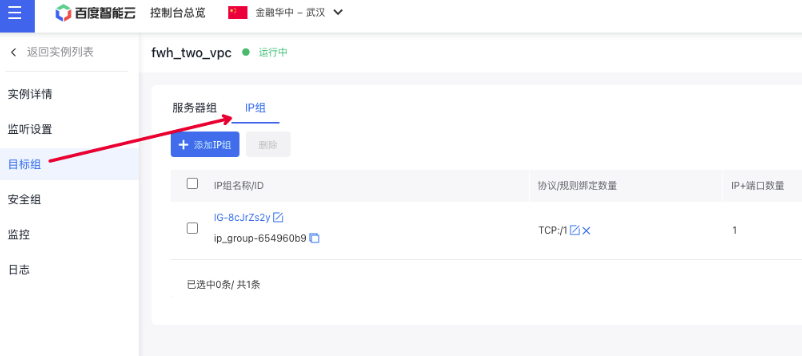
- Note: Below are the definitions for each type.
| Types | Application scenarios |
|---|---|
| Same region - same VPC: | The IP addresses added to the IP group belong to the same VPC as the BLB. This allows mounting of servers like BCC or BBC within the same VPC. |
| Same region - cross-VPC: | The IP addresses added to the IP group belong to separate VPCs from the BLB but can communicate through peering connections. For example, cross-VPC BCC or BBC servers can be mounted. |
| Cross region: | The IP addresses added to the IP group belong to different regions with the BLB, which can be interconnected through peering connections, and the IP addresses are compute-type servers (BCC or BBC) |
| Hybrid cloud: | The IP addresses added to the IP group belong to the same region or different regions with the BLB. For example, it can mount servers in offline IDCs, cross-region server IP addresses in the cloud, cross-region network elements with IP addresses, or cross-cloud accessible IP addresses |
| Custom IP: | If the IP custom type is selected, IP members in the IP group can be configured with the above target types respectively |
- Mount 172.18.0.6 as an IP group member, with the target type as same-region and cross-VPC, and add open protocol types as TCP or UDP
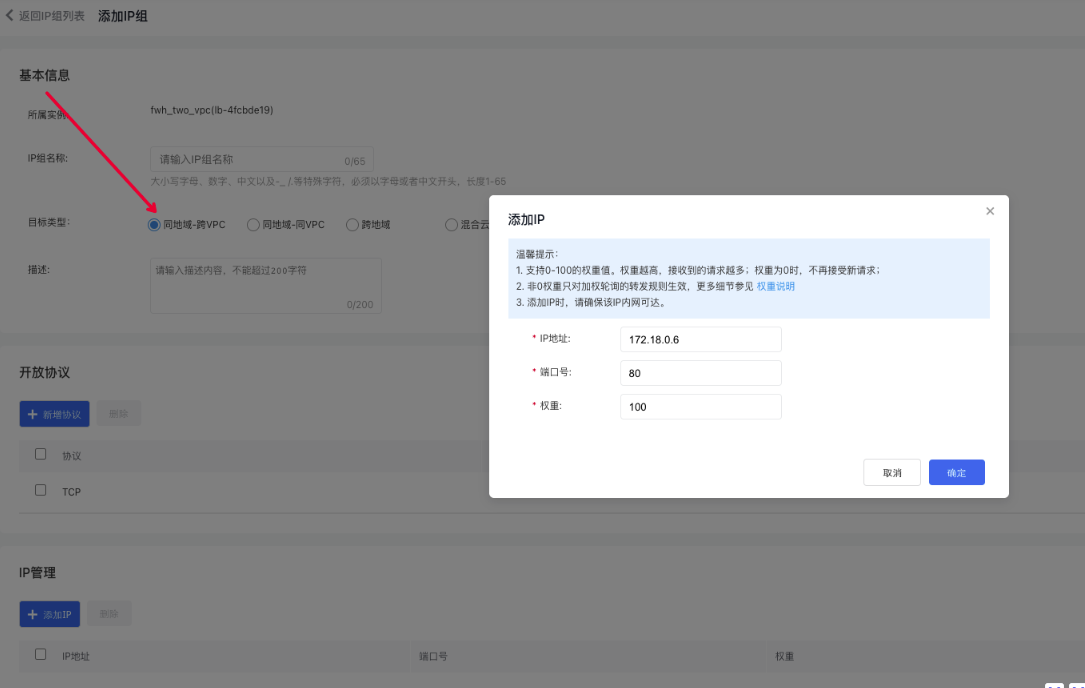
- Set up the appropriate TCP or UDP listeners in the load balancer and attach the IP group created in the previous step.
Use peering connections or CSN to connect VPC1 and VPC2 environment
Either peering connections or CSN product can be selected. It is recommended to use the CSN product to reduce custom route configuration. For more instructions on CSN use, please refer to: CSN Description Document For more instructions on peering connections, refer to: Peering Connections Description Document
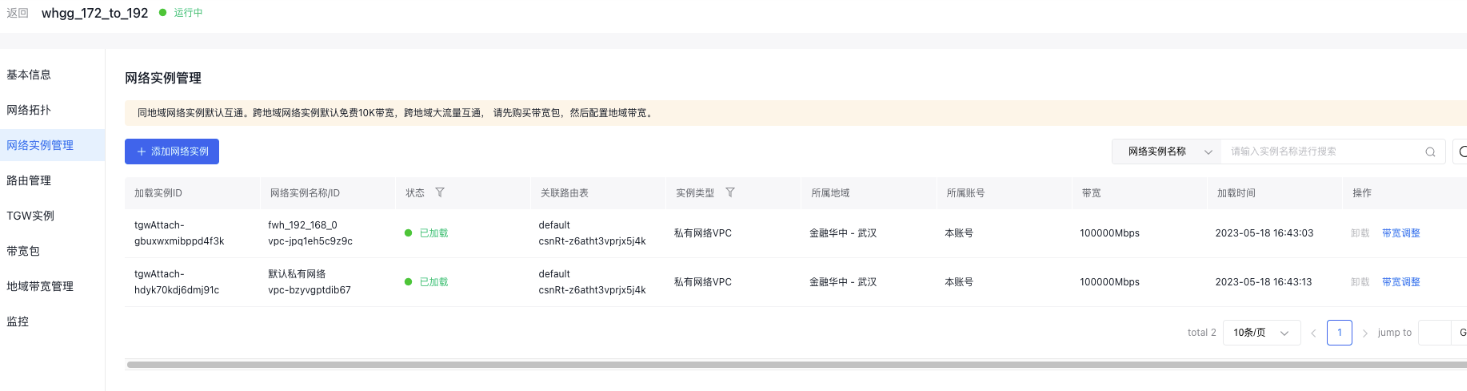
Use CSN
Use the CSN product to connect the two VPC networks: fwh_192_168_0 (192.168.0.0/24) and the default virtual private cloud (172.18.0.0/16).
Use peering connections
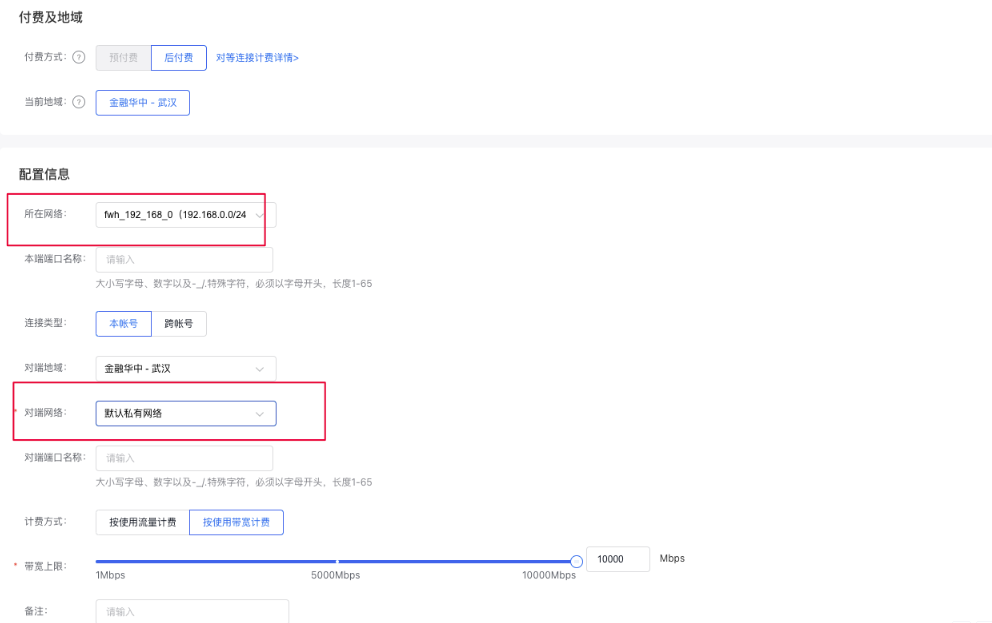
- Step 1: Ensure that the relay route function is enabled for the LB-side VPC.
- Step 2: Add custom route: 100.64.0.0/10→X.X.X.X/32 to the route configuration of VPC1 where the BLB resides (real server IP address or the subnet segment where the real server resides). For example, configure 100.64.0.0/10->172.18.0.6/32 to establish health check route connectivity.
- Step 3: Check whether the subnet route configuration of VPC1 where the BLB resides in the peering connection has established route entries with the subnet of VPC2. If not, you can refer to "Peering Connections Description Document" to configure route fwh_192_168_0 (192.168.0.0/24) and the default virtual private cloud (172.18.0.0/16) in the peering connections product to connect the two VPCs.
Test connectivity
Access the Load Balancer IP 192.168.0.2:80 using the client
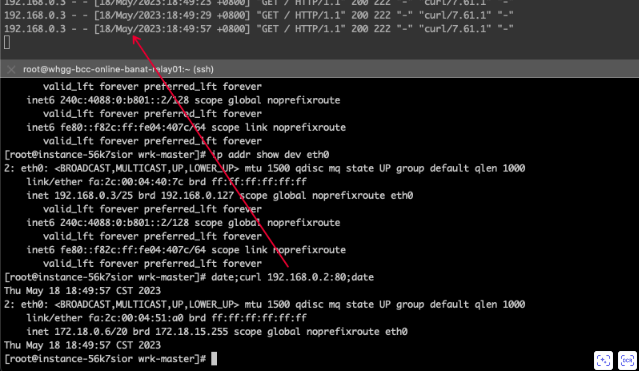
Data flow across VPCs within the same region is possible, and the source IP address (192.168.0.3) is visible on the server RS (172.18.0.6) side.
Note
- Route rules and load balancer configurations must match the client's actual network segment environment to guarantee connectivity.
- Security groups and ACL settings for each BLB and real server must be correctly configured to prevent unintended blockages and packet loss, which could lead to access failures.