Access control

BLB BLB

  • API Reference
    • Access control
    • API Service Domain Name
    • Appendix
    • Application BLB Interface
      • Application BLB Instance Related Interfaces
      • Application BLB Listener Related Interfaces
      • Application BLB Security Group Related Interfaces
      • Application BLB Server Group Related Interfaces
    • Application IPv6 BLB Interface
      • Application IPv6 BLB Instance Related Interfaces
      • Application IPv6 BLB Listener Related Interfaces
      • Application IPv6 BLB Security Group Related Interfaces
      • Application IPv6 BLB Server Group Related Interfaces
    • BLB Order Related Interfaces
      • BLB - Resize
      • BLB Charge Shift - Cancel Prepay to Postpay
      • BLB Charge Shift - Postpay to Prepay
      • BLB Charge Shift - Prepay to Postpay
      • BLB Inquiry
      • BLB Unsubscribe Interface
    • Document Update Records
    • Error code
    • Interface Specifications
    • Introduction
    • Load Balancer Dedicated Cluster LBDC Interface
      • LBDC Instance Related Interfaces
    • Service Publishing Point Interface
      • Service Publishing Point Related Interfaces
    • Standard BLB Interface
      • Standard BLB Instance Related Interfaces
      • Standard BLB Listener Related Interfaces
      • Standard BLB Real Server Related Interfaces
      • Standard BLB Security Group Related Interfaces
    • Standard IPv6 BLB Interface
      • Standard IPv6 BLB Related Interfaces
  • FAQs
    • Billing Problems
    • Common Questions Overview
    • Configuration-related questions
    • Fault-related questions
    • General Problems
    • Load Balancer Dedicated Cluster Related Issues
    • Performance-related questions
    • Security Problems
  • Function Release Records
  • Operation guide
    • Access control
    • Access Logs
    • Application BLB instance
    • Application IPv6 Instance
    • BLB metric description
    • Certification
    • Custom configuration
    • Extended domain name
    • General-purpose BLB instance
      • Creating BLB Ordinary Instance
      • Managing BLB Ordinary Instance
    • General-purpose IPv6 BLB instance
    • Identity and access management
    • IP Group Usage Guide
    • Load Balance Dedicated Cluster
    • Load Balancer Frontend and Backend Protocol Correspondence
    • Recording Access Logs Using VPC Flow Logs
    • Service Release Point
    • Tag Management
  • Product Description
    • Application scenarios
    • Basic Architecture
    • Basic concepts
    • Performance Specification Description
    • Product advantages
    • Product features
    • Product Introduction
    • Usage restrictions
  • Product pricing
    • Load Balancer Dedicated Cluster Billing
    • Load Balancer Instance Billing
  • Quick Start
  • SDK
    • GO-SDK
      • Application BLB Instance
      • Initialization
      • Install
      • IPv6 BLB Instance
      • Load Balance Dedicated Cluster (LBDC)
      • Ordinary BLB Instance
      • Overview
      • Service Release Point
      • Version Change Records
    • Java-SDK
      • Application BLB instance
      • General-purpose BLB instance
      • Initialization
      • Install the SDK Package
      • IPv6 BLB Instance
      • Load Balance Dedicated Cluster (LBDC)
      • Overview
      • Service Release Point
      • Version Update Description
    • PHP-SDK
      • Initialization
      • Install
      • Ordinary BLB Instance
      • Overview
    • Python-SDK
      • Application BLB Instance
      • Initialization
      • Install
      • IPv6 BLB Instance
      • Load Balance Dedicated Cluster (LBDC)
      • Ordinary BLB Instance
      • Overview
      • Service Release Point
      • Version Update Description
  • Service Level Agreement (SLA)
    • Description of Baidu AI Cloud Load Balancer Trusted Cloud certification service availability
    • LBDC Service Level Agreement SLA
    • BLB Service Level Agreement (V2.0)
  • Typical Practices
    • BLB Selection Guide
    • Health Check Exception Troubleshooting
    • Implementing BLB Association with Listeners, Real Servers, Security Groups, etc. via Terraform
    • Implementing Multi-Site Hosting via Application BLB
    • Load Balancer Security Protection Strategy
    • Managing BLB via Terraform
    • Obtaining Client Information via Application BLB Instance
    • Using IP Group Function to Mount Real Servers Across VPCs in Different Regions
    • Using IP Group Function to Mount Real Servers Across VPCs in the Same Region
All documents
menu
No results found, please re-enter

BLB BLB

  • API Reference
    • Access control
    • API Service Domain Name
    • Appendix
    • Application BLB Interface
      • Application BLB Instance Related Interfaces
      • Application BLB Listener Related Interfaces
      • Application BLB Security Group Related Interfaces
      • Application BLB Server Group Related Interfaces
    • Application IPv6 BLB Interface
      • Application IPv6 BLB Instance Related Interfaces
      • Application IPv6 BLB Listener Related Interfaces
      • Application IPv6 BLB Security Group Related Interfaces
      • Application IPv6 BLB Server Group Related Interfaces
    • BLB Order Related Interfaces
      • BLB - Resize
      • BLB Charge Shift - Cancel Prepay to Postpay
      • BLB Charge Shift - Postpay to Prepay
      • BLB Charge Shift - Prepay to Postpay
      • BLB Inquiry
      • BLB Unsubscribe Interface
    • Document Update Records
    • Error code
    • Interface Specifications
    • Introduction
    • Load Balancer Dedicated Cluster LBDC Interface
      • LBDC Instance Related Interfaces
    • Service Publishing Point Interface
      • Service Publishing Point Related Interfaces
    • Standard BLB Interface
      • Standard BLB Instance Related Interfaces
      • Standard BLB Listener Related Interfaces
      • Standard BLB Real Server Related Interfaces
      • Standard BLB Security Group Related Interfaces
    • Standard IPv6 BLB Interface
      • Standard IPv6 BLB Related Interfaces
  • FAQs
    • Billing Problems
    • Common Questions Overview
    • Configuration-related questions
    • Fault-related questions
    • General Problems
    • Load Balancer Dedicated Cluster Related Issues
    • Performance-related questions
    • Security Problems
  • Function Release Records
  • Operation guide
    • Access control
    • Access Logs
    • Application BLB instance
    • Application IPv6 Instance
    • BLB metric description
    • Certification
    • Custom configuration
    • Extended domain name
    • General-purpose BLB instance
      • Creating BLB Ordinary Instance
      • Managing BLB Ordinary Instance
    • General-purpose IPv6 BLB instance
    • Identity and access management
    • IP Group Usage Guide
    • Load Balance Dedicated Cluster
    • Load Balancer Frontend and Backend Protocol Correspondence
    • Recording Access Logs Using VPC Flow Logs
    • Service Release Point
    • Tag Management
  • Product Description
    • Application scenarios
    • Basic Architecture
    • Basic concepts
    • Performance Specification Description
    • Product advantages
    • Product features
    • Product Introduction
    • Usage restrictions
  • Product pricing
    • Load Balancer Dedicated Cluster Billing
    • Load Balancer Instance Billing
  • Quick Start
  • SDK
    • GO-SDK
      • Application BLB Instance
      • Initialization
      • Install
      • IPv6 BLB Instance
      • Load Balance Dedicated Cluster (LBDC)
      • Ordinary BLB Instance
      • Overview
      • Service Release Point
      • Version Change Records
    • Java-SDK
      • Application BLB instance
      • General-purpose BLB instance
      • Initialization
      • Install the SDK Package
      • IPv6 BLB Instance
      • Load Balance Dedicated Cluster (LBDC)
      • Overview
      • Service Release Point
      • Version Update Description
    • PHP-SDK
      • Initialization
      • Install
      • Ordinary BLB Instance
      • Overview
    • Python-SDK
      • Application BLB Instance
      • Initialization
      • Install
      • IPv6 BLB Instance
      • Load Balance Dedicated Cluster (LBDC)
      • Ordinary BLB Instance
      • Overview
      • Service Release Point
      • Version Update Description
  • Service Level Agreement (SLA)
    • Description of Baidu AI Cloud Load Balancer Trusted Cloud certification service availability
    • LBDC Service Level Agreement SLA
    • BLB Service Level Agreement (V2.0)
  • Typical Practices
    • BLB Selection Guide
    • Health Check Exception Troubleshooting
    • Implementing BLB Association with Listeners, Real Servers, Security Groups, etc. via Terraform
    • Implementing Multi-Site Hosting via Application BLB
    • Load Balancer Security Protection Strategy
    • Managing BLB via Terraform
    • Obtaining Client Information via Application BLB Instance
    • Using IP Group Function to Mount Real Servers Across VPCs in Different Regions
    • Using IP Group Function to Mount Real Servers Across VPCs in the Same Region
  • Document center
  • arrow
  • BLBBLB
  • arrow
  • Operation guide
  • arrow
  • Access control
Table of contents on this page
  • BLB supports ACL
  • Operation steps
  • BLB supports security group
  • Prerequisites
  • Operation steps

Access control

Updated at:2025-10-16

After creating a load balancer, you can implement access control at the instance level by configuring an ACL or associating security groups with the subnet where the load balancer resides.

Note: Pinging the load balancer Intranet IP or bound EIP will be responded by the load balancer cluster without forwarding to real servers, and is not subject to the access control to ACL or security group.

BLB supports ACL

You can realize the access control at the load balancer instance level by configuring configure rules in the ACL corresponding to the subnet where the load balancer is located. For ACL usage, refer to ACL Operation Guide.

Operation steps

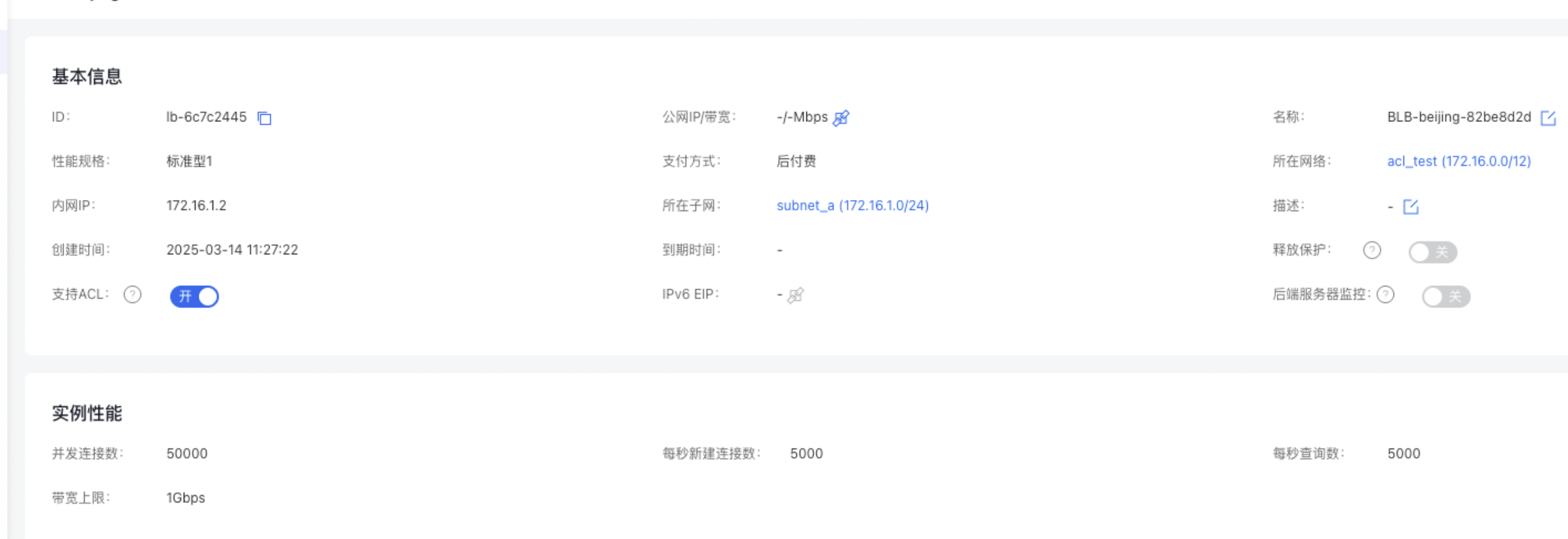
  1. Log in to the Baidu AI Cloud Platform, go to Products & Services > Baidu Load Balance (BLB), and click on the BLB name to access the Instance Details page.
  2. Activating the ACL support feature on the BLB Instance Details page ensures that the ACL rules associated with the subnet where the load balancer is deployed will be applied to the BLB instance.
  3. Configure corresponding rules in the ACL corresponding to the subnet where the load balancer is located. image.png
BLB supports security group

You can associate and bind the security group to the corresponding load balancer instance, so that the load balancer instance can implement the network access control function according to the security group rule settings.
For security group operations, refer to Security Group Document.

Prerequisites

Before associating a load balancer instance with a security group, verify the following information:

  • You must have successfully created a load balancer instance beforehand.
  • A load balancer instance can be associated with one or more security groups based on service requirements, with each load balancer supporting a maximum of 10 security groups.
  • When associating a load balancer instance with a security group, both the target security group and the load balancer must reside within the same virtual private cloud.

Operation steps

  1. Log in to the Baidu AI Cloud Platform, go to Products & Services > Baidu Load Balance (BLB), and click on the BLB name to access the Instance Details page.
  2. In the left navigation bar, click on Security Group and select the security group you want to associate.
  3. Once a security group is associated, you can view the currently applied security group rules.
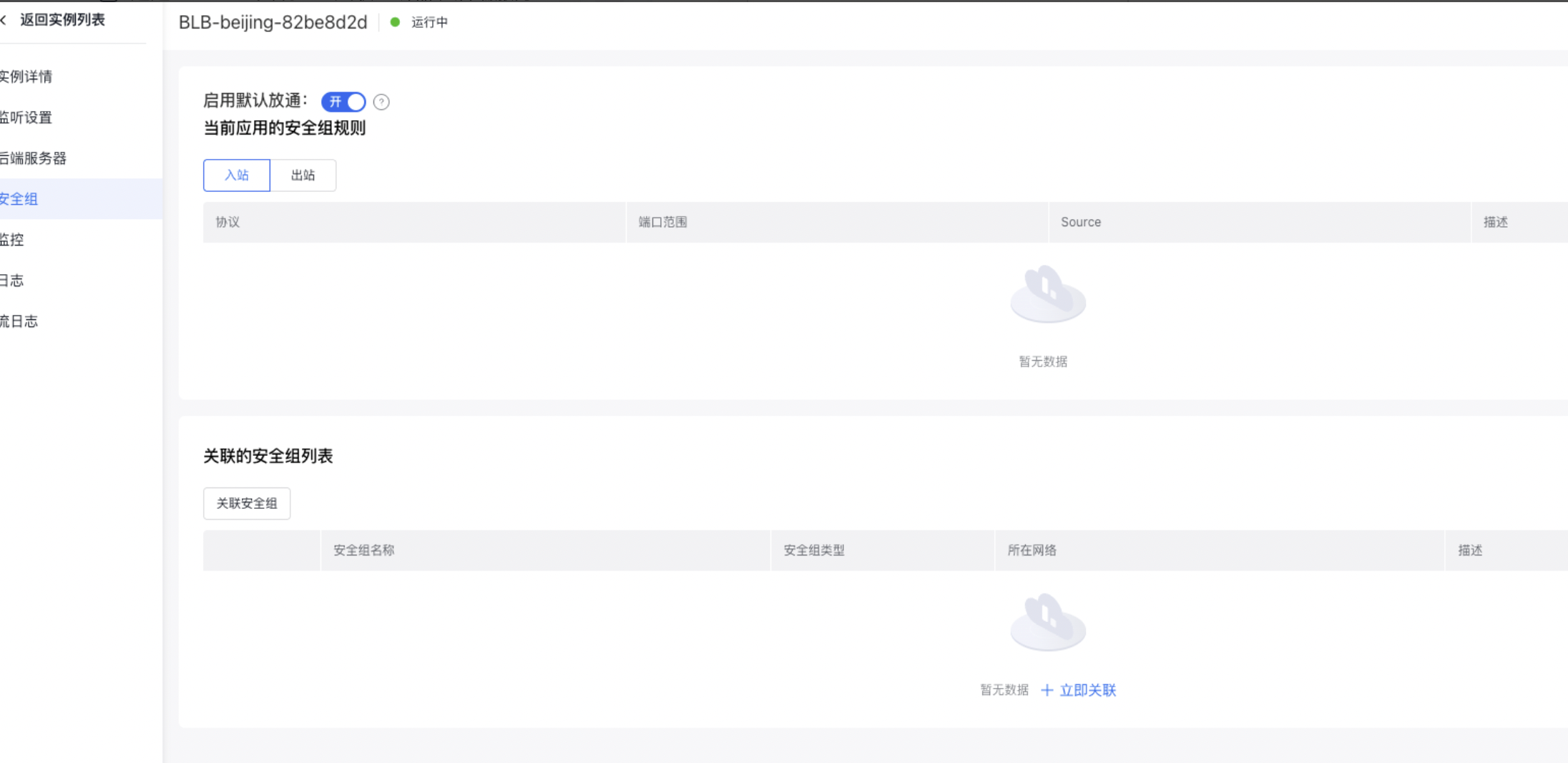
image.png

Description:

  • For models Standard IV and above, the security group bound to the real server will not block BLB traffic, allowing communication between BLB and BCC by default.
  • For models Standard III and below, BLB traffic will be controlled by the BCC security groups.

Previous
Function Release Records
Next
Access Logs