Load Balancer Instance Billing

BLB BLB

  • API Reference
    • Access control
    • API Service Domain Name
    • Appendix
    • Application BLB Interface
      • Application BLB Instance Related Interfaces
      • Application BLB Listener Related Interfaces
      • Application BLB Security Group Related Interfaces
      • Application BLB Server Group Related Interfaces
    • Application IPv6 BLB Interface
      • Application IPv6 BLB Instance Related Interfaces
      • Application IPv6 BLB Listener Related Interfaces
      • Application IPv6 BLB Security Group Related Interfaces
      • Application IPv6 BLB Server Group Related Interfaces
    • BLB Order Related Interfaces
      • BLB - Resize
      • BLB Charge Shift - Cancel Prepay to Postpay
      • BLB Charge Shift - Postpay to Prepay
      • BLB Charge Shift - Prepay to Postpay
      • BLB Inquiry
      • BLB Unsubscribe Interface
    • Document Update Records
    • Error code
    • Interface Specifications
    • Introduction
    • Load Balancer Dedicated Cluster LBDC Interface
      • LBDC Instance Related Interfaces
    • Service Publishing Point Interface
      • Service Publishing Point Related Interfaces
    • Standard BLB Interface
      • Standard BLB Instance Related Interfaces
      • Standard BLB Listener Related Interfaces
      • Standard BLB Real Server Related Interfaces
      • Standard BLB Security Group Related Interfaces
    • Standard IPv6 BLB Interface
      • Standard IPv6 BLB Related Interfaces
  • FAQs
    • Billing Problems
    • Common Questions Overview
    • Configuration-related questions
    • Fault-related questions
    • General Problems
    • Load Balancer Dedicated Cluster Related Issues
    • Performance-related questions
    • Security Problems
  • Function Release Records
  • Operation guide
    • Access control
    • Access Logs
    • Application BLB instance
    • Application IPv6 Instance
    • BLB metric description
    • Certification
    • Custom configuration
    • Extended domain name
    • General-purpose BLB instance
      • Creating BLB Ordinary Instance
      • Managing BLB Ordinary Instance
    • General-purpose IPv6 BLB instance
    • Identity and access management
    • IP Group Usage Guide
    • Load Balance Dedicated Cluster
    • Load Balancer Frontend and Backend Protocol Correspondence
    • Recording Access Logs Using VPC Flow Logs
    • Service Release Point
    • Tag Management
  • Product Description
    • Application scenarios
    • Basic Architecture
    • Basic concepts
    • Performance Specification Description
    • Product advantages
    • Product features
    • Product Introduction
    • Usage restrictions
  • Product pricing
    • Load Balancer Dedicated Cluster Billing
    • Load Balancer Instance Billing
  • Quick Start
  • SDK
    • GO-SDK
      • Application BLB Instance
      • Initialization
      • Install
      • IPv6 BLB Instance
      • Load Balance Dedicated Cluster (LBDC)
      • Ordinary BLB Instance
      • Overview
      • Service Release Point
      • Version Change Records
    • Java-SDK
      • Application BLB instance
      • General-purpose BLB instance
      • Initialization
      • Install the SDK Package
      • IPv6 BLB Instance
      • Load Balance Dedicated Cluster (LBDC)
      • Overview
      • Service Release Point
      • Version Update Description
    • PHP-SDK
      • Initialization
      • Install
      • Ordinary BLB Instance
      • Overview
    • Python-SDK
      • Application BLB Instance
      • Initialization
      • Install
      • IPv6 BLB Instance
      • Load Balance Dedicated Cluster (LBDC)
      • Ordinary BLB Instance
      • Overview
      • Service Release Point
      • Version Update Description
  • Service Level Agreement (SLA)
    • Description of Baidu AI Cloud Load Balancer Trusted Cloud certification service availability
    • LBDC Service Level Agreement SLA
    • BLB Service Level Agreement (V2.0)
  • Typical Practices
    • BLB Selection Guide
    • Health Check Exception Troubleshooting
    • Implementing BLB Association with Listeners, Real Servers, Security Groups, etc. via Terraform
    • Implementing Multi-Site Hosting via Application BLB
    • Load Balancer Security Protection Strategy
    • Managing BLB via Terraform
    • Obtaining Client Information via Application BLB Instance
    • Using IP Group Function to Mount Real Servers Across VPCs in Different Regions
    • Using IP Group Function to Mount Real Servers Across VPCs in the Same Region
All documents
menu
No results found, please re-enter

BLB BLB

  • API Reference
    • Access control
    • API Service Domain Name
    • Appendix
    • Application BLB Interface
      • Application BLB Instance Related Interfaces
      • Application BLB Listener Related Interfaces
      • Application BLB Security Group Related Interfaces
      • Application BLB Server Group Related Interfaces
    • Application IPv6 BLB Interface
      • Application IPv6 BLB Instance Related Interfaces
      • Application IPv6 BLB Listener Related Interfaces
      • Application IPv6 BLB Security Group Related Interfaces
      • Application IPv6 BLB Server Group Related Interfaces
    • BLB Order Related Interfaces
      • BLB - Resize
      • BLB Charge Shift - Cancel Prepay to Postpay
      • BLB Charge Shift - Postpay to Prepay
      • BLB Charge Shift - Prepay to Postpay
      • BLB Inquiry
      • BLB Unsubscribe Interface
    • Document Update Records
    • Error code
    • Interface Specifications
    • Introduction
    • Load Balancer Dedicated Cluster LBDC Interface
      • LBDC Instance Related Interfaces
    • Service Publishing Point Interface
      • Service Publishing Point Related Interfaces
    • Standard BLB Interface
      • Standard BLB Instance Related Interfaces
      • Standard BLB Listener Related Interfaces
      • Standard BLB Real Server Related Interfaces
      • Standard BLB Security Group Related Interfaces
    • Standard IPv6 BLB Interface
      • Standard IPv6 BLB Related Interfaces
  • FAQs
    • Billing Problems
    • Common Questions Overview
    • Configuration-related questions
    • Fault-related questions
    • General Problems
    • Load Balancer Dedicated Cluster Related Issues
    • Performance-related questions
    • Security Problems
  • Function Release Records
  • Operation guide
    • Access control
    • Access Logs
    • Application BLB instance
    • Application IPv6 Instance
    • BLB metric description
    • Certification
    • Custom configuration
    • Extended domain name
    • General-purpose BLB instance
      • Creating BLB Ordinary Instance
      • Managing BLB Ordinary Instance
    • General-purpose IPv6 BLB instance
    • Identity and access management
    • IP Group Usage Guide
    • Load Balance Dedicated Cluster
    • Load Balancer Frontend and Backend Protocol Correspondence
    • Recording Access Logs Using VPC Flow Logs
    • Service Release Point
    • Tag Management
  • Product Description
    • Application scenarios
    • Basic Architecture
    • Basic concepts
    • Performance Specification Description
    • Product advantages
    • Product features
    • Product Introduction
    • Usage restrictions
  • Product pricing
    • Load Balancer Dedicated Cluster Billing
    • Load Balancer Instance Billing
  • Quick Start
  • SDK
    • GO-SDK
      • Application BLB Instance
      • Initialization
      • Install
      • IPv6 BLB Instance
      • Load Balance Dedicated Cluster (LBDC)
      • Ordinary BLB Instance
      • Overview
      • Service Release Point
      • Version Change Records
    • Java-SDK
      • Application BLB instance
      • General-purpose BLB instance
      • Initialization
      • Install the SDK Package
      • IPv6 BLB Instance
      • Load Balance Dedicated Cluster (LBDC)
      • Overview
      • Service Release Point
      • Version Update Description
    • PHP-SDK
      • Initialization
      • Install
      • Ordinary BLB Instance
      • Overview
    • Python-SDK
      • Application BLB Instance
      • Initialization
      • Install
      • IPv6 BLB Instance
      • Load Balance Dedicated Cluster (LBDC)
      • Ordinary BLB Instance
      • Overview
      • Service Release Point
      • Version Update Description
  • Service Level Agreement (SLA)
    • Description of Baidu AI Cloud Load Balancer Trusted Cloud certification service availability
    • LBDC Service Level Agreement SLA
    • BLB Service Level Agreement (V2.0)
  • Typical Practices
    • BLB Selection Guide
    • Health Check Exception Troubleshooting
    • Implementing BLB Association with Listeners, Real Servers, Security Groups, etc. via Terraform
    • Implementing Multi-Site Hosting via Application BLB
    • Load Balancer Security Protection Strategy
    • Managing BLB via Terraform
    • Obtaining Client Information via Application BLB Instance
    • Using IP Group Function to Mount Real Servers Across VPCs in Different Regions
    • Using IP Group Function to Mount Real Servers Across VPCs in the Same Region
  • Document center
  • arrow
  • BLBBLB
  • arrow
  • Product pricing
  • arrow
  • Load Balancer Instance Billing
Table of contents on this page
  • Billing mode
  • Prepay instructions
  • Billing rules
  • Postpay instructions by usage specification
  • Billing rules
  • Billing formula
  • Billing price
  • Insufficient balance reminders and debt handling
  • Postpay instructions based on usage
  • Billing logic
  • Instance fee
  • Usage fee (CU fee)
  • Billing example based on pay-as-you-go mode
  • Billing conversion
  • Prepay to postpay billing rules:
  • LCU billing conversion effective time

Load Balancer Instance Billing

Updated at:2025-10-16

Billing mode

Charge type Billing dimension Charge Charge item
Prepay Specification Purchase instances for entire months. Specification fee
Postpay by usage specification Specification Charges are deducted in real time based on usage, calculated according to the duration and your usage specifications. Specification fee
Postpay based on usage Actual connection count, bandwidth, QPS and other usages Charge for usage based on the performance dimension with higher actual usage Instance fee, usage fee (CU fee)

Prepay instructions

Billing rules

  • Prepayment can be made based on the selected purchase period, with prices varying according to the specifications chosen.
  • The minimum purchase period is one month. A full-year purchase earns you an 8.3% discount for annual prepayment.

For details, refer to BLB Pricing Details. You can also preset BLB configurations in the BLB Price Calculator and view corresponding prices. EIP must be bound when purchasing BLB services. For EIP product pricing, refer to [EIP Product Pricing](EIP/Product pricing/EIP Instance Billing.md).

Postpay instructions by usage specification

Billing rules

Specific rules are as follows:
· Billed by minute, with fractions of a minute rounded up to a full minute.
· Deducted by hour, with charges deducted and bills generated at the top of the hour, Beijing Time. The bill time is within 1 hour after the current billing cycle ends. For example, the bill for 10:00-11:00 will be generated before 12:00, subject to the system billing time.
· Before purchase, ensure the account is free of debt and that the total of account balance and available coupons is greater than or equal to RMB 100.

Billing formula

Cost = Usage duration × Instance unit price × Instance count

Billing price

Prices may vary in different regions. For details, refer to BLB Pricing Details. You can also preset BLB configurations in the BLB Price Calculator and view corresponding prices. EIP must be bound when purchasing BLB services. For EIP product pricing, refer to [EIP Product Pricing](EIP/Product pricing/EIP Instance Billing.md).

Insufficient balance reminders and debt handling

  • Insufficient balance reminder:

    • The system checks if your account balance (including available coupons) is enough to cover the next three days' costs based on your bill amount from the past three days. If the balance is insufficient, a renewal reminder will be sent.
    • The system checks if your account balance (including available coupons) is enough to cover the next day's costs based on your bill amount from the past day. If the balance is insufficient, a renewal reminder will be sent.
  • Debt handling:

    • At the beginning of every hour, Beijing Time, the system checks if your account balance is sufficient to cover the current BLB bill (e.g., at 11:00 Beijing Time, it checks if the account balance can pay for the bill between 10:00 and 11:00). If the balance is insufficient, debt occurs, and the system will send a debt notification.
    • If debt occurs, the service will be suspended immediately, and a service suspension notification will be sent. Data will be retained for 7 days without additional charge. If no recharge is made within 7 days, the data will be released. The system will send a release notice one day before and at the time of release.

Postpay instructions based on usage

Billing logic

Postpay load balancer instances based on usage will generate the following two charge items:

Instance fee

Billed based on usage duration:
· Billed by minute, with fractions of a minute rounded up to a full minute.
· Deducted by hour, with charges deducted and bills generated at the top of the hour, Beijing Time. The bill time is within 1 hour after the current billing cycle ends. For example, the bill for 10:00-11:00 will be generated before 12:00, subject to the system billing time.
Instance fee price: The price for general-purpose BLB and general-purpose IPv6 BLB is RMB 0.15/hour, while the price for application BLB and application IPv6 instances is RMB 0.2/hour.

Usage fee (CU fee)

Convert actual usage to CU (Capacity Unit) and bill based on the count of CUs.
The specific CU conversion rules are as follows:

Protocol Performance corresponding to a single LCU
HTTP/HTTPS protocol 25 new connections per second, or 3,000 concurrent connections per minute, or 1,000 QPS per minute, or 1GB traffic per hour
TCP protocol 800 new connections per second, or 10W concurrent connections per minute, or 1GB traffic per hour
UDP protocol 400 new UDP flows per second, or 5W active UDP flows per minute, or 1GB traffic per hour
TCP SSL protocol 800 new connections per second, or 10W concurrent connections per minute, or 50 new TLS traffics per second, or 3,000 active TLS traffics per minute, or 1GB traffic per hour


CU fee price:
The price for general-purpose BLB and general-purpose IPv6 BLB is RMB 0.04/CU/hour, while the price for application BLB and application IPv6 instances is RMB 0.049/CU/hour.

LCU aggregation logic:
For each instance: Count of CUs per protocol = maximum count of CUs generated per dimension.
Count of CUs generated by the instance =total count of CUs generated by each protocol on the instance.

Billing example based on pay-as-you-go mode

The user purchases an application BLB instance, establishes both TCP and HTTP listeners, and then releases them after using for 1 hour. Within 1 hour, the metrics used by the user are as follows:

Time TCP hourly traffic TCP concurrent connections per minute TCP new connections per second HTTP hourly traffic HTTP concurrent connections per minute HTTP new connections per second HTTP QPS per minute
First hour 1G 50000 1600 2G 3000 75 2000
CU usage generated in the first hour 1CU 0.5CU 2CU 2CU 1CU 3CU 2CU

In the first hour:

  • CU consumption for TCP: Max(1CU,0.5CU,2CU)=2CU
  • CU consumption for HTTP: Max(2CU,1CU,3CU,2CU)=3CU
  • Total consumption in the first hour = 2CU+3CU=5CU
  • Billing fee for the first hour: 0.2 (instance fee) + 5 * 0.049 (CU fee) = 0.445 (RMB)

Billing conversion

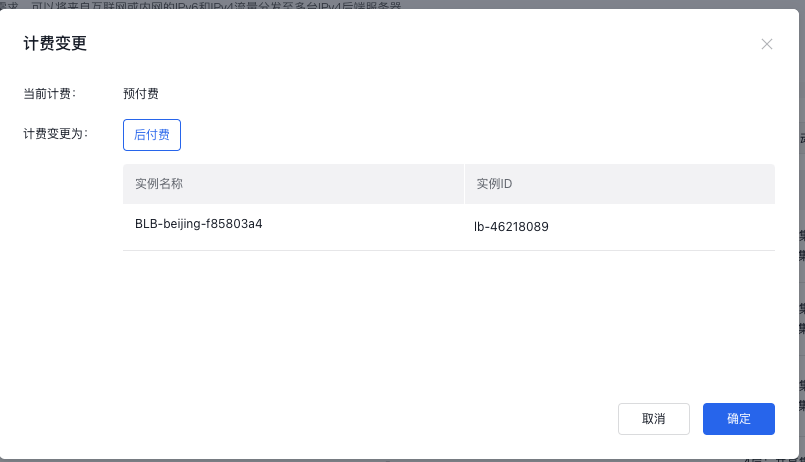
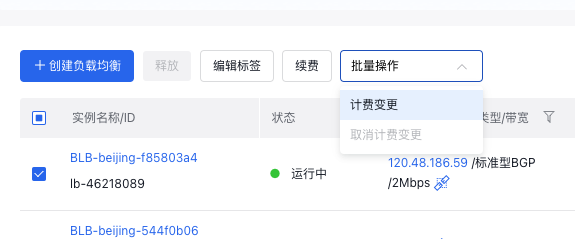
Prepaid instances and postpaid instances can be converted for billing after they are created. Check an instance for which you want to perform billing conversion, and select Shift Charge from the drop-down box above the list. image.png image.png In the pop-up, select the desired Charge Type and click OK. Proceed to complete the order.
Prepay to postpay billing rules:

After a prepaid instance is converted to a postpaid instance, the remaining unused amount will be refunded according to the usage. For details, refer to Shift Charge Description Document

LCU billing conversion effective time

When switching to the pay-as-you-go billing mode, the change will take effect after the billing system records it at the closest full hour.

Previous
Load Balancer Dedicated Cluster Billing
Next
Quick Start