Load Balance Dedicated Cluster

BLB BLB

  • API Reference
    • Access control
    • API Service Domain Name
    • Appendix
    • Application BLB Interface
      • Application BLB Instance Related Interfaces
      • Application BLB Listener Related Interfaces
      • Application BLB Security Group Related Interfaces
      • Application BLB Server Group Related Interfaces
    • Application IPv6 BLB Interface
      • Application IPv6 BLB Instance Related Interfaces
      • Application IPv6 BLB Listener Related Interfaces
      • Application IPv6 BLB Security Group Related Interfaces
      • Application IPv6 BLB Server Group Related Interfaces
    • BLB Order Related Interfaces
      • BLB - Resize
      • BLB Charge Shift - Cancel Prepay to Postpay
      • BLB Charge Shift - Postpay to Prepay
      • BLB Charge Shift - Prepay to Postpay
      • BLB Inquiry
      • BLB Unsubscribe Interface
    • Document Update Records
    • Error code
    • Interface Specifications
    • Introduction
    • Load Balancer Dedicated Cluster LBDC Interface
      • LBDC Instance Related Interfaces
    • Service Publishing Point Interface
      • Service Publishing Point Related Interfaces
    • Standard BLB Interface
      • Standard BLB Instance Related Interfaces
      • Standard BLB Listener Related Interfaces
      • Standard BLB Real Server Related Interfaces
      • Standard BLB Security Group Related Interfaces
    • Standard IPv6 BLB Interface
      • Standard IPv6 BLB Related Interfaces
  • FAQs
    • Billing Problems
    • Common Questions Overview
    • Configuration-related questions
    • Fault-related questions
    • General Problems
    • Load Balancer Dedicated Cluster Related Issues
    • Performance-related questions
    • Security Problems
  • Function Release Records
  • Operation guide
    • Access control
    • Access Logs
    • Application BLB instance
    • Application IPv6 Instance
    • BLB metric description
    • Certification
    • Custom configuration
    • Extended domain name
    • General-purpose BLB instance
      • Creating BLB Ordinary Instance
      • Managing BLB Ordinary Instance
    • General-purpose IPv6 BLB instance
    • Identity and access management
    • IP Group Usage Guide
    • Load Balance Dedicated Cluster
    • Load Balancer Frontend and Backend Protocol Correspondence
    • Recording Access Logs Using VPC Flow Logs
    • Service Release Point
    • Tag Management
  • Product Description
    • Application scenarios
    • Basic Architecture
    • Basic concepts
    • Performance Specification Description
    • Product advantages
    • Product features
    • Product Introduction
    • Usage restrictions
  • Product pricing
    • Load Balancer Dedicated Cluster Billing
    • Load Balancer Instance Billing
  • Quick Start
  • SDK
    • GO-SDK
      • Application BLB Instance
      • Initialization
      • Install
      • IPv6 BLB Instance
      • Load Balance Dedicated Cluster (LBDC)
      • Ordinary BLB Instance
      • Overview
      • Service Release Point
      • Version Change Records
    • Java-SDK
      • Application BLB instance
      • General-purpose BLB instance
      • Initialization
      • Install the SDK Package
      • IPv6 BLB Instance
      • Load Balance Dedicated Cluster (LBDC)
      • Overview
      • Service Release Point
      • Version Update Description
    • PHP-SDK
      • Initialization
      • Install
      • Ordinary BLB Instance
      • Overview
    • Python-SDK
      • Application BLB Instance
      • Initialization
      • Install
      • IPv6 BLB Instance
      • Load Balance Dedicated Cluster (LBDC)
      • Ordinary BLB Instance
      • Overview
      • Service Release Point
      • Version Update Description
  • Service Level Agreement (SLA)
    • Description of Baidu AI Cloud Load Balancer Trusted Cloud certification service availability
    • LBDC Service Level Agreement SLA
    • BLB Service Level Agreement (V2.0)
  • Typical Practices
    • BLB Selection Guide
    • Health Check Exception Troubleshooting
    • Implementing BLB Association with Listeners, Real Servers, Security Groups, etc. via Terraform
    • Implementing Multi-Site Hosting via Application BLB
    • Load Balancer Security Protection Strategy
    • Managing BLB via Terraform
    • Obtaining Client Information via Application BLB Instance
    • Using IP Group Function to Mount Real Servers Across VPCs in Different Regions
    • Using IP Group Function to Mount Real Servers Across VPCs in the Same Region
All documents
menu
No results found, please re-enter

BLB BLB

  • API Reference
    • Access control
    • API Service Domain Name
    • Appendix
    • Application BLB Interface
      • Application BLB Instance Related Interfaces
      • Application BLB Listener Related Interfaces
      • Application BLB Security Group Related Interfaces
      • Application BLB Server Group Related Interfaces
    • Application IPv6 BLB Interface
      • Application IPv6 BLB Instance Related Interfaces
      • Application IPv6 BLB Listener Related Interfaces
      • Application IPv6 BLB Security Group Related Interfaces
      • Application IPv6 BLB Server Group Related Interfaces
    • BLB Order Related Interfaces
      • BLB - Resize
      • BLB Charge Shift - Cancel Prepay to Postpay
      • BLB Charge Shift - Postpay to Prepay
      • BLB Charge Shift - Prepay to Postpay
      • BLB Inquiry
      • BLB Unsubscribe Interface
    • Document Update Records
    • Error code
    • Interface Specifications
    • Introduction
    • Load Balancer Dedicated Cluster LBDC Interface
      • LBDC Instance Related Interfaces
    • Service Publishing Point Interface
      • Service Publishing Point Related Interfaces
    • Standard BLB Interface
      • Standard BLB Instance Related Interfaces
      • Standard BLB Listener Related Interfaces
      • Standard BLB Real Server Related Interfaces
      • Standard BLB Security Group Related Interfaces
    • Standard IPv6 BLB Interface
      • Standard IPv6 BLB Related Interfaces
  • FAQs
    • Billing Problems
    • Common Questions Overview
    • Configuration-related questions
    • Fault-related questions
    • General Problems
    • Load Balancer Dedicated Cluster Related Issues
    • Performance-related questions
    • Security Problems
  • Function Release Records
  • Operation guide
    • Access control
    • Access Logs
    • Application BLB instance
    • Application IPv6 Instance
    • BLB metric description
    • Certification
    • Custom configuration
    • Extended domain name
    • General-purpose BLB instance
      • Creating BLB Ordinary Instance
      • Managing BLB Ordinary Instance
    • General-purpose IPv6 BLB instance
    • Identity and access management
    • IP Group Usage Guide
    • Load Balance Dedicated Cluster
    • Load Balancer Frontend and Backend Protocol Correspondence
    • Recording Access Logs Using VPC Flow Logs
    • Service Release Point
    • Tag Management
  • Product Description
    • Application scenarios
    • Basic Architecture
    • Basic concepts
    • Performance Specification Description
    • Product advantages
    • Product features
    • Product Introduction
    • Usage restrictions
  • Product pricing
    • Load Balancer Dedicated Cluster Billing
    • Load Balancer Instance Billing
  • Quick Start
  • SDK
    • GO-SDK
      • Application BLB Instance
      • Initialization
      • Install
      • IPv6 BLB Instance
      • Load Balance Dedicated Cluster (LBDC)
      • Ordinary BLB Instance
      • Overview
      • Service Release Point
      • Version Change Records
    • Java-SDK
      • Application BLB instance
      • General-purpose BLB instance
      • Initialization
      • Install the SDK Package
      • IPv6 BLB Instance
      • Load Balance Dedicated Cluster (LBDC)
      • Overview
      • Service Release Point
      • Version Update Description
    • PHP-SDK
      • Initialization
      • Install
      • Ordinary BLB Instance
      • Overview
    • Python-SDK
      • Application BLB Instance
      • Initialization
      • Install
      • IPv6 BLB Instance
      • Load Balance Dedicated Cluster (LBDC)
      • Ordinary BLB Instance
      • Overview
      • Service Release Point
      • Version Update Description
  • Service Level Agreement (SLA)
    • Description of Baidu AI Cloud Load Balancer Trusted Cloud certification service availability
    • LBDC Service Level Agreement SLA
    • BLB Service Level Agreement (V2.0)
  • Typical Practices
    • BLB Selection Guide
    • Health Check Exception Troubleshooting
    • Implementing BLB Association with Listeners, Real Servers, Security Groups, etc. via Terraform
    • Implementing Multi-Site Hosting via Application BLB
    • Load Balancer Security Protection Strategy
    • Managing BLB via Terraform
    • Obtaining Client Information via Application BLB Instance
    • Using IP Group Function to Mount Real Servers Across VPCs in Different Regions
    • Using IP Group Function to Mount Real Servers Across VPCs in the Same Region
  • Document center
  • arrow
  • BLBBLB
  • arrow
  • Operation guide
  • arrow
  • Load Balance Dedicated Cluster
Table of contents on this page
  • Create a dedicated cluster
  • Upgrade of dedicated cluster
  • Manage BLB instances
  • BLB instance selection target cluster
  • Changing the active-standby mode of a BLB instance
  • BLB instance migration target cluster
  • New BLB instance switch
  • View associated BLB instances
  • View monitor data
  • Load balance dedicated clusters support TOPN statistic

Load Balance Dedicated Cluster

Updated at:2025-10-16

The load balancer dedicated cluster offers reliable load balancing services with guaranteed performance, exclusive resources, and isolated physical resources to meet ultra-high performance and exclusive requirements.

The load balance dedicated cluster uses dedicated physical servers to achieve hard isolation at the network resource level. Users can apply to create multiple exclusive dedicated clusters for different business departments, enabling each department to productively create load balancer instances on their corresponding dedicated clusters. If you need to use it, submit an application.

Create a dedicated cluster

  1. Log in to the Baidu AI Cloud Platform, go to Product Services > Baidu Load Balancer (BLB) > BLB Dedicated Cluster, and access the BLB Dedicated Cluster List page.
  2. Click the Create Dedicated Cluster button to open the interface for creating a new dedicated cluster.
  3. Enter the required configuration details.
ConfigMap Description
Bill type Support Prepay only
Current region Support Beijing, Baoding, Guangzhou, Suzhou, Wuhan, Shanghai, Hong Kong, Yangquan, Chengdu, Nanjing. Switch via the top-left Region
Dedicated cluster name User-defined BLB dedicated cluster name
Cluster type Select the cluster type, supporting Layer 4 or Layer 7
Performance capacity Select the count of CCUs. The performance capacity unit CCU is used to measure various metrics involved in BLB cluster traffic processing. The dedicated cluster adopts a mutual primary-backup disaster recovery architecture between computer rooms. The purchased CCU represents the sum of the performance of the mutually primary-backup computer rooms
Description Edit the description information related to the BLB dedicated cluster
Purchase period Select purchase period
Auto-renewal Auto-renewal when enabled

Cluster performance capacity parameters for 1 CCU:

  • Layer 4 cluster: Supports up to 80 million concurrent connections, new connection rates of 12 million, inbound bandwidth of 120Gbps, and outbound bandwidth of 120Gbps.
  • Layer 7 cluster: Supports up to 2 million concurrent connections, new HTTP connection speeds of 1.2 million, new HTTPS connection rates of 224,000, inbound bandwidth of 40Gbps, outbound bandwidth of 40Gbps, HTTP QPS of 1.2 million, and HTTPS QPS of 224,000.
  1. Verify the configuration details and follow the system prompts to complete the order confirmation and payment.
  2. Once you submit the request to create a dedicated load balancer cluster, Baidu AI Cloud staff will review your configuration details within 1-3 business days. Upon approval, the setup process will commence, and you will receive an SMS notification when it is completed.

image.png

Upgrade of dedicated cluster

  1. To upgrade a dedicated load balancer cluster, click the Cluster Upgrade button, select the desired performance capacity configuration, and click Next to confirm the order and make the payment.
  2. After making the payment, Baidu AI Cloud staff will review the submitted upgrade details within 1-3 business days. Upon approval, the upgrade process for the dedicated load balancer cluster will begin, and you will receive an SMS notification upon completion.

image.png

Manage BLB instances

BLB instance selection target cluster

  1. Log in to the Baidu AI Cloud Platform, navigate to Product Services > Baidu Load Balancer (BLB) > BLB Instances, and access the BLB Instance List page.
  2. Click "Create Load Balancer" to open the Create Load Balancer interface.
  3. Choose the target cluster and the active-standby mode.

Description:

  • If both Layer-4 and Layer-7 clusters are dedicated clusters, no charges will be incurred for the BLB instance.
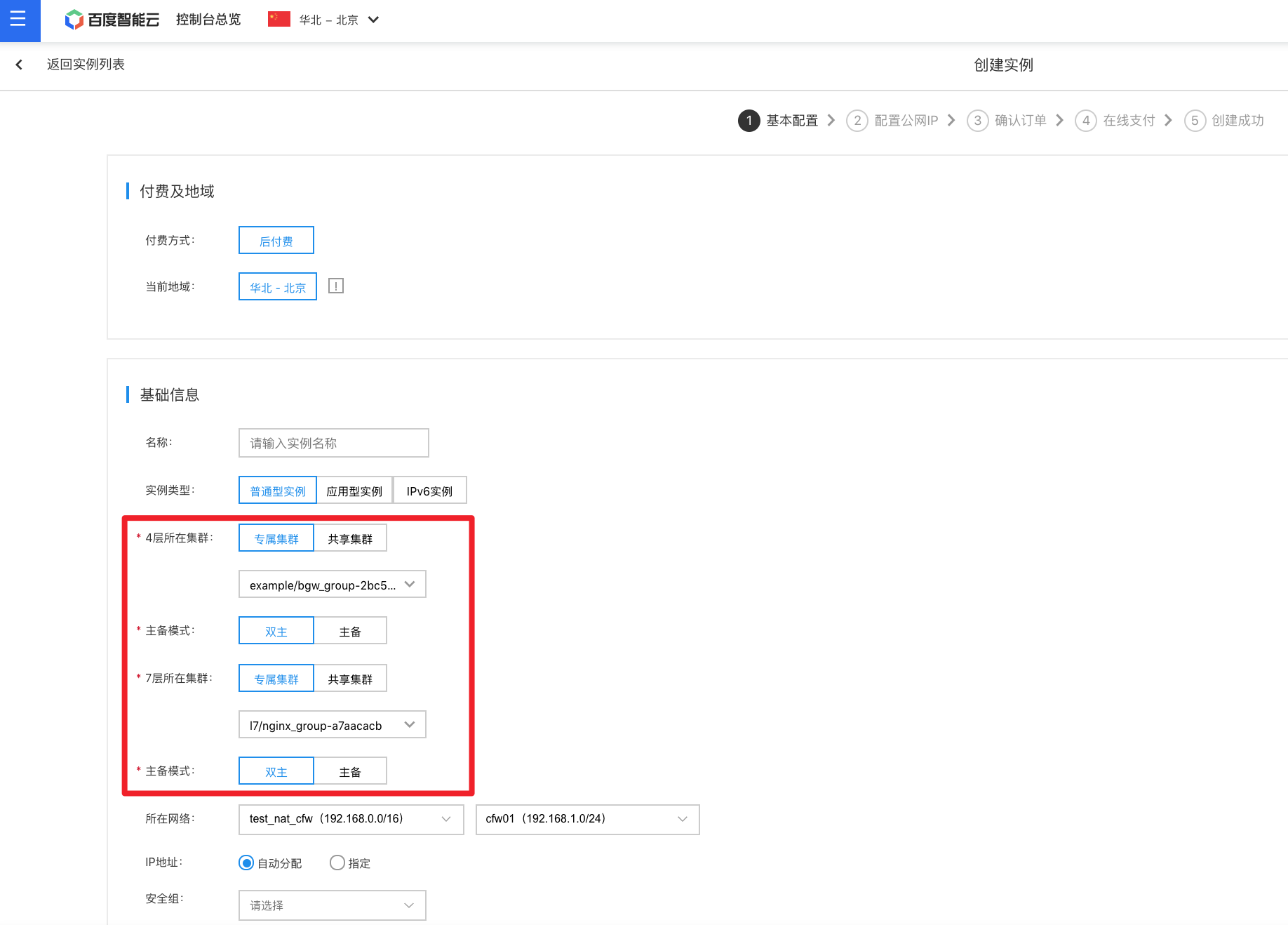
image.png

Changing the active-standby mode of a BLB instance

Click on the BLB instance name to enter the details page. Under the Basic Information section of the BLB details page, you can click to modify the active-standby mode, allowing a switch between the active-standby mode and the dual-active mode.

Notes Changing the active-standby mode affects both long and short links to the BLB. The duration is approximately the listener's health check interval * health threshold. Retries can restore access later. To minimize migration damage time, you can reduce the settings of the above two parameters.
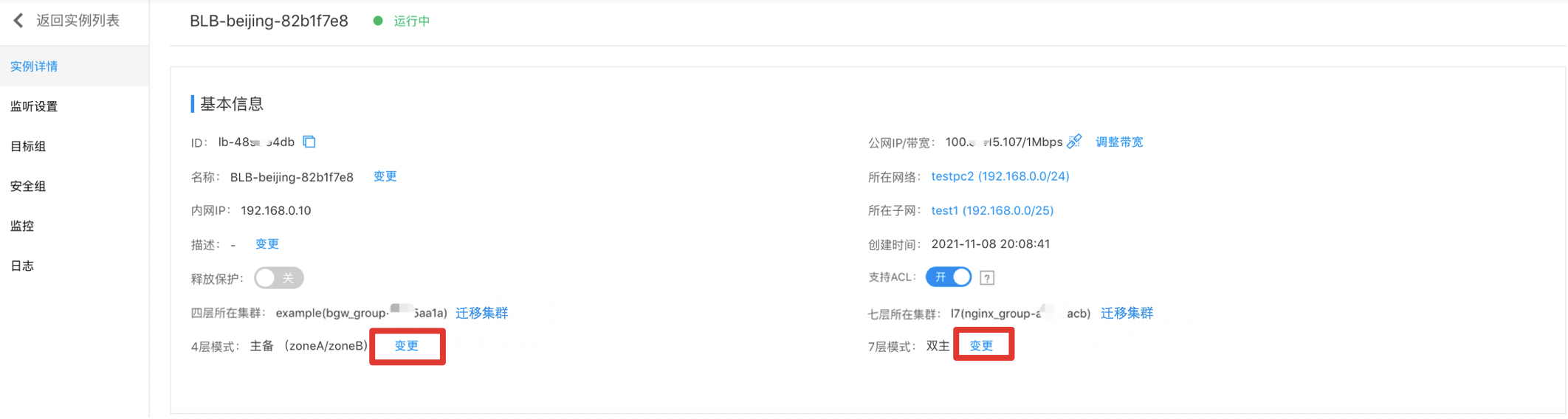
image.png

BLB instance migration target cluster

Click on the BLB instance name to enter the details page. Under the Basic Information section of the BLB details page, you can click "Migrate Cluster" to enable migration from a shared cluster to a dedicated cluster, from a dedicated cluster to a shared cluster, or between dedicated clusters.

Note:

The migration process may cause brief traffic interruptions. Please proceed cautiously.
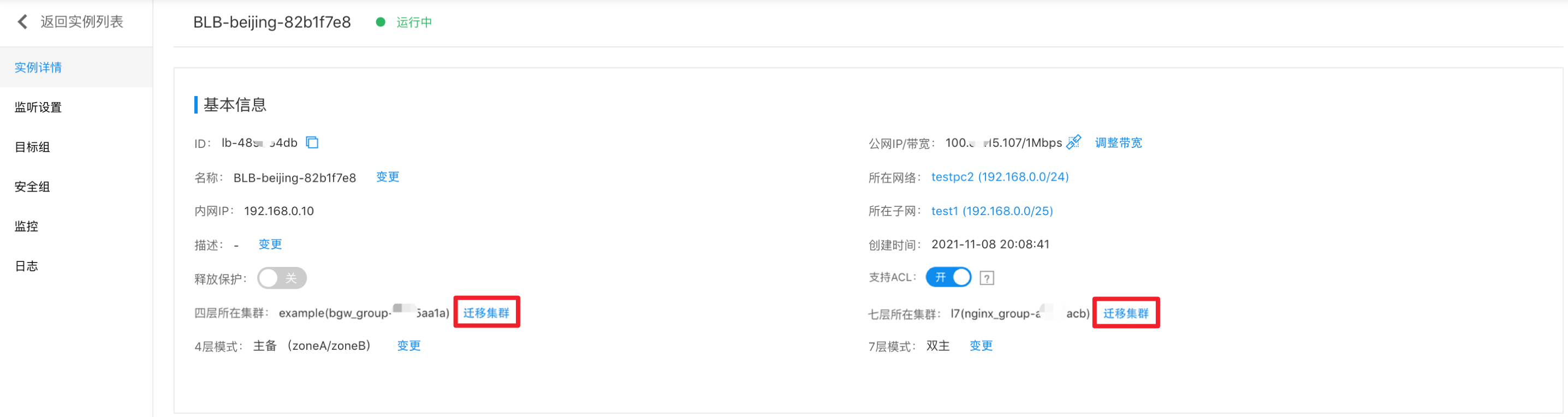
image.png

New BLB instance switch

Click the cluster name to access the details page and configure the switch for new BLB instance creation. This is enabled by default. If disabled, the dedicated load balancing cluster will no longer allow new BLB instances to be created.
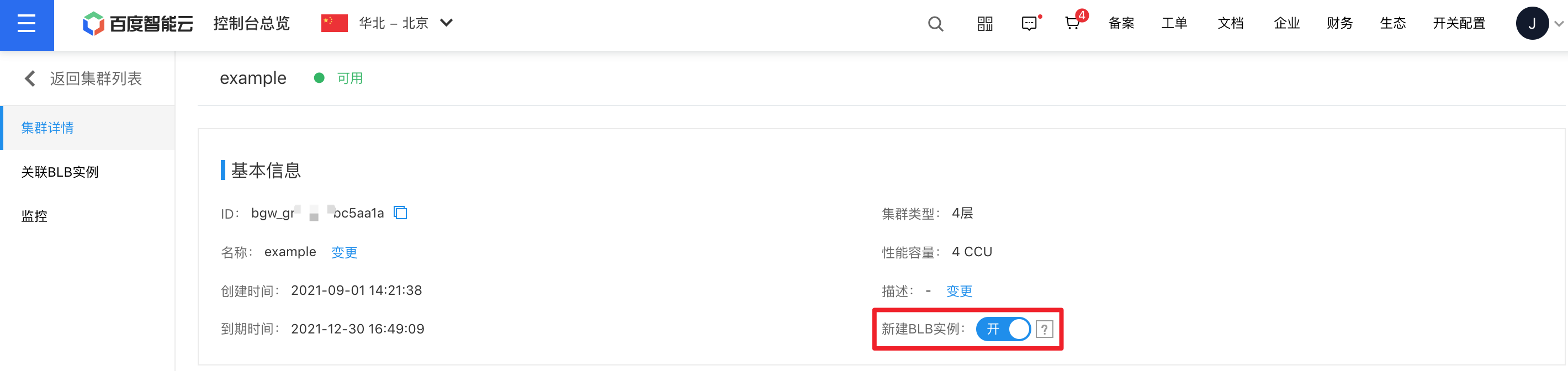
image.png

View associated BLB instances

Click the cluster name to enter the details page, select "Associated BLB Instance" in the left navigation bar, and navigate to the Associated BLB Instance List page to view information on BLB instances linked to the dedicated cluster.
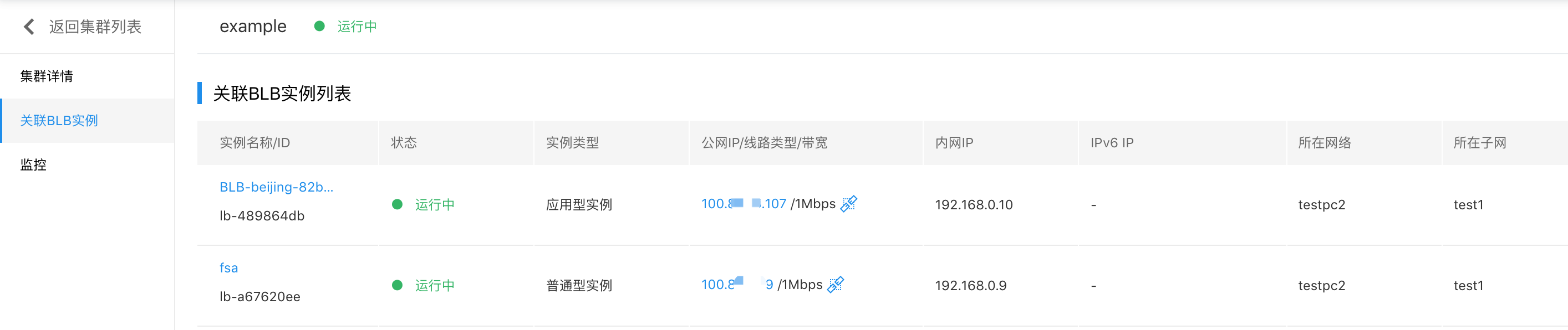
image.png

View monitor data

  1. Click the cluster name to enter the details page, select "Monitor" from the left navigation bar, and open the Monitor page to view monitoring and water level details of the dedicated cluster.
  2. Click Alarm Details on the Monitor page to enter the alarm policy configuration page, where you can manage the alarm strategy of the load balance dedicated cluster. For detailed operation steps, please see BCM Alarm Management.

Load balance dedicated clusters support TOPN statistic

TOPN: After specifying the time range, statistical method, and metric, enable the TOP display feature and click the Refresh button in the top-left corner. The system will automatically display the top 10 BLB instance IDs ranked by traffic proportion based on your selections.

Statistical methods include: Average, Maximum, Minimum, Sum.

  • Layer 4 Load Balancer metrics: Health check (count), network traffic (bytes), network packets (count), concurrent connections (count), traffic dropped (bytes/minute), packets dropped (count/minute), connections dropped (count/minute), new connections (count/minute), network inbound bandwidth (bps), network outbound bandwidth (bps), rate-limited traffic (bytes), rate-limited packets (count)
  • Layer 7 Load Balancer metrics: Health check (count), request count (count/minute), network traffic (bytes), network packets (count), concurrent connections (counts), traffic dropped (bytes/minute), packets dropped (count/minute), connections dropped (count/minute), new connections (counts/minute), response time (ms), response status codes (counts/minute), response status code ratio (percentage), real server response status codes (count/minute), real server response time (ms), network inbound bandwidth (bps), network outbound bandwidth (bps), queries per second (count), rate-limited traffic (bytes), rate-limited packets (count), QPS usage (percentage)

Log in to the Baidu AI Cloud Management Console, go to Product Services > Network > Baidu Load Balancer (BLB). From the left navigation bar, select the BLB dedicated cluster, click on the cluster name, choose "Monitor" from the left navigation bar, and review the "BLB Instance Monitor Information."

Description:

  • At present, the TOPN function is in the public beta stage. If you need to use it, please submit a Ticket application.
  • The BLB dedicated cluster instance status is "Available";
  • Network traffic must pass through the BLB dedicated cluster;
  • After clicking the Refresh button, there may be a delay before the Traffic Graph appears. Please wait approximately three minutes for it to load.
  • Data should be available within the past three days, and the maximum query time span is 30 days.
  • The system supports three time selection methods: 1. Query time range less than 1 hour (1–59 minutes): For example, if you initiate a query at 20:00, only data from 18:56 to 19:55 can be queried. 2. Query time range of more than 1 hour: Query time must be an integer multiple of 1 hour, ranging from 1 to 12 hours. For example, if you query at 20:00 with a range between 1 and 12 hours, only data before 19:00 will be available. 3. For ranges over 1 hour that are not whole multiples, you can query up to an hour's data combined with a range of less than 1 hour (1–59 minutes).

Previous
IP Group Usage Guide
Next
Load Balancer Frontend and Backend Protocol Correspondence