Extended domain name

BLB BLB

  • API Reference
    • Access control
    • API Service Domain Name
    • Appendix
    • Application BLB Interface
      • Application BLB Instance Related Interfaces
      • Application BLB Listener Related Interfaces
      • Application BLB Security Group Related Interfaces
      • Application BLB Server Group Related Interfaces
    • Application IPv6 BLB Interface
      • Application IPv6 BLB Instance Related Interfaces
      • Application IPv6 BLB Listener Related Interfaces
      • Application IPv6 BLB Security Group Related Interfaces
      • Application IPv6 BLB Server Group Related Interfaces
    • BLB Order Related Interfaces
      • BLB - Resize
      • BLB Charge Shift - Cancel Prepay to Postpay
      • BLB Charge Shift - Postpay to Prepay
      • BLB Charge Shift - Prepay to Postpay
      • BLB Inquiry
      • BLB Unsubscribe Interface
    • Document Update Records
    • Error code
    • Interface Specifications
    • Introduction
    • Load Balancer Dedicated Cluster LBDC Interface
      • LBDC Instance Related Interfaces
    • Service Publishing Point Interface
      • Service Publishing Point Related Interfaces
    • Standard BLB Interface
      • Standard BLB Instance Related Interfaces
      • Standard BLB Listener Related Interfaces
      • Standard BLB Real Server Related Interfaces
      • Standard BLB Security Group Related Interfaces
    • Standard IPv6 BLB Interface
      • Standard IPv6 BLB Related Interfaces
  • FAQs
    • Billing Problems
    • Common Questions Overview
    • Configuration-related questions
    • Fault-related questions
    • General Problems
    • Load Balancer Dedicated Cluster Related Issues
    • Performance-related questions
    • Security Problems
  • Function Release Records
  • Operation guide
    • Access control
    • Access Logs
    • Application BLB instance
    • Application IPv6 Instance
    • BLB metric description
    • Certification
    • Custom configuration
    • Extended domain name
    • General-purpose BLB instance
      • Creating BLB Ordinary Instance
      • Managing BLB Ordinary Instance
    • General-purpose IPv6 BLB instance
    • Identity and access management
    • IP Group Usage Guide
    • Load Balance Dedicated Cluster
    • Load Balancer Frontend and Backend Protocol Correspondence
    • Recording Access Logs Using VPC Flow Logs
    • Service Release Point
    • Tag Management
  • Product Description
    • Application scenarios
    • Basic Architecture
    • Basic concepts
    • Performance Specification Description
    • Product advantages
    • Product features
    • Product Introduction
    • Usage restrictions
  • Product pricing
    • Load Balancer Dedicated Cluster Billing
    • Load Balancer Instance Billing
  • Quick Start
  • SDK
    • GO-SDK
      • Application BLB Instance
      • Initialization
      • Install
      • IPv6 BLB Instance
      • Load Balance Dedicated Cluster (LBDC)
      • Ordinary BLB Instance
      • Overview
      • Service Release Point
      • Version Change Records
    • Java-SDK
      • Application BLB instance
      • General-purpose BLB instance
      • Initialization
      • Install the SDK Package
      • IPv6 BLB Instance
      • Load Balance Dedicated Cluster (LBDC)
      • Overview
      • Service Release Point
      • Version Update Description
    • PHP-SDK
      • Initialization
      • Install
      • Ordinary BLB Instance
      • Overview
    • Python-SDK
      • Application BLB Instance
      • Initialization
      • Install
      • IPv6 BLB Instance
      • Load Balance Dedicated Cluster (LBDC)
      • Ordinary BLB Instance
      • Overview
      • Service Release Point
      • Version Update Description
  • Service Level Agreement (SLA)
    • Description of Baidu AI Cloud Load Balancer Trusted Cloud certification service availability
    • LBDC Service Level Agreement SLA
    • BLB Service Level Agreement (V2.0)
  • Typical Practices
    • BLB Selection Guide
    • Health Check Exception Troubleshooting
    • Implementing BLB Association with Listeners, Real Servers, Security Groups, etc. via Terraform
    • Implementing Multi-Site Hosting via Application BLB
    • Load Balancer Security Protection Strategy
    • Managing BLB via Terraform
    • Obtaining Client Information via Application BLB Instance
    • Using IP Group Function to Mount Real Servers Across VPCs in Different Regions
    • Using IP Group Function to Mount Real Servers Across VPCs in the Same Region
All documents
menu
No results found, please re-enter

BLB BLB

  • API Reference
    • Access control
    • API Service Domain Name
    • Appendix
    • Application BLB Interface
      • Application BLB Instance Related Interfaces
      • Application BLB Listener Related Interfaces
      • Application BLB Security Group Related Interfaces
      • Application BLB Server Group Related Interfaces
    • Application IPv6 BLB Interface
      • Application IPv6 BLB Instance Related Interfaces
      • Application IPv6 BLB Listener Related Interfaces
      • Application IPv6 BLB Security Group Related Interfaces
      • Application IPv6 BLB Server Group Related Interfaces
    • BLB Order Related Interfaces
      • BLB - Resize
      • BLB Charge Shift - Cancel Prepay to Postpay
      • BLB Charge Shift - Postpay to Prepay
      • BLB Charge Shift - Prepay to Postpay
      • BLB Inquiry
      • BLB Unsubscribe Interface
    • Document Update Records
    • Error code
    • Interface Specifications
    • Introduction
    • Load Balancer Dedicated Cluster LBDC Interface
      • LBDC Instance Related Interfaces
    • Service Publishing Point Interface
      • Service Publishing Point Related Interfaces
    • Standard BLB Interface
      • Standard BLB Instance Related Interfaces
      • Standard BLB Listener Related Interfaces
      • Standard BLB Real Server Related Interfaces
      • Standard BLB Security Group Related Interfaces
    • Standard IPv6 BLB Interface
      • Standard IPv6 BLB Related Interfaces
  • FAQs
    • Billing Problems
    • Common Questions Overview
    • Configuration-related questions
    • Fault-related questions
    • General Problems
    • Load Balancer Dedicated Cluster Related Issues
    • Performance-related questions
    • Security Problems
  • Function Release Records
  • Operation guide
    • Access control
    • Access Logs
    • Application BLB instance
    • Application IPv6 Instance
    • BLB metric description
    • Certification
    • Custom configuration
    • Extended domain name
    • General-purpose BLB instance
      • Creating BLB Ordinary Instance
      • Managing BLB Ordinary Instance
    • General-purpose IPv6 BLB instance
    • Identity and access management
    • IP Group Usage Guide
    • Load Balance Dedicated Cluster
    • Load Balancer Frontend and Backend Protocol Correspondence
    • Recording Access Logs Using VPC Flow Logs
    • Service Release Point
    • Tag Management
  • Product Description
    • Application scenarios
    • Basic Architecture
    • Basic concepts
    • Performance Specification Description
    • Product advantages
    • Product features
    • Product Introduction
    • Usage restrictions
  • Product pricing
    • Load Balancer Dedicated Cluster Billing
    • Load Balancer Instance Billing
  • Quick Start
  • SDK
    • GO-SDK
      • Application BLB Instance
      • Initialization
      • Install
      • IPv6 BLB Instance
      • Load Balance Dedicated Cluster (LBDC)
      • Ordinary BLB Instance
      • Overview
      • Service Release Point
      • Version Change Records
    • Java-SDK
      • Application BLB instance
      • General-purpose BLB instance
      • Initialization
      • Install the SDK Package
      • IPv6 BLB Instance
      • Load Balance Dedicated Cluster (LBDC)
      • Overview
      • Service Release Point
      • Version Update Description
    • PHP-SDK
      • Initialization
      • Install
      • Ordinary BLB Instance
      • Overview
    • Python-SDK
      • Application BLB Instance
      • Initialization
      • Install
      • IPv6 BLB Instance
      • Load Balance Dedicated Cluster (LBDC)
      • Ordinary BLB Instance
      • Overview
      • Service Release Point
      • Version Update Description
  • Service Level Agreement (SLA)
    • Description of Baidu AI Cloud Load Balancer Trusted Cloud certification service availability
    • LBDC Service Level Agreement SLA
    • BLB Service Level Agreement (V2.0)
  • Typical Practices
    • BLB Selection Guide
    • Health Check Exception Troubleshooting
    • Implementing BLB Association with Listeners, Real Servers, Security Groups, etc. via Terraform
    • Implementing Multi-Site Hosting via Application BLB
    • Load Balancer Security Protection Strategy
    • Managing BLB via Terraform
    • Obtaining Client Information via Application BLB Instance
    • Using IP Group Function to Mount Real Servers Across VPCs in Different Regions
    • Using IP Group Function to Mount Real Servers Across VPCs in the Same Region
  • Document center
  • arrow
  • BLBBLB
  • arrow
  • Operation guide
  • arrow
  • Extended domain name
Table of contents on this page
  • Add extended domain name

Extended domain name

Updated at:2025-10-16

The load balancer's HTTPS listener supports attaching multiple certificates. Requests from different endpoints can be routed to distinct real servers or server groups by setting up extended domain names.

Add extended domain name

  1. Log in to the Baidu AI Cloud Platform, go to Products & Services > Baidu Load Balance (BLB), and click on the BLB name to access the Instance Details page.
  2. Click on Listener Settings in the left navigation bar to edit existing HTTPS protocol listeners or add new listener configurations.
  3. On the premise that the server certificate is set, click to enable "Extended Domain Name". At this point, you can see the extended domain name ConfigMap, where each domain name corresponds to a certificate name.
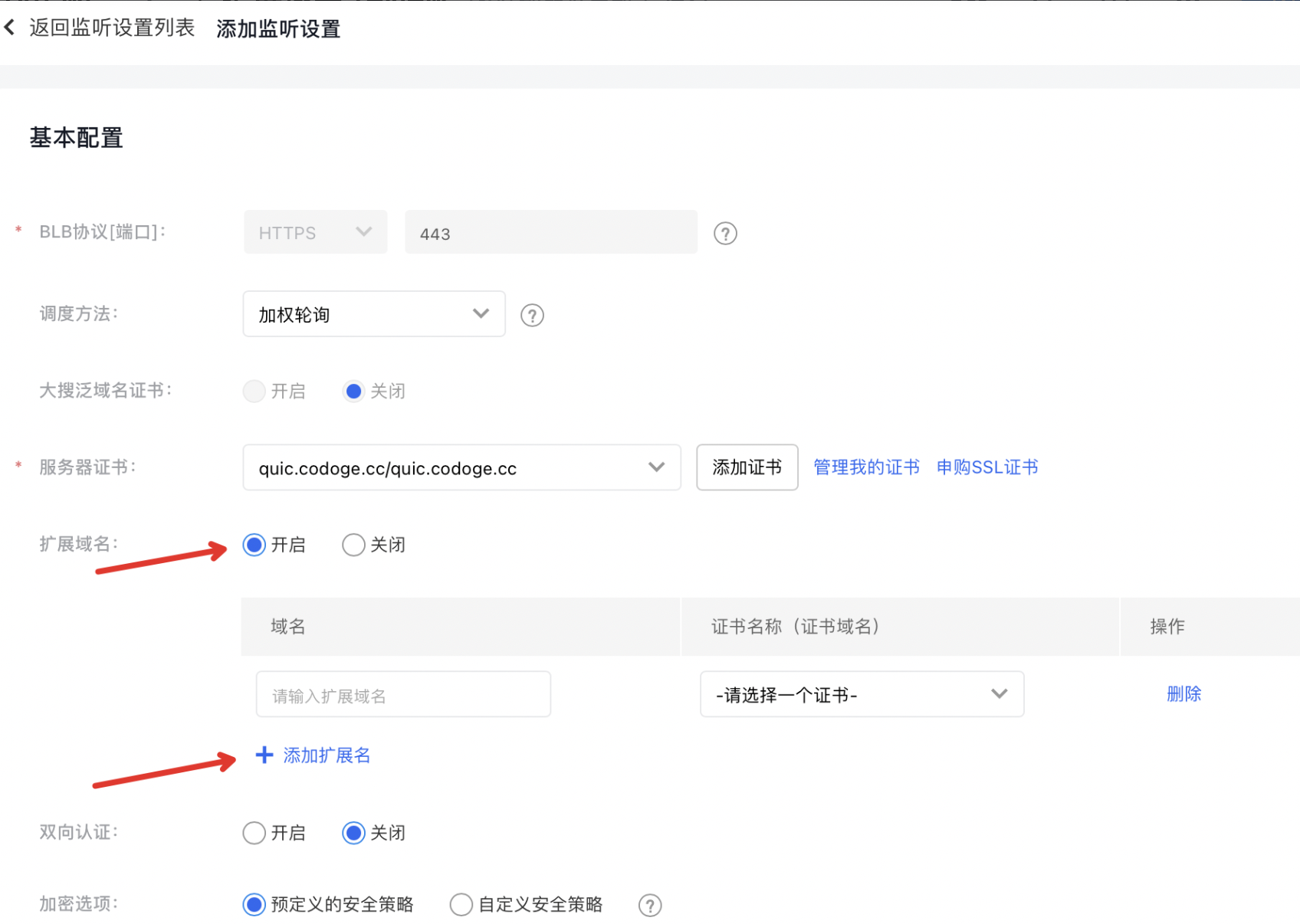
    image.png
    The ConfigMap is described as follows:
ConfigMap Description
Domain name Fill in the domain name, which supports both exact domain name and wildcard domain name.
Certificate name Select the certificate associated with this domain name
  1. In the application BLB instance, after the extended domain name is enabled, you can set the matching conditions as domain name in listener rules as needed, allowing different domain names to be assigned to different backend target groups and target protocols.
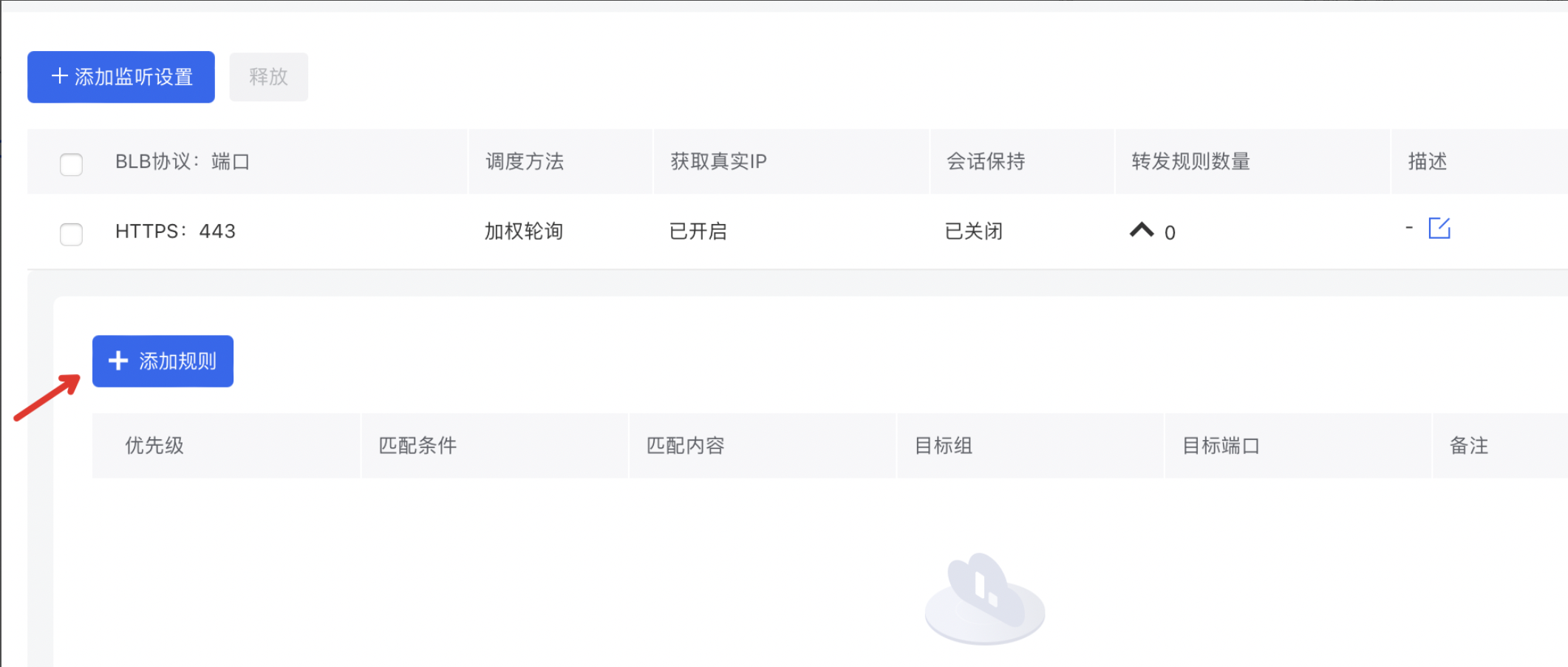
    image.png

Description:

  • The domain name in the certificate must exactly match the domain name you added.
  • If a frontend request matches multiple domain name rules at the same time, the policy's matching priority follows the longest-match principle, e.g., exact match > narrow wildcard match > broad wildcard match.
  • The extended domain name must be paired with forwarding rules to take effect. The corresponding domain name forwarding policy should be configured for it to work.

Previous
Custom configuration
Next
General-purpose BLB instance