自定义驱动开发指南
自定义驱动介绍
BIE提供了子设备管理能力,针对不同类型的子设备,需要通过驱动完成BIE与子设备间的适配工作。BIE已经提供了Modbus、OPC-UA、IPC、IEC-104的系统驱动。除此之外的子设备,需要通过BIE提供的SDK(https://github.com/baetyl/baetyl-go) 开发自定义驱动,以完成BIE与子设备间的适配工作。
自定义驱动复用原设备接入框架,就可以实现数据接入,不需要bie做任何修改,快速实现自定义设备接入。
BIE各模块与驱动交互逻辑如下图所示
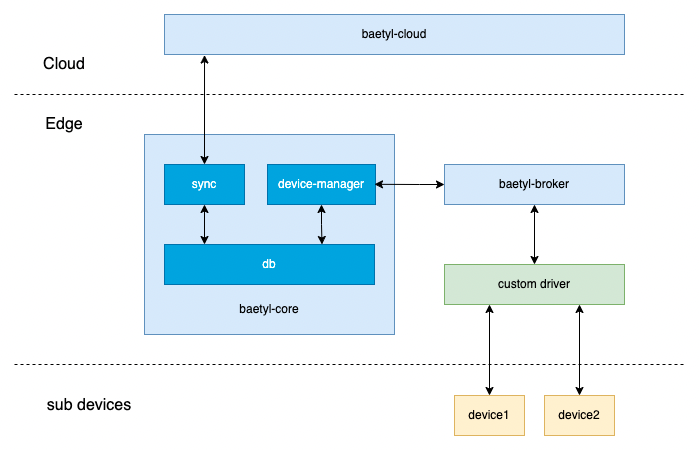
上图中包含几个主要模块
- baetyl-cloud:BIE云端管理服务
- baetyl-core:BIE边缘核心服务
- baetyl-broker:mqtt broker
- custom driver:自定义驱动
- device1、device2:子设备 驱动位于BIE 边缘组件 baetyl-core 和子设备之间,与baetyl-core之间通过baetyl-broker进行解耦。驱动与baetyl-broker,baetyl-broker与baetyl-core之间都是通过mqtt协议通信。一方面,驱动与子设备对接,需要通过协议读取子设备的数据后需要发送至baetyl-broker,再通过baetyl-core发送至云端baetyl-cloud。另一方面,驱动接收来自baetyl-broker的数据,写入子设备。baetyl-broker发送至驱动的数据来自于云端baetyl-cloud。
Golang驱动开发SDK
配置文件
SDK会从配置文件中获取设备、驱动、接入模板的数据,配置文件都放在驱动pod里的 /etc/baetyl/ 目录下
sub_devices.yml
『节点管理』-『子设备管理』中的驱动配置和子设备配置信息存放在sub_device.yml中
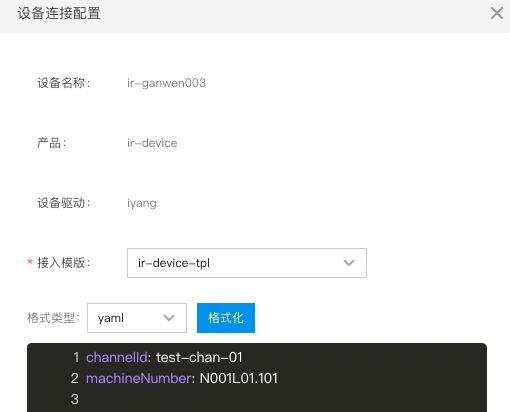
- devcies[i].accessConfig.custom为子设备的配置
- driver为驱动配置
1devices:
2- name: device1
3  version: 1663240313luvrs4
4  deviceModel: device-model
5  accessTemplate: device-access-tpl
6  deviceTopic:
7    delta:
8      qos: 1
9      topic: thing/device-model/device1/property/invoke
10    report:
11      qos: 1
12      topic: thing/device-model/device1/property/post
13    event:
14      qos: 1
15      topic: thing/device-model/device1/raw/c2d
16    get:
17      qos: 1
18      topic: $baetyl/device/device1/get
19    getResponse:
20      qos: 1
21      topic: $baetyl/device/device1/getResponse
22    eventReport:
23      qos: 1
24      topic: thing/device-model/device1/event/post
25    propertyGet:
26      qos: 1
27      topic: thing/device-model/device1/property/get
28    lifecycleReport:
29      qos: 1
30      topic: thing/device-model/device1/lifecycle/post
31  accessConfig:
32    custom: |-
33      channelId: test-chan-01
34      machineNumber: N001L01.101
35driver: |-
36  channels:
37  - name: test-chan-01
38    address: 192.168.0.1:23
39    interval: 30s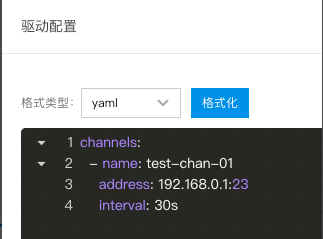
models.yml
『子设备管理』-『产品』中的产品测点信息存放在models.yml中
1device-model:
2- name: switch
3  type: bool
4  mode: rw
5- name: temperature
6  type: float32
7  mode: ro
8- name: humidity
9  type: float32
10  mode: ro
11- name: high-temperature-threshold
12  type: int32
13  mode: rw
14- name: high-temperature-alarm
15  type: bool
16  mode: ro
access_template.yml
『子设备管理』-『接入模板』中的设备点表和物模型点位映射信息存放在access_template.yml中
- device-access-tpl.properties[i].visitor.custom为设备点表信息中的采集配置
- device-access-tpl.properties[i].mapping为物模型点位映射信息
1device-access-tpl:
2  properties:
3  - name: 高温报警
4    id: "1"
5    type: bool
6    visitor:
7      custom: |-
8        start: 1
9        offset: 14
10  mappings:
11  - attribute: high-temperature-alarm
12    type: value
13    expression: x1
主要数据结构
子设备信息结构体 DeviceInfo
1type DeviceInfo struct {
2	Name    string `yaml:"name,omitempty" json:"name,omitempty"`
3	Version string `yaml:"version,omitempty" json:"version,omitempty"`
4	// Deprecated: Use DeviceTopic instead.
5	// Change from access template support
6	Topic          `yaml:",inline" json:",inline"`
7	DeviceModel    string        `yaml:"deviceModel,omitempty" json:"deviceModel,omitempty"`
8	AccessTemplate string        `yaml:"accessTemplate,omitempty" json:"accessTemplate,omitempty"`
9	DeviceTopic    DeviceTopic   `yaml:"deviceTopic,omitempty" json:"deviceTopic,omitempty"`
10	AccessConfig   *AccessConfig `yaml:"accessConfig,omitempty" json:"accessConfig,omitempty"`
11}
12
13type DeviceTopic struct {
14	Delta           mqtt2.QOSTopic `yaml:"delta,omitempty" json:"delta,omitempty"`
15	Report          mqtt2.QOSTopic `yaml:"report,omitempty" json:"report,omitempty"`
16	Event           mqtt2.QOSTopic `yaml:"event,omitempty" json:"event,omitempty"`
17	Get             mqtt2.QOSTopic `yaml:"get,omitempty" json:"get,omitempty"`
18	GetResponse     mqtt2.QOSTopic `yaml:"getResponse,omitempty" json:"getResponse,omitempty"`
19	EventReport     mqtt2.QOSTopic `yaml:"eventReport,omitempty" json:"eventReport,omitempty"`
20	PropertyGet     mqtt2.QOSTopic `yaml:"propertyGet,omitempty" json:"propertyGet,omitempty"`
21	LifecycleReport mqtt2.QOSTopic `yaml:"lifecycleReport,omitempty" json:"lifecycleReport,omitempty"`
22}- Name:子设备名称
- Version:子设备当前版本
-
DeviceTopic:子设备系统主题
- Delta:thing/{产品名}/{设备名}/property/invoke,接收来自云端的属性变更通知,驱动通过该主题接收到消息时通常需要将对应的属性值写入子设备。
- Report:thing/{产品名}/{设备名}/property/post,用于驱动将获取的子设备数据发送至baetyl-core。
- Event:thing/{产品名}/{设备名}/raw/c2d,接收来自云端的事件通知。
- Get:$baetyl/device/{设备名}/get,边缘侧用于驱动向baetyl-core发送消息,获取当前所有子设备的数据。
- GetResponse:$baetyl/device/{设备名}/getResponse,用于接收来自baetyl-core发送的所有子设备的数据,该主题只有在驱动向baetyl-core发送消息后才会接到数据,即向Get主题发送消息后。
- EventReport:thing/{产品名}/{设备名}/event/post,驱动上报事件的主题。
- PropertyGet:thing/{产品名}/{设备名}/property/get,接收来自云端的属性获取请求,驱动接收到后立即进行一次数据采集,并通过Report主题上报。
- LifecycleReport:thing/{产品名}/{设备名}/lifecycle/post,驱动上报设备在离线状态的主题。
子设备连接配置结构体 AccessConfig
1type AccessConfig struct {
2	Modbus *ModbusAccessConfig `yaml:"modbus,omitempty" json:"modbus,omitempty"`
3	Opcua  *OpcuaAccessConfig  `yaml:"opcua,omitempty" json:"opcua,omitempty"`
4	IEC104 *IEC104AccessConfig `yaml:"iec104,omitempty" json:"iec104,omitempty"`
5	Custom *CustomAccessConfig `yaml:"custom,omitempty" json:"custom,omitempty"`
6}
7
8type CustomAccessConfig string- Modbus、Opcua、IEC104字段为系统驱动使用,开发自定义驱动时不需要使用。
- CustomAccessConfig对应每个子设备的连接配置信息且是字符串,具体格式可能为Yaml或JSON,驱动根据实际进行相应解析。即2.1.1节中的子设备配置和驱动配置。
子设备属性结构体 DeviceProperty
1type DeviceProperty struct {
2	Name    string          `yaml:"name,omitempty" json:"name,omitempty"`
3	Id      string          `yaml:"id,omitempty" json:"id,omitempty"`
4	Type    string          `yaml:"type,omitempty" json:"type,omitempty" validate:"regexp=^(int16|int32|int64|float32|float64|string|bool)?$"`
5	Mode    string          `yaml:"mode,omitempty" json:"mode,omitempty" validate:"regexp=^(ro|rw)?$"`
6	Unit    string          `yaml:"unit,omitempty" json:"unit,omitempty"`
7	Visitor PropertyVisitor `yaml:"visitor,omitempty" json:"visitor,omitempty"`
8}
9
10type PropertyVisitor struct {
11	Modbus *ModbusVisitor `yaml:"modbus,omitempty" json:"modbus,omitempty"`
12	Opcua  *OpcuaVisitor  `yaml:"opcua,omitempty" json:"opcua,omitempty"`
13	IEC104 *IEC104Visitor `yaml:"iec104,omitempty" json:"iec104,omitempty"`
14	Custom *CustomVisitor `yaml:"custom,omitempty" json:"custom,omitempty"`
15}
16
17type CustomVisitor string- Name:属性的名字
- Type:属性的数据类型
- Mode:标识该属性是读写或只读
- Vistor:属性的扩展字段,驱动使用该信息向子设备读取写入数据
-
PropertyVisitor
- Modbus、Opcua、IEC104:是系统驱动使用,开发自定义驱动无需使用
- Custom:该字段也以字符串保存属性的扩展信息,驱动根据实际进行相应解析。即2.1.3中的设备点表信息中的采集配置。
子设备影子结构体 DeviceShadow
1type DeviceShadow struct {
2	Name   string    `yaml:"name,omitempty" json:"name,omitempty"`
3	Report v1.Report `yaml:"report,omitempty" json:"report,omitempty"`
4	Desire v1.Desire `yaml:"desire,omitempty" json:"desire,omitempty"`
5}
6
7type Report map[string]interface{}
8type Desire map[string]interface{}- Name:子设备名字
- Report:驱动读取子设备的上报数据。
- Desire:云端设置的子设备数据,该字段仅针对子设备读写属性。
事件结构体 Event
1type Event struct {
2	Type    string      yaml:"type,omitempty" json:"type,omitempty"
3	Payload interface{} yaml:"payload,omitempty" json:"payload,omitempty"
4}- Type:事件类型
- Payload:事件的具体数据
系统接口
1// 获取驱动配置
2GetDriverConfig() string
3
4// 获取所有子设备的信息
5GetAllDevices() []DeviceInfo
6// 获取某个子设备的信息
7GetDevice(device string) (*DeviceInfo, error)
8
9// 获取所有子设备的测点/物模型信息
10GetAllDeviceModels() map[string][]DeviceProperty
11// 获取某个子设备的测点/物模型信息
12GetDeviceModel(device *DeviceInfo) ([]DeviceProperty, error)
13
14// 获取所有子设备的接入模板
15GetAllAccessTemplates() map[string]AccessTemplate
16// 获取某个子设备的接入模板
17GetAccessTemplates(device *DeviceInfo) (*AccessTemplate, error)
18
19// 获取子设备数据,通过该方法向Get主题发送请求消息,需要手动订阅GetResponse主题获取返回结果
20GetDeviceProperties(device *DeviceInfo) (*DeviceShadow, error)
21
22// 上报子设备在线
23Online(device *DeviceInfo) error
24// 上报子设备离线
25Offline(device *DeviceInfo) error
26// 上报子设备测点数据
27ReportDeviceProperties(*DeviceInfo, v1.Report) error
28// 上报子设备事件
29ReportDeviceEvents(*DeviceInfo, v1.EventReport) error
30
31// 注册云端置数回调函数
32RegisterDeltaCallback(cb DeltaCallback) error
33type DeltaCallback func(*DeviceInfo, v1.Delta) error
34// 注册云端事件下发回调函数
35RegisterEventCallback(cb EventCallback) error
36type EventCallback func(*DeviceInfo, *Event) error
37// 注册云端召测回调函数
38RegisterPropertyGetCallback(cb PropertyGetCallback) error
39type PropertyGetCallback func(*DeviceInfo, []string) error
开发示例
开发一个针对http设备模拟器的自定义驱动 BIE自定义驱动SDK:https://github.com/baetyl/baetyl-go
http设备模拟器
镜像地址
registry.baidubce.com/baetyl-test/device-simulator:v0.1.0
模拟行为
- 当计数器开关关闭时,每次获取随机值会得到随机的int32数值,计数器值为0
- 当计数器开关打开时,每次获取随机值会得到随机的int32数值,计数器值每隔1秒加1, 加到100000后重置为0,重新开始 设备点位
| 点位名称 | 点位标识符 | 数据类型 |
|---|---|---|
| 计数器开关 | switch | bool |
| 计数器值 | counter | int32 |
| 随机值 | random | int32 |
接口
| 路径 | 方法 | request body | response body |
|---|---|---|---|
| /switch | GET | 无 | {"switch": true, "status": "success"} |
| /switch | PUT | {"switch", false} | {"status": "success"} |
| /counter | GET | 无 | {"counter": 32, "status": "success"} |
| /random | GET | 无 | {"random": 12, "status": "success"} |
核心代码
主函数
main.go
1package main
2
3import dm "github.com/baetyl/baetyl-go/v2/dmcontext"
4
5func main() {
6	dm.Run(func(ctx dm.Context) error {
7		d, err := newDriver(ctx)
8		if err != nil {
9			return err
10		}
11		d.start()
12		defer d.stop()
13		ctx.Wait()
14		return nil
15	})
16}
驱动配置和子设备配置
device_config.go
1package config
2
3type DeviceConfig struct {
4	Channel    string     `yaml:"channel" json:"channel"`
5	MachineNum string     `yaml:"machineNum" json:"machineNum"`
6	Properties []Property `yaml:"properties" json:"properties"`
7}
8
9type Property struct {
10	Name string `yaml:"name" json:"name"`
11	Path string `yaml:"path" json:"path"`
12}
driver_config.go
1package config
2
3import "time"
4
5type DriverConfig struct {
6	Channels []Channel `yaml:"channels" json:"channels"`
7}
8
9type Channel struct {
10	Name     string        `yaml:"name" json:"name"`
11	Address  string        `yaml:"address" json:"address"`
12	Interval time.Duration `yaml:"interval" json:"interval" default:"30s"`
13}
配置解析
driver.go
1package main
2
3import (
4    "bytes"
5    "encoding/json"
6    "fmt"
7    "net/http"
8    "time"
9
10    dm "github.com/baetyl/baetyl-go/v2/dmcontext"
11    "github.com/baetyl/baetyl-go/v2/errors"
12    "github.com/baetyl/baetyl-go/v2/log"
13    "github.com/baetyl/baetyl-go/v2/spec/v1"
14    "gopkg.in/yaml.v2"
15
16    "custom-driver/config"
17)
18
19type driver struct {
20    ctx      dm.Context
21    channels map[string]config.Channel
22    devCfgs  map[string]config.DeviceConfig
23    log      *log.Logger
24}
25
26func newDriver(ctx dm.Context) (*driver, error) {
27    // 解析驱动配置
28    var driverCfg config.DriverConfig
29    if err := yaml.Unmarshal([]byte(ctx.GetDriverConfig()), &driverCfg); err != nil {
30        return nil, err
31    }
32    channels := make(map[string]config.Channel)
33    for _, channel := range driverCfg.Channels {
34        channels[channel.Name] = channel
35    }
36
37    // 解析各个子设备配置
38    devCfgs := make(map[string]config.DeviceConfig)
39    for _, dev := range ctx.GetAllDevices() {
40        var devCfg config.DeviceConfig
41        if err := yaml.Unmarshal([]byte(*dev.AccessConfig.Custom), &devCfg); err != nil {
42            return nil, err
43        }
44
45        accessTpl, err := ctx.GetAccessTemplates(&dev)
46        if err != nil {
47            return nil, err
48        }
49        var properties []config.Property
50        for _, prop := range accessTpl.Properties {
51            cfg := config.Property{Name: prop.Name}
52            if err := yaml.Unmarshal([]byte(*prop.Visitor.Custom), &cfg); err != nil {
53                return nil, err
54            }
55            properties = append(properties, cfg)
56        }
57        devCfg.Properties = properties
58        devCfgs[dev.Name] = devCfg
59        // ensure device is ready, then tell cloud all the devices is online
60        if err := ctx.Online(&dev); err != nil {
61            return nil, err
62        }
63    }
64    d := &driver{
65        ctx:      ctx,
66        channels: channels,
67        devCfgs:  devCfgs,
68        log:      ctx.Log().With(log.Any("module", "custom driver")),
69    }
70
71    // 注册数据通知、事件、召测回调函数
72    if err := ctx.RegisterDeltaCallback(d.DeltaCallback); err != nil {
73        return nil, err
74    }
75    if err := ctx.RegisterEventCallback(d.EventCallback); err != nil {
76        return nil, err
77    }
78    if err := ctx.RegisterPropertyGetCallback(d.PropertyGetCallback); err != nil {
79        return nil, err
80    }
81    return d, nil
82}
定时读取设备数据上报
driver.go
1func (d *driver) start() {
2    for _, dev := range d.ctx.GetAllDevices() {
3        go d.running(&dev)
4    }
5}
6
7func (d *driver) stop() {
8}
9
10// 针对多个子设备开始定时读数据
11func (d *driver) running(dev *dm.DeviceInfo) {
12    cfg, ok := d.devCfgs[dev.Name]
13    if !ok {
14        d.log.Error("device config not exist", log.Any("device", cfg))
15        return
16    }
17    channel, ok := d.channels[cfg.Channel]
18    if !ok {
19        d.log.Error("channel not exist", log.Any("channel", cfg.Channel))
20        return
21    }
22
23    ticker := time.NewTicker(channel.Interval)
24    defer ticker.Stop()
25    for {
26        select {
27        case <-ticker.C:
28            err := d.execute(dev)
29            if err != nil {
30                d.log.Error("failed to execute", log.Error(err))
31            }
32        case <-d.ctx.WaitChan():
33            d.log.Warn("task of device stopped", log.Any("device", dev))
34            return
35        }
36    }
37}
38
39// 读取数据后通过上报函数发送数据至baetyl-broker
40func (d *driver) execute(dev *dm.DeviceInfo) error {
41    cfg, _ := d.devCfgs[dev.Name]
42    r := v1.Report{}
43    for _, p := range cfg.Properties {
44        val, err := d.read(&cfg, &p)
45        if err != nil {
46            return err
47        }
48        r[p.Name] = val
49    }
50    if err := d.ctx.ReportDeviceProperties(dev, r); err != nil {
51        return err
52    }
53    return nil
54}
55
56// 读取子设备数据
57func (d *driver) read(dev *config.DeviceConfig, prop *config.Property) (interface{}, error) {
58    resp, err := http.Get(d.channels[dev.Channel].Address + prop.Path)
59    if err != nil {
60        return nil, err
61    }
62    defer resp.Body.Close()
63    var result map[string]interface{}
64    if err := json.NewDecoder(resp.Body).Decode(&result); err != nil {
65        return nil, err
66    }
67    if val, ok := result[prop.Name]; ok {
68        return val, nil
69    } else {
70        return nil, fmt.Errorf("failed to get property: %s", prop.Name)
71    }
72}
回调函数
driver.go
1// 数据通知回调函数,标识云端写入数据至子设备
2func (d *driver) DeltaCallback(dev *dm.DeviceInfo, prop v1.Delta) error {
3    devConfig, _ := d.devCfgs[dev.Name]
4    for _, cfg := range devConfig.Properties {
5        for k, v := range prop {
6            if k == cfg.Name {
7                pld, err := json.Marshal(map[string]interface{}{cfg.Name: v})
8                if err != nil {
9                    return err
10                }
11                req, err := http.NewRequest("PUT", d.channels[devConfig.Channel].Address+cfg.Path, bytes.NewBuffer(pld))
12                if err != nil {
13                    return err
14                }
15                _, err = http.DefaultClient.Do(req)
16                if err != nil {
17                    return err
18                }
19            }
20        }
21    }
22    return nil
23}
24
25// 事件回调函数
26func (d *driver) EventCallback(dev *dm.DeviceInfo, event *dm.Event) error {
27    switch event.Type {
28    // 即时上报事件
29    case dm.TypeReportEvent:
30        if err := d.execute(dev); err != nil {
31            return err
32        }
33    default:
34        return errors.New("event type not supported yet")
35    }
36    return nil
37}
38
39// 召测回调函数
40func (d *driver) PropertyGetCallback(dev *dm.DeviceInfo, properties []string) error {
41    return d.execute(dev)
42}
BIE云端配置
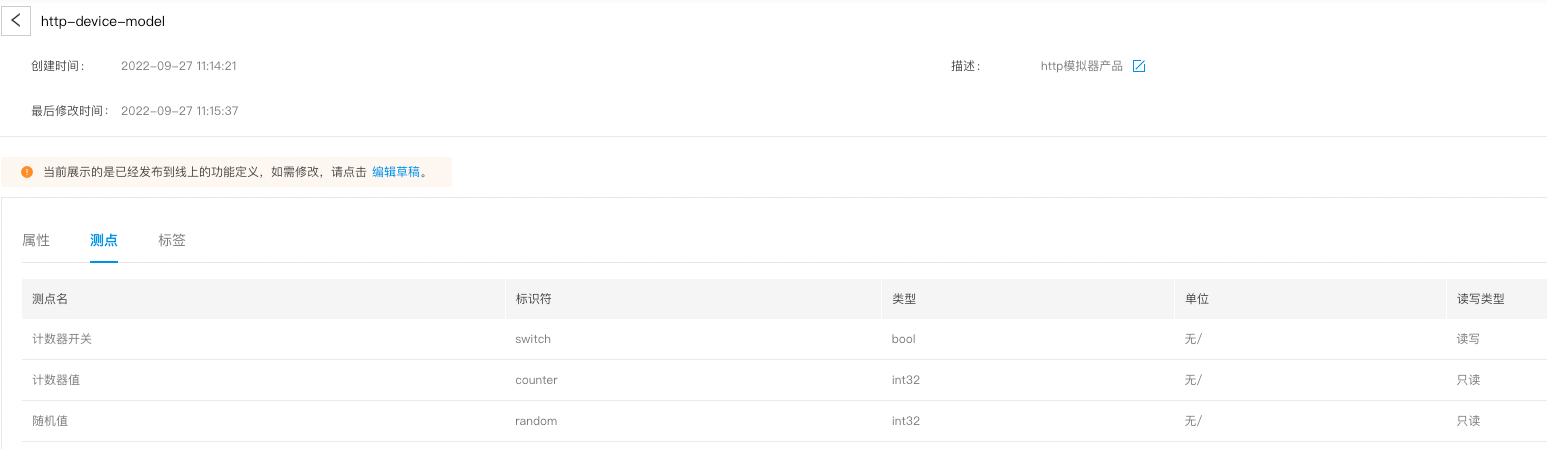
产品
『子设备管理』-『产品』
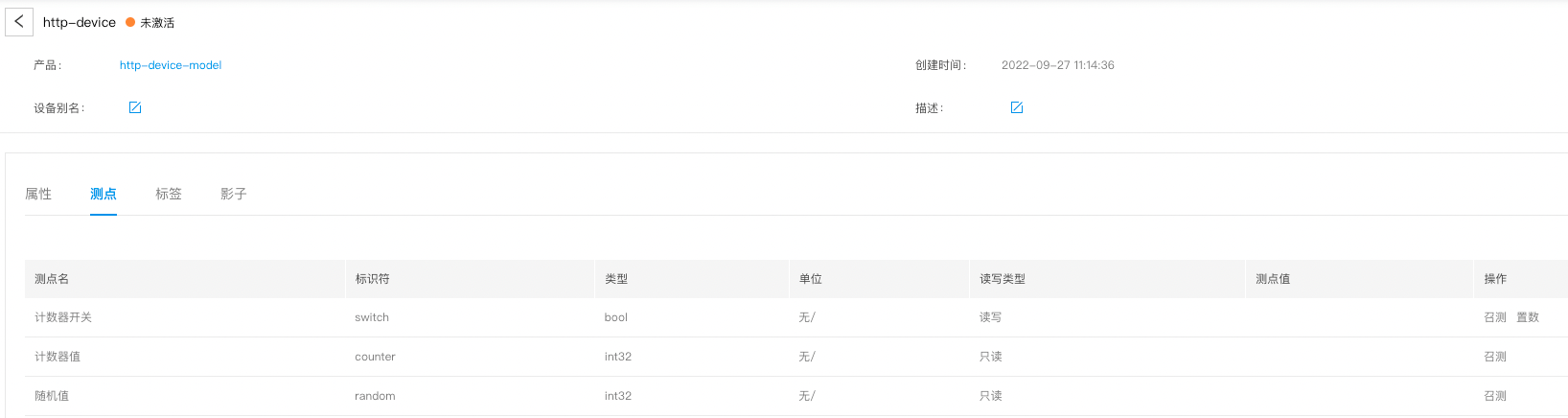
子设备
『子设备管理』-『子设备』
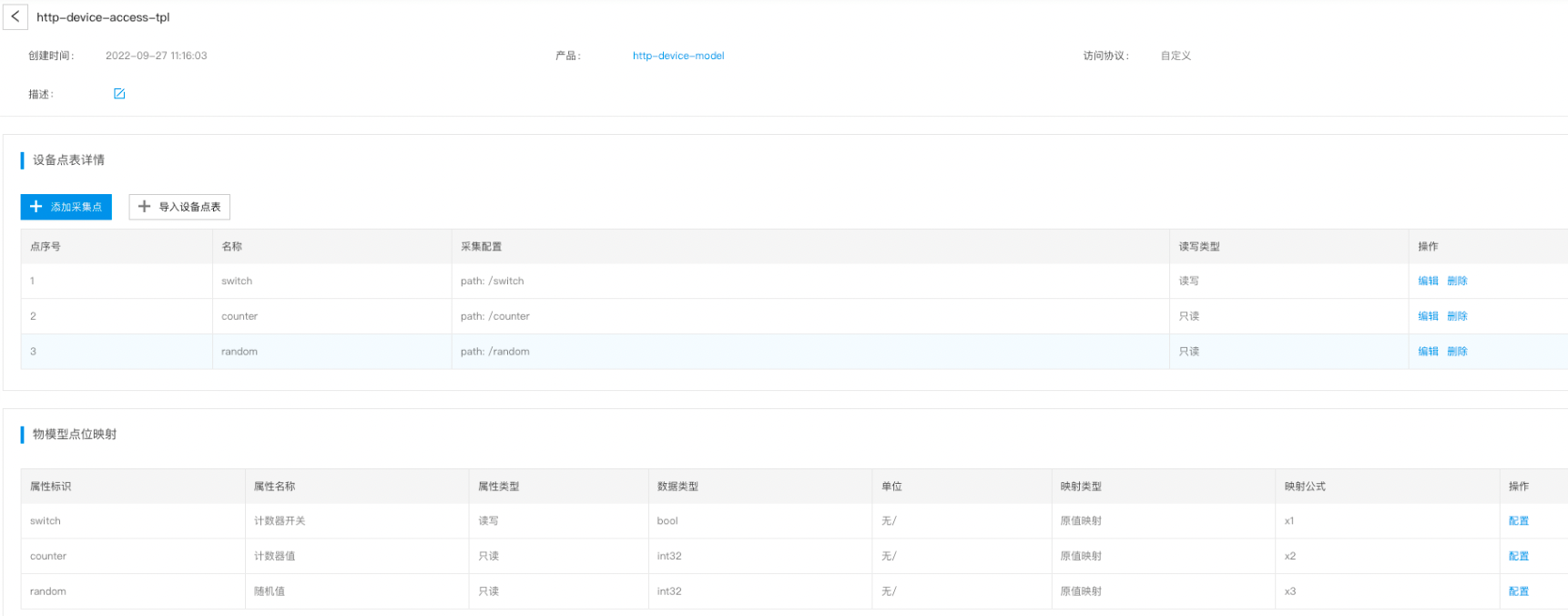
接入模板
『子设备管理』-『接入模板』
驱动配置
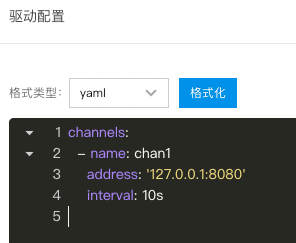
『边缘节点』-『子设备管理』-『设备驱动』-『配置』
子设备配置
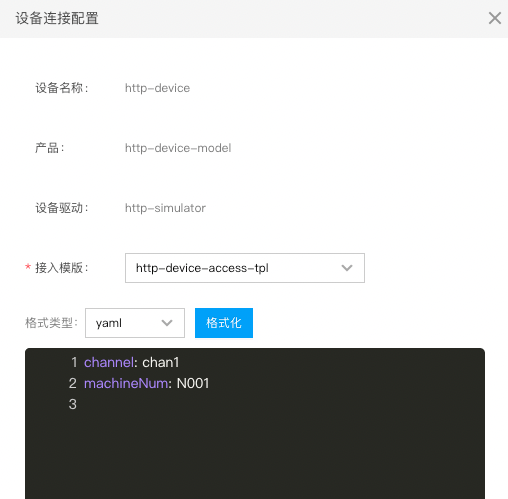
『边缘节点』-『子设备管理』-『子设备』-『配置』