Storage package billing

CFS

  • Updates and Announcements
    • Function Release Records
    • Product Announcement
      • Announcement on CFS Metric Adjustments
  • Product Description
    • Product Introduction
    • Basic concepts
    • Product features
    • Product specifications
    • Usage Limits and Recommendations
    • Selection Guide
      • How to Choose Between CFS and PFS
      • How to Choose Between CFS, BOS and CDS
    • Application scenarios
  • Product pricing
    • Pay-as-you-go
    • Storage package billing
    • Insufficient balance reminders and debt handling
    • Billing Cases
  • Quick Start
    • Getting Started Overview
    • Quick start (Linux)
    • Quick start (Windows)
  • Operation guide
    • Activate Service
    • Manage File System
      • Create file system
      • Delete a file system
      • View file system details
      • Set File System Capacity Upper Limit
    • Mount and Access
      • Add mount target
      • Mount and Unmount CFS on BCC
        • Mount and Unmount on Linux System
          • Mount and Unmount SMB Protocol CFS on Single BCC
          • Batch mounting and unmounting NFS CFS on multiple BCC
          • Mounting and unmounting NFS CFS on a single BCC
        • Mount and Unmount SMB Protocol CFS on Windows System
        • Mount CFS File System When Purchasing New BCC
      • Using CFS in CCE
    • Permission Group Management
    • Identity and access management
    • Data encryption
    • Management Tags
    • Backup
    • Monitor and Alarm
      • View monitoring
      • Alarm management
      • Metric definition
    • Cloud Audit
  • Typical Practices
    • Set Different User Permissions for Different Directories
    • Using File Systems Across Regions Or Accounts
    • Use SFTP to Upload and Download CFS File System Data
    • Use Rsync to Sync From Old File System to CFS File System
    • Best Practices for Managing CFS with Terraform
    • Performance Testing Methods
      • Linux System Performance Testing Methods
      • Windows System Performance Testing Methods
  • API Reference
    • API Function Update Records
    • API Overview
    • Interface Overview
    • General Description
    • Service domain
    • Error code
    • File System Related Interfaces
      • Create file system
      • Update file system
      • Query file system
      • Query mount client
      • Drop file system
      • Update file system tags
    • mount target Related Interfaces
      • Create mount target
      • Query mount targets
      • Delete mount target
    • Permission Group-related APIs
      • Create Permission Group
      • Update permission group
      • Query Permission Groups
      • Delete permission group
      • Create permission group rules
      • Update permission group rules
      • Query permission group rules
      • Delete permission group rule
    • Data type
  • Go-SDK
    • Overview
    • Initialization
    • File system
    • Mount target
    • Error handling
  • FAQs
    • Common Questions Overview
    • General Problems
    • Billing Problems
    • NFS protocol questions
    • SMB Protocol Issues
  • Service Level Agreement (SLA)
    • CFS Service Level Agreement (SLA)
All documents
menu
No results found, please re-enter

CFS

  • Updates and Announcements
    • Function Release Records
    • Product Announcement
      • Announcement on CFS Metric Adjustments
  • Product Description
    • Product Introduction
    • Basic concepts
    • Product features
    • Product specifications
    • Usage Limits and Recommendations
    • Selection Guide
      • How to Choose Between CFS and PFS
      • How to Choose Between CFS, BOS and CDS
    • Application scenarios
  • Product pricing
    • Pay-as-you-go
    • Storage package billing
    • Insufficient balance reminders and debt handling
    • Billing Cases
  • Quick Start
    • Getting Started Overview
    • Quick start (Linux)
    • Quick start (Windows)
  • Operation guide
    • Activate Service
    • Manage File System
      • Create file system
      • Delete a file system
      • View file system details
      • Set File System Capacity Upper Limit
    • Mount and Access
      • Add mount target
      • Mount and Unmount CFS on BCC
        • Mount and Unmount on Linux System
          • Mount and Unmount SMB Protocol CFS on Single BCC
          • Batch mounting and unmounting NFS CFS on multiple BCC
          • Mounting and unmounting NFS CFS on a single BCC
        • Mount and Unmount SMB Protocol CFS on Windows System
        • Mount CFS File System When Purchasing New BCC
      • Using CFS in CCE
    • Permission Group Management
    • Identity and access management
    • Data encryption
    • Management Tags
    • Backup
    • Monitor and Alarm
      • View monitoring
      • Alarm management
      • Metric definition
    • Cloud Audit
  • Typical Practices
    • Set Different User Permissions for Different Directories
    • Using File Systems Across Regions Or Accounts
    • Use SFTP to Upload and Download CFS File System Data
    • Use Rsync to Sync From Old File System to CFS File System
    • Best Practices for Managing CFS with Terraform
    • Performance Testing Methods
      • Linux System Performance Testing Methods
      • Windows System Performance Testing Methods
  • API Reference
    • API Function Update Records
    • API Overview
    • Interface Overview
    • General Description
    • Service domain
    • Error code
    • File System Related Interfaces
      • Create file system
      • Update file system
      • Query file system
      • Query mount client
      • Drop file system
      • Update file system tags
    • mount target Related Interfaces
      • Create mount target
      • Query mount targets
      • Delete mount target
    • Permission Group-related APIs
      • Create Permission Group
      • Update permission group
      • Query Permission Groups
      • Delete permission group
      • Create permission group rules
      • Update permission group rules
      • Query permission group rules
      • Delete permission group rule
    • Data type
  • Go-SDK
    • Overview
    • Initialization
    • File system
    • Mount target
    • Error handling
  • FAQs
    • Common Questions Overview
    • General Problems
    • Billing Problems
    • NFS protocol questions
    • SMB Protocol Issues
  • Service Level Agreement (SLA)
    • CFS Service Level Agreement (SLA)
  • Document center
  • arrow
  • CFS
  • arrow
  • Product pricing
  • arrow
  • Storage package billing
Table of contents on this page
  • Overview
  • Purchasing a storage package
  • Storage package price
  • Storage package statuses
  • Billing rules

Storage package billing

Updated at:2025-11-11

Overview

Baidu AI Cloud File System (CFS) offers users two flexible billing methods: pay-as-you-go and storage package billing.

The storage package service is based on a pre-payment model. By purchasing a storage package, you can reserve cloud storage resources upfront, enjoy discounted rates, and effectively lower resource costs.

Currently, two binding options are available: First, create a file system and then bind the purchased storage package to it. Alternatively, create a new file system while purchasing the storage package and bind them simultaneously. After purchasing a storage package, any usage costs for the associated file system will be primarily offset by the storage package. Usage that exceeds the package's capacity will be billed on a pay-as-you-go basis.

Purchasing a storage package

Sign in directly to the Cloud File System (CFS) Console, and click the Storage Packages tab in the left navigation bar to purchase a package. During purchase, follow the prompts to select the storage package type, region, associated file system, specification, purchase duration, effective date, and auto-renewal status. Detailed purchase interface and parameters:
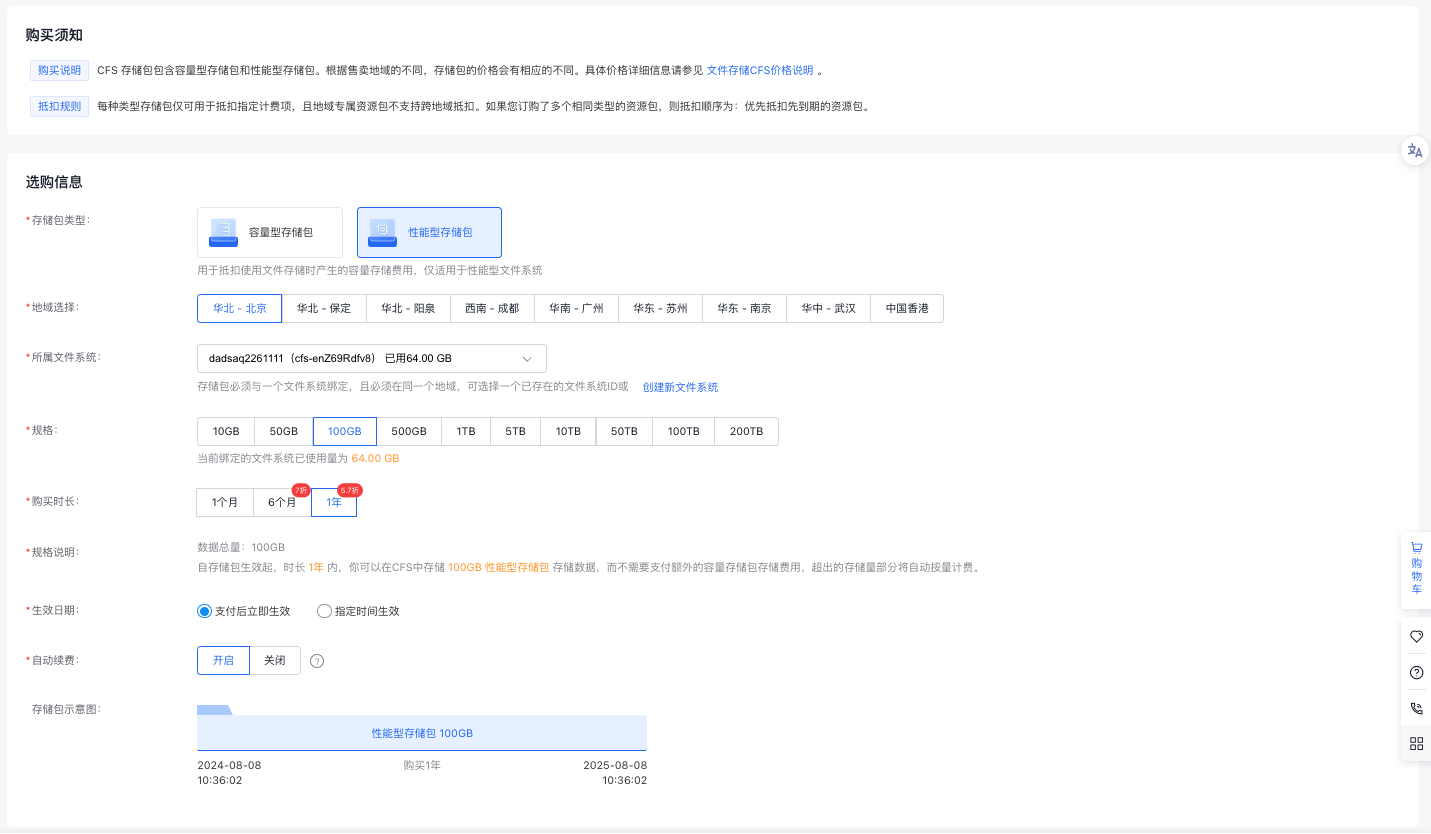
image.png

Parameters Description
Storage package type Storage package type. It includes performance-optimized and capacity-optimized types. Different package types apply to corresponding file system types.A performance-optimized/capacity-optimized storage package can only be bound to a performance-optimized/capacity-optimized file system.
Region selection Select the region to which the storage package belongs.A storage package can only be bound to file systems in the same region.
Associated file system A storage package must be bound to a single file system (one package per file system). You can either bind it to an existing file system or create a new one. Ensure that the storage package type matches the type of the file system.
Specification Choose the storage package specification that meets your requirements. Any usage beyond the package's capacity will incur pay-as-you-go charges.
Purchase period Select the duration of the storage package based on your requirements. Once the package expires, the file system will transition to pay-as-you-go billing.
Effective date Choose the storage package's effective date according to your needs. Immediate activation and activation at a specified time (to the minute) are both supported.
Auto-renewal Determine whether to enable auto-renewal. If enabled, the system will automatically renew the storage package with the same specifications and validity period once it expires.

Storage package price

It includes performance-optimized storage package and capacity-optimized storage package. Prices of storage packages vary by sales region. For detailed pricing, see Cloud File System (CFS) Pricing Instructions

Storage package statuses

Common storage package statuses:

Storage package statuses Status description
Creating The purchased storage package is being created
Active The storage package is in effect and can offset the storage costs of the bound file system
Pending activation The storage package is pending activation; it will start offsetting costs after the specified effective time
Invalid The storage package is automatically invalidated when the bound file system is deleted, and cannot be bound to a new file system
Expired When the storage package expires, you can purchase a new one with the same configuration.
Cancelled The purchased storage package is cancelled if a refund is processed, or 7 days after the package expires

Billing rules

  1. Storage packages are prepaid and require a one-time payment at the time of purchase.
  2. Validity period: You can opt for immediate activation or activation at a specified time (to the minute) when making your purchase.
  3. While the storage package is active, the costs for the associated file system will first be offset by the package. Any usage that exceeds the package's capacity will incur pay-as-you-go charges. Example:

    • You have two active 100 GB storage packages bound to file system A. If file system A uses 180 GB (180 GB < 200 GB), the usage is within the total package capacity, so costs are fully offset by the packages;
    • If you have two active 100 GB storage packages bound to file system A and file system A uses 250 GB (250 GB > 200 GB), the additional 50 GB will be billed on a pay-as-you-go basis.
  4. If a storage package is activated halfway through an hour, the cost will be proportionally deducted in the next hourly bill, rather than being fully deducted.
  5. You can buy multiple storage packages, and they can all be active at the same time.
  6. Refund Policy: A full refund is available if the storage package hasn’t been used (i.e., not yet activated) and the refund request is submitted within 7 days of purchase. Refunds are not available once the package has been used or if the 7-day period has passed.
  7. Expiration Notice: Expired storage packages become invalid immediately. You will receive reminder notifications 7 days before expiration and on the expiration date itself.

Previous
Pay-as-you-go
Next
Insufficient balance reminders and debt handling