Mount and Unmount SMB Protocol CFS on Windows System

CFS

  • Updates and Announcements
    • Function Release Records
    • Product Announcement
      • Announcement on CFS Metric Adjustments
  • Product Description
    • Product Introduction
    • Basic concepts
    • Product features
    • Product specifications
    • Usage Limits and Recommendations
    • Selection Guide
      • How to Choose Between CFS and PFS
      • How to Choose Between CFS, BOS and CDS
    • Application scenarios
  • Product pricing
    • Pay-as-you-go
    • Storage package billing
    • Insufficient balance reminders and debt handling
    • Billing Cases
  • Quick Start
    • Getting Started Overview
    • Quick start (Linux)
    • Quick start (Windows)
  • Operation guide
    • Activate Service
    • Manage File System
      • Create file system
      • Delete a file system
      • View file system details
      • Set File System Capacity Upper Limit
    • Mount and Access
      • Add mount target
      • Mount and Unmount CFS on BCC
        • Mount and Unmount on Linux System
          • Mount and Unmount SMB Protocol CFS on Single BCC
          • Batch mounting and unmounting NFS CFS on multiple BCC
          • Mounting and unmounting NFS CFS on a single BCC
        • Mount and Unmount SMB Protocol CFS on Windows System
        • Mount CFS File System When Purchasing New BCC
      • Using CFS in CCE
    • Permission Group Management
    • Identity and access management
    • Data encryption
    • Management Tags
    • Backup
    • Monitor and Alarm
      • View monitoring
      • Alarm management
      • Metric definition
    • Cloud Audit
  • Typical Practices
    • Set Different User Permissions for Different Directories
    • Using File Systems Across Regions Or Accounts
    • Use SFTP to Upload and Download CFS File System Data
    • Use Rsync to Sync From Old File System to CFS File System
    • Best Practices for Managing CFS with Terraform
    • Performance Testing Methods
      • Linux System Performance Testing Methods
      • Windows System Performance Testing Methods
  • API Reference
    • API Function Update Records
    • API Overview
    • Interface Overview
    • General Description
    • Service domain
    • Error code
    • File System Related Interfaces
      • Create file system
      • Update file system
      • Query file system
      • Query mount client
      • Drop file system
      • Update file system tags
    • mount target Related Interfaces
      • Create mount target
      • Query mount targets
      • Delete mount target
    • Permission Group-related APIs
      • Create Permission Group
      • Update permission group
      • Query Permission Groups
      • Delete permission group
      • Create permission group rules
      • Update permission group rules
      • Query permission group rules
      • Delete permission group rule
    • Data type
  • Go-SDK
    • Overview
    • Initialization
    • File system
    • Mount target
    • Error handling
  • FAQs
    • Common Questions Overview
    • General Problems
    • Billing Problems
    • NFS protocol questions
    • SMB Protocol Issues
  • Service Level Agreement (SLA)
    • CFS Service Level Agreement (SLA)
All documents
menu
No results found, please re-enter

CFS

  • Updates and Announcements
    • Function Release Records
    • Product Announcement
      • Announcement on CFS Metric Adjustments
  • Product Description
    • Product Introduction
    • Basic concepts
    • Product features
    • Product specifications
    • Usage Limits and Recommendations
    • Selection Guide
      • How to Choose Between CFS and PFS
      • How to Choose Between CFS, BOS and CDS
    • Application scenarios
  • Product pricing
    • Pay-as-you-go
    • Storage package billing
    • Insufficient balance reminders and debt handling
    • Billing Cases
  • Quick Start
    • Getting Started Overview
    • Quick start (Linux)
    • Quick start (Windows)
  • Operation guide
    • Activate Service
    • Manage File System
      • Create file system
      • Delete a file system
      • View file system details
      • Set File System Capacity Upper Limit
    • Mount and Access
      • Add mount target
      • Mount and Unmount CFS on BCC
        • Mount and Unmount on Linux System
          • Mount and Unmount SMB Protocol CFS on Single BCC
          • Batch mounting and unmounting NFS CFS on multiple BCC
          • Mounting and unmounting NFS CFS on a single BCC
        • Mount and Unmount SMB Protocol CFS on Windows System
        • Mount CFS File System When Purchasing New BCC
      • Using CFS in CCE
    • Permission Group Management
    • Identity and access management
    • Data encryption
    • Management Tags
    • Backup
    • Monitor and Alarm
      • View monitoring
      • Alarm management
      • Metric definition
    • Cloud Audit
  • Typical Practices
    • Set Different User Permissions for Different Directories
    • Using File Systems Across Regions Or Accounts
    • Use SFTP to Upload and Download CFS File System Data
    • Use Rsync to Sync From Old File System to CFS File System
    • Best Practices for Managing CFS with Terraform
    • Performance Testing Methods
      • Linux System Performance Testing Methods
      • Windows System Performance Testing Methods
  • API Reference
    • API Function Update Records
    • API Overview
    • Interface Overview
    • General Description
    • Service domain
    • Error code
    • File System Related Interfaces
      • Create file system
      • Update file system
      • Query file system
      • Query mount client
      • Drop file system
      • Update file system tags
    • mount target Related Interfaces
      • Create mount target
      • Query mount targets
      • Delete mount target
    • Permission Group-related APIs
      • Create Permission Group
      • Update permission group
      • Query Permission Groups
      • Delete permission group
      • Create permission group rules
      • Update permission group rules
      • Query permission group rules
      • Delete permission group rule
    • Data type
  • Go-SDK
    • Overview
    • Initialization
    • File system
    • Mount target
    • Error handling
  • FAQs
    • Common Questions Overview
    • General Problems
    • Billing Problems
    • NFS protocol questions
    • SMB Protocol Issues
  • Service Level Agreement (SLA)
    • CFS Service Level Agreement (SLA)
  • Document center
  • arrow
  • CFS
  • arrow
  • Operation guide
  • arrow
  • Mount and Access
  • arrow
  • Mount and Unmount CFS on BCC
  • arrow
  • Mount and Unmount SMB Protocol CFS on Windows System
Table of contents on this page
  • Prerequisites
  • Mounting steps
  • Step I: Obtain domain name of a mount target
  • Step II: Mount SMB file system
  • Step III: View mounted SMB file systems
  • Unmounting steps
  • FAQs
  • How to resolve system error 1272?

Mount and Unmount SMB Protocol CFS on Windows System

Updated at:2025-11-11

After creating a CFS SMB file system, you need to mount it using Baidu Cloud Compute (BCC) to enable shared access across multiple BCC instances. This document explains how to mount a CFS SMB file system using a Windows BCC instance.

Prerequisites

  1. The target BCC instance (Windows) has been created for mounting the CFS file system. For BCC creation methods, refer to: Quick Configuration of Windows Cloud Servers.
  2. An SMB file system has been created with a mount target added. For detailed steps, refer to: Create File System, Add Mount Target.

Mounting steps

Step I: Obtain domain name of a mount target

Once the mount target is created, you can start using the file system. Click the Manage button in the operation bar of the file system list to open the mount target information page, as shown below:

image.png

After logging into the virtual machine or container, use the mount target's domain name to access and operate the file system.

Step II: Mount SMB file system

In Windows systems, open PowerShell or cmd command line and use the following command to mount the SMB file system:

Shell
1net use <Client Local Drive Letter>: \\<Domain Name of a Mount Target>\cfs

Description:

  • <Client Local Drive Letter> is the local drive letter of the CFS file system to be mounted (e.g., z) and cannot be duplicated with existing drive letters;
  • <Domain name of a mount target> can be found in the file system’s mount target list (see Step I);
  • "cfs" is the fixed SMB share name and cannot be changed.

Example:

Shell
1net use z: \\cfs-****.lb-b768ef66.cfs.bj.baidubce.com\cfs

Step III: View mounted SMB file systems

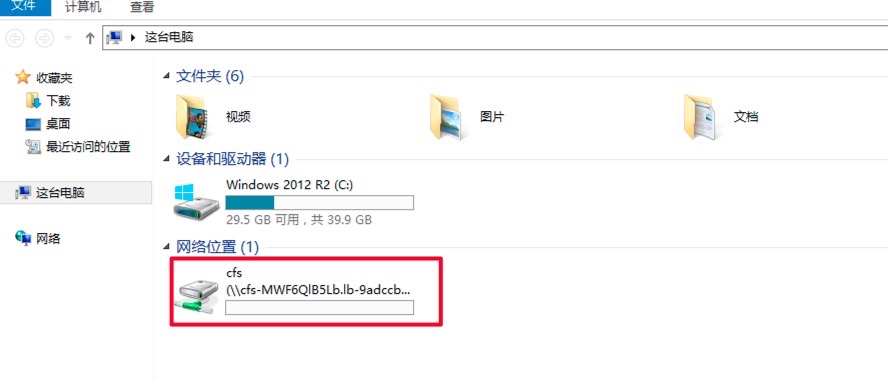
After mounting, you can use Windows Command Line or PowerShell to view the mounted file systems with the following commands.

Shell
1net use

Alternatively, you can open Windows Explorer to check the drive letters in the network locations.
1579161087514.jpg

Unmounting steps

  1. Sign in to the Baidu Cloud Compute (BCC) where the CFS file system is mounted.
  2. To unmount the file system, use the following command.
Shell
1net use <Target Drive Letter>: /del
2 ## Among which, <target drive letter> refers to the drive letter of the CFS file system to be unmounted.
  1. Execute the net use command to check unmounting results. If the mounted CFS file system information is not found in the echo, it means the file system's directory has been successfully unmounted.

FAQs

How to resolve system error 1272?

If Windows Server displays the following error (System Error 1272), it is because Windows security policies block users accessing SMB file systems via Guest Auth

image.png

Solution: Run the following PowerShell command as administrator

Shell
1reg add "HKLM\SYSTEM\CurrentControlSet\Services\LanmanWorkstation\Parameters" /v "AllowInsecureGuestAuth" /t REG_DWORD /d 1 /f
2net stop lanmanworkstation /y ; net start lanmanworkstation ; net start SessionEnv

Alternatively, run the following cmd as an administrator:

Shell
1reg add "HKLM\SYSTEM\CurrentControlSet\Services\LanmanWorkstation\Parameters" /v "AllowInsecureGuestAuth" /t REG_DWORD /d 1 /f
2net stop lanmanworkstation /y && net start lanmanworkstation && net start SessionEnv

Previous
Mount and Unmount on Linux System
Next
Mount CFS File System When Purchasing New BCC