Best Practices for Managing CFS with Terraform

CFS

  • Updates and Announcements
    • Function Release Records
    • Product Announcement
      • Announcement on CFS Metric Adjustments
  • Product Description
    • Product Introduction
    • Basic concepts
    • Product features
    • Product specifications
    • Usage Limits and Recommendations
    • Selection Guide
      • How to Choose Between CFS and PFS
      • How to Choose Between CFS, BOS and CDS
    • Application scenarios
  • Product pricing
    • Pay-as-you-go
    • Storage package billing
    • Insufficient balance reminders and debt handling
    • Billing Cases
  • Quick Start
    • Getting Started Overview
    • Quick start (Linux)
    • Quick start (Windows)
  • Operation guide
    • Activate Service
    • Manage File System
      • Create file system
      • Delete a file system
      • View file system details
      • Set File System Capacity Upper Limit
    • Mount and Access
      • Add mount target
      • Mount and Unmount CFS on BCC
        • Mount and Unmount on Linux System
          • Mount and Unmount SMB Protocol CFS on Single BCC
          • Batch mounting and unmounting NFS CFS on multiple BCC
          • Mounting and unmounting NFS CFS on a single BCC
        • Mount and Unmount SMB Protocol CFS on Windows System
        • Mount CFS File System When Purchasing New BCC
      • Using CFS in CCE
    • Permission Group Management
    • Identity and access management
    • Data encryption
    • Management Tags
    • Backup
    • Monitor and Alarm
      • View monitoring
      • Alarm management
      • Metric definition
    • Cloud Audit
  • Typical Practices
    • Set Different User Permissions for Different Directories
    • Using File Systems Across Regions Or Accounts
    • Use SFTP to Upload and Download CFS File System Data
    • Use Rsync to Sync From Old File System to CFS File System
    • Best Practices for Managing CFS with Terraform
    • Performance Testing Methods
      • Linux System Performance Testing Methods
      • Windows System Performance Testing Methods
  • API Reference
    • API Function Update Records
    • API Overview
    • Interface Overview
    • General Description
    • Service domain
    • Error code
    • File System Related Interfaces
      • Create file system
      • Update file system
      • Query file system
      • Query mount client
      • Drop file system
      • Update file system tags
    • mount target Related Interfaces
      • Create mount target
      • Query mount targets
      • Delete mount target
    • Permission Group-related APIs
      • Create Permission Group
      • Update permission group
      • Query Permission Groups
      • Delete permission group
      • Create permission group rules
      • Update permission group rules
      • Query permission group rules
      • Delete permission group rule
    • Data type
  • Go-SDK
    • Overview
    • Initialization
    • File system
    • Mount target
    • Error handling
  • FAQs
    • Common Questions Overview
    • General Problems
    • Billing Problems
    • NFS protocol questions
    • SMB Protocol Issues
  • Service Level Agreement (SLA)
    • CFS Service Level Agreement (SLA)
All documents
menu
No results found, please re-enter

CFS

  • Updates and Announcements
    • Function Release Records
    • Product Announcement
      • Announcement on CFS Metric Adjustments
  • Product Description
    • Product Introduction
    • Basic concepts
    • Product features
    • Product specifications
    • Usage Limits and Recommendations
    • Selection Guide
      • How to Choose Between CFS and PFS
      • How to Choose Between CFS, BOS and CDS
    • Application scenarios
  • Product pricing
    • Pay-as-you-go
    • Storage package billing
    • Insufficient balance reminders and debt handling
    • Billing Cases
  • Quick Start
    • Getting Started Overview
    • Quick start (Linux)
    • Quick start (Windows)
  • Operation guide
    • Activate Service
    • Manage File System
      • Create file system
      • Delete a file system
      • View file system details
      • Set File System Capacity Upper Limit
    • Mount and Access
      • Add mount target
      • Mount and Unmount CFS on BCC
        • Mount and Unmount on Linux System
          • Mount and Unmount SMB Protocol CFS on Single BCC
          • Batch mounting and unmounting NFS CFS on multiple BCC
          • Mounting and unmounting NFS CFS on a single BCC
        • Mount and Unmount SMB Protocol CFS on Windows System
        • Mount CFS File System When Purchasing New BCC
      • Using CFS in CCE
    • Permission Group Management
    • Identity and access management
    • Data encryption
    • Management Tags
    • Backup
    • Monitor and Alarm
      • View monitoring
      • Alarm management
      • Metric definition
    • Cloud Audit
  • Typical Practices
    • Set Different User Permissions for Different Directories
    • Using File Systems Across Regions Or Accounts
    • Use SFTP to Upload and Download CFS File System Data
    • Use Rsync to Sync From Old File System to CFS File System
    • Best Practices for Managing CFS with Terraform
    • Performance Testing Methods
      • Linux System Performance Testing Methods
      • Windows System Performance Testing Methods
  • API Reference
    • API Function Update Records
    • API Overview
    • Interface Overview
    • General Description
    • Service domain
    • Error code
    • File System Related Interfaces
      • Create file system
      • Update file system
      • Query file system
      • Query mount client
      • Drop file system
      • Update file system tags
    • mount target Related Interfaces
      • Create mount target
      • Query mount targets
      • Delete mount target
    • Permission Group-related APIs
      • Create Permission Group
      • Update permission group
      • Query Permission Groups
      • Delete permission group
      • Create permission group rules
      • Update permission group rules
      • Query permission group rules
      • Delete permission group rule
    • Data type
  • Go-SDK
    • Overview
    • Initialization
    • File system
    • Mount target
    • Error handling
  • FAQs
    • Common Questions Overview
    • General Problems
    • Billing Problems
    • NFS protocol questions
    • SMB Protocol Issues
  • Service Level Agreement (SLA)
    • CFS Service Level Agreement (SLA)
  • Document center
  • arrow
  • CFS
  • arrow
  • Typical Practices
  • arrow
  • Best Practices for Managing CFS with Terraform
Table of contents on this page
  • Overview
  • Requirement scenarios
  • Before configuration, you should know
  • Configuration steps
  • Environment preparation
  • Initialize Terraform
  • CFS creation configuration example
  • Mount target creation configuration example
  • Application configuration
  • CFS management
  • Modify CFS name
  • Query CFS information
  • Resource deletion
  • Testing and verification
  • Related products

Best Practices for Managing CFS with Terraform

Updated at:2025-11-11

Overview

Baidu AI Cloud File Storage (CFS) supports the standard NFS protocol and is fully compatible with the POSIX API. It offers cross-operating system file storage and sharing for virtual machines and cloud container resources. Additionally, Baidu AI Cloud CFS provides user-friendly external interfaces, charges based on actual usage (free during the public beta phase), and minimizes deployment and maintenance expenses while maximizing business efficiency.

Currently, when using CFS, developers and operations personnel must log in to the Baidu AI Cloud Console and perform tasks within its interface, such as CFS creation, modification, and release. This method is prone to human error and lacks the ability to batch create, manage, or modify resources.

These challenges can be effectively addressed with Terraform, an infrastructure-as-code automation tool. Terraform enables the creation of configuration templates for defining and provisioning Baidu AI Cloud resources in a repeatable and predictable way, significantly reducing errors caused by human interaction. The same template can be deployed multiple times to establish identical development, testing, and production environments.

Requirement scenarios

Benefits for enterprise IT personnel (enhancing efficiency in cloud resource management and maintenance)

  • Manage and maintain your CFS resources through code. Preserve the state of your CFS configurations, allowing you to track changes and share these configurations with collaborators.
  • Lower costs by creating development and deployment environments as needed. Assess changes to CFS configurations prior to implementing them.
  • Significantly lower enterprise costs in the infrastructure construction process, improve the IaC (Infrastructure as Code) skills of cloud infrastructure developers, and simplify the O&M of cloud resources

Before configuration, you should know

The CFS product has the following quota limits:

Limitation items Limit
Maximum number of file systems per user 20 counts
Capacity of individual file system 100PB
Maximum number of files per file system 100 billion
Size of single file 1PB
Directory depth 1,000 levels
Symlink path length 4,080 bytes
File name length 255 bytes
Maximum number of concurrent connected clients Hundreds

Configuration steps

Environment preparation

Terraform: Currently, Baidu AI Cloud has integrated with Terraform. You can use Terraform to create and manage various Baidu AI Cloud resources such as CFS, VPC, and BCC. For details, please refer to Terraform BaiduCloud Provider.

Initialize Terraform

  1. Sign in to the Terraform official website and download the installation package suitable for your operating system.
  2. Set up the Terraform Baidu Provider information. Refer to the sample code below to create a configuration file, and save it as version.tf in the current directory.
Hcl
1terraform {
2  required_providers {
3    baiducloud = {
4      source = "baidubce/baiducloud"
5 version = "1.18.0" #Version note: Cloud File System (CFS) is supported starting from version 1.18.0
6    }
7  }
8}
  1. Run the command terraform init. Terraform will initialize the workspace based on the version.tf file in the current directory.
  2. Modify the Terraform configuration file by creating a new file named main.tf. Within this file, define metadata for VPC, CFS, and CFS mount targets. Refer to the configuration examples provided in the subsequent steps for further guidance.

    For more CFS parameter information, please refer to the official Baidu Provider documentation

CFS creation configuration example

Hcl
1resource "baiducloud_vpc" "vpc" {
2  name = "terraform_vpc"
3  cidr = "172.16.0.0/16"
4}
5resource "baiducloud_subnet" "subnet" {
6  name        = "terraform_subnet-c"
7  zone_name   = "cn-bj-c"
8  cidr        = "172.16.128.0/24"
9  vpc_id      = baiducloud_vpc.vpc.id
10  description = "terraform test subnet"
11}
12resource "baiducloud_cfs" "default" {
13# CFS name
14  name = "terraform_test"
15# Availability zone
16  zone = "zoneD"
17# Protocol type: Defaults to "nfs"
18  protocol = "nfs"
19# Storage class: Defaults to "cap"
20  type = "cap"
21}

Mount target creation configuration example

Hcl
1resource "baiducloud_cfs_mount_target" "mount1" {
2  fs_id = baiducloud_cfs.default.id
3  subnet_id = baiducloud_subnet.subnet.id
4  vpc_id = baiducloud_vpc.vpc.id
5}

Application configuration

  • Execute the following command to view the resource change plan
Shell
1$ terraform plan
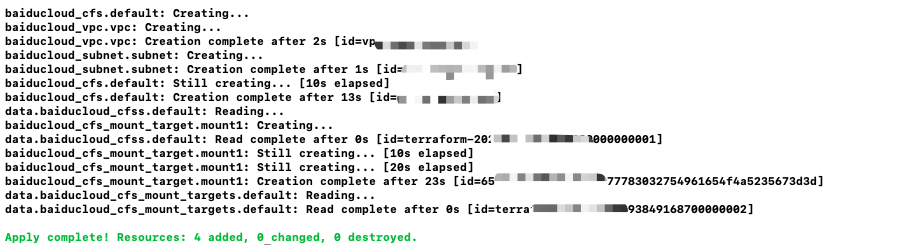
  • Execute the following command to apply the resource change plan and complete resource creation or update (as shown in the figure)
Shell
1$ terraform apply

image.png

CFS management

Modify CFS name

To modify the name of a CFS, simply change the value of the name field and then execute Step 7

Query CFS information

Hcl
1data "baiducloud_cfss" "default" {
2# Filtering can be done using the filter parameter. The following example filters the CFS with fs_id=fsxxxx
3  filter{
4    name = "fs_id"
5    values = ["fsxxxx"]
6  }
7}

Resource deletion

  • To delete a mount target, simply remove the baiducloud_cfs_mount_target resource and execute the following command
Shell
1 # Specify the resource to delete using the -target parameter
2 terraform destroy -target baiducloud_cfs_mount_target.mount1

Note: Unmount the mount target first before deleting it

  • To delete a CFS, simply remove the baiducloud_cfs resource and use the corresponding command
Shell
1 # Specify the resource to delete using the -target parameter
2 terraform destroy -target baiducloud_cfs.default
  • Execute the following command to destroy all resources defined in the current main.tf
Shell
1 terraform destroy

Testing and verification

  1. Verify if all the corresponding resources have been successfully created in the product API of the Baidu AI Cloud Console.
  2. After completing the above configurations, you can follow the steps in this document to use CFS and verify its proper functionality. Document link

Related products

Cloud File System (CFS), Virtual Private Cloud (VPC)

Previous
Use Rsync to Sync From Old File System to CFS File System
Next
Performance Testing Methods