Create file system

CFS

  • Updates and Announcements
    • Function Release Records
    • Product Announcement
      • Announcement on CFS Metric Adjustments
  • Product Description
    • Product Introduction
    • Basic concepts
    • Product features
    • Product specifications
    • Usage Limits and Recommendations
    • Selection Guide
      • How to Choose Between CFS and PFS
      • How to Choose Between CFS, BOS and CDS
    • Application scenarios
  • Product pricing
    • Pay-as-you-go
    • Storage package billing
    • Insufficient balance reminders and debt handling
    • Billing Cases
  • Quick Start
    • Getting Started Overview
    • Quick start (Linux)
    • Quick start (Windows)
  • Operation guide
    • Activate Service
    • Manage File System
      • Create file system
      • Delete a file system
      • View file system details
      • Set File System Capacity Upper Limit
    • Mount and Access
      • Add mount target
      • Mount and Unmount CFS on BCC
        • Mount and Unmount on Linux System
          • Mount and Unmount SMB Protocol CFS on Single BCC
          • Batch mounting and unmounting NFS CFS on multiple BCC
          • Mounting and unmounting NFS CFS on a single BCC
        • Mount and Unmount SMB Protocol CFS on Windows System
        • Mount CFS File System When Purchasing New BCC
      • Using CFS in CCE
    • Permission Group Management
    • Identity and access management
    • Data encryption
    • Management Tags
    • Backup
    • Monitor and Alarm
      • View monitoring
      • Alarm management
      • Metric definition
    • Cloud Audit
  • Typical Practices
    • Set Different User Permissions for Different Directories
    • Using File Systems Across Regions Or Accounts
    • Use SFTP to Upload and Download CFS File System Data
    • Use Rsync to Sync From Old File System to CFS File System
    • Best Practices for Managing CFS with Terraform
    • Performance Testing Methods
      • Linux System Performance Testing Methods
      • Windows System Performance Testing Methods
  • API Reference
    • API Function Update Records
    • API Overview
    • Interface Overview
    • General Description
    • Service domain
    • Error code
    • File System Related Interfaces
      • Create file system
      • Update file system
      • Query file system
      • Query mount client
      • Drop file system
      • Update file system tags
    • mount target Related Interfaces
      • Create mount target
      • Query mount targets
      • Delete mount target
    • Permission Group-related APIs
      • Create Permission Group
      • Update permission group
      • Query Permission Groups
      • Delete permission group
      • Create permission group rules
      • Update permission group rules
      • Query permission group rules
      • Delete permission group rule
    • Data type
  • Go-SDK
    • Overview
    • Initialization
    • File system
    • Mount target
    • Error handling
  • FAQs
    • Common Questions Overview
    • General Problems
    • Billing Problems
    • NFS protocol questions
    • SMB Protocol Issues
  • Service Level Agreement (SLA)
    • CFS Service Level Agreement (SLA)
All documents
menu
No results found, please re-enter

CFS

  • Updates and Announcements
    • Function Release Records
    • Product Announcement
      • Announcement on CFS Metric Adjustments
  • Product Description
    • Product Introduction
    • Basic concepts
    • Product features
    • Product specifications
    • Usage Limits and Recommendations
    • Selection Guide
      • How to Choose Between CFS and PFS
      • How to Choose Between CFS, BOS and CDS
    • Application scenarios
  • Product pricing
    • Pay-as-you-go
    • Storage package billing
    • Insufficient balance reminders and debt handling
    • Billing Cases
  • Quick Start
    • Getting Started Overview
    • Quick start (Linux)
    • Quick start (Windows)
  • Operation guide
    • Activate Service
    • Manage File System
      • Create file system
      • Delete a file system
      • View file system details
      • Set File System Capacity Upper Limit
    • Mount and Access
      • Add mount target
      • Mount and Unmount CFS on BCC
        • Mount and Unmount on Linux System
          • Mount and Unmount SMB Protocol CFS on Single BCC
          • Batch mounting and unmounting NFS CFS on multiple BCC
          • Mounting and unmounting NFS CFS on a single BCC
        • Mount and Unmount SMB Protocol CFS on Windows System
        • Mount CFS File System When Purchasing New BCC
      • Using CFS in CCE
    • Permission Group Management
    • Identity and access management
    • Data encryption
    • Management Tags
    • Backup
    • Monitor and Alarm
      • View monitoring
      • Alarm management
      • Metric definition
    • Cloud Audit
  • Typical Practices
    • Set Different User Permissions for Different Directories
    • Using File Systems Across Regions Or Accounts
    • Use SFTP to Upload and Download CFS File System Data
    • Use Rsync to Sync From Old File System to CFS File System
    • Best Practices for Managing CFS with Terraform
    • Performance Testing Methods
      • Linux System Performance Testing Methods
      • Windows System Performance Testing Methods
  • API Reference
    • API Function Update Records
    • API Overview
    • Interface Overview
    • General Description
    • Service domain
    • Error code
    • File System Related Interfaces
      • Create file system
      • Update file system
      • Query file system
      • Query mount client
      • Drop file system
      • Update file system tags
    • mount target Related Interfaces
      • Create mount target
      • Query mount targets
      • Delete mount target
    • Permission Group-related APIs
      • Create Permission Group
      • Update permission group
      • Query Permission Groups
      • Delete permission group
      • Create permission group rules
      • Update permission group rules
      • Query permission group rules
      • Delete permission group rule
    • Data type
  • Go-SDK
    • Overview
    • Initialization
    • File system
    • Mount target
    • Error handling
  • FAQs
    • Common Questions Overview
    • General Problems
    • Billing Problems
    • NFS protocol questions
    • SMB Protocol Issues
  • Service Level Agreement (SLA)
    • CFS Service Level Agreement (SLA)
  • Document center
  • arrow
  • CFS
  • arrow
  • Operation guide
  • arrow
  • Manage File System
  • arrow
  • Create file system

Create file system

Updated at:2025-11-11

To utilize the Baidu AI Cloud File System (CFS) service, you need to first create a file system.

Navigate to the Cloud File System (CFS) -> File System List page in the Baidu AI Cloud management console. Click the Create File System button in the upper left corner of the page. Configure the required parameters for the file system in the pop-up window and complete the setup. Detailed purchase interface and parameters are as follows:
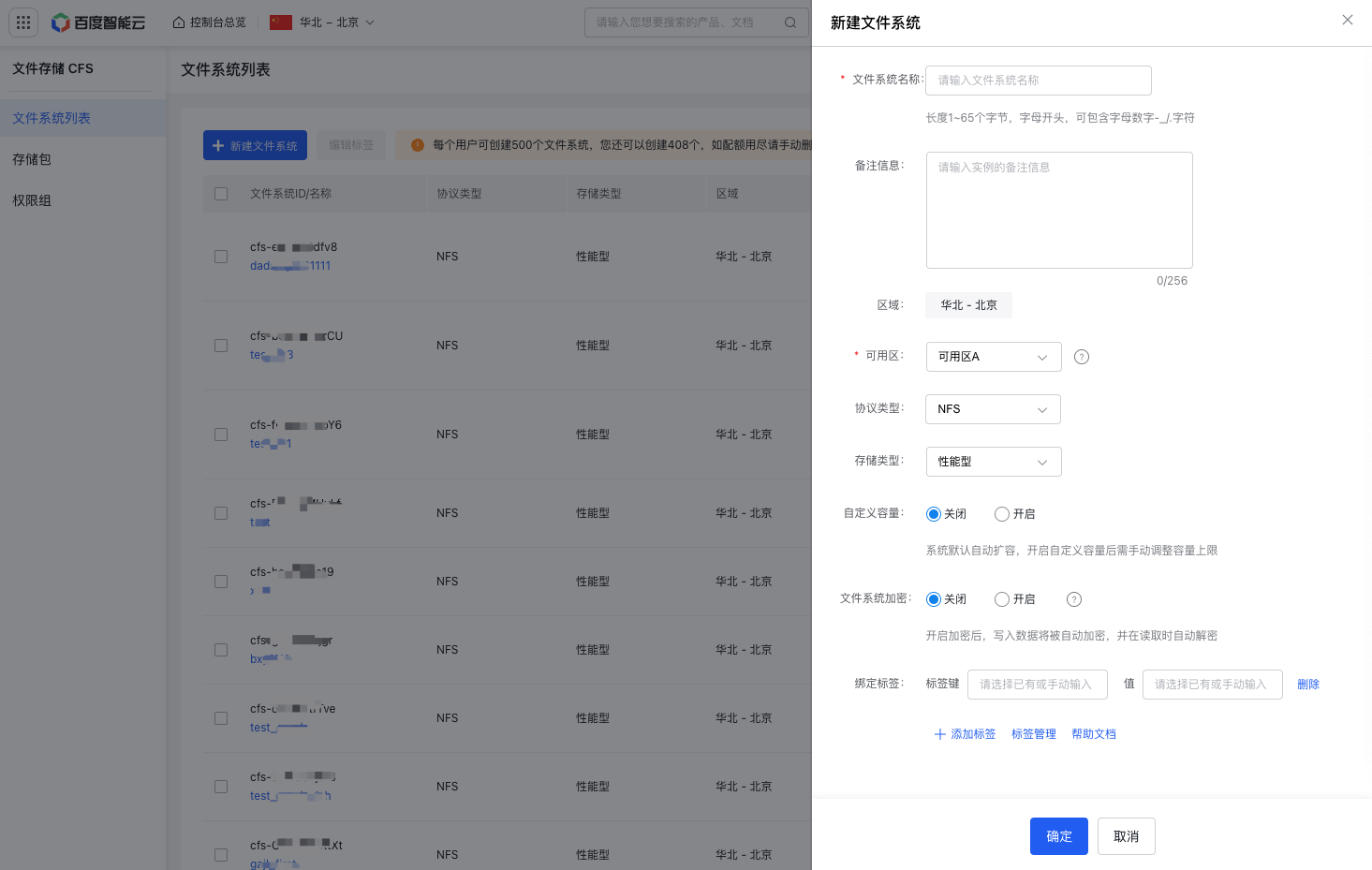
image.png

Parameters Description
File system name Assign a name to the file system according to your requirements.
Remarks Provide remarks for the instance (up to 256 characters) as needed.
Region This indicates the region where the file system will be created. To change the region, select the region name in the upper left corner of the console.
Availability zone Choose an availability zone for the file system based on your needs. Each region has multiple availability zones. All availability zones where the CFS service is deployed within the selected region will be displayed. While CFS file systems can be mounted across different availability zones, it is recommended to choose the same availability zone where your virtual machines/containers are located. This reduces latency caused by cross-zone access and ensures optimal performance.
Protocol type Select the desired protocol for the file system. Currently, CFS supports NFS and SMB protocols.
Storage class Choose between capacity-optimized and performance-optimized CFS types based on your requirements.
Custom capacity Enable or disable custom capacity as needed. By default, the system auto-scales. If custom capacity is enabled, you will need to manually adjust the maximum capacity.
Capacity limit If Custom Capacity is enabled, set the maximum capacity (upper limit) of the file system as needed. When the actual usage reaches this limit, write operations will be disabled, and you will need to adjust the capacity accordingly.
File system encryption Once encryption is enabled, data will automatically be encrypted when written and decrypted when read.
Tag unbinding By assigning tags to each cloud resource, you can easily classify, identify, and manage these resources.

After configuring all parameters of the file system, click OK to create the file system successfully.

Once the file system is created, you will need to create a mount target to use the file system. Common statuses of file system instances include:

Instance status Status description
Running File system instance running normally
Creating File system instance creating
Deleting File system instance deleting
Backup restoration failed The file system instance failed to be restored from the backup copy of the source file system. It is recommended to delete the instance and retry the backup restoration
Backup restoring The file system instance is being restored from the backup copy of the source file system. If the amount of data to be restored is large, the restoration process will take longer
Stopped After your account is in arrears, the file system will stop running if any of the following conditions are met.
1. The file system is not bound to a storage package
2. The file system is bound to a storage package, but the package has been exhausted
3. The file system is bound to a storage package, but the package is not active or has expired
For more details, see Insufficient balance reminders and debt handling.

Previous
Activate Service
Next
Delete a file system