Identity and access management

CFS

  • Updates and Announcements
    • Function Release Records
    • Product Announcement
      • Announcement on CFS Metric Adjustments
  • Product Description
    • Product Introduction
    • Basic concepts
    • Product features
    • Product specifications
    • Usage Limits and Recommendations
    • Selection Guide
      • How to Choose Between CFS and PFS
      • How to Choose Between CFS, BOS and CDS
    • Application scenarios
  • Product pricing
    • Pay-as-you-go
    • Storage package billing
    • Insufficient balance reminders and debt handling
    • Billing Cases
  • Quick Start
    • Getting Started Overview
    • Quick start (Linux)
    • Quick start (Windows)
  • Operation guide
    • Activate Service
    • Manage File System
      • Create file system
      • Delete a file system
      • View file system details
      • Set File System Capacity Upper Limit
    • Mount and Access
      • Add mount target
      • Mount and Unmount CFS on BCC
        • Mount and Unmount on Linux System
          • Mount and Unmount SMB Protocol CFS on Single BCC
          • Batch mounting and unmounting NFS CFS on multiple BCC
          • Mounting and unmounting NFS CFS on a single BCC
        • Mount and Unmount SMB Protocol CFS on Windows System
        • Mount CFS File System When Purchasing New BCC
      • Using CFS in CCE
    • Permission Group Management
    • Identity and access management
    • Data encryption
    • Management Tags
    • Backup
    • Monitor and Alarm
      • View monitoring
      • Alarm management
      • Metric definition
    • Cloud Audit
  • Typical Practices
    • Set Different User Permissions for Different Directories
    • Using File Systems Across Regions Or Accounts
    • Use SFTP to Upload and Download CFS File System Data
    • Use Rsync to Sync From Old File System to CFS File System
    • Best Practices for Managing CFS with Terraform
    • Performance Testing Methods
      • Linux System Performance Testing Methods
      • Windows System Performance Testing Methods
  • API Reference
    • API Function Update Records
    • API Overview
    • Interface Overview
    • General Description
    • Service domain
    • Error code
    • File System Related Interfaces
      • Create file system
      • Update file system
      • Query file system
      • Query mount client
      • Drop file system
      • Update file system tags
    • mount target Related Interfaces
      • Create mount target
      • Query mount targets
      • Delete mount target
    • Permission Group-related APIs
      • Create Permission Group
      • Update permission group
      • Query Permission Groups
      • Delete permission group
      • Create permission group rules
      • Update permission group rules
      • Query permission group rules
      • Delete permission group rule
    • Data type
  • Go-SDK
    • Overview
    • Initialization
    • File system
    • Mount target
    • Error handling
  • FAQs
    • Common Questions Overview
    • General Problems
    • Billing Problems
    • NFS protocol questions
    • SMB Protocol Issues
  • Service Level Agreement (SLA)
    • CFS Service Level Agreement (SLA)
All documents
menu
No results found, please re-enter

CFS

  • Updates and Announcements
    • Function Release Records
    • Product Announcement
      • Announcement on CFS Metric Adjustments
  • Product Description
    • Product Introduction
    • Basic concepts
    • Product features
    • Product specifications
    • Usage Limits and Recommendations
    • Selection Guide
      • How to Choose Between CFS and PFS
      • How to Choose Between CFS, BOS and CDS
    • Application scenarios
  • Product pricing
    • Pay-as-you-go
    • Storage package billing
    • Insufficient balance reminders and debt handling
    • Billing Cases
  • Quick Start
    • Getting Started Overview
    • Quick start (Linux)
    • Quick start (Windows)
  • Operation guide
    • Activate Service
    • Manage File System
      • Create file system
      • Delete a file system
      • View file system details
      • Set File System Capacity Upper Limit
    • Mount and Access
      • Add mount target
      • Mount and Unmount CFS on BCC
        • Mount and Unmount on Linux System
          • Mount and Unmount SMB Protocol CFS on Single BCC
          • Batch mounting and unmounting NFS CFS on multiple BCC
          • Mounting and unmounting NFS CFS on a single BCC
        • Mount and Unmount SMB Protocol CFS on Windows System
        • Mount CFS File System When Purchasing New BCC
      • Using CFS in CCE
    • Permission Group Management
    • Identity and access management
    • Data encryption
    • Management Tags
    • Backup
    • Monitor and Alarm
      • View monitoring
      • Alarm management
      • Metric definition
    • Cloud Audit
  • Typical Practices
    • Set Different User Permissions for Different Directories
    • Using File Systems Across Regions Or Accounts
    • Use SFTP to Upload and Download CFS File System Data
    • Use Rsync to Sync From Old File System to CFS File System
    • Best Practices for Managing CFS with Terraform
    • Performance Testing Methods
      • Linux System Performance Testing Methods
      • Windows System Performance Testing Methods
  • API Reference
    • API Function Update Records
    • API Overview
    • Interface Overview
    • General Description
    • Service domain
    • Error code
    • File System Related Interfaces
      • Create file system
      • Update file system
      • Query file system
      • Query mount client
      • Drop file system
      • Update file system tags
    • mount target Related Interfaces
      • Create mount target
      • Query mount targets
      • Delete mount target
    • Permission Group-related APIs
      • Create Permission Group
      • Update permission group
      • Query Permission Groups
      • Delete permission group
      • Create permission group rules
      • Update permission group rules
      • Query permission group rules
      • Delete permission group rule
    • Data type
  • Go-SDK
    • Overview
    • Initialization
    • File system
    • Mount target
    • Error handling
  • FAQs
    • Common Questions Overview
    • General Problems
    • Billing Problems
    • NFS protocol questions
    • SMB Protocol Issues
  • Service Level Agreement (SLA)
    • CFS Service Level Agreement (SLA)
  • Document center
  • arrow
  • CFS
  • arrow
  • Operation guide
  • arrow
  • Identity and access management
Table of contents on this page
  • Basic concepts
  • IAM user application scenarios
  • Policy description
  • Operation steps

Identity and access management

Updated at:2025-11-11

Basic concepts

The Cloud File System (CFS) has been integrated with the Baidu AI Cloud IAM platform, allowing users to create IAM users for refined management and use of cloud services.

Baidu AI Cloud IAM users have these features:

  1. All IAM user resources are owned by the primary account. While IAM users with specific permissions can create resources, the billing responsibility remains with the primary account.
  2. IAM users can independently access and utilize the management console and APIs.
  3. The primary account can grant permissions to IAM users. In IAM, this is achieved by associating policies with users, and a single IAM user can have multiple policies assigned.

IAM user application scenarios

Users can utilize CFS resources on Baidu AI Cloud more flexibly through the IAM user system.

  • Enterprise IAM user management and permission separation: Enterprise A has acquired various cloud resources (such as BCC instances, CFS instances, BLB instances, BOS storage, etc.) using its Baidu AI Cloud account. A’s employees need to manage these resources, including tasks like purchasing, operations and maintenance, and deploying applications online. Employees in different roles have diverse responsibilities requiring specific permissions. For security reasons, A opts not to share the root account's access keys directly with employees but instead creates IAM users corresponding to their roles. IAM users can only operate resources within the scope of their permissions and do not require separate billing. All charges are attributed to A’s root account. At any time, A’s root account can revoke the permissions of IAM users or delete them as necessary.
  • Cross-enterprise resource operation and authorization management: Let A and B represent different enterprises. Enterprise A has acquired various cloud resources (such as BCC, CFS, BLB, BOS, etc.) to support its business. To focus on its core operations, A delegates tasks such as resource maintenance and monitoring to Enterprise B. Enterprise B can establish IAM users for its employees, assigning them appropriate permissions to manage A's resources efficiently. A’s resources remain under its control, as it can revoke B’s access if their partnership ends.

Policy description

CFS provides two policy modes on the cloud: system policy and custom policy.

System policy: After being authorized by the primary user, IAM users can perform corresponding operations on all CFS resources under the primary user’s name. There are three types of system policies as follows:

  • CFSFullControlAccessPolicy: Grants full management permissions for the Baidu AI Cloud File System (CFS).
  • CFSOperateAccessPolicy: Grants permissions for the maintenance and operation of the Baidu AI Cloud File System (CFS).
  • CFSReadOnlyAccessPolicy: Grants read-only access to the Baidu AI Cloud File System (CFS).

The permissions corresponding to the three system policies and their API mappings in CFS are as follows:

System policies Operable APIs
Management All CFS read operation APIs and write operation APIs
Operation and maintenance All CFS read operation APIs
, some CFS write operation APIs, including the following:
  • UpdateCfs: Update CFS
  • CreateMountTarget: Create a mount target
  • DropMountTarget: Delete mount target
  • UpdateMountTarget: Update mount target
  • UpdateTagAssociation: Update CFS tags
  • CreateBackup: Create backup
  • DropBackup: Delete a backup
  • CloseAutoBackup: Disable auto backup
  • ModifyBackupInfo: Modify backup information
  • CreateStoragePackageOrder: Purchasing a storage package
  • CreateAutoBilling: Enable storage package auto-renewal
  • DeleteAutoBilling: Disable storage package auto-renewal
  • Read-only All CFS read operation APIs

    Custom policies: The primary user can authorize sub-users with custom read-only and operation and maintenance permissions, or authorize specific operation permissions. The supported specific operation APIs are as follows:

    Operation type Specific operation APIs
    Read operations DescribeCfs: Query CFS details
    GetCfs: Get CFS list
    DescribeMountTarget: Query mount point details
    ListTagResource: Query CFS resources associated with tags
    More read operations are being supported...
    Write operations CreateCfs: Create a CFS
    DropCfs: Remove a CFS
    UpdateCfs: Update CFS
    UpdateTagAssociation: Update CFS Tag
    CreateMountTarget, create a mount target
    DropMountTarget: Delete a mount target
    UpdateMountTarget: Update a mount target
    CreateAccessGroup: Create access group
    DropAccessGroup: Delete access group
    UpdateAccessGroup: Update access group
    CreateAccessRule: Create access group rule
    DropAccessRule: Remove permission group rule
    UpdateAccessRule: Update access group rule
    RecoverBackup: Restore backup
    AddItemToShoppingCart: Add storage package to cart
    More write operations are being supported...

    Operation steps

    1. Click the account avatar in the upper right corner and select Multi-user Access Control.
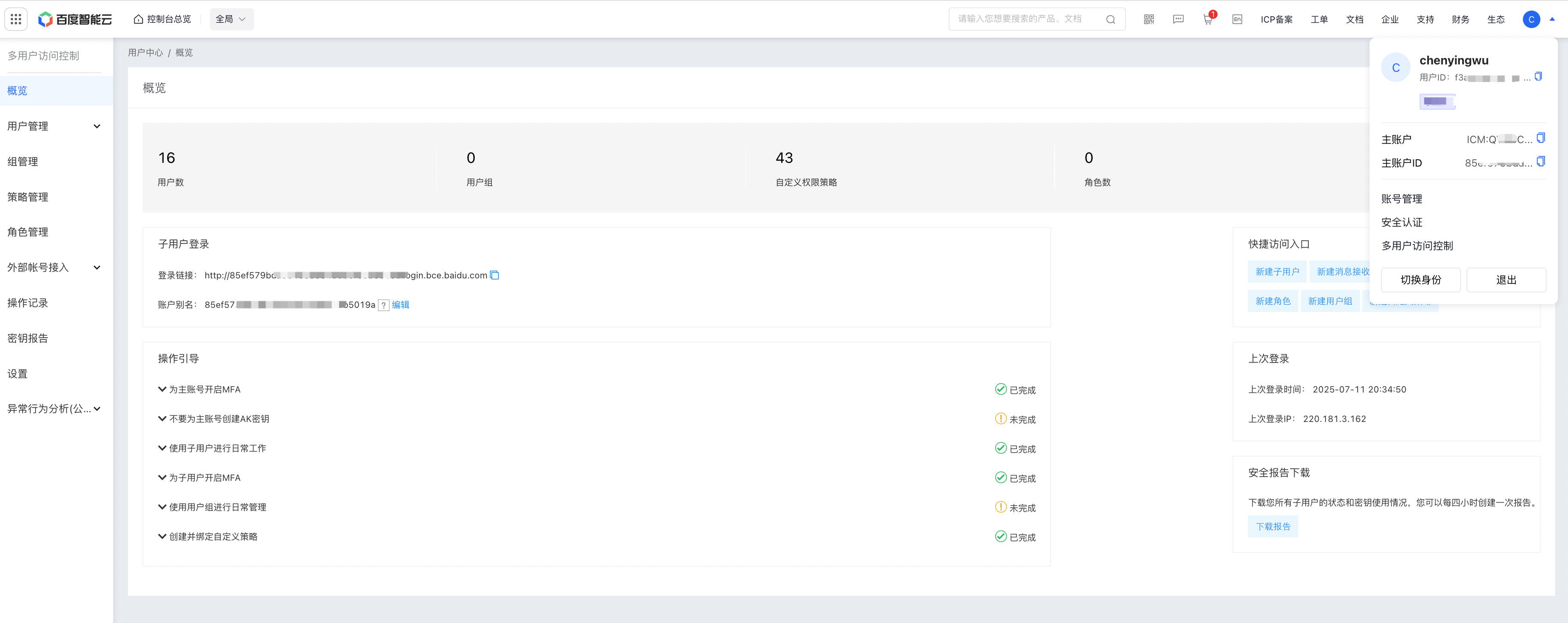
    image.png

    1. Select Policy Management to enter the Policy Management page, then click Create Policy.

    image.png

    • If you want to create a custom permission policy for read-only or operation and maintenance, select Create via Policy Generator. On the Policy Generator page, set the policy name and description, select File Storage CFS in the service, and set the permission effect (allow or deny are supported), operations (read-only or operation and maintenance are supported), resources, conditions (time, ipAddress, sourceVpc are supported), etc.

    image.png

    • If you want to create a permission policy for specific operations, select Create via Policy Syntax. On the Create Permission Policy page, set the policy name, description and custom policy content.
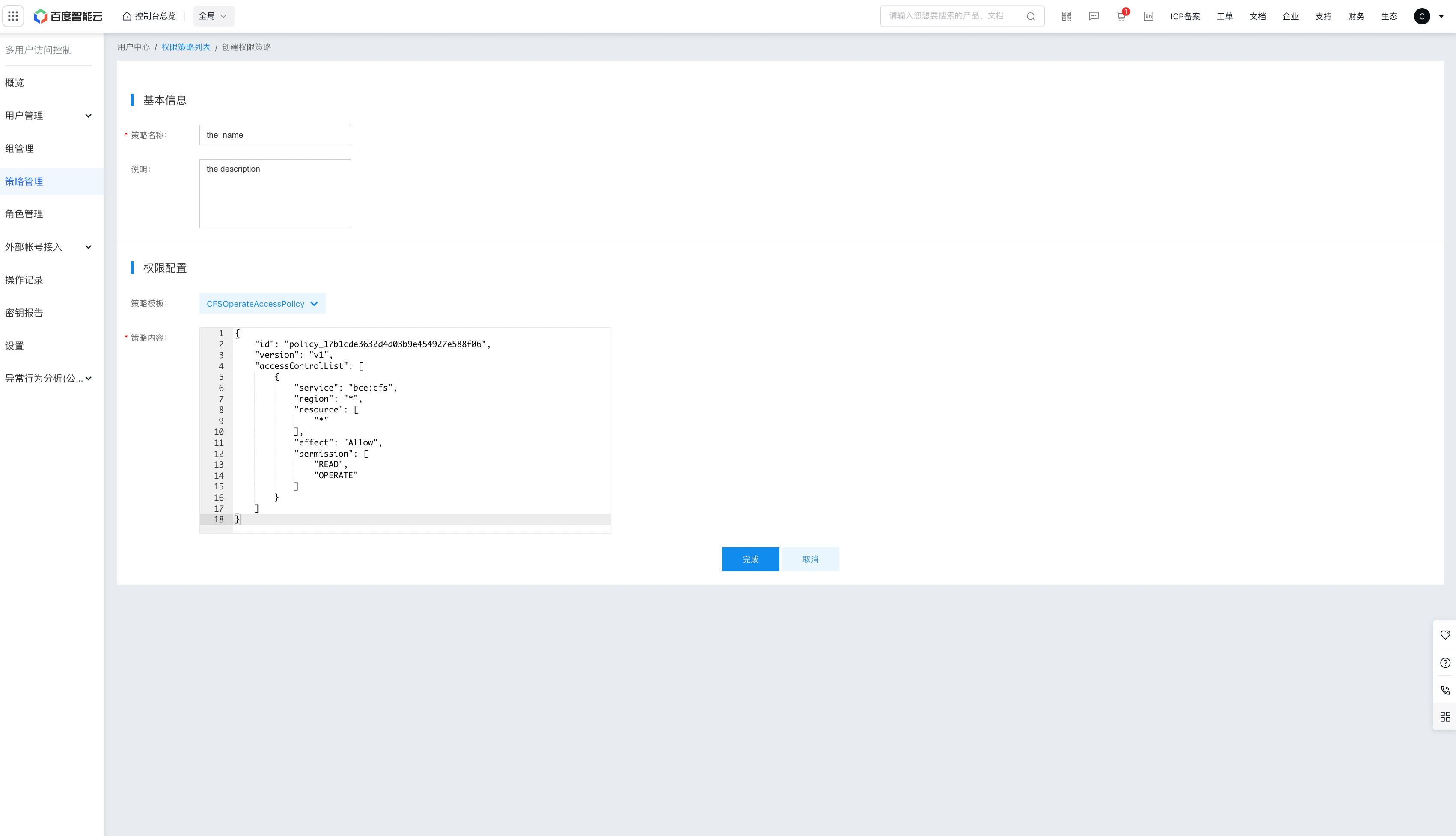
    image.png

    Bash
    1# Policy example: Prohibit sub-users from deleting CFS file systems
    2{
    3    "id": "policy_ea5e180cf9c34ed9be78449d76765f4a",
    4    "version": "v1",
    5    "accessControlList": [
    6        {
    7            "service": "bce:cfs",
    8            “region”: “*”,         ##  Region, such as bj, bd, * (all regions), etc.
    9            "resource": [
    10                "*"
    11            ],
    12            “effect”: “deny”,      ##  Effects, such as allow and deny
    13            “permission”: [        ## Operation, the specific operation APIs currently supported for setting can be found in the policy description chapter
    14                "DropCfs"
    15            ]
    16        }
    17    ]
    18}
    1. Once being created, the newly created custom policy will be displayed in the Permission Policy List .
    2. On the User Management - Sub-users page, select the corresponding sub-user, click Edit Permissions, check the permissions you want to grant to the sub-user, and click OK to assign the permissions to the sub-user.
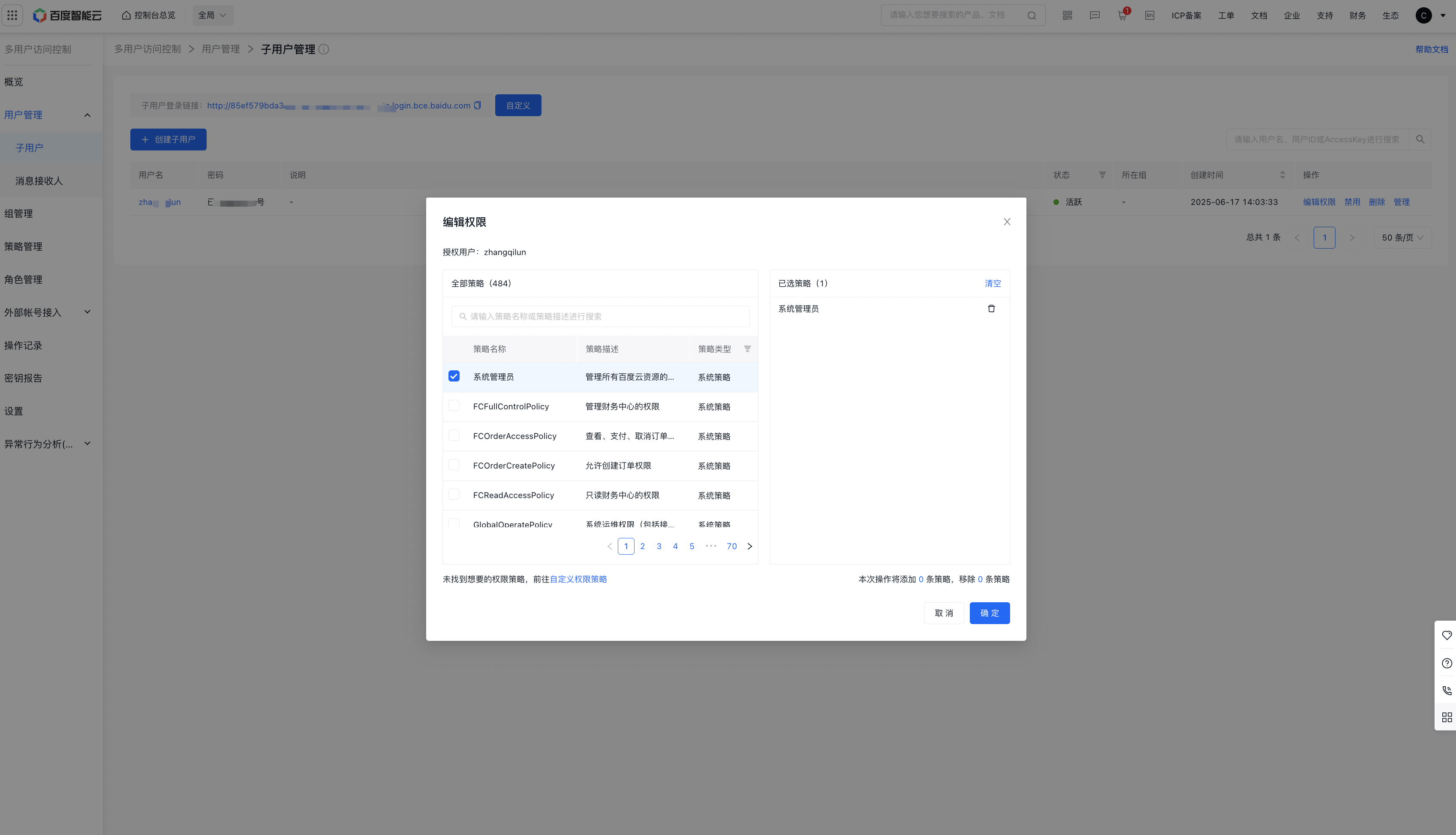
    image.png

    1. If you want to delete the sub-user’s permissions, follow the same steps as Step 4: delete the corresponding permission from the selected policies and click OK to remove this permission from the sub-user’s permissions.

    Previous
    Permission Group Management
    Next
    Data encryption