Federated Login Overview

IAM IAM

  • API Reference
    • Common request header and common response header
    • Data type
    • Error code
    • Feature Update Records
    • General Description
    • Introduction
    • Service domain
    • STS-Related Interfaces
  • API Reference_IAM
    • Common request header and common response header
    • Data type
    • Error code
    • General Description
    • Group management API
    • Introduction
    • Policy management API
    • Role Management Interfaces
    • Service domain
    • User management API
  • FAQs
    • Common Questions Overview
    • FAQs related to IAM users
    • FAQs related to product permissions
  • Function Release Records
  • Operation guide
    • Account Security Audit
    • Enterprise Account Integration
      • Federated Login Overview
      • IAM Role-based SSO
      • IAM User-based SSO
    • Group Management
    • Message Center
    • Permission Policies
      • ACL
      • Authorization
      • Managing IAM Policies
      • Permission Policy Overview
      • Policy Authentication Evaluation Logic
      • Strategy type
      • Tag-Based Authorization and Authentication
    • Role Management
      • Common scenarios
      • Create role
      • FAQs
      • Managing Roles
      • Overview
      • Related concepts
      • Using Roles
    • Settings
    • User
      • IAM User Operations
      • Two-Factor Authentication
      • User management
    • User Anomaly Behavior Analysis (Public Beta)
      • Risk Behavior Management
  • Operation records
    • Cloud Trail (Public Beta)
  • Product Announcement
    • Baidu Intelligent Cloud Enables Login Protection MFA Multi-Factor Authentication Notification for All Users
  • Product Description
    • Application scenarios
    • Concepts
    • Currently Supported Product Lines
    • Product functions
    • Product overview
    • System Restrictions
    • Enterprise Organization vs Identity and Access Management
  • Product pricing
    • Product pricing
  • Quick Start
    • Create groups and grant permissions
    • Creating IAM User Administrators
  • SDK
    • Go-SDK
      • Error handling
      • Group management API
      • Initialize SDK
      • Install the SDK Package
      • Overview
      • Policy management API
      • Role Management Interfaces
      • User management API
      • Version Change Records
    • Java-SDK
      • Error code
      • Group management API
      • Initialization
      • Install the SDK Package
      • Overview
      • Policy management API
      • Role Management Interfaces
      • User management API
      • Version Change Records
    • Python-SDK
      • Error code
      • Group management API
      • Initialization
      • Install the SDK Package
      • Overview
      • Policy management API
      • Role Management Interfaces
      • User management API
      • Version Change Records
  • Testing Knowledge Base SDK
  • Typical Practices
    • Baidu Intelligent Cloud Partner Guide to Creating IAM Users
    • User Management and Permission Assignment
All documents
menu
No results found, please re-enter

IAM IAM

  • API Reference
    • Common request header and common response header
    • Data type
    • Error code
    • Feature Update Records
    • General Description
    • Introduction
    • Service domain
    • STS-Related Interfaces
  • API Reference_IAM
    • Common request header and common response header
    • Data type
    • Error code
    • General Description
    • Group management API
    • Introduction
    • Policy management API
    • Role Management Interfaces
    • Service domain
    • User management API
  • FAQs
    • Common Questions Overview
    • FAQs related to IAM users
    • FAQs related to product permissions
  • Function Release Records
  • Operation guide
    • Account Security Audit
    • Enterprise Account Integration
      • Federated Login Overview
      • IAM Role-based SSO
      • IAM User-based SSO
    • Group Management
    • Message Center
    • Permission Policies
      • ACL
      • Authorization
      • Managing IAM Policies
      • Permission Policy Overview
      • Policy Authentication Evaluation Logic
      • Strategy type
      • Tag-Based Authorization and Authentication
    • Role Management
      • Common scenarios
      • Create role
      • FAQs
      • Managing Roles
      • Overview
      • Related concepts
      • Using Roles
    • Settings
    • User
      • IAM User Operations
      • Two-Factor Authentication
      • User management
    • User Anomaly Behavior Analysis (Public Beta)
      • Risk Behavior Management
  • Operation records
    • Cloud Trail (Public Beta)
  • Product Announcement
    • Baidu Intelligent Cloud Enables Login Protection MFA Multi-Factor Authentication Notification for All Users
  • Product Description
    • Application scenarios
    • Concepts
    • Currently Supported Product Lines
    • Product functions
    • Product overview
    • System Restrictions
    • Enterprise Organization vs Identity and Access Management
  • Product pricing
    • Product pricing
  • Quick Start
    • Create groups and grant permissions
    • Creating IAM User Administrators
  • SDK
    • Go-SDK
      • Error handling
      • Group management API
      • Initialize SDK
      • Install the SDK Package
      • Overview
      • Policy management API
      • Role Management Interfaces
      • User management API
      • Version Change Records
    • Java-SDK
      • Error code
      • Group management API
      • Initialization
      • Install the SDK Package
      • Overview
      • Policy management API
      • Role Management Interfaces
      • User management API
      • Version Change Records
    • Python-SDK
      • Error code
      • Group management API
      • Initialization
      • Install the SDK Package
      • Overview
      • Policy management API
      • Role Management Interfaces
      • User management API
      • Version Change Records
  • Testing Knowledge Base SDK
  • Typical Practices
    • Baidu Intelligent Cloud Partner Guide to Creating IAM Users
    • User Management and Permission Assignment
  • Document center
  • arrow
  • IAMIAM
  • arrow
  • Operation guide
  • arrow
  • Enterprise Account Integration
  • arrow
  • Federated Login Overview
Table of contents on this page
  • Overview
  • Operating principle
  • Federated authentication mode
  • Applicable scenarios
  • IAM User-based SSO
  • IAM Role-based SSO

Federated Login Overview

Updated at:2025-10-27

Overview

Security Assertion Markup Language (SAML) is an XML-based communication protocol for exchanging certification and authorization data across security domains to enable cross-system single sign-on. The object of SAML protocol is mainly constrained by identity provider (IdP) and service provider (SP).

Baidu AI Cloud supports single sign-on (SSO) based on the SAML 2.0 protocol. Enterprise customers can use an account system compatible with the SAML protocol as the IdP, and Baidu AI Cloud as the SP, to integrate their existing account system with Baidu AI Cloud, enabling SSO functionality.

Operating principle

Baidu AI Cloud provides direct integration with enterprise account systems (IdP) based on SAML 2.0 protocol to enable single sign-on capability, with the main working principle shown in the figure:
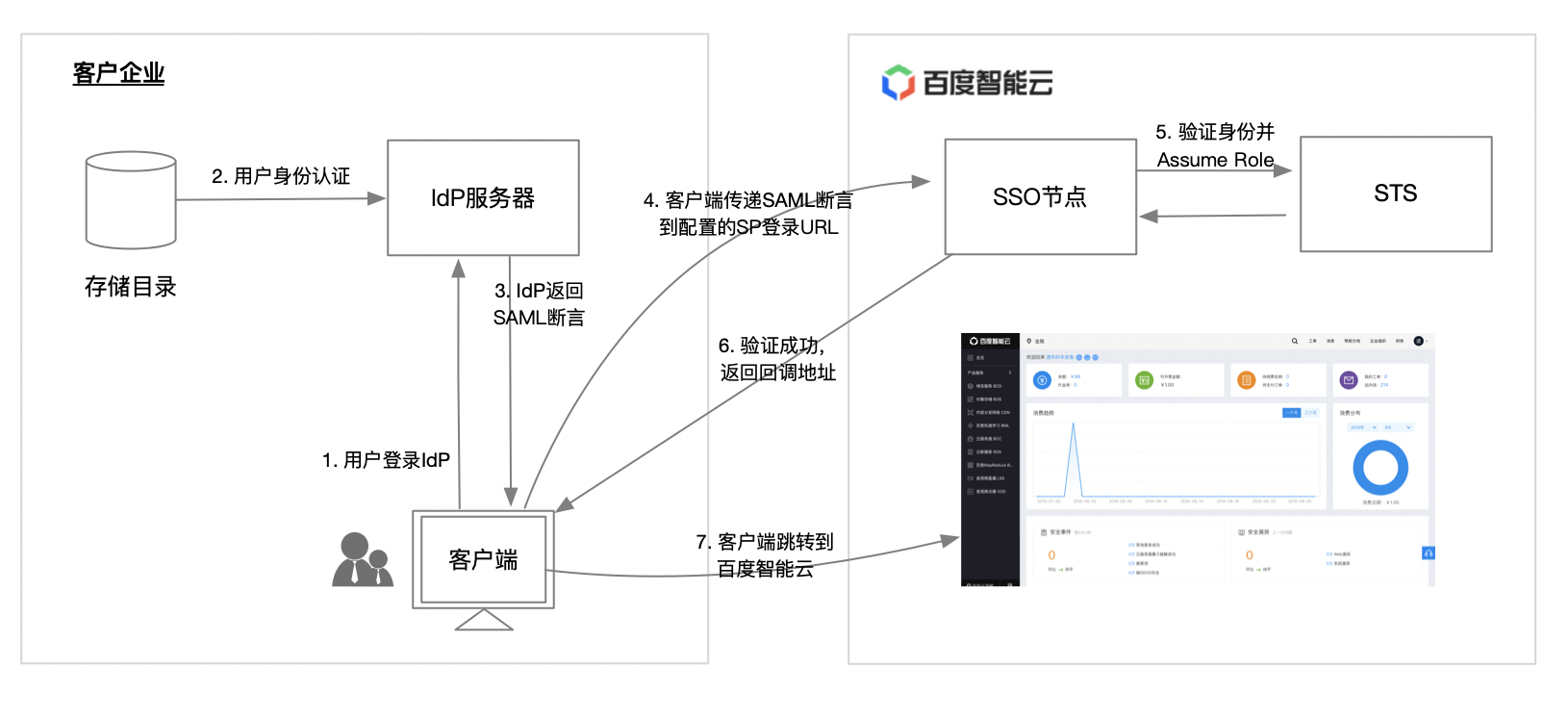
image.png

  1. Enterprise employees or users sign in to corporate IdP via client (typically browsers);
  2. The enterprise IdP authenticates user identities through the enterprise's identity storage directory;
  3. The enterprise IdP returns the logged-in user's information to the client in the form of a SAML assertion;
  4. The client forwards the SAML assertion returned by IdP to the configured Baidu AI Cloud (SP) sign-on URL
  5. Baidu AI Cloud SSO node authenticates user identity via SAML configuration and retrieves credentials from Security Token Service (STS);
  6. Return client verification success messages, identity credentials, and callback addresses;
  7. The client is redirected to the Baidu AI Cloud homepage to complete SSO.

Federated authentication mode

Baidu AI Cloud currently offers two SAML 2.0-based SSO certification methods: IAM User-based SSO and IAM Role-based SSO.

  • IAM User-based SSO: Enterprise employees (customers) access cloud resources as IAM users after authenticating through external identity sources;
  • IAM role-based SSO: Enterprise employees (customers) access cloud resources as IAM roles after authenticating through external identity sources.

The differences between the two SSO certification modes are as follows:

Differences IAM User-based SSO IAM Role-based SSO
Access cloud resources under which identity IAM user IAM role
Mapping relationship Typically one-to-one Typically many-to-many, where multiple employees can share the same role
Accessible service scope Services supporting primary/IAM users For services supporting STS, refer to [Currently Supported Product Lines](IAM/Product Description/Currently Supported Product Lines.md) for details
Create identity entity It is necessary to create IAM users for each SSO employee Only limited IAM roles are required to be created
Sign in to the console IAM users support independent sign-on to the AI Cloud console IAM roles do not support independent console sign-on and must be assumed by a trusted enterprise account

Applicable scenarios

Different SSO authentication modes are chosen depending on enterprise service requirements. This section explains how to select the appropriate SSO sign-on methods based on enterprise needs.

IAM User-based SSO

  • You desire to synchronize users from your enterprise IdP to Baidu AI Cloud and establish a one-to-one correspondence to ensure accountability for access
  • Some services you desire to access do not yet support role-based access (using STS service)
  • Your enterprise IdP does not support more complex attribute configurations

IAM Role-based SSO

  • You are not willing to synchronize the creation of IAM users for every employee in Baidu AI Cloud to reduce management overhead
  • You desire to retain IAM user management capabilities while using SSO
  • You want to differentiate cloud permissions based on employee attributes within the enterprise IdP. When making permission adjustments, attributes only need to be modified locally.
  • You own multiple Baidu AI Cloud accounts but use a unified enterprise IdP, and you wish to configure the enterprise IdP once to enable SSO across multiple Baidu AI Cloud accounts
  • If there are multiple IdPs within your enterprise or among partners that need to access the same Baidu AI Cloud account, you need to configure multiple IdPs within one Baidu AI Cloud for SSO
  • Besides accessing the console, you might also prefer using API methods for SSO integration.

Previous
Account Security Audit
Next
IAM Role-based SSO