

User Management and Permission Assignment
Scenario description
Imagine you are the administrator of Company A. During its incorporation, you registered the cloud account "Company-A" and purchased various cloud resources (e.g., BCC, BOS, CDN, RDS, etc.). The personnel structure of Company A is as follows: several employees are tasked with managing these cloud resources—some handle procurement, others focus on operations, while others are responsible for viewing and utilizing resources. Employees in different roles have distinct responsibilities, requiring varied permissions.
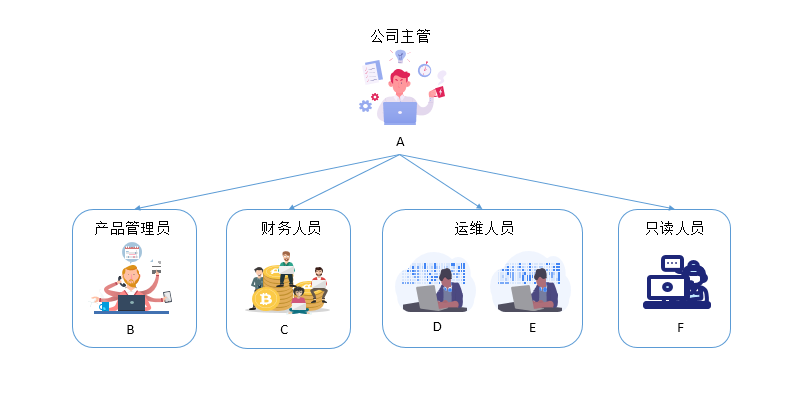
The following requirements exist for the aforementioned scenarios:
- For reasons of security or trust, Company A prefers not to share the credentials of its cloud account directly with employees. Instead, the company opts to create separate accounts and assign specific permissions to them.
- All operational activities performed by employee accounts can be audited.
- There’s no need to separately track the costs incurred by each operator; all charges are consolidated and billed to the root account.
Solution
In light of the above scenarios, let’s discuss how IAM can assist you in managing users and allocating resource permissions.
Step 1: Enable login protection for the root account
Given that you may have previously shared an account with others, the risk of account compromise is significantly higher. It is recommended that you enable the [login protection](UserGuide/Operation guide/Login Protection.md) function for your account.
An extra layer of security is applied during the sign-in process. This protection requires not only the correct account and password but also additional identity verification credentials. Even if a user's password is compromised, unauthorized sign-in attempts can be blocked, maximizing account security.
Step 2: Create IAM users and groups
Based on above enterprise scenarios, create distinct IAM user accounts for users A/B/C/D/E/F, establish corresponding product management, finance, operations, and read-only groups, then add all relevant users to respective organizations. For creation details, refer to [User Management](IAM/Operation guide/User/User management.md) and [Group Management](IAM/Operation guide/Group Management.md).
Step 3: Enable two factor authentication for IAM users
Given that management and financial operations are generally relatively sensitive, you may be worrying that administrator account password leaks could pose significant risks. Therefore, you can enable [Two Factor Authentication](IAM/Operation guide/User/Two-Factor Authentication.md) for these IAM users and assign the account passwords and two factor authentication devices to different personnel for separate safekeeping. This ensures that account logins and certain sensitive operations require the simultaneous presence of two individuals.
Step 4: Assign permissions to different groups
IAM provides multiple pre-defined system policies to choose from. Based on the scenarios discussed earlier, the following permissions can be assigned:
- Company Supervisor A: Granted system administrator permissions with full access to manage all Baidu AI Cloud resources
- Product Administrator B: Granted with product management permissions, including the authority to create and delete instances, as well as perform related operations on instances
- Finance Personnel C: Granted with financial permissions (FCFullControlPolicy), with permissions to manage the financial center
- Operations personnel D, E: Grant operational permissions for related products, allowing resource configuration and viewing, but not resource creation, purchase, or deletion
- Read-only personnel (e.g., F): Suitable for HR or other participants who only require read-only permissions to view resource lists, logs, etc., without the ability to perform operations.
If the system policies provided by IAM do not satisfy your granular requirements, you can also [configure custom policy](IAM/Operation guide/Permission Policies/Managing IAM Policies.md#Manage custom policy) to achieve fine-grained resource and instance-level permission settings. For example, granting an IAM User management permissions for a specific BCC instance without having permissions for all BCC instances.
IAM user operation audit
Company Supervisor A can review operation logs of each IAM user's operations to monitor instance usage, thereby enabling security analysis, resource changes, and compliance audits. For details, refer to [Operation Logs](IAM/Operation records/Cloud Trail (Public Beta).md#Introduction).
Changes of employee positions
If an employee’s role changes and their permissions need to be updated, simply transfer them to a different group. If an employee leaves the company or encounters any issues, disabling their account will automatically revoke all associated IAM permissions. For new employees, you can create an IAM account and assign them relevant permissions.