IAM User-based SSO

IAM IAM

  • API Reference
    • Common request header and common response header
    • Data type
    • Error code
    • Feature Update Records
    • General Description
    • Introduction
    • Service domain
    • STS-Related Interfaces
  • API Reference_IAM
    • Common request header and common response header
    • Data type
    • Error code
    • General Description
    • Group management API
    • Introduction
    • Policy management API
    • Role Management Interfaces
    • Service domain
    • User management API
  • FAQs
    • Common Questions Overview
    • FAQs related to IAM users
    • FAQs related to product permissions
  • Function Release Records
  • Operation guide
    • Account Security Audit
    • Enterprise Account Integration
      • Federated Login Overview
      • IAM Role-based SSO
      • IAM User-based SSO
    • Group Management
    • Message Center
    • Permission Policies
      • ACL
      • Authorization
      • Managing IAM Policies
      • Permission Policy Overview
      • Policy Authentication Evaluation Logic
      • Strategy type
      • Tag-Based Authorization and Authentication
    • Role Management
      • Common scenarios
      • Create role
      • FAQs
      • Managing Roles
      • Overview
      • Related concepts
      • Using Roles
    • Settings
    • User
      • IAM User Operations
      • Two-Factor Authentication
      • User management
    • User Anomaly Behavior Analysis (Public Beta)
      • Risk Behavior Management
  • Operation records
    • Cloud Trail (Public Beta)
  • Product Announcement
    • Baidu Intelligent Cloud Enables Login Protection MFA Multi-Factor Authentication Notification for All Users
  • Product Description
    • Application scenarios
    • Concepts
    • Currently Supported Product Lines
    • Product functions
    • Product overview
    • System Restrictions
    • Enterprise Organization vs Identity and Access Management
  • Product pricing
    • Product pricing
  • Quick Start
    • Create groups and grant permissions
    • Creating IAM User Administrators
  • SDK
    • Go-SDK
      • Error handling
      • Group management API
      • Initialize SDK
      • Install the SDK Package
      • Overview
      • Policy management API
      • Role Management Interfaces
      • User management API
      • Version Change Records
    • Java-SDK
      • Error code
      • Group management API
      • Initialization
      • Install the SDK Package
      • Overview
      • Policy management API
      • Role Management Interfaces
      • User management API
      • Version Change Records
    • Python-SDK
      • Error code
      • Group management API
      • Initialization
      • Install the SDK Package
      • Overview
      • Policy management API
      • Role Management Interfaces
      • User management API
      • Version Change Records
  • Testing Knowledge Base SDK
  • Typical Practices
    • Baidu Intelligent Cloud Partner Guide to Creating IAM Users
    • User Management and Permission Assignment
All documents
menu
No results found, please re-enter

IAM IAM

  • API Reference
    • Common request header and common response header
    • Data type
    • Error code
    • Feature Update Records
    • General Description
    • Introduction
    • Service domain
    • STS-Related Interfaces
  • API Reference_IAM
    • Common request header and common response header
    • Data type
    • Error code
    • General Description
    • Group management API
    • Introduction
    • Policy management API
    • Role Management Interfaces
    • Service domain
    • User management API
  • FAQs
    • Common Questions Overview
    • FAQs related to IAM users
    • FAQs related to product permissions
  • Function Release Records
  • Operation guide
    • Account Security Audit
    • Enterprise Account Integration
      • Federated Login Overview
      • IAM Role-based SSO
      • IAM User-based SSO
    • Group Management
    • Message Center
    • Permission Policies
      • ACL
      • Authorization
      • Managing IAM Policies
      • Permission Policy Overview
      • Policy Authentication Evaluation Logic
      • Strategy type
      • Tag-Based Authorization and Authentication
    • Role Management
      • Common scenarios
      • Create role
      • FAQs
      • Managing Roles
      • Overview
      • Related concepts
      • Using Roles
    • Settings
    • User
      • IAM User Operations
      • Two-Factor Authentication
      • User management
    • User Anomaly Behavior Analysis (Public Beta)
      • Risk Behavior Management
  • Operation records
    • Cloud Trail (Public Beta)
  • Product Announcement
    • Baidu Intelligent Cloud Enables Login Protection MFA Multi-Factor Authentication Notification for All Users
  • Product Description
    • Application scenarios
    • Concepts
    • Currently Supported Product Lines
    • Product functions
    • Product overview
    • System Restrictions
    • Enterprise Organization vs Identity and Access Management
  • Product pricing
    • Product pricing
  • Quick Start
    • Create groups and grant permissions
    • Creating IAM User Administrators
  • SDK
    • Go-SDK
      • Error handling
      • Group management API
      • Initialize SDK
      • Install the SDK Package
      • Overview
      • Policy management API
      • Role Management Interfaces
      • User management API
      • Version Change Records
    • Java-SDK
      • Error code
      • Group management API
      • Initialization
      • Install the SDK Package
      • Overview
      • Policy management API
      • Role Management Interfaces
      • User management API
      • Version Change Records
    • Python-SDK
      • Error code
      • Group management API
      • Initialization
      • Install the SDK Package
      • Overview
      • Policy management API
      • Role Management Interfaces
      • User management API
      • Version Change Records
  • Testing Knowledge Base SDK
  • Typical Practices
    • Baidu Intelligent Cloud Partner Guide to Creating IAM Users
    • User Management and Permission Assignment
  • Document center
  • arrow
  • IAMIAM
  • arrow
  • Operation guide
  • arrow
  • Enterprise Account Integration
  • arrow
  • IAM User-based SSO
Table of contents on this page
  • Configure IAM user-based SSO
  • Prerequisites
  • Configuration process
  • Configure IdP
  • Configure SP
  • Configuration instructions for SAML assertions in local identity Services
  • Verify single sign-on
  • Initiate sign-on from the AAD side
  • Initiate sign-on from the Baidu AI Cloud side

IAM User-based SSO

Updated at:2025-10-27

Configure IAM user-based SSO

The users can configure the SAML node on the enterprise IdP and Baidu AI Cloud SP's External Account Access > IAM User-based SSO to enable single sign-on for enterprise users from enterprise applications to Baidu AI Cloud IAM users.

Prerequisites

  1. The enterprise IdP supports the SAML 2.0 protocol;
  2. Possess an activated Baidu AI Cloud account.

Configuration process

Configuring SAML-based single sign-on involves completing the setups for both IdP and SP. IdP configuration includes basic settings, user attribute configuration, and metadata download, while SP configuration encompasses creating an identity service provider and setting up a trust policy. This document uses Microsoft Azure Active Directory (AAD) as the IdP to demonstrate the steps for configuring the SAML IdP and Baidu AI Cloud SP.

Configure IdP

  1. Follow the process to register an Azure account;
  2. Sign in to the Azure portal and navigate to All Services > Azure Active Directory in the left sidebar;
  3. Click Enterprise Applications > New Application, select Non-library Application, enter the application name, and click Add to complete creation;

Note: Non-library applications require AAD Premium. Users may opt for a free trial version and decide whether to discontinue it after completing the configuration.
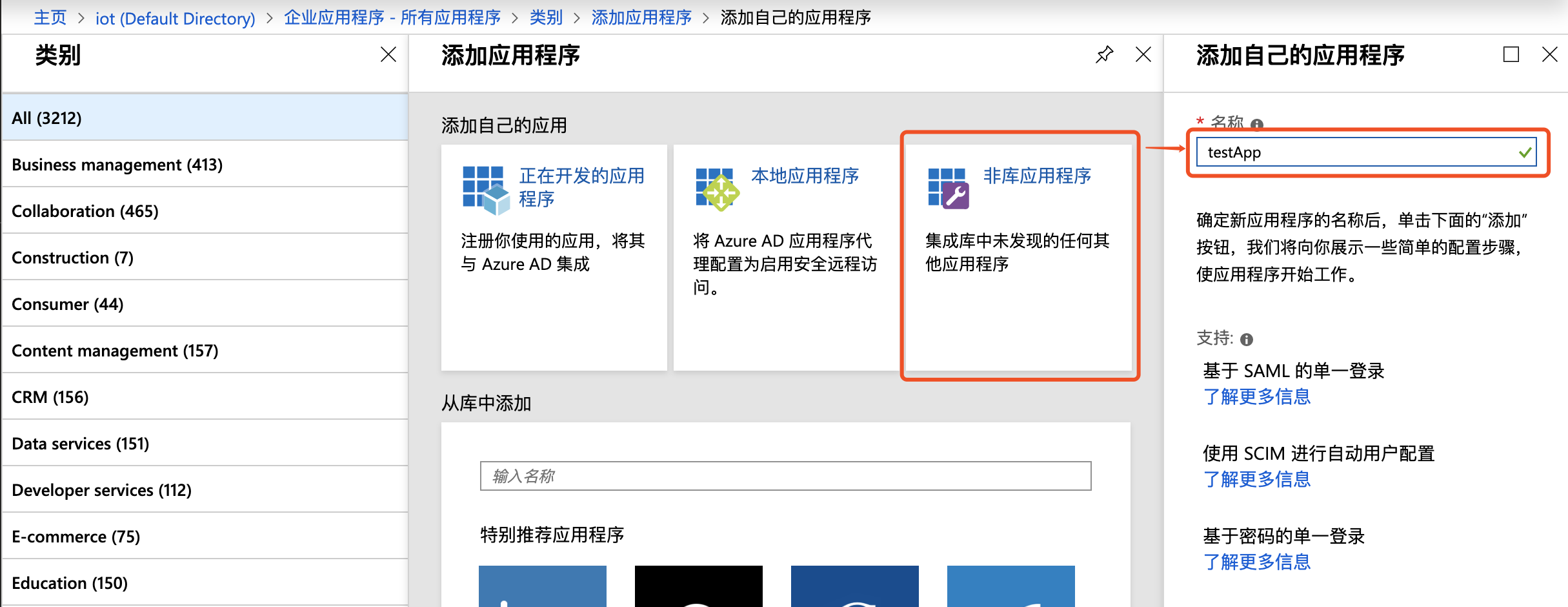
image.png

  1. Navigate to the application, select Single Sign-on > SAML;
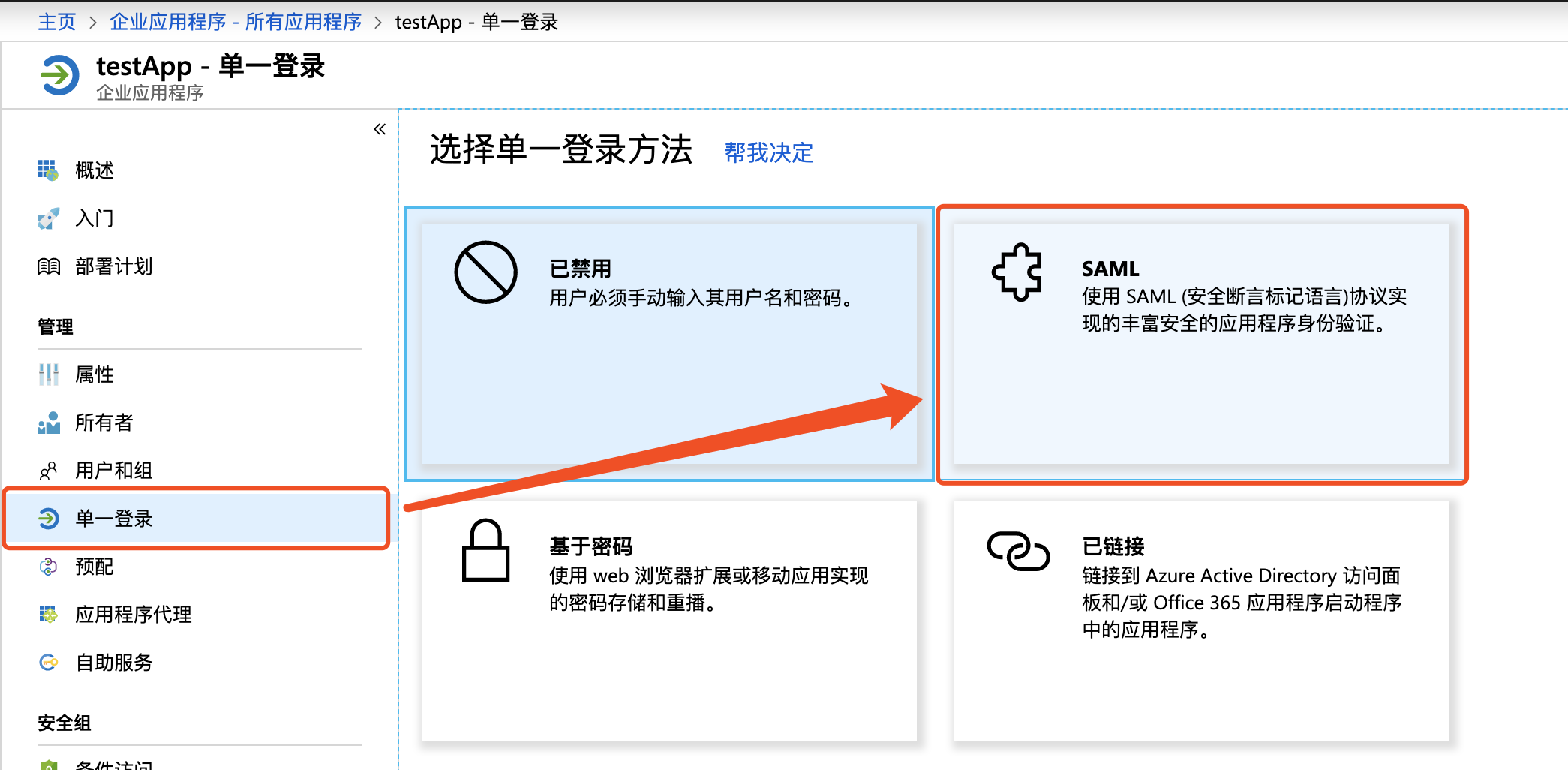
image.png

  1. In basic SAML configuration, click Edit button in the upper right, set the identifier (entity ID) field as urn:bce:baidu:webservices or https://sign-on.bce.baidu.com/accountId/saml, replacing "accountId" with your actual Baidu AI Cloud account ID (obtained from the user center)
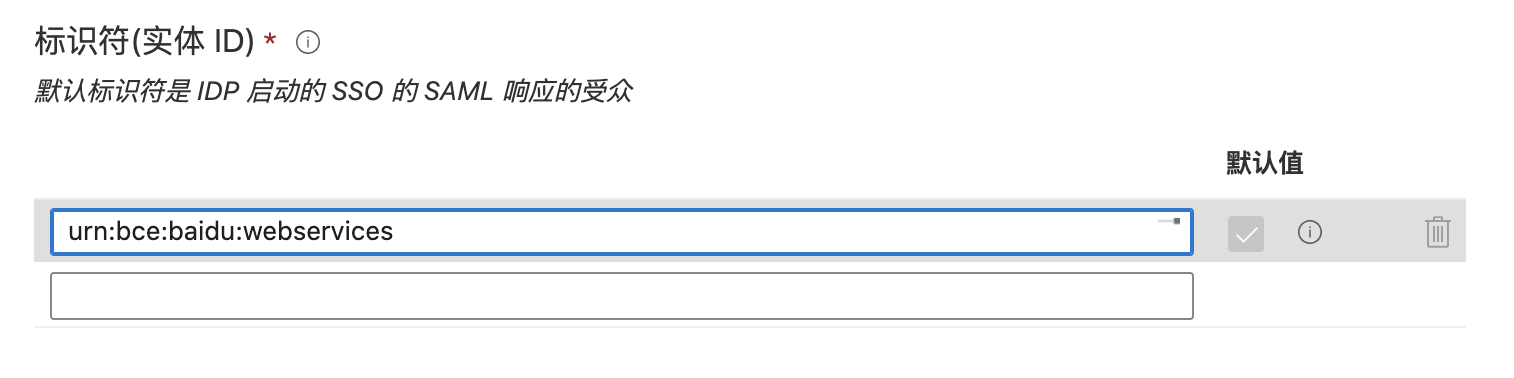
image.png

Note: For [AAD-initiated sign-on](#Initiate sign-on from the AAD side), set the identifier (entity ID) field to urn:bce:baidu:webservices; for [Baidu AI Cloud-initiated sign-on](#Initiate sign-on from the Baidu AI Cloud side), set identifier (entity ID) to https://sign-on.bce.baidu.com/accountId/saml.

  1. In basic SAML configuration, continue configuring the reply URL (assertion consumer service URL) field as https://sign-on.bce.baidu.com/saml;
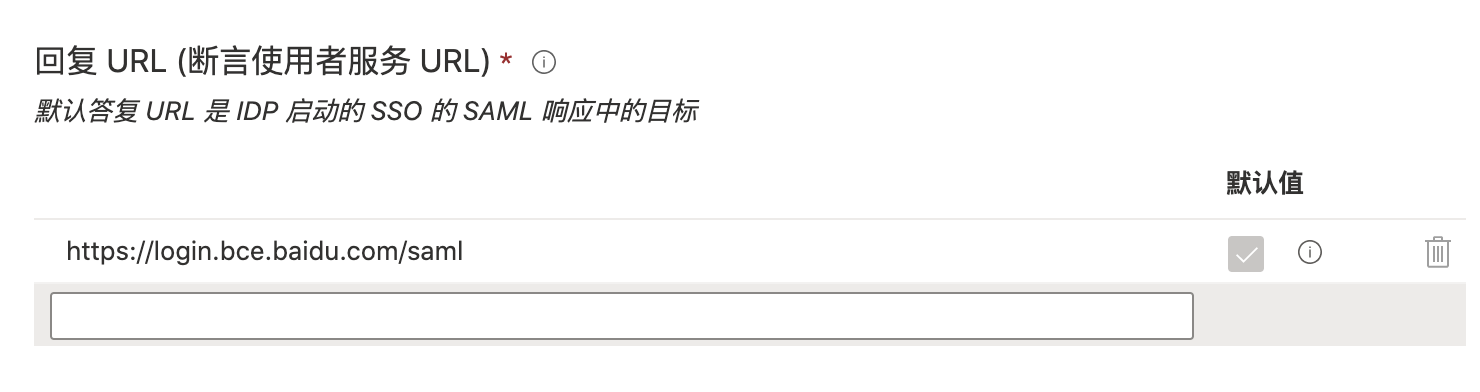
image.png

  1. In user attributes and fields, click the Edit button in the upper right corner to add the following user attribute fields:
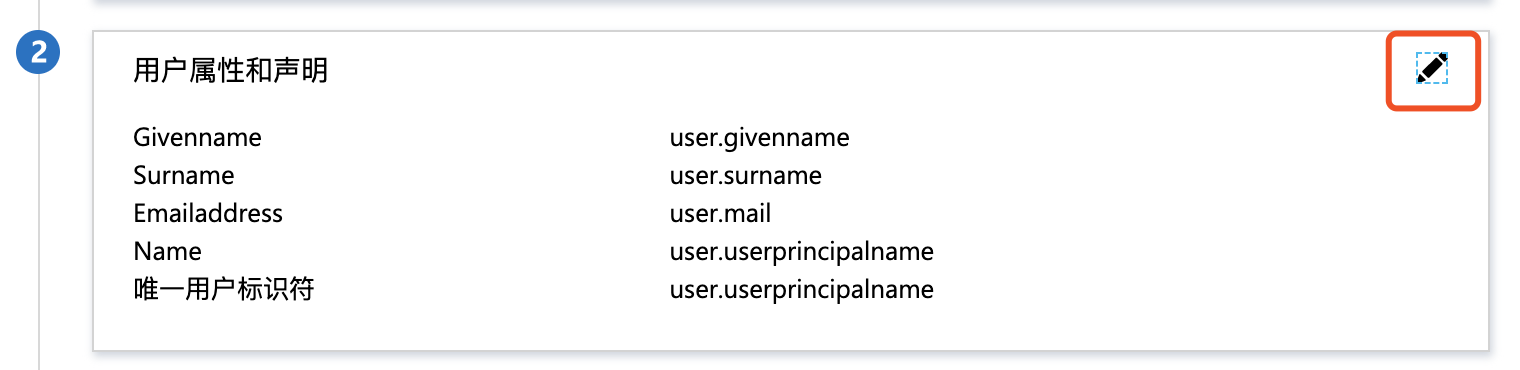
image.png

Name Source Source attribute Description
https://bce.baidu.com/SAML/Attributes/Subuser Attribute accountId:subuser-name/{subuser_name}, accountId:saml-provider/{providerName} Replace the accountId field with the actual accountId in Baidu AI Cloud (obtained from the Baidu AI Cloud user center), subuser_name with the IAM user name, and providerName with the IdP name (any valid string), such as azure

The above fields are mandatory. Users may add additional user attribute fields as needed. For detailed configuration, refer to [SAML Assertion Configuration Guide for Local Identity Services](#SAML Assertion Configuration for Local Identity Service)

  1. In the SAML signing certificate, download the IdP SAML metadata, which signifies the completion of the IdP configuration.
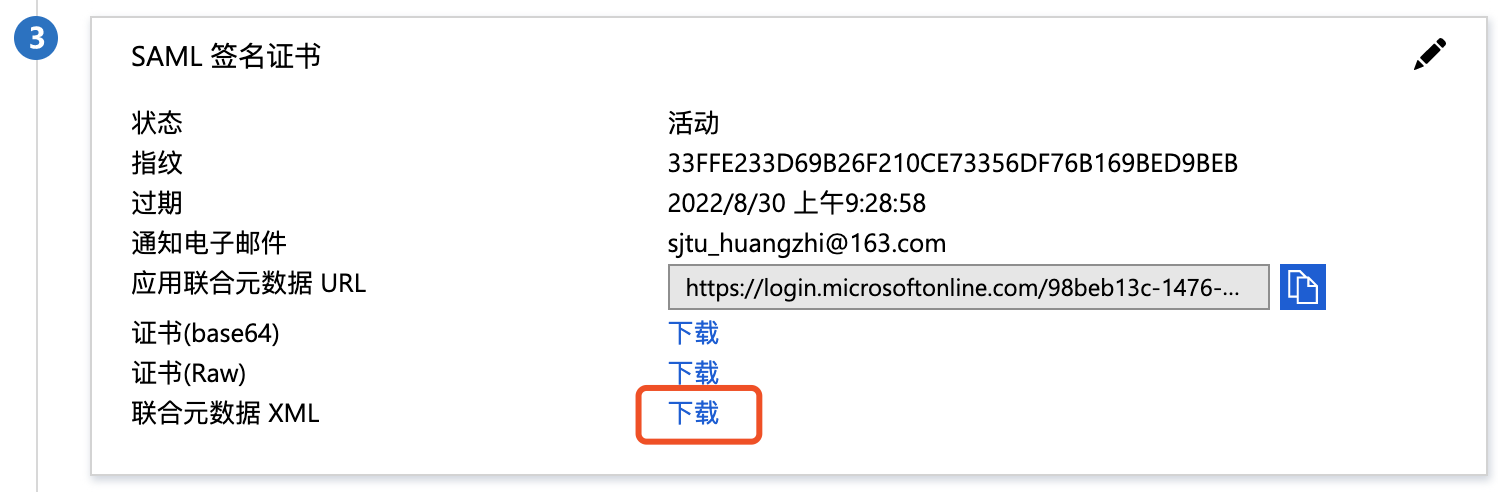
image.png

Configure SP

Configure SP identity provider

  1. Sign in to Baidu AI Cloud, move the cursor to the top-right corner, and navigate to Identity and Access Management > External Account Access > IAM User-based SSO;
  2. In user-based SSO settings, upload the SAML metadata downloaded in Step 7 in IdP configuration , and toggle the Function Status Switch to ON.

Configuration instructions for SAML assertions in local identity Services

Basic configuration

  • Recipient field in SubjectConfirmationData must be configured as https://login.bce.baidu.com/saml
  • Audience field in AudienceRestriction must be configured as urn:bce:baidu:webservices
  • The attribute must contain an assertion named https://bce.baidu.com/SAML/Attributes/Subuser, formatted as "accountId:subuser-name/{subuser_name}, accountId:saml-provider/{providerName}", where the accountId field should be replaced with the actual accountId from Baidu AI Cloud (obtained from the Baidu AI Cloud user center), subuser_name with the IAM user name, and providerName with the IdP name (any valid string), such as azure.

SAML assertion attributes

SAML assertion names correspond one-to-one with IDP trust policy attributes. Currently supported attributes in Baidu AI Cloud include: saml:iss, saml:aud, saml:cn, saml:eduPersonAffiliation, saml:eduPersonPrincipalName, their corresponding SAML attributes are:

Name Attribute meaning
saml:iss Issuer field in the SAML assertion, optional
saml:aud Audience field in the AudienceRestriction in the SAML assertion
saml:cn urn:oid:2.5.4.3 attribute in the SAML assertion
saml: eduPersonAffiliation urn:oid:1.3.6.1.4.1.5923.1.1.1.1 attribute in the SAML assertion
saml: eduPersonPrincipalName urn:oid:1.3.6.1.4.1.5923.1.1.1.6 attribute in the SAML assertion

Verify single sign-on

Initiate sign-on from the AAD side

Prerequisites

The SAML configuration for both IdP and SP has been completed.

Guide

  1. Sign in to the azure portal and navigate to All Services > Azure Active Directory > Enterprise Applications > testApp;
  2. Click Users and Groups > New User, and then add the users requiring single sign-on to the application;
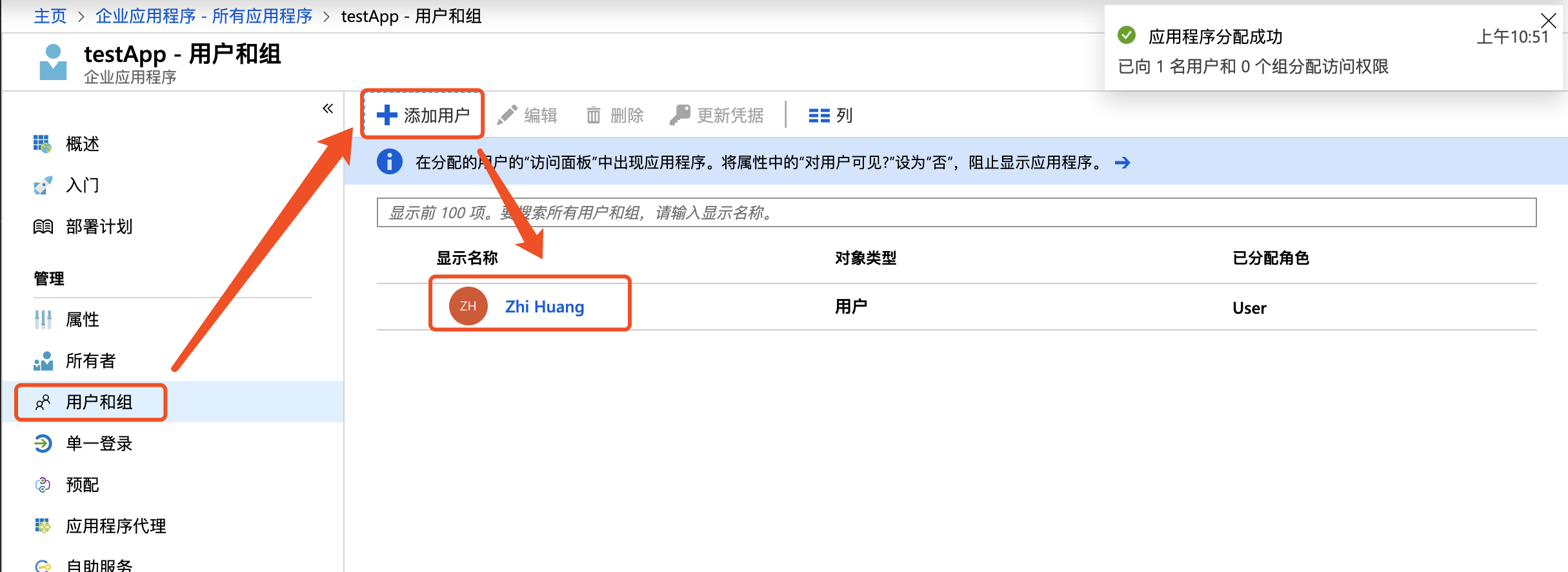
image.png

  1. Click Single Sign-on, then click Validate, and select Sign in as Current User to test the redirection to the Baidu AI Cloud page

image.png

  1. To embed login links into enterprise applications, retrieve them directly at:
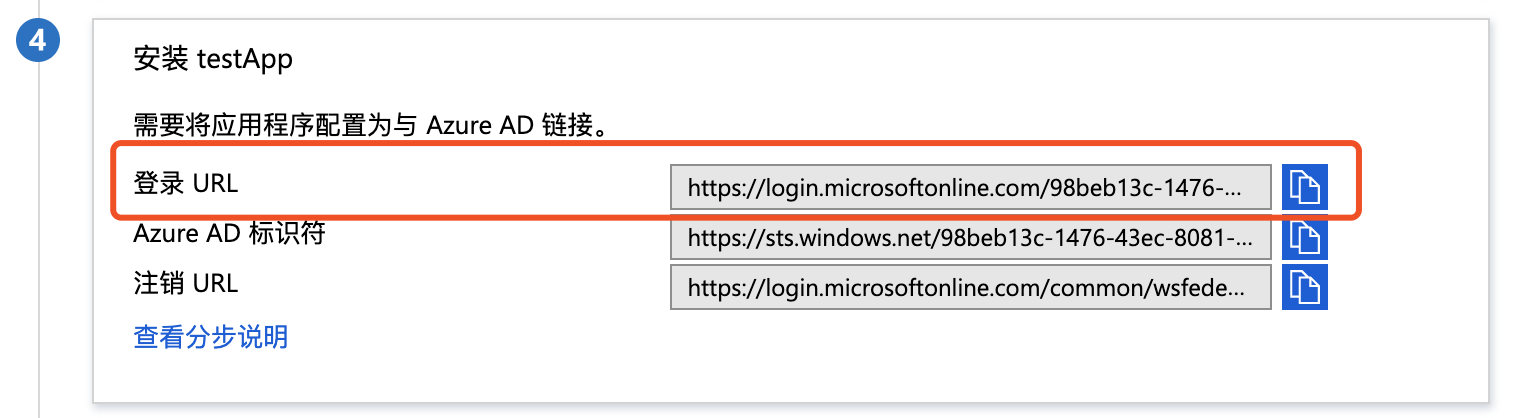
image.png

Initiate sign-on from the Baidu AI Cloud side

Prerequisites

The SAML configuration for both IdP and SP has been completed.

Guide

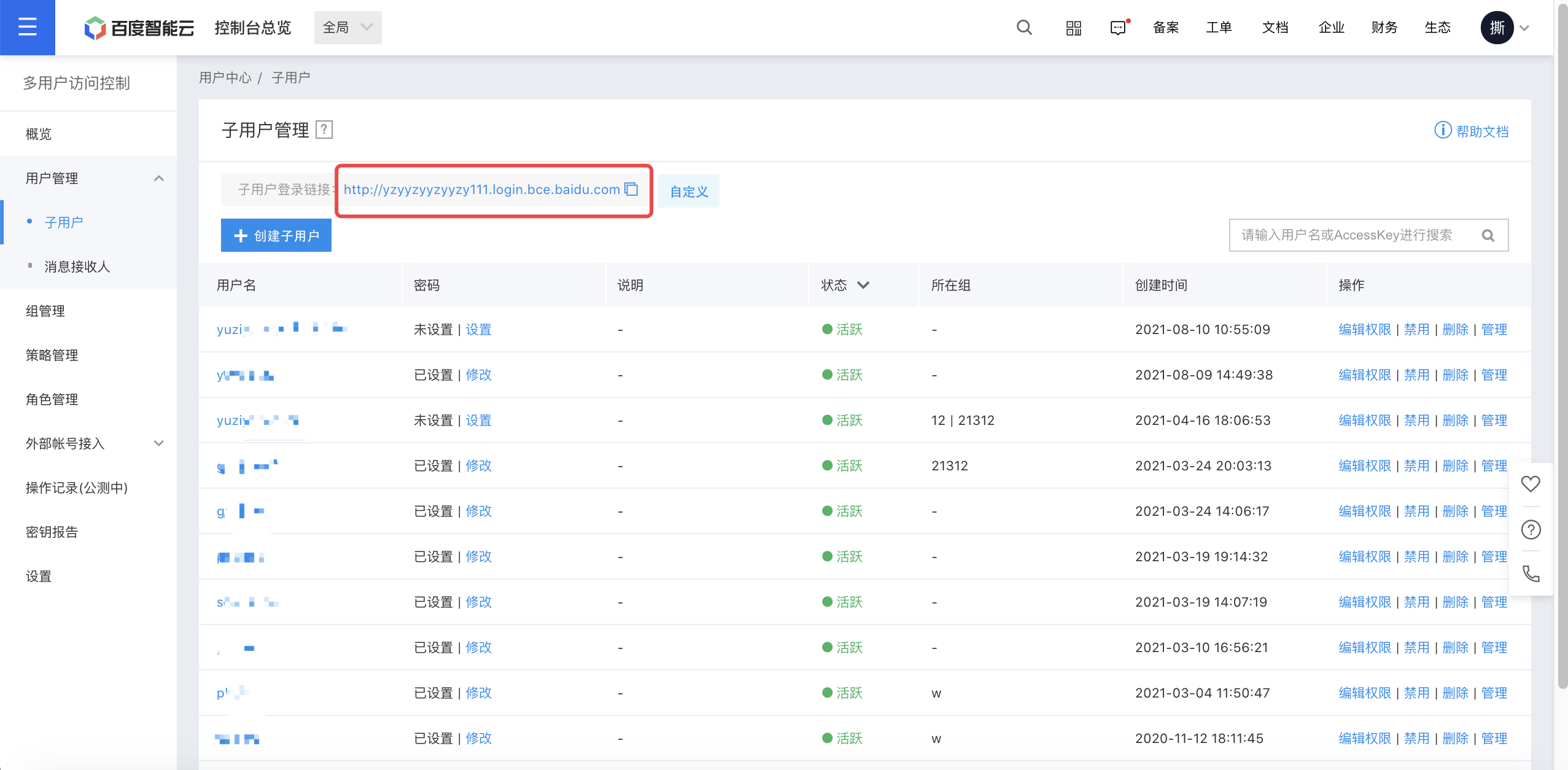
  1. Sign in to Baidu AI Cloud console, navigate to Identity and Access Management - User Management - IAM users, and click the IAM user Sign-on link; image.png
  2. Click Sign in with Enterprise Account to redirect to the AAD Sign-in page. After entering the username and password and passing the verification, you will be redirected to the Baidu AI Cloud page
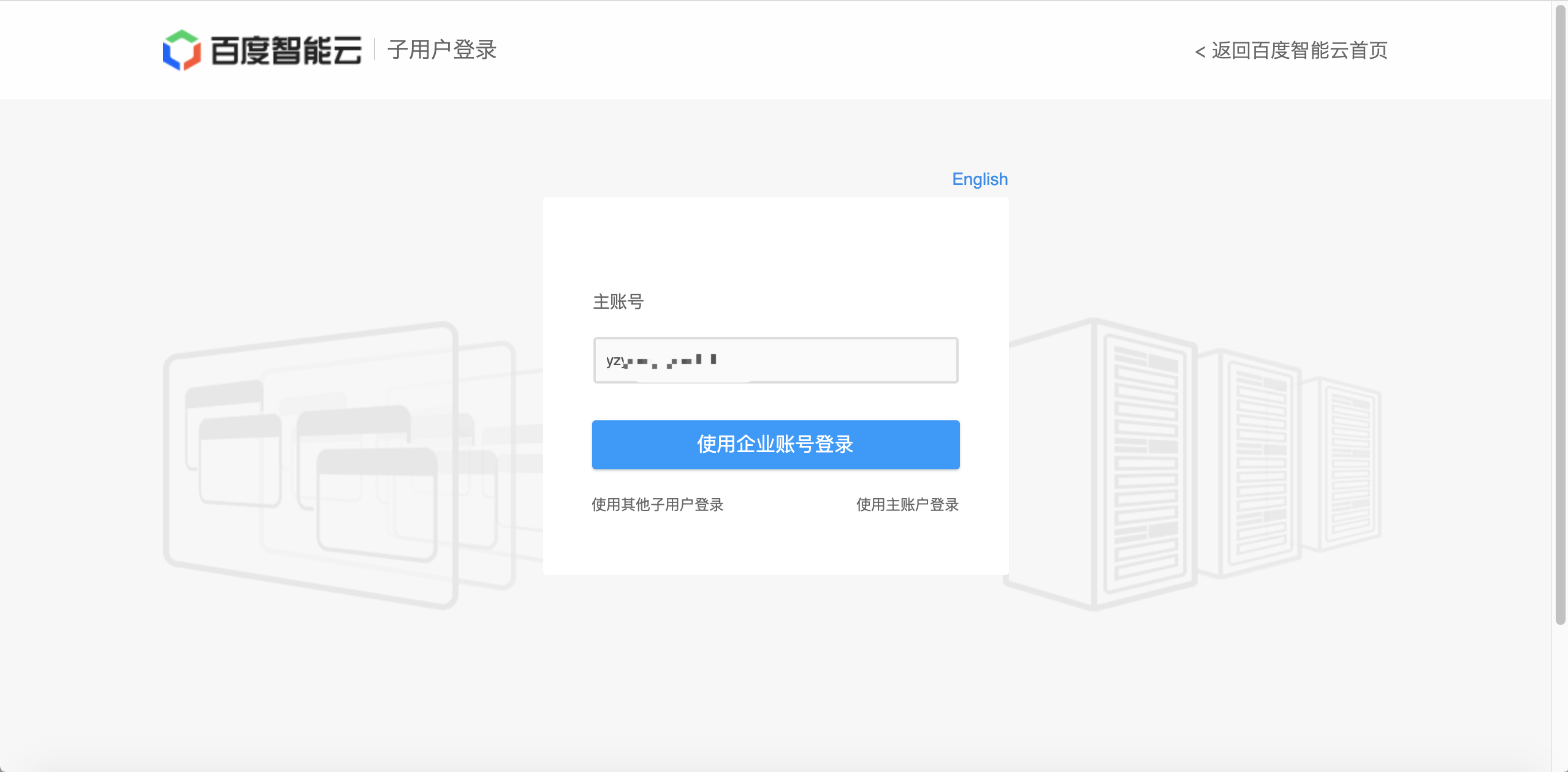
image.png

Note

During development, when redirecting to https://login.bce.baidu.com/saml, it is necessary to carry the information in SAMLResponse, which should specify the user's identity assertion.

Plain Text
1<RequestedAttribute isRequired="true" Name="https://bce.baidu.com/SAML/Attributes/Subuser" FriendlyName="RoleEntitlement"/>

These two attributes are mandatory, in particular

Attribute https://bce.baidu.com/SAML/Attributes/Subuser is used to represent the currently accessed account, IAM user, and IdP name, formatted as "accountId:subuser-name/{subuser_name}, accountId:saml-provider/{providerName}", where accountId is the actual account ID in Baidu AI Cloud, subuser_name conveys the IAM user name after SSO, and providerName is the name field of the configured external identity provider.

Previous
IAM Role-based SSO
Next
Group Management