Using Roles

IAM IAM

  • API Reference
    • Common request header and common response header
    • Data type
    • Error code
    • Feature Update Records
    • General Description
    • Introduction
    • Service domain
    • STS-Related Interfaces
  • API Reference_IAM
    • Common request header and common response header
    • Data type
    • Error code
    • General Description
    • Group management API
    • Introduction
    • Policy management API
    • Role Management Interfaces
    • Service domain
    • User management API
  • FAQs
    • Common Questions Overview
    • FAQs related to IAM users
    • FAQs related to product permissions
  • Function Release Records
  • Operation guide
    • Account Security Audit
    • Enterprise Account Integration
      • Federated Login Overview
      • IAM Role-based SSO
      • IAM User-based SSO
    • Group Management
    • Message Center
    • Permission Policies
      • ACL
      • Authorization
      • Managing IAM Policies
      • Permission Policy Overview
      • Policy Authentication Evaluation Logic
      • Strategy type
      • Tag-Based Authorization and Authentication
    • Role Management
      • Common scenarios
      • Create role
      • FAQs
      • Managing Roles
      • Overview
      • Related concepts
      • Using Roles
    • Settings
    • User
      • IAM User Operations
      • Two-Factor Authentication
      • User management
    • User Anomaly Behavior Analysis (Public Beta)
      • Risk Behavior Management
  • Operation records
    • Cloud Trail (Public Beta)
  • Product Announcement
    • Baidu Intelligent Cloud Enables Login Protection MFA Multi-Factor Authentication Notification for All Users
  • Product Description
    • Application scenarios
    • Concepts
    • Currently Supported Product Lines
    • Product functions
    • Product overview
    • System Restrictions
    • Enterprise Organization vs Identity and Access Management
  • Product pricing
    • Product pricing
  • Quick Start
    • Create groups and grant permissions
    • Creating IAM User Administrators
  • SDK
    • Go-SDK
      • Error handling
      • Group management API
      • Initialize SDK
      • Install the SDK Package
      • Overview
      • Policy management API
      • Role Management Interfaces
      • User management API
      • Version Change Records
    • Java-SDK
      • Error code
      • Group management API
      • Initialization
      • Install the SDK Package
      • Overview
      • Policy management API
      • Role Management Interfaces
      • User management API
      • Version Change Records
    • Python-SDK
      • Error code
      • Group management API
      • Initialization
      • Install the SDK Package
      • Overview
      • Policy management API
      • Role Management Interfaces
      • User management API
      • Version Change Records
  • Testing Knowledge Base SDK
  • Typical Practices
    • Baidu Intelligent Cloud Partner Guide to Creating IAM Users
    • User Management and Permission Assignment
All documents
menu
No results found, please re-enter

IAM IAM

  • API Reference
    • Common request header and common response header
    • Data type
    • Error code
    • Feature Update Records
    • General Description
    • Introduction
    • Service domain
    • STS-Related Interfaces
  • API Reference_IAM
    • Common request header and common response header
    • Data type
    • Error code
    • General Description
    • Group management API
    • Introduction
    • Policy management API
    • Role Management Interfaces
    • Service domain
    • User management API
  • FAQs
    • Common Questions Overview
    • FAQs related to IAM users
    • FAQs related to product permissions
  • Function Release Records
  • Operation guide
    • Account Security Audit
    • Enterprise Account Integration
      • Federated Login Overview
      • IAM Role-based SSO
      • IAM User-based SSO
    • Group Management
    • Message Center
    • Permission Policies
      • ACL
      • Authorization
      • Managing IAM Policies
      • Permission Policy Overview
      • Policy Authentication Evaluation Logic
      • Strategy type
      • Tag-Based Authorization and Authentication
    • Role Management
      • Common scenarios
      • Create role
      • FAQs
      • Managing Roles
      • Overview
      • Related concepts
      • Using Roles
    • Settings
    • User
      • IAM User Operations
      • Two-Factor Authentication
      • User management
    • User Anomaly Behavior Analysis (Public Beta)
      • Risk Behavior Management
  • Operation records
    • Cloud Trail (Public Beta)
  • Product Announcement
    • Baidu Intelligent Cloud Enables Login Protection MFA Multi-Factor Authentication Notification for All Users
  • Product Description
    • Application scenarios
    • Concepts
    • Currently Supported Product Lines
    • Product functions
    • Product overview
    • System Restrictions
    • Enterprise Organization vs Identity and Access Management
  • Product pricing
    • Product pricing
  • Quick Start
    • Create groups and grant permissions
    • Creating IAM User Administrators
  • SDK
    • Go-SDK
      • Error handling
      • Group management API
      • Initialize SDK
      • Install the SDK Package
      • Overview
      • Policy management API
      • Role Management Interfaces
      • User management API
      • Version Change Records
    • Java-SDK
      • Error code
      • Group management API
      • Initialization
      • Install the SDK Package
      • Overview
      • Policy management API
      • Role Management Interfaces
      • User management API
      • Version Change Records
    • Python-SDK
      • Error code
      • Group management API
      • Initialization
      • Install the SDK Package
      • Overview
      • Policy management API
      • Role Management Interfaces
      • User management API
      • Version Change Records
  • Testing Knowledge Base SDK
  • Typical Practices
    • Baidu Intelligent Cloud Partner Guide to Creating IAM Users
    • User Management and Permission Assignment
  • Document center
  • arrow
  • IAMIAM
  • arrow
  • Operation guide
  • arrow
  • Role Management
  • arrow
  • Using Roles
Table of contents on this page
  • Prerequisites
  • Operation steps
  • Assume role via console
  • Assume a role using API

Using Roles

Updated at:2025-10-27

Through the [Create Role](IAM/Operation guide/Role Management/Create role.md) operation, the user has obtained a role granted specific permissions, which can be used by a cloud account. This section explains, from the perspective of a trusted account, how trusted users can assume roles to access the cloud resources of the trusted account. For clarity, assume that the cloud resource and role are in account ID 111111111. The role named RoleA has operation and maintenance permissions for BCC server Server001. The trusted cloud account is 222222222, which intends to grant IAM user UserB the permission to assume RoleA.

Prerequisites

  1. It has System Administrator permissions for the trusted account 222222222;
  2. IAM user UserB possesses valid [Obtain AKSK](Reference/Retrieve AK and SK/How to Obtain AKSK.md);
  3. IAM user UserB has the ID and role name of the target account.

Operation steps

Assume role via console

  1. Sign in to the Baidu AI Cloud Console by administrator credentials of account 2222222;
  2. Grant the STSAssumeRoleAccess policy permission to IAM user UserB. For specific operations, please refer to [User Authorization](IAM/Operation guide/Permission Policies/Authorization.md);
  3. IAM user UserB signs in to the console, moves the cursor to the avatar in the upper-right corner, and clicks the Switch Role button to redirect the page;
  4. On the redirect page, enter the ID and role name of the target account, and then click Switch to enter the target role space;
  5. To return to the account where IAM user UserB is located, hover over the avatar in the upper-right corner on the page, and click the Return to UserB button.
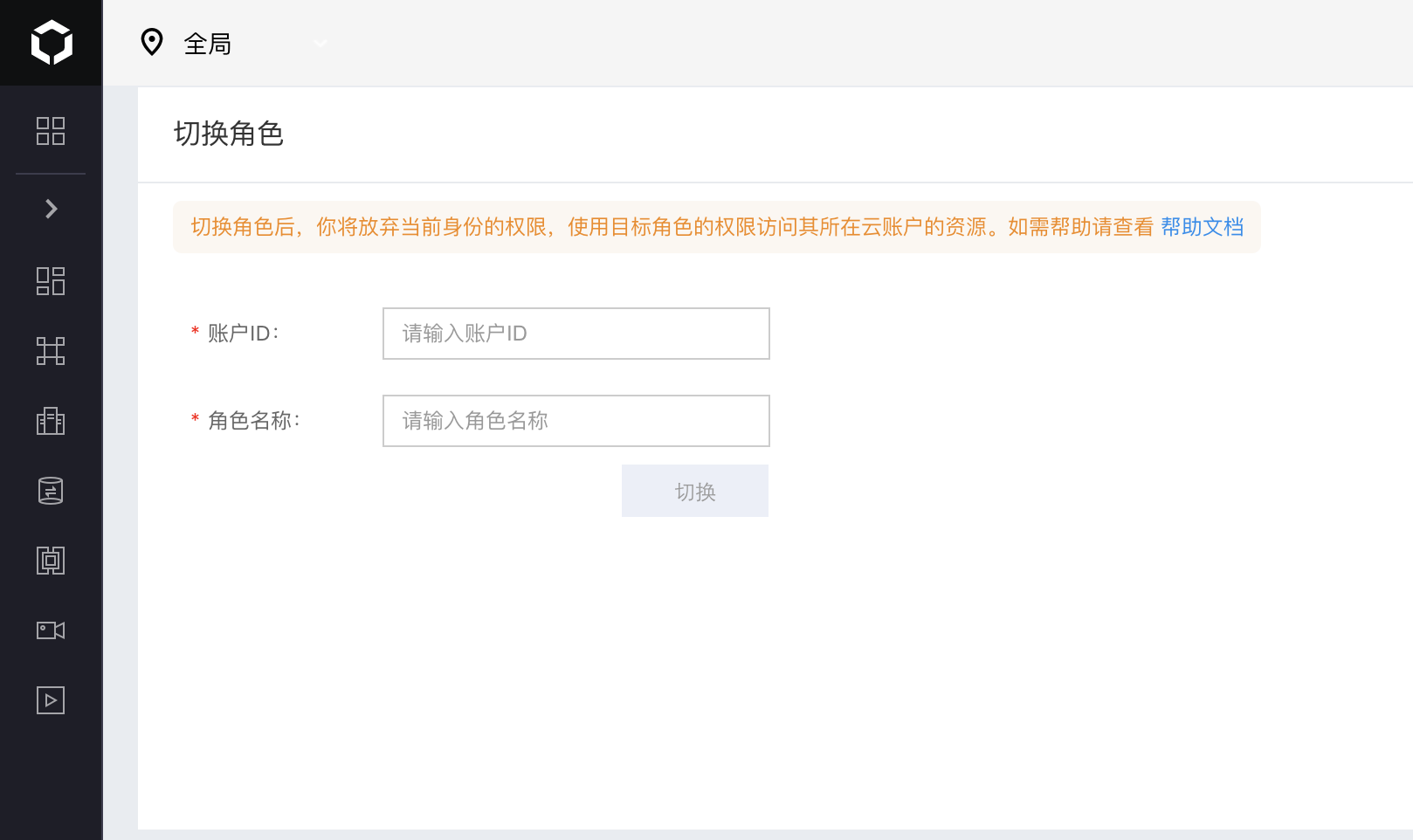
image.png

Assume a role using API

  1. Sign in to the Baidu AI Cloud Console by administrator credentials of account 222222222;
  2. Grant the STSAssumeRoleAccess policy permission to IAM user UserB. For specific operations, refer to [User Authorization](IAM/Operation guide/Permission Policies/Authorization.md);
  3. IAM user UserB uses the [AssumeRole](IAM/API Reference/STS-Related Interfaces.md#AssumeRole) API, replacing parameter accountID with 111111111 and roleName with RoleA, thereby assuming RoleA in account 111111111. By default, role sessions last 2 hours. When using AssumeRole API, you may specify the exact duration of parameter durationSeconds, which cannot exceed 2 hours;

  4. At this point, IAM user UserB will obtain temporary credentials of RoleA, temporarily relinquishing its permission in account 222222222 and gaining permission to operate and maintain Server001. When accessing Server001, you need to replace the AK/SK with the temporary AK/SK returned by the AssumeRole API, and replace the Token with the returned SessionToken.

Previous
Related concepts
Next
Settings