Common scenarios

IAM IAM

  • API Reference
    • Common request header and common response header
    • Data type
    • Error code
    • Feature Update Records
    • General Description
    • Introduction
    • Service domain
    • STS-Related Interfaces
  • API Reference_IAM
    • Common request header and common response header
    • Data type
    • Error code
    • General Description
    • Group management API
    • Introduction
    • Policy management API
    • Role Management Interfaces
    • Service domain
    • User management API
  • FAQs
    • Common Questions Overview
    • FAQs related to IAM users
    • FAQs related to product permissions
  • Function Release Records
  • Operation guide
    • Account Security Audit
    • Enterprise Account Integration
      • Federated Login Overview
      • IAM Role-based SSO
      • IAM User-based SSO
    • Group Management
    • Message Center
    • Permission Policies
      • ACL
      • Authorization
      • Managing IAM Policies
      • Permission Policy Overview
      • Policy Authentication Evaluation Logic
      • Strategy type
      • Tag-Based Authorization and Authentication
    • Role Management
      • Common scenarios
      • Create role
      • FAQs
      • Managing Roles
      • Overview
      • Related concepts
      • Using Roles
    • Settings
    • User
      • IAM User Operations
      • Two-Factor Authentication
      • User management
    • User Anomaly Behavior Analysis (Public Beta)
      • Risk Behavior Management
  • Operation records
    • Cloud Trail (Public Beta)
  • Product Announcement
    • Baidu Intelligent Cloud Enables Login Protection MFA Multi-Factor Authentication Notification for All Users
  • Product Description
    • Application scenarios
    • Concepts
    • Currently Supported Product Lines
    • Product functions
    • Product overview
    • System Restrictions
    • Enterprise Organization vs Identity and Access Management
  • Product pricing
    • Product pricing
  • Quick Start
    • Create groups and grant permissions
    • Creating IAM User Administrators
  • SDK
    • Go-SDK
      • Error handling
      • Group management API
      • Initialize SDK
      • Install the SDK Package
      • Overview
      • Policy management API
      • Role Management Interfaces
      • User management API
      • Version Change Records
    • Java-SDK
      • Error code
      • Group management API
      • Initialization
      • Install the SDK Package
      • Overview
      • Policy management API
      • Role Management Interfaces
      • User management API
      • Version Change Records
    • Python-SDK
      • Error code
      • Group management API
      • Initialization
      • Install the SDK Package
      • Overview
      • Policy management API
      • Role Management Interfaces
      • User management API
      • Version Change Records
  • Testing Knowledge Base SDK
  • Typical Practices
    • Baidu Intelligent Cloud Partner Guide to Creating IAM Users
    • User Management and Permission Assignment
All documents
menu
No results found, please re-enter

IAM IAM

  • API Reference
    • Common request header and common response header
    • Data type
    • Error code
    • Feature Update Records
    • General Description
    • Introduction
    • Service domain
    • STS-Related Interfaces
  • API Reference_IAM
    • Common request header and common response header
    • Data type
    • Error code
    • General Description
    • Group management API
    • Introduction
    • Policy management API
    • Role Management Interfaces
    • Service domain
    • User management API
  • FAQs
    • Common Questions Overview
    • FAQs related to IAM users
    • FAQs related to product permissions
  • Function Release Records
  • Operation guide
    • Account Security Audit
    • Enterprise Account Integration
      • Federated Login Overview
      • IAM Role-based SSO
      • IAM User-based SSO
    • Group Management
    • Message Center
    • Permission Policies
      • ACL
      • Authorization
      • Managing IAM Policies
      • Permission Policy Overview
      • Policy Authentication Evaluation Logic
      • Strategy type
      • Tag-Based Authorization and Authentication
    • Role Management
      • Common scenarios
      • Create role
      • FAQs
      • Managing Roles
      • Overview
      • Related concepts
      • Using Roles
    • Settings
    • User
      • IAM User Operations
      • Two-Factor Authentication
      • User management
    • User Anomaly Behavior Analysis (Public Beta)
      • Risk Behavior Management
  • Operation records
    • Cloud Trail (Public Beta)
  • Product Announcement
    • Baidu Intelligent Cloud Enables Login Protection MFA Multi-Factor Authentication Notification for All Users
  • Product Description
    • Application scenarios
    • Concepts
    • Currently Supported Product Lines
    • Product functions
    • Product overview
    • System Restrictions
    • Enterprise Organization vs Identity and Access Management
  • Product pricing
    • Product pricing
  • Quick Start
    • Create groups and grant permissions
    • Creating IAM User Administrators
  • SDK
    • Go-SDK
      • Error handling
      • Group management API
      • Initialize SDK
      • Install the SDK Package
      • Overview
      • Policy management API
      • Role Management Interfaces
      • User management API
      • Version Change Records
    • Java-SDK
      • Error code
      • Group management API
      • Initialization
      • Install the SDK Package
      • Overview
      • Policy management API
      • Role Management Interfaces
      • User management API
      • Version Change Records
    • Python-SDK
      • Error code
      • Group management API
      • Initialization
      • Install the SDK Package
      • Overview
      • Policy management API
      • Role Management Interfaces
      • User management API
      • Version Change Records
  • Testing Knowledge Base SDK
  • Typical Practices
    • Baidu Intelligent Cloud Partner Guide to Creating IAM Users
    • User Management and Permission Assignment
  • Document center
  • arrow
  • IAMIAM
  • arrow
  • Operation guide
  • arrow
  • Role Management
  • arrow
  • Common scenarios
Table of contents on this page
  • Authorize third-party accounts to access your cloud resources
  • Temporary authorization in the same account

Common scenarios

Updated at:2025-10-27

Roles are commonly used to address cross-account resource access and temporary authorization issues for IAM users within the same account, without sharing user credentials. This section introduces several typical use cases.

Authorize third-party accounts to access your cloud resources

Users can authorize third-party accounts to grant permissions to their IAM users or services, allowing them to assume roles in your cloud account and access authorized resources. Similarly, users can switch to roles granted by other cloud accounts to access their resources.

The following practical example illustrates how to achieve cross-account resource access:

Company A has created Account111111111 in Baidu AI Cloud and deployed a BCC server, Server001, in this account. The administrator of Company A wants to delegate the operation and maintenance of this server to Company B, which owns account Account222222222.
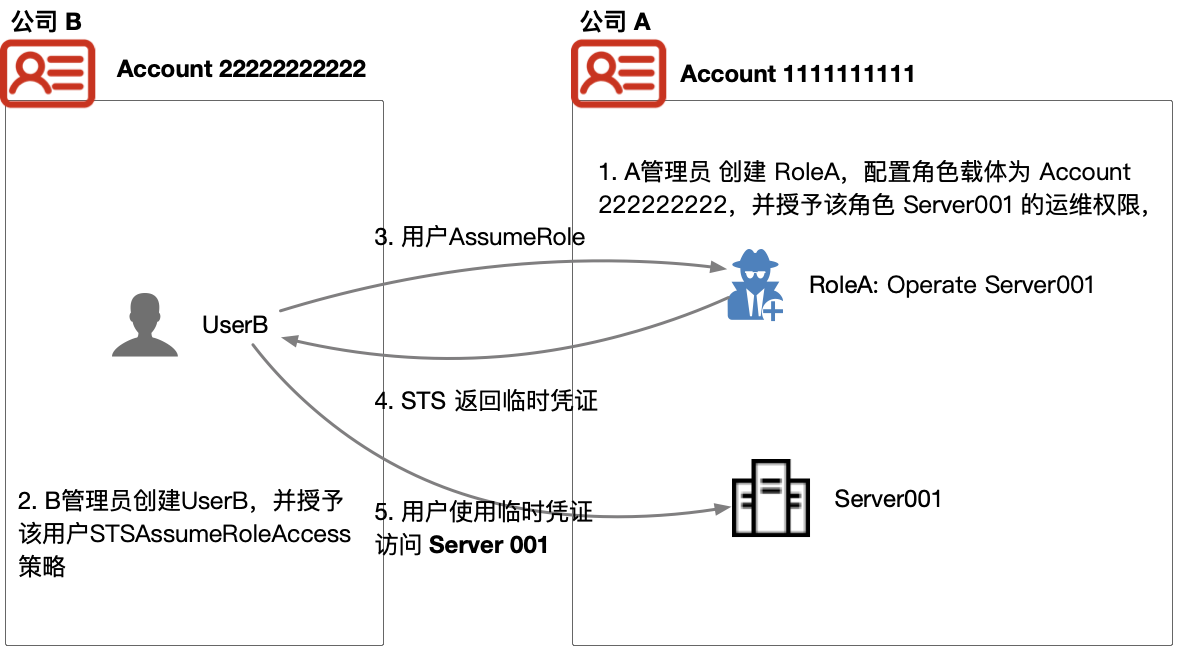
image.png

To satisfy Company A's management requirements in this scenario, the following steps are required:

  1. Company B provides its cloud account ID or alias to Company A's administrator;
  2. Company A’s administrator creates RoleA in Account111111111, sets the role entity to other cloud accounts, and enters Company B's cloud account ID or alias;
  3. Company A grants the Server001 operation and maintenance policies to RoleA;
  4. Company B's administrator created an IAM User named UserB and granted the user the _STSAssumeRoleAccess_ policy;
  5. UserB can switch to RoleA by calling [Security Token Service (STS)](IAM/API Reference/STS-Related Interfaces.md)_AssumeRole_ API, thereby obtaining the permission to operate and maintain Server001.

Temporary authorization in the same account

You can grant permissions for IAM users to switch to roles within your account or to roles in third-party accounts that trust you.

The following example illustrates how roles solve intra-account permission elevation:

If your account contains a core BCC server instance and, for security reasons, you are not willing to allow your IAM users to directly manage it (e.g., deletion) via the console, you may grant the server management permission to a role (refer to [Create Role](IAM/Operation guide/Role Management/Create role.md) for details) and authorize specific IAM Users to assume the role (refer to [Use Role](IAM/Operation guide/Role Management/Using Roles.md) for details). This adds the following layers of protection to the server instance:

  • You must explicitly grant the IAM user the permission to assume this role
  • The current IAM user must use the API of Baidu AI Cloud to assume the role

This method follows the principle of least privilege, ensuring higher-security permissions are only granted when users perform specific tasks, reducing the risk of unintentional actions or modifications to sensitive environments or services.

Previous
Permission Policies
Next
Create role