Tag-Based Authorization and Authentication

IAM IAM

  • API Reference
    • Common request header and common response header
    • Data type
    • Error code
    • Feature Update Records
    • General Description
    • Introduction
    • Service domain
    • STS-Related Interfaces
  • API Reference_IAM
    • Common request header and common response header
    • Data type
    • Error code
    • General Description
    • Group management API
    • Introduction
    • Policy management API
    • Role Management Interfaces
    • Service domain
    • User management API
  • FAQs
    • Common Questions Overview
    • FAQs related to IAM users
    • FAQs related to product permissions
  • Function Release Records
  • Operation guide
    • Account Security Audit
    • Enterprise Account Integration
      • Federated Login Overview
      • IAM Role-based SSO
      • IAM User-based SSO
    • Group Management
    • Message Center
    • Permission Policies
      • ACL
      • Authorization
      • Managing IAM Policies
      • Permission Policy Overview
      • Policy Authentication Evaluation Logic
      • Strategy type
      • Tag-Based Authorization and Authentication
    • Role Management
      • Common scenarios
      • Create role
      • FAQs
      • Managing Roles
      • Overview
      • Related concepts
      • Using Roles
    • Settings
    • User
      • IAM User Operations
      • Two-Factor Authentication
      • User management
    • User Anomaly Behavior Analysis (Public Beta)
      • Risk Behavior Management
  • Operation records
    • Cloud Trail (Public Beta)
  • Product Announcement
    • Baidu Intelligent Cloud Enables Login Protection MFA Multi-Factor Authentication Notification for All Users
  • Product Description
    • Application scenarios
    • Concepts
    • Currently Supported Product Lines
    • Product functions
    • Product overview
    • System Restrictions
    • Enterprise Organization vs Identity and Access Management
  • Product pricing
    • Product pricing
  • Quick Start
    • Create groups and grant permissions
    • Creating IAM User Administrators
  • SDK
    • Go-SDK
      • Error handling
      • Group management API
      • Initialize SDK
      • Install the SDK Package
      • Overview
      • Policy management API
      • Role Management Interfaces
      • User management API
      • Version Change Records
    • Java-SDK
      • Error code
      • Group management API
      • Initialization
      • Install the SDK Package
      • Overview
      • Policy management API
      • Role Management Interfaces
      • User management API
      • Version Change Records
    • Python-SDK
      • Error code
      • Group management API
      • Initialization
      • Install the SDK Package
      • Overview
      • Policy management API
      • Role Management Interfaces
      • User management API
      • Version Change Records
  • Testing Knowledge Base SDK
  • Typical Practices
    • Baidu Intelligent Cloud Partner Guide to Creating IAM Users
    • User Management and Permission Assignment
All documents
menu
No results found, please re-enter

IAM IAM

  • API Reference
    • Common request header and common response header
    • Data type
    • Error code
    • Feature Update Records
    • General Description
    • Introduction
    • Service domain
    • STS-Related Interfaces
  • API Reference_IAM
    • Common request header and common response header
    • Data type
    • Error code
    • General Description
    • Group management API
    • Introduction
    • Policy management API
    • Role Management Interfaces
    • Service domain
    • User management API
  • FAQs
    • Common Questions Overview
    • FAQs related to IAM users
    • FAQs related to product permissions
  • Function Release Records
  • Operation guide
    • Account Security Audit
    • Enterprise Account Integration
      • Federated Login Overview
      • IAM Role-based SSO
      • IAM User-based SSO
    • Group Management
    • Message Center
    • Permission Policies
      • ACL
      • Authorization
      • Managing IAM Policies
      • Permission Policy Overview
      • Policy Authentication Evaluation Logic
      • Strategy type
      • Tag-Based Authorization and Authentication
    • Role Management
      • Common scenarios
      • Create role
      • FAQs
      • Managing Roles
      • Overview
      • Related concepts
      • Using Roles
    • Settings
    • User
      • IAM User Operations
      • Two-Factor Authentication
      • User management
    • User Anomaly Behavior Analysis (Public Beta)
      • Risk Behavior Management
  • Operation records
    • Cloud Trail (Public Beta)
  • Product Announcement
    • Baidu Intelligent Cloud Enables Login Protection MFA Multi-Factor Authentication Notification for All Users
  • Product Description
    • Application scenarios
    • Concepts
    • Currently Supported Product Lines
    • Product functions
    • Product overview
    • System Restrictions
    • Enterprise Organization vs Identity and Access Management
  • Product pricing
    • Product pricing
  • Quick Start
    • Create groups and grant permissions
    • Creating IAM User Administrators
  • SDK
    • Go-SDK
      • Error handling
      • Group management API
      • Initialize SDK
      • Install the SDK Package
      • Overview
      • Policy management API
      • Role Management Interfaces
      • User management API
      • Version Change Records
    • Java-SDK
      • Error code
      • Group management API
      • Initialization
      • Install the SDK Package
      • Overview
      • Policy management API
      • Role Management Interfaces
      • User management API
      • Version Change Records
    • Python-SDK
      • Error code
      • Group management API
      • Initialization
      • Install the SDK Package
      • Overview
      • Policy management API
      • Role Management Interfaces
      • User management API
      • Version Change Records
  • Testing Knowledge Base SDK
  • Typical Practices
    • Baidu Intelligent Cloud Partner Guide to Creating IAM Users
    • User Management and Permission Assignment
  • Document center
  • arrow
  • IAMIAM
  • arrow
  • Operation guide
  • arrow
  • Permission Policies
  • arrow
  • Tag-Based Authorization and Authentication
Table of contents on this page
  • Overview
  • Tag-based permission feature
  • Common service scenarios
  • Tag-based authorization

Tag-Based Authorization and Authentication

Updated at:2025-10-27

Overview

Baidu AI Cloud offers public tag management service for resource grouping. Users can plan tags for resources within their accounts, assign identical tags to related resources or those within the same project to enhance management efficiency.

For resources that have been tagged, it is possible to use IAM's tag-based authorization to quickly configure custom policies for resources with associated relationships and grant them to users who require permission to resources under those tags. For currently supported services with tag authorization, please refer to [Currently Supported Product Lines](IAM/Product Description/Currently Supported Product Lines.md)

Tag-based permission feature

Tag-based authorization and authentication provide the following permission management features to enhance management efficiency:

  • Group authorization: Rapid authorization for different service instances with associated relationships
  • When a service lacks permissions such as "Add or Create" to generate resources from scratch, enable such operations and automatically grant the authorized user permissions to the resources they create
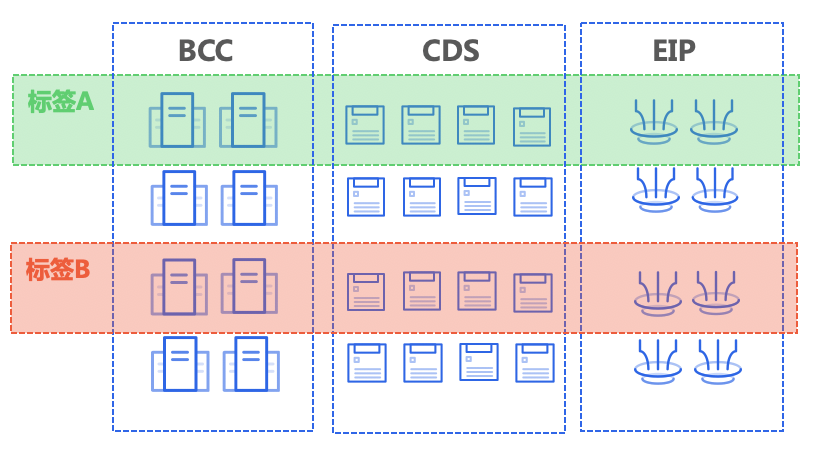
image.png

Common service scenarios

Scenario 1. Group management of different service resources for a large enterprise customer

A large enterprise needed to configure permissions for 60 BCC instances and 120 CDS disks for a new project. Before adopting tag-based authorization, staff had to manually maintain BCC-CDS disk relationships and assign resource permissions to multiple users, which significantly reduced efficiency. With tag-based authorization, users merely add the same tags to related resources when creating BCC or CDS. This allows permissions to be quickly assigned. Moreover, for any new BCC or CDS resources added later in this project, simply applying the same tag enables IAM users to automatically gain permissions for the new machines. This greatly enhances management efficiency.

Scenario 2: A large enterprise customer desires its IAM users to create CDN domain names and automatically obtain permissions for the created domain names.

An administrator of a large enterprise customer wishes to delegate domain name management permissions to IAM user accounts. The detailed requirements are as follows:

  1. IAM users can independently add domain names and automatically obtain permissions for the added domain names;
  2. Domain name resources are isolated between IAM users. For example, IAM User A cannot view domain names added by IAM User B without authorization;
  3. Primary users can view and manage all domain names added by IAM users;

Tag-based authorization can satisfy the above product requirements. The specific operation methods are as follows:

Step 1. Administrator user plans tags—e.g., assign IAM user a Key: department/Value: 123, and assign user B a key: department/Value: 456 to User B—then create these tags in tag management

Step 2. Administrator navigates to IAM Multi-User Access Control - Policy Management, clicks Create Policy, and selects the policy creation method as Tag-based Creation;

Step 3. The Administrator user fills in the basic information of the policy, naming it (e.g., policy_for_user_A_with_tag123). In permission configuration, select the tag key: department/Value: 123, select the service "Content Delivery Network CDN", select the operation Management Permission, and the resource scope will default to all resources with this tag attribute. Click OK to save;

Step4. Administrator user follows Step 3 process to create the policy_for_user_B_with_tag456 based on tag456

Step 5. The Administrator user creates IAM User A (e.g., UserA) and assigns the policy_for_user_A_with_tag123; the Administrator user also creates IAM User B (e.g., UserB) and assigns the policy_for_user_B_with_tag456

Step6. IAM User UserA signs in to the console, navigates to CDN, selects Domain Management - Add New Domain. For example, when adding the domain "cloud.baidu.com", at Tag in Step 3 in the wizard, the default bound tag key: department/Value: 123 is applied. Click OK to finish domain creation, granting IAM User UserA Permission to manage cloud.baidu.com, with no permissions for other domains. To grant UserA access to other domains, administrator user must provide additional authorization in IAM. The same applies to IAM User UserB.

Tag-based authorization

Essentially, tags are conditions or attributes of permission policies. Tag-based policies belong to user-defined policies and, in terms of permission types, fall under resource-based policies. The authorization evaluation logic when users are granted tag resource permissions aligns with [policy authorization evaluation logics](IAM/Operation guide/Permission Policies/Policy Authentication Evaluation Logic.md).

Previous
Strategy type
Next
Role Management