

IAM Role-based SSO
Configure IAM role-based SSO
Users can configure the SAML node on the enterprise IdP and Baidu AI Cloud SP External Account Access > IAM Role-based SSO to achieve single sign-on (SSO) from enterprise applications to Baidu AI Cloud using Baidu AI Cloud roles.
Prerequisites
- The enterprise IdP supports the SAML 2.0 protocol;
- Possess an activated Baidu AI Cloud account.
Configuration process
Configuring SAML-based single sign-on requires completing both IdP and SP configurations. IdP configuration includes basic setup, user attribute configuration, and metadata download, while SP configuration includes creating an identity service provider and configuring role carrier (for generating the final trust policy). This document adopts Microsoft Azure Active Directory (AAD) as the IdP to explain how to configure SAML IdP and Baidu AI Cloud SP.
Configure IdP
- Follow the process to register an Azure account;
- Sign in to the Azure portal and navigate to All Services > Azure Active Directory in the left sidebar;
-
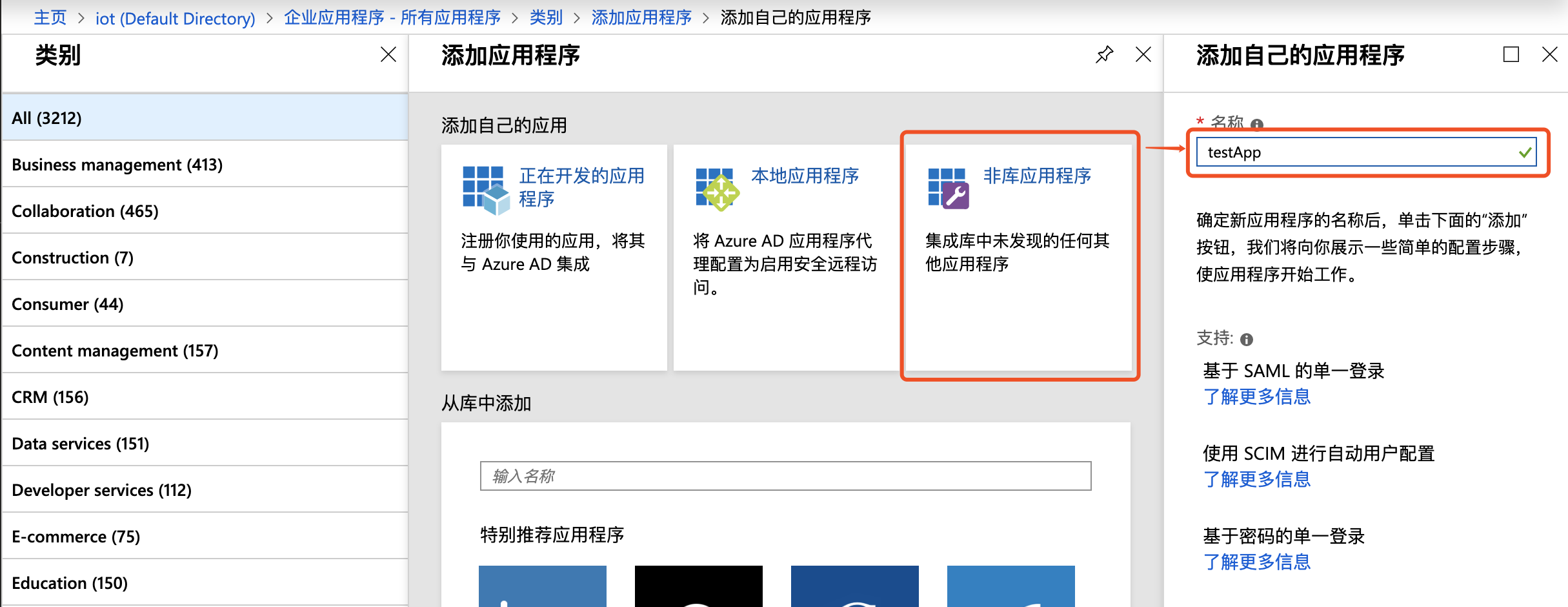
Click Enterprise Application > Create Application, select Non-library Application, enter the application name, and click Add to complete creation;
Note: Non-library applications require AAD Premium. Users may opt for a free trial version and decide whether to discontinue it after completing the configuration.
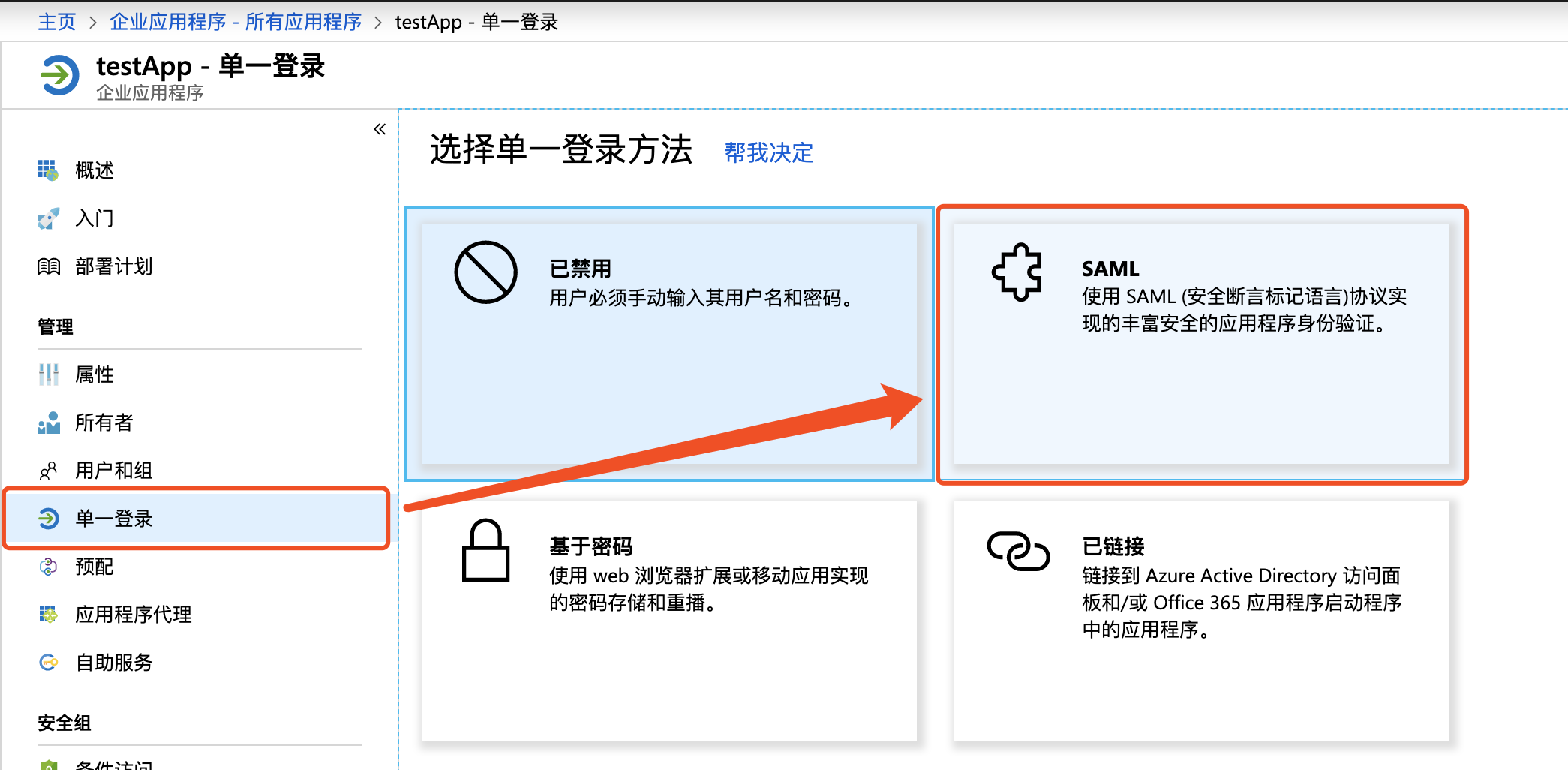
- Navigate to the application, select Single Sign-on > SAML;
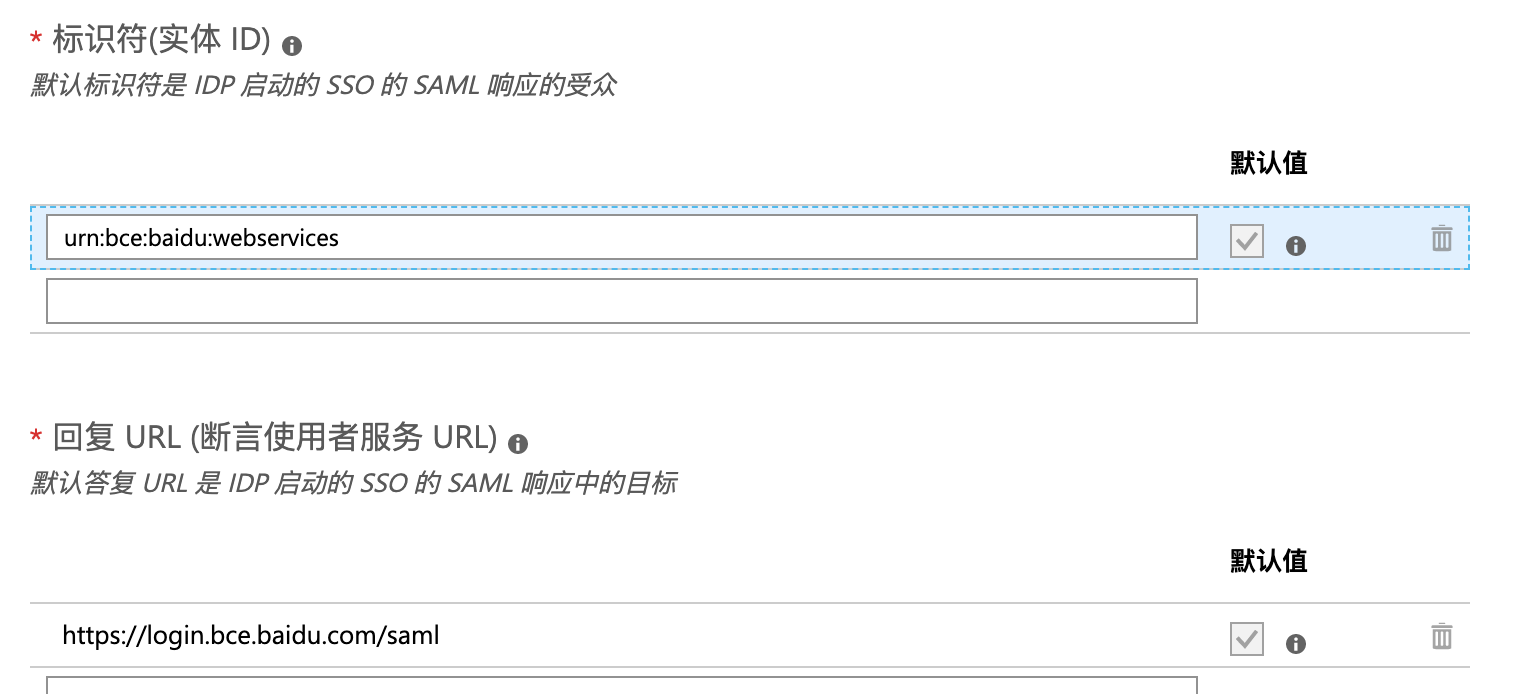
- In basic SAML configuration, click Edit button at the upper-right corner, configure the identifier (entity ID) and Reply URL (Assertion Consumer Service URL) fields as
urn:bce:baidu:webservicesandhttps://login.bce.baidu.com/saml
- In user attributes and fields, click the Edit button in the upper right corner to add the following user attribute fields:
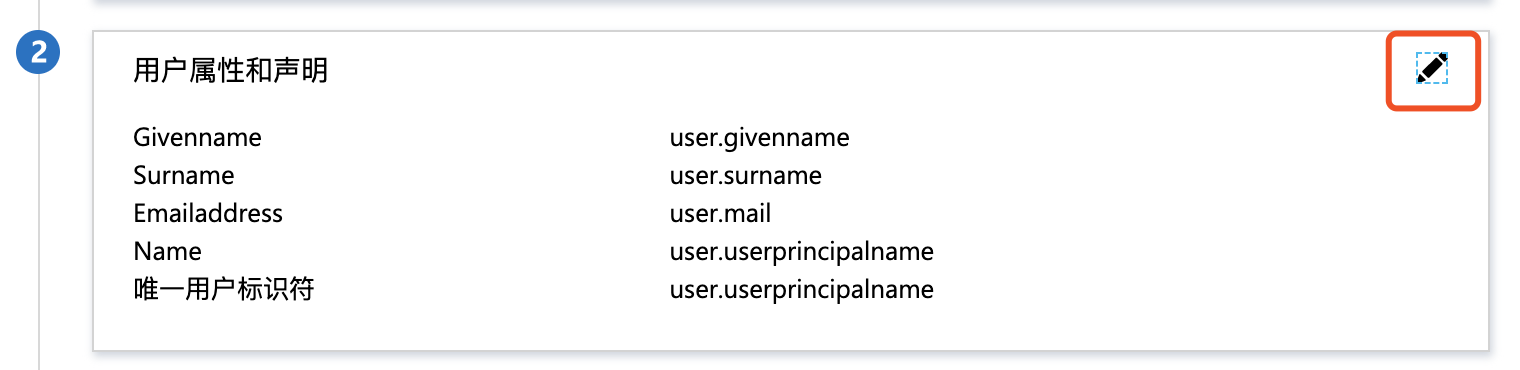
| Name | Source | Source attribute | Description |
|---|---|---|---|
https://bce.baidu.com/SAML/Attributes/Role |
Attribute | accountId:role/roleName, accountId:saml-provider/providerName | Replace the accountId field with the actual accountId in Baidu AI Cloud (obtained from the Baidu AI Cloud User Center), replace the roleName field with the role name field during federated login (configured in SP Role Management), such as BCCAdmin, and replace the providerName field with the IdP name, such as azure |
https://bce.baidu.com/SAML/Attributes/RoleSessionName |
Attribute | RoleSessionName | Replace RoleSessionName with desired display username in Baidu AI Cloud, such as User01 |
The above two fields are mandatory. Users may add additional user attribute fields as needed. For detailed configuration, refer to [SAML Assertion Configuration Guide for Local Identity Services](#Configuration instructions for SAML assertions in local identity Services)
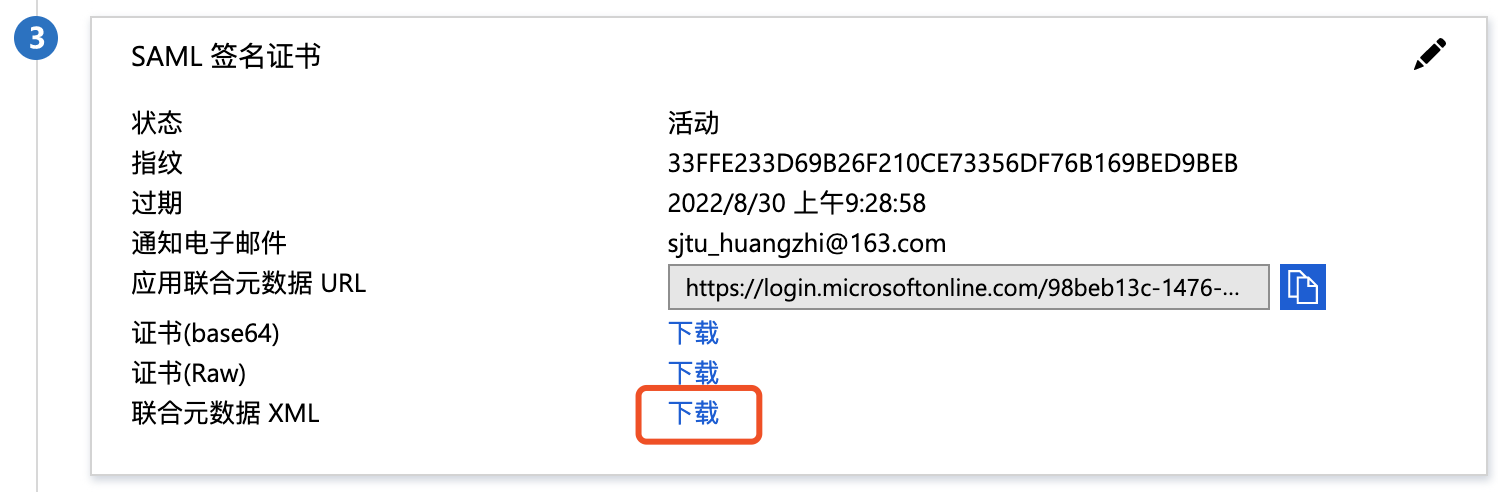
- In the SAML signing certificate, download the IdP SAML metadata, which signifies the completion of the IdP configuration.
Configure SP
Create SP identity provider
- Sign in to Baidu AI Cloud, move the cursor to the top-right corner, and navigate to Identity and Access Management > External Account Access > IAM Role-based SSO;
-
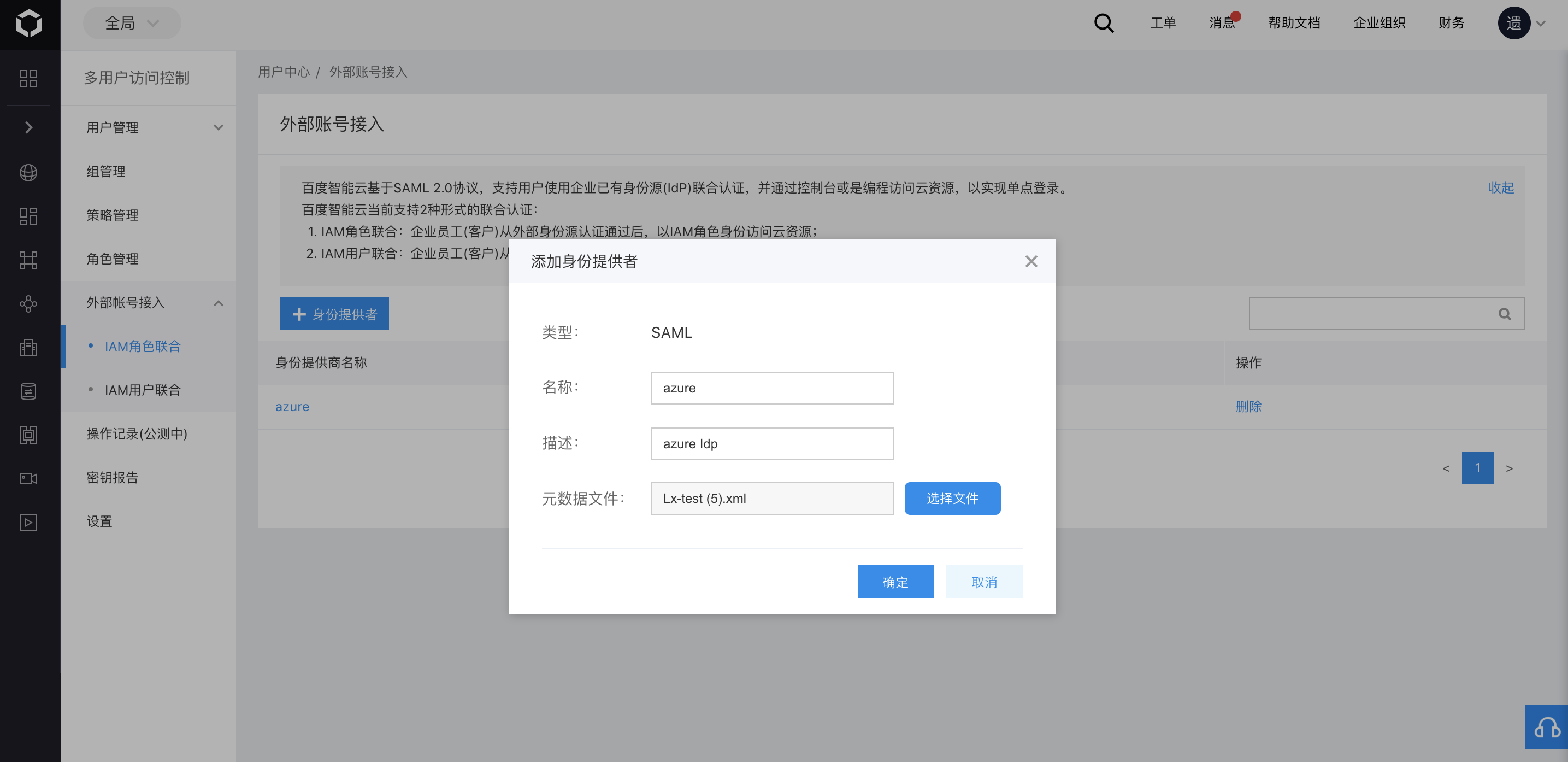
Click Add Identity Provider, fill in the name and description, import the SAML metadata downloaded in step 7 of the IdP configuration above, and then click OK to save;
Note: The identity provider name here must match the user attribute
providerNameconfigured in IdP. In this case, fill inazure;
Configure IAM roles and authorize permissions
From the left navigation bar, click Role Management to configure assumable roles for external identity SSO to Baidu AI Cloud. BCC administrator role is taken as an example
- Click Create New Role, fill in the role name such as "BCCAdmin with the description of BCC management role;
- In Role Carrier, select the principal type as External Account, and select the azure instance added in the previous step as the principal instance,
- Users can also set conditional restrictions for IdP to switch to Baidu AI Cloud. Currently supported attribute fields include saml:iss, saml:aud, saml:cn, saml:eduPersonAffiliation, and eduPersonPrincipalName. The purpose of adding restrictions is to enable more granular permission control. Single sign-on (SSO) to Baidu AI Cloud using the BCCAdmin Role can only occur when specific conditions are met.
- In Policy Management, grant BCCFullControlAccessPolicy to the current role, and then click Complete;
- If it is required to configure different roles for the current IdP, follow the above steps to continue the setup. When identities within the IdP perform SSO to Baidu AI Cloud, switch via the
https://bce.baidu.com/SAML/Attributes/Roleattribute field roleName.
At this stage, the user has successfully completed the configuration of Baidu AI Cloud SAML SP. Users can now return to Azure AD to test the single sign-on functionality.
Configuration instructions for SAML assertions in local identity Services
Basic configuration
Recipientfield in SubjectConfirmationData must be configured ashttps://login.bce.baidu.com/saml- Audience field in AudienceRestriction must be configured as
urn:bce:baidu:webservices - The attribute must contain an assertion named
https://bce.baidu.com/SAML/Attributes/Role, formatted as "accountId:role/roleName, accountId:saml-provider/providerName", where accountId should be replaced with the target account's actual AccountId, roleName configured as the role desired to assume when SSO to Baidu AI Cloud, and providerName configured as the identity provider name set in IAM Role-based SSO; - The attribute must contain an assertion named
https://bce.baidu.com/SAML/Attributes/RoleSessionName. RoleSessionName will be displayed in Baidu AI Cloud in the format of a string.
SAML assertion attributes
SAML assertion names correspond one-to-one with IdP trust policy attributes. Currently supported attributes in Baidu AI Cloud include: saml:iss, saml:aud, saml:cn, saml:eduPersonAffiliation, saml:eduPersonPrincipalName, their corresponding SAML attributes are:
| Name | Attribute meaning |
|---|---|
| saml:iss | Issuer field in the SAML assertion, optional |
| saml:aud | Audience field in the AudienceRestriction in the SAML assertion |
| saml:cn | urn:oid:2.5.4.3 attribute in the SAML assertion |
| saml: eduPersonAffiliation | urn:oid:1.3.6.1.4.1.5923.1.1.1.1 attribute in the SAML assertion |
| saml: eduPersonPrincipalName | urn:oid:1.3.6.1.4.1.5923.1.1.1.6 attribute in the SAML assertion |
Verify single sign-on
Prerequisites
The SAML configuration for both IdP and SP has been completed.
Guide
- Sign in to the azure portal and navigate to All Services > Azure Active Directory > Enterprise Applications > testApp;
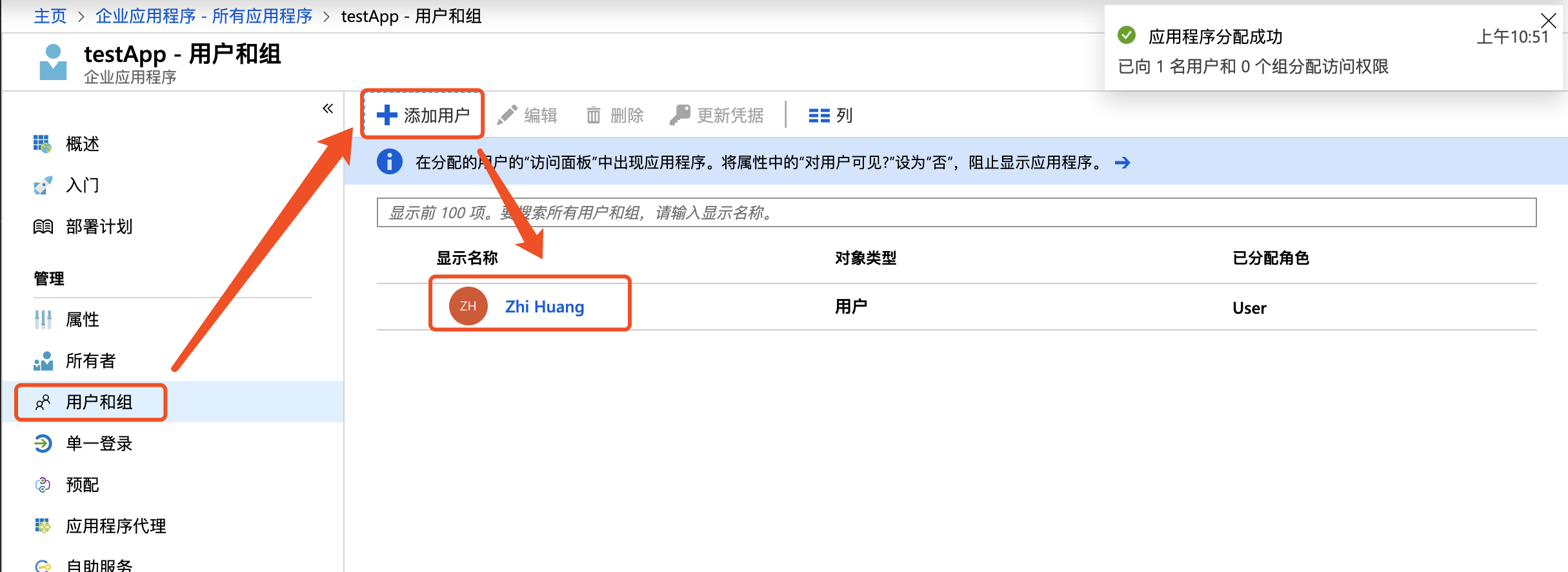
- Click Users and Groups - New User, and then authorize the users requiring single sign-on to the application;
- Click Single Sign-on, then click Validate, and select Sign in as Current User to test the redirection to the Baidu AI Cloud page;

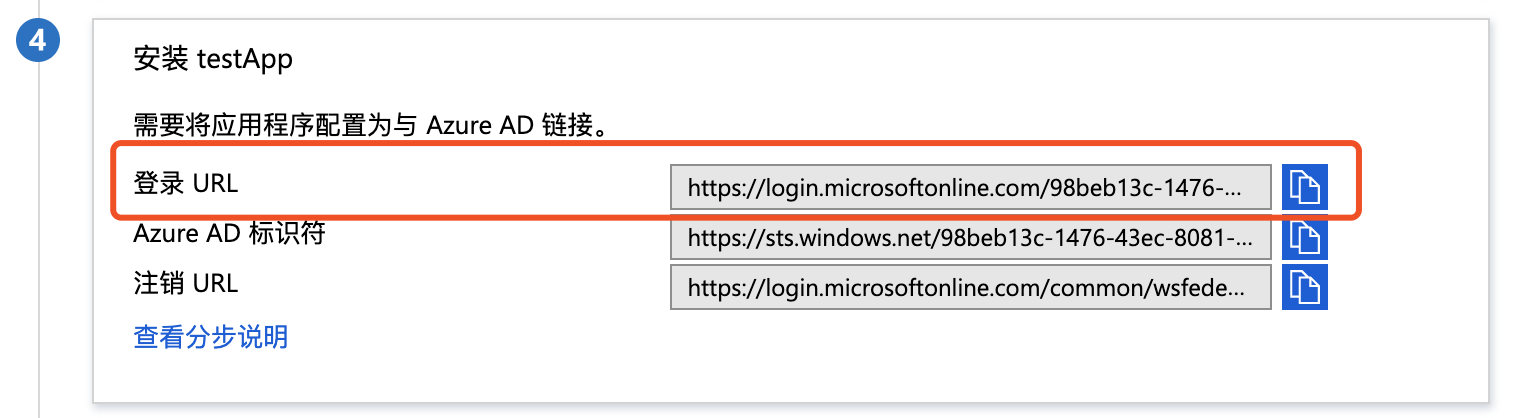
- To embed login links into enterprise applications, retrieve them directly at:
Note
During development, when redirecting to https://login.bce.baidu.com/saml, it is necessary to carry the information in SAMLResponse, which should specify the user's identity assertion.
1<RequestedAttribute isRequired="true" Name="https://bce.baidu.com/SAML/Attributes/Role" FriendlyName="RoleEntitlement"/>
2<RequestedAttribute isRequired="true" Name="https://bce.baidu.com/SAML/Attributes/RoleSessionName" FriendlyName="RoleSessionName"/>
These two attributes are mandatory, in particular
- The attribute
https://bce.baidu.com/SAML/Attributes/Rolerepresents the user's currently accessed account, role, and IdP name, formatted as "accountId:role/roleName, accountId:saml-provider/providerName". Here,accountIddenotes the actual account ID in Baidu AI Cloud;roleNameshould be populated with BCCAdmin as configured earlier, indicating SAML-authenticated users possess admin permissions;providerNamedenotes the name field of the external identity provider; - Attribute
https://bce.baidu.com/SAML/Attributes/RoleSessionNamespecifies the user's name displayed in Baidu AI Cloud console, which is also recorded in operation logs.