

Create Delivery Task
Updated at:2025-11-03
Taking the process of delivering the logstore "ng-log" to BOS as an example, this document introduces the specific operation of creating logshippers:
- Go to the Log Service page, click Data Processing, choose Delivery Management to access the Logshipper List page, and then select Create Logshipper to proceed to the Create Logshipper page.
- In the Task Information section, enter the task name as nginx_log without adding any tags.

-
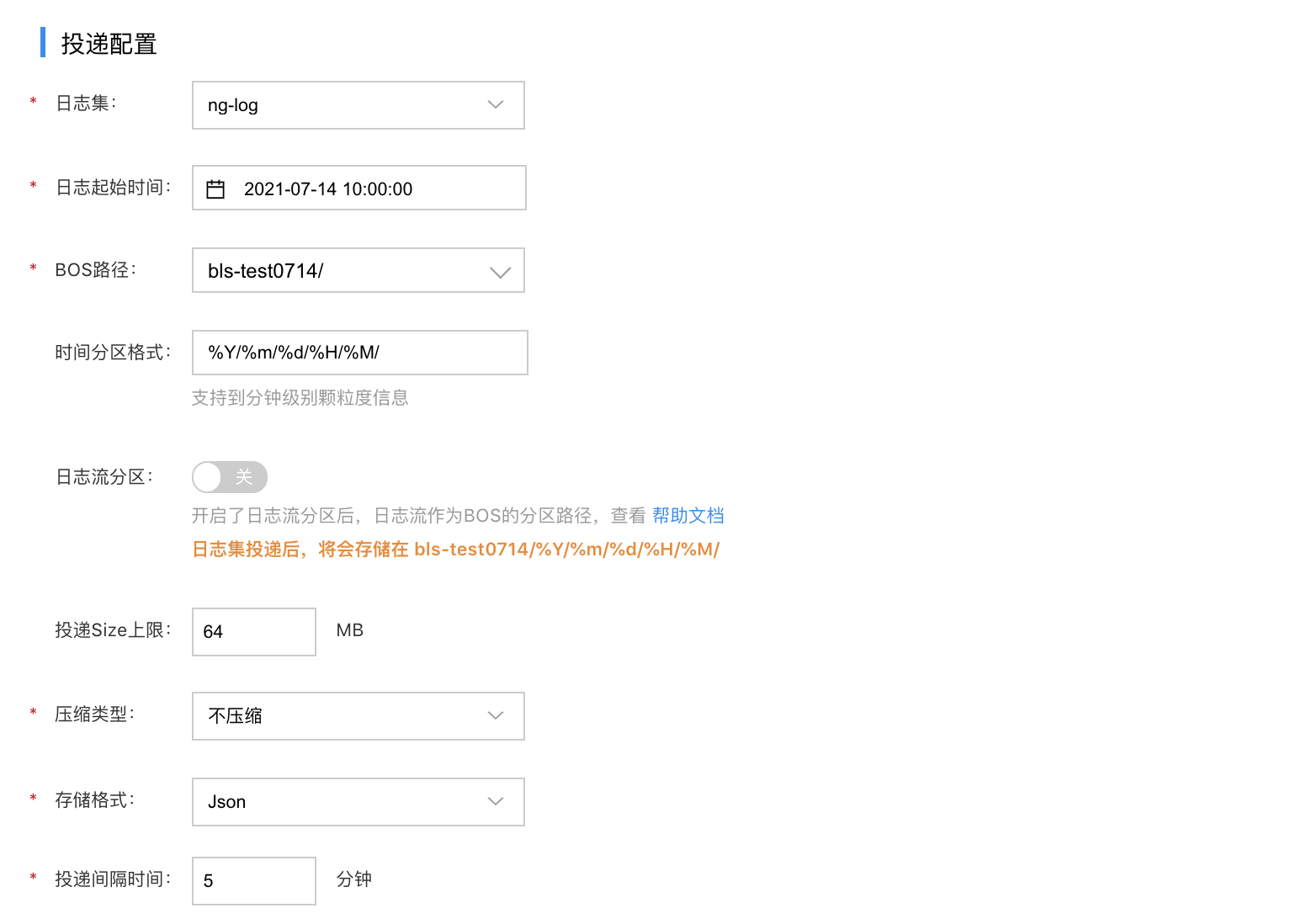
In the Logshipper Configuration zone, configure the following parameters:
- BOS path: enter bos://nginx-logs. If the bucket does not exist in BOS, please enter BOS to create it first.
- Logstore: Choose the logstore created earlier, named ng-log.
- Start time of log: select time: 2021-7-14 10:00:00.
- BOS Path: Choose the previously created bucket path: bls-test0714/.
- Time Partition Format: Use the default format: %Y/%m/%d/%H/%M/.
- Maximum Logshipper Size: Set the input limit to 64MB.
- Compression Type: Select "No Compression."
- Storage Format: Choose the JSON format.
- Logshipper Interval: Set the interval to 5 minutes.
- Click Save to finish configuring the logshipper.