Logset Management

BLS

  • Function Release Records
  • Product Description
    • Usage restrictions
    • Product Introduction
  • Product pricing
  • Quick Start
    • Introduction
    • Install agent
    • Create LogStore
    • Create Transmission Task
    • Log Analysis and Alerting
    • Create Delivery Task
  • Operation guide
    • Baidu Intelligent Cloud Environment Preparation
    • Overview
    • Identity and access management
    • Logset Management
    • Agent
      • Install Agent on Host
      • Install Agent in K8s Environment
      • Agent Management
      • Agent Release Version
      • Set Agent Startup Parameters
    • Log Collection
      • Transmission Task Collection
        • Create Transmission Task
        • Manage Transmission Task
      • Uploading Logs Using Kafka Protocol
    • Query analysis
      • Log query
      • SQL Syntax
      • Search Syntax
    • Dashboard
      • Overview
      • Management Dashboard
      • Management Dashboard Charts
    • Alarm management
      • Alert Overview
      • Alarm strategy
        • Management alarm strategy
        • Trigger conditions
      • Alarm history
      • Alert execution statistics
      • Alarm notification
        • Alarm Notification Template
        • Alarm callback
    • Data processing
      • Log Delivery
        • Log Delivery Overview
        • Create Delivery Task
        • Manage Delivery Task
      • Scheduled SQL Analysis
        • Manage Scheduled SQL Analysis Task
        • Create Scheduled SQL Analysis Task
      • Real-Time Consumption
      • Data processing
        • Data processing
          • Overview of data processing functions
          • Process control function
          • Mapping enrichment functions
          • Event operation functions
          • Field operation functions
          • Field value extraction functions
    • Log Applications
      • Intelligent Diagnostics
  • Best Practices
    • Use Year-Over-Year and Month-Over-Month as Alert Trigger Conditions
    • BLS Integration with Kibana
    • Use BLS via Grafana
  • Development Guide
    • API Reference
      • API function release records
      • API Overview
      • Interface Overview
      • General Description
      • Service domain
      • Common error codes
      • Terminology
      • Project Related APIs
        • Create Project
        • Update Project
        • Describe Project
        • Delete Project
        • List Project
      • LogStore Related APIs
        • Create LogStore
        • Update LogStore
        • Delete LogStore
        • Describe LogStore
        • Batch Get LogStore
        • List LogStore
      • LogStream Related APIs
        • List LogStream
      • LogRecord Related APIs
        • Push log PushLogRecord
        • Obtain logrecord PullLogRecord
        • Search analysis log QueryLogRecord
        • Histogram API QueryLogHistogram
      • Fast Query FastQuery Related Interfaces
        • Create Fast Query CreateFastQuery
        • Update Fast Query UpdateFastQuery
        • Delete Fast Query DeleteFastQuery
        • Get Fast Query Details DescribeFastQuery
        • Get Fast Query List ListFastQuery
      • Index Related APIs
        • Create Index
        • Update Index
        • Delete Index
        • Describe Index
      • Log Shipper LogShipper Related Interfaces
        • Create Log Shipper
        • Update Log Shipper
        • Set Single Log Shipper Status
        • Delete Single Log Shipper
        • Bulk Delete Log Shipper
        • List Log Shipper Records
        • List Log Shipper
        • Bulk Set Log Shipper Status
        • Get Log Shipper
      • Alarm-Related Interfaces
        • CreateAlarmPolicy
        • UpdateAlarmPolicy
        • DeleteAlarmPolicy
        • ValidateAlarmCondition
        • ValidateAlarmPolicySQL
        • EnableAlarmPolicy
        • DescribeAlarmRecord
        • DisableAlarmPolicy
        • DescribeAlarmPolicy
        • ListAlarmPolicy
        • ListAlarmRecord
        • ListAlarmExecutionStats
        • ListAlarmExecutions
      • LogStore Template-Related Interfaces
        • CreateLogStoreTemplate
        • UpdateLogStoreTemplate
        • DeleteLogStoreTemplates
        • DescribeLogStoreTemplates
        • DescribeLogStoreTemplate
      • Download Log Download Related Interfaces
        • Create Download Task CreateDownloadTask
        • Get Download Task List ListDownloadTask
        • Delete Download Task DeleteDownloadTask
        • Get Download Task Address GetDownloadTaskLink
        • Get Download Task Details DescribeDownloadTask
      • LogAlarm Related Interfaces
        • SetLogAlarmStatus
        • deleteLogAlarm
        • createLogAlarm
        • listLogAlarm
        • updateLogAlarm
        • BulkDeleteLogAlarm
        • PreviewAlarmLogRecord
        • getLogAlarm
        • BulkSetLogAlarmStatus
      • Transmission Task Related Interfaces
        • Create Task CreateTask
        • UpdateTask
      • Interfaces Compatible with Elasticsearch
        • ResolveIndex
        • FieldCaps
        • TermsEnum
        • AsyncSearch
    • SDK Reference
      • Go SDK
        • Overview
        • Initialization
        • Version Release Records
        • Project Operations
        • LogStore Operations
        • Install the SDK Package
        • LogStream Operations
        • LogRecord Operations
        • FastQuery Operations
        • LogShipper Operations
        • Index Operations
        • Download Task Operations
      • Java SDK
        • Overview
        • Install the SDK Package
        • LogRecord Operations
      • iOS SDK
        • Overview
        • Quick start
        • Version Release Records
      • Android SDK
        • Overview
        • Quick start
        • Version Release Records
      • Android & iOS SDK Download
      • SDK Privacy Policy
      • SDK Developer Personal Information Protection Compliance Guide
    • Importing SLS Collection Configuration
  • FAQs
    • Common Questions Overview
    • Fault-related questions
    • Configuration-related questions
  • Log Service Level Agreement SLA
All documents
menu
No results found, please re-enter

BLS

  • Function Release Records
  • Product Description
    • Usage restrictions
    • Product Introduction
  • Product pricing
  • Quick Start
    • Introduction
    • Install agent
    • Create LogStore
    • Create Transmission Task
    • Log Analysis and Alerting
    • Create Delivery Task
  • Operation guide
    • Baidu Intelligent Cloud Environment Preparation
    • Overview
    • Identity and access management
    • Logset Management
    • Agent
      • Install Agent on Host
      • Install Agent in K8s Environment
      • Agent Management
      • Agent Release Version
      • Set Agent Startup Parameters
    • Log Collection
      • Transmission Task Collection
        • Create Transmission Task
        • Manage Transmission Task
      • Uploading Logs Using Kafka Protocol
    • Query analysis
      • Log query
      • SQL Syntax
      • Search Syntax
    • Dashboard
      • Overview
      • Management Dashboard
      • Management Dashboard Charts
    • Alarm management
      • Alert Overview
      • Alarm strategy
        • Management alarm strategy
        • Trigger conditions
      • Alarm history
      • Alert execution statistics
      • Alarm notification
        • Alarm Notification Template
        • Alarm callback
    • Data processing
      • Log Delivery
        • Log Delivery Overview
        • Create Delivery Task
        • Manage Delivery Task
      • Scheduled SQL Analysis
        • Manage Scheduled SQL Analysis Task
        • Create Scheduled SQL Analysis Task
      • Real-Time Consumption
      • Data processing
        • Data processing
          • Overview of data processing functions
          • Process control function
          • Mapping enrichment functions
          • Event operation functions
          • Field operation functions
          • Field value extraction functions
    • Log Applications
      • Intelligent Diagnostics
  • Best Practices
    • Use Year-Over-Year and Month-Over-Month as Alert Trigger Conditions
    • BLS Integration with Kibana
    • Use BLS via Grafana
  • Development Guide
    • API Reference
      • API function release records
      • API Overview
      • Interface Overview
      • General Description
      • Service domain
      • Common error codes
      • Terminology
      • Project Related APIs
        • Create Project
        • Update Project
        • Describe Project
        • Delete Project
        • List Project
      • LogStore Related APIs
        • Create LogStore
        • Update LogStore
        • Delete LogStore
        • Describe LogStore
        • Batch Get LogStore
        • List LogStore
      • LogStream Related APIs
        • List LogStream
      • LogRecord Related APIs
        • Push log PushLogRecord
        • Obtain logrecord PullLogRecord
        • Search analysis log QueryLogRecord
        • Histogram API QueryLogHistogram
      • Fast Query FastQuery Related Interfaces
        • Create Fast Query CreateFastQuery
        • Update Fast Query UpdateFastQuery
        • Delete Fast Query DeleteFastQuery
        • Get Fast Query Details DescribeFastQuery
        • Get Fast Query List ListFastQuery
      • Index Related APIs
        • Create Index
        • Update Index
        • Delete Index
        • Describe Index
      • Log Shipper LogShipper Related Interfaces
        • Create Log Shipper
        • Update Log Shipper
        • Set Single Log Shipper Status
        • Delete Single Log Shipper
        • Bulk Delete Log Shipper
        • List Log Shipper Records
        • List Log Shipper
        • Bulk Set Log Shipper Status
        • Get Log Shipper
      • Alarm-Related Interfaces
        • CreateAlarmPolicy
        • UpdateAlarmPolicy
        • DeleteAlarmPolicy
        • ValidateAlarmCondition
        • ValidateAlarmPolicySQL
        • EnableAlarmPolicy
        • DescribeAlarmRecord
        • DisableAlarmPolicy
        • DescribeAlarmPolicy
        • ListAlarmPolicy
        • ListAlarmRecord
        • ListAlarmExecutionStats
        • ListAlarmExecutions
      • LogStore Template-Related Interfaces
        • CreateLogStoreTemplate
        • UpdateLogStoreTemplate
        • DeleteLogStoreTemplates
        • DescribeLogStoreTemplates
        • DescribeLogStoreTemplate
      • Download Log Download Related Interfaces
        • Create Download Task CreateDownloadTask
        • Get Download Task List ListDownloadTask
        • Delete Download Task DeleteDownloadTask
        • Get Download Task Address GetDownloadTaskLink
        • Get Download Task Details DescribeDownloadTask
      • LogAlarm Related Interfaces
        • SetLogAlarmStatus
        • deleteLogAlarm
        • createLogAlarm
        • listLogAlarm
        • updateLogAlarm
        • BulkDeleteLogAlarm
        • PreviewAlarmLogRecord
        • getLogAlarm
        • BulkSetLogAlarmStatus
      • Transmission Task Related Interfaces
        • Create Task CreateTask
        • UpdateTask
      • Interfaces Compatible with Elasticsearch
        • ResolveIndex
        • FieldCaps
        • TermsEnum
        • AsyncSearch
    • SDK Reference
      • Go SDK
        • Overview
        • Initialization
        • Version Release Records
        • Project Operations
        • LogStore Operations
        • Install the SDK Package
        • LogStream Operations
        • LogRecord Operations
        • FastQuery Operations
        • LogShipper Operations
        • Index Operations
        • Download Task Operations
      • Java SDK
        • Overview
        • Install the SDK Package
        • LogRecord Operations
      • iOS SDK
        • Overview
        • Quick start
        • Version Release Records
      • Android SDK
        • Overview
        • Quick start
        • Version Release Records
      • Android & iOS SDK Download
      • SDK Privacy Policy
      • SDK Developer Personal Information Protection Compliance Guide
    • Importing SLS Collection Configuration
  • FAQs
    • Common Questions Overview
    • Fault-related questions
    • Configuration-related questions
  • Log Service Level Agreement SLA
  • Document center
  • arrow
  • BLS
  • arrow
  • Operation guide
  • arrow
  • Logset Management
Table of contents on this page
  • Overview
  • Project and LogStore list
  • Project management
  • Create LogStore
  • LogStore details
  • Edit LogStore
  • Delete LogStore
  • Usage restrictions

Logset Management

Updated at:2025-11-03

Overview

LogStore is the basic unit for log data collection, storage, search, and analysis. Generally, a LogStore corresponds to a specific application or service (with consistent log structures). Projects can also be used to group multiple LogStores!

Project and LogStore list

  • By default, all LogStores are displayed. Switch projects on the left panel to view the LogStore list under specific projects. The operations column allows quick actions such as log query, index configuration, and delivery management.
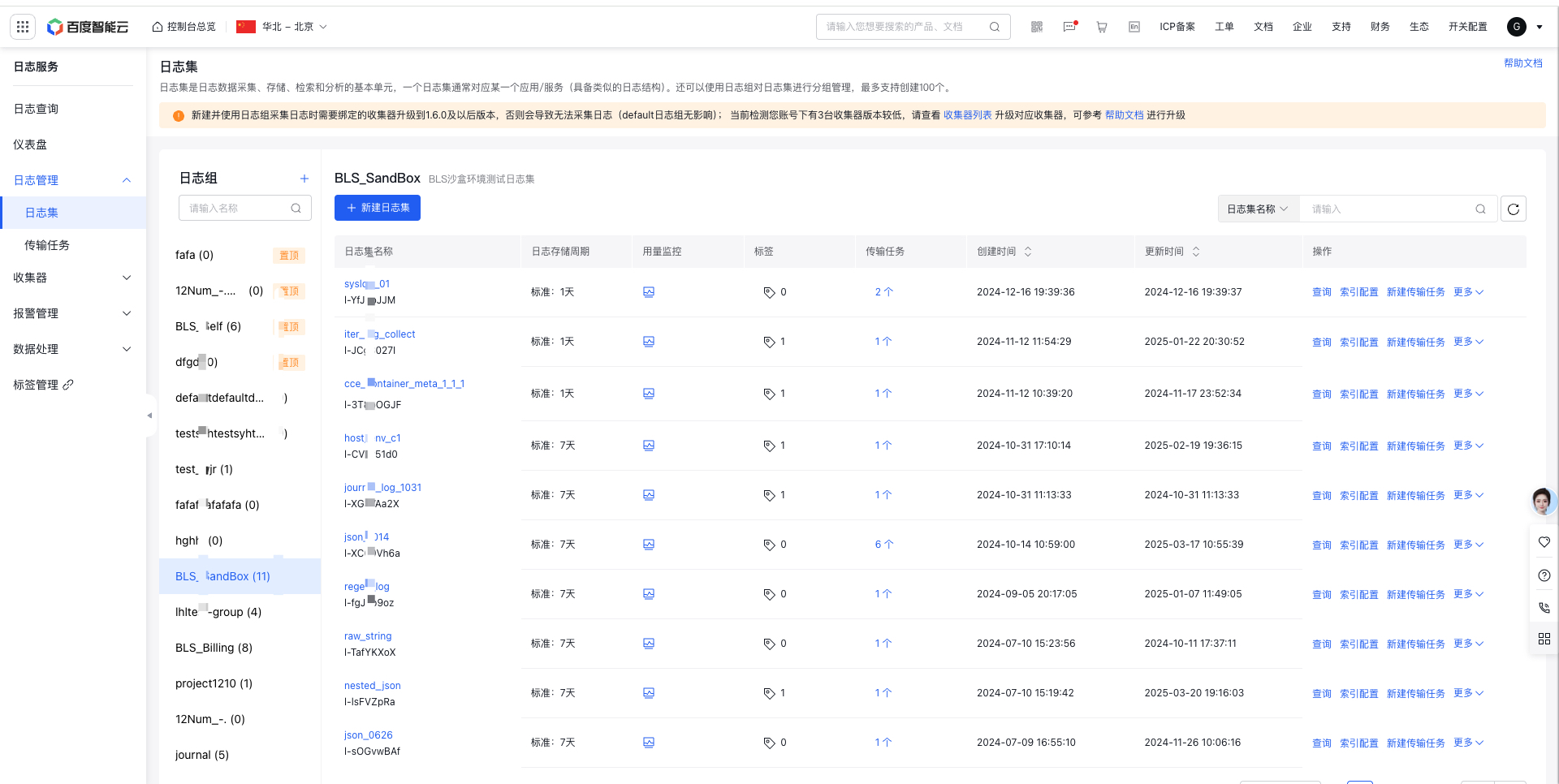
image.png

  • Logstore monitoring: Click the Logstore Usage Monitoring icon in the list to display the monitor data of log write traffic, log index traffic, log storage, index storage, request, write count and other metrics of this logstore. You can click the alarm policy on the right to jump to the BCM side to configure alarms

    • The traffic metric summary data represents the total data within the selected time period
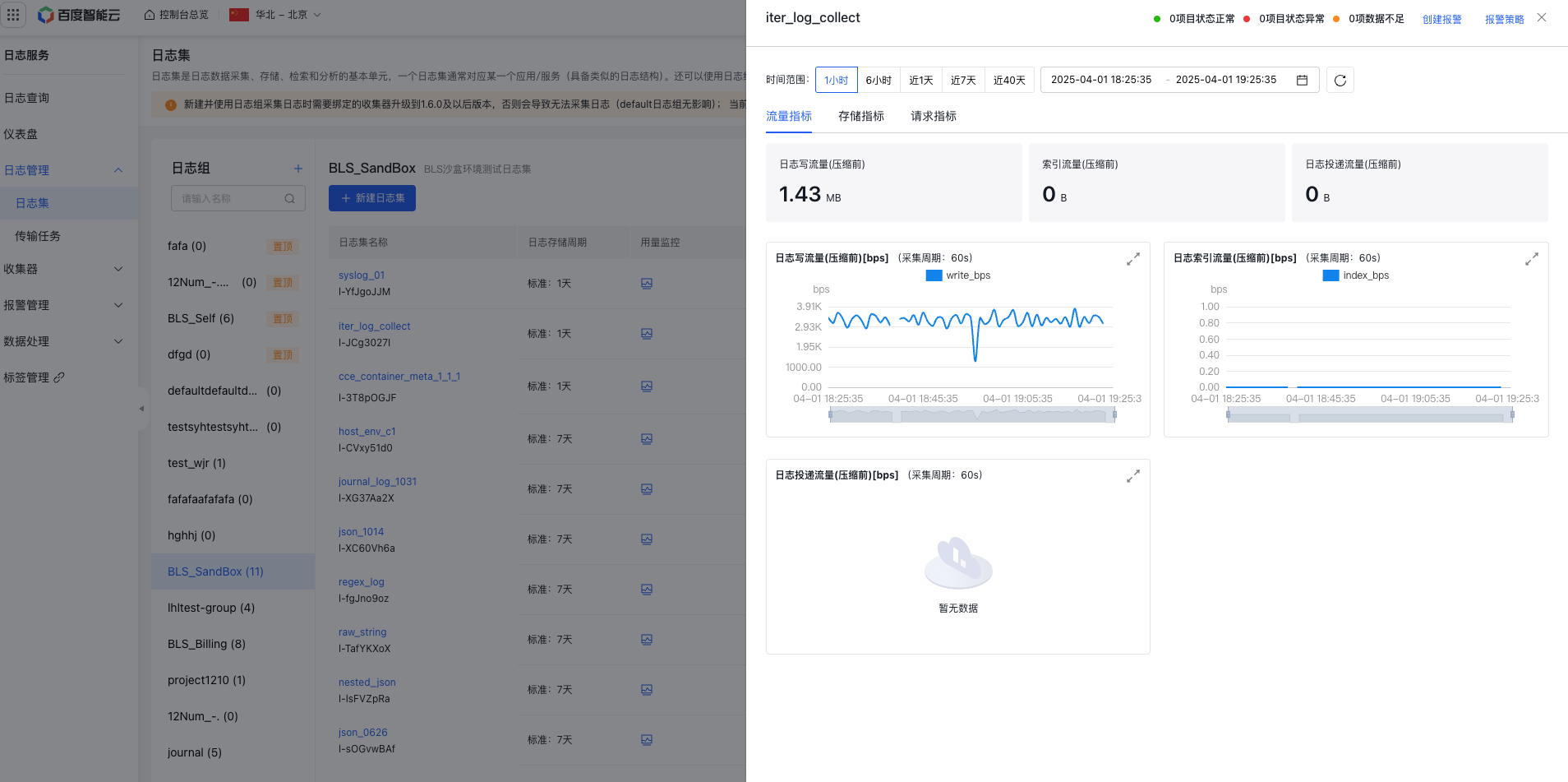
    image.png

    • The stored metric summary data is the last data within the selected time period
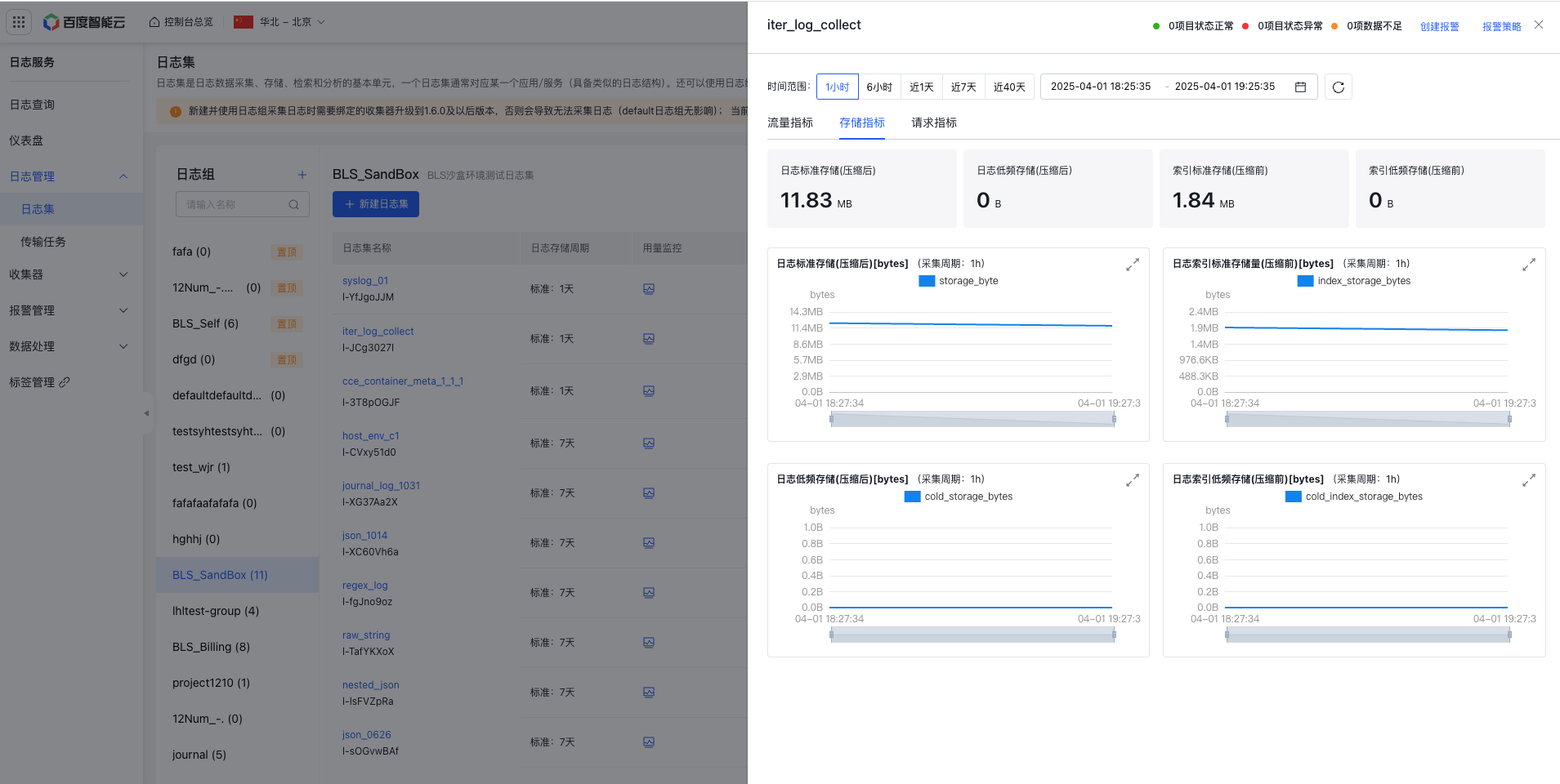
    image.png

    • The request count summary data represents the total data within the selected time period. Request failure rate = total 5xx request count / total request count
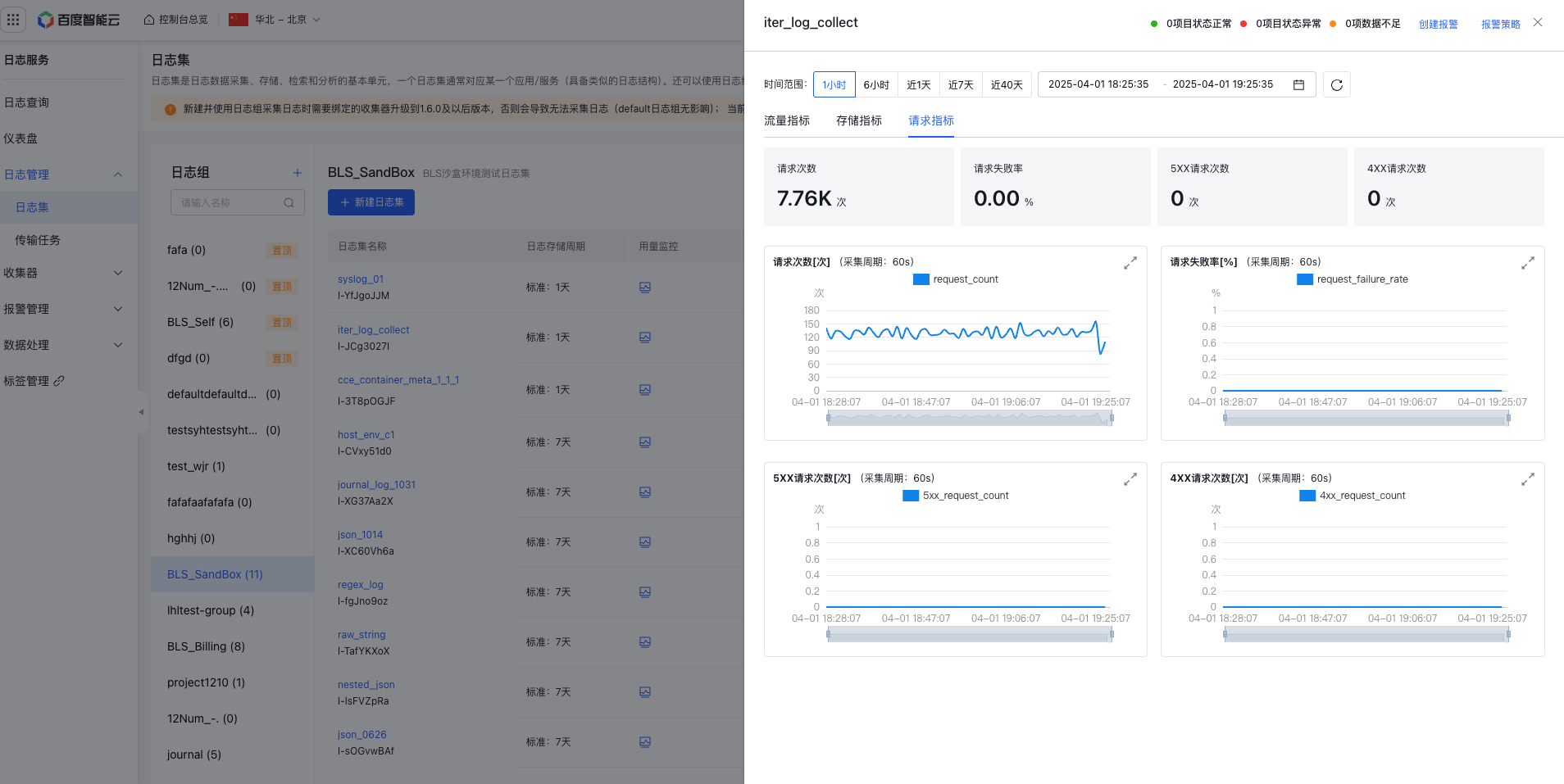
    image.png

    • The write metric summary data represents the total data within the selected time period
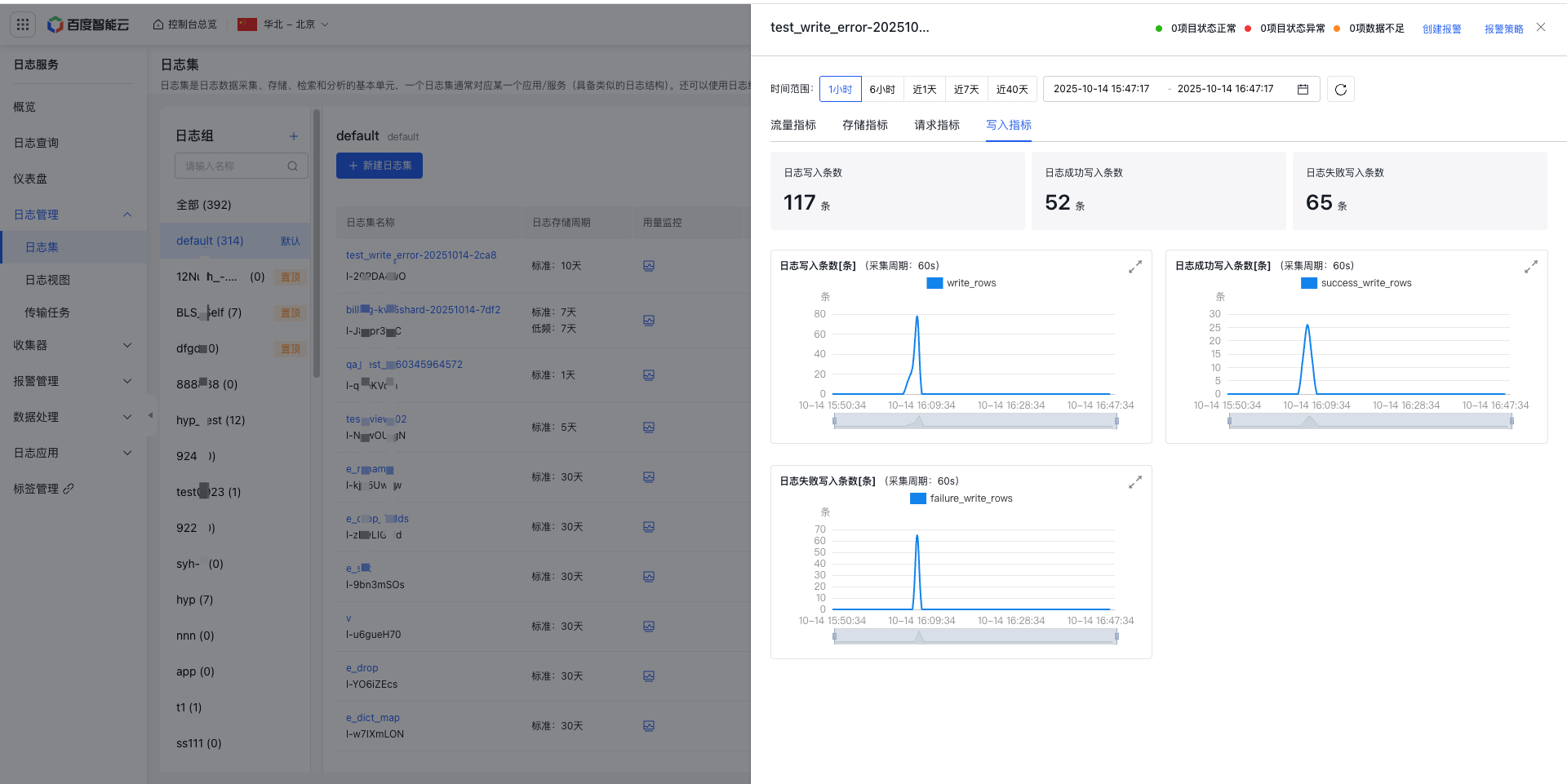
    image.png

Project management

  • Introduce a feature to manage projects—use projects to organize LogStores into groups and support the creation of up to 100 projects.
  • Support operations such as creating, editing, deleting, and topping projects

    Description: When creating and using a new project for log collection, the bound agent must be upgraded to version 1.6.0 or later; otherwise, log collection will fail (default projects are unaffected). Refer to help documentation for upgrade
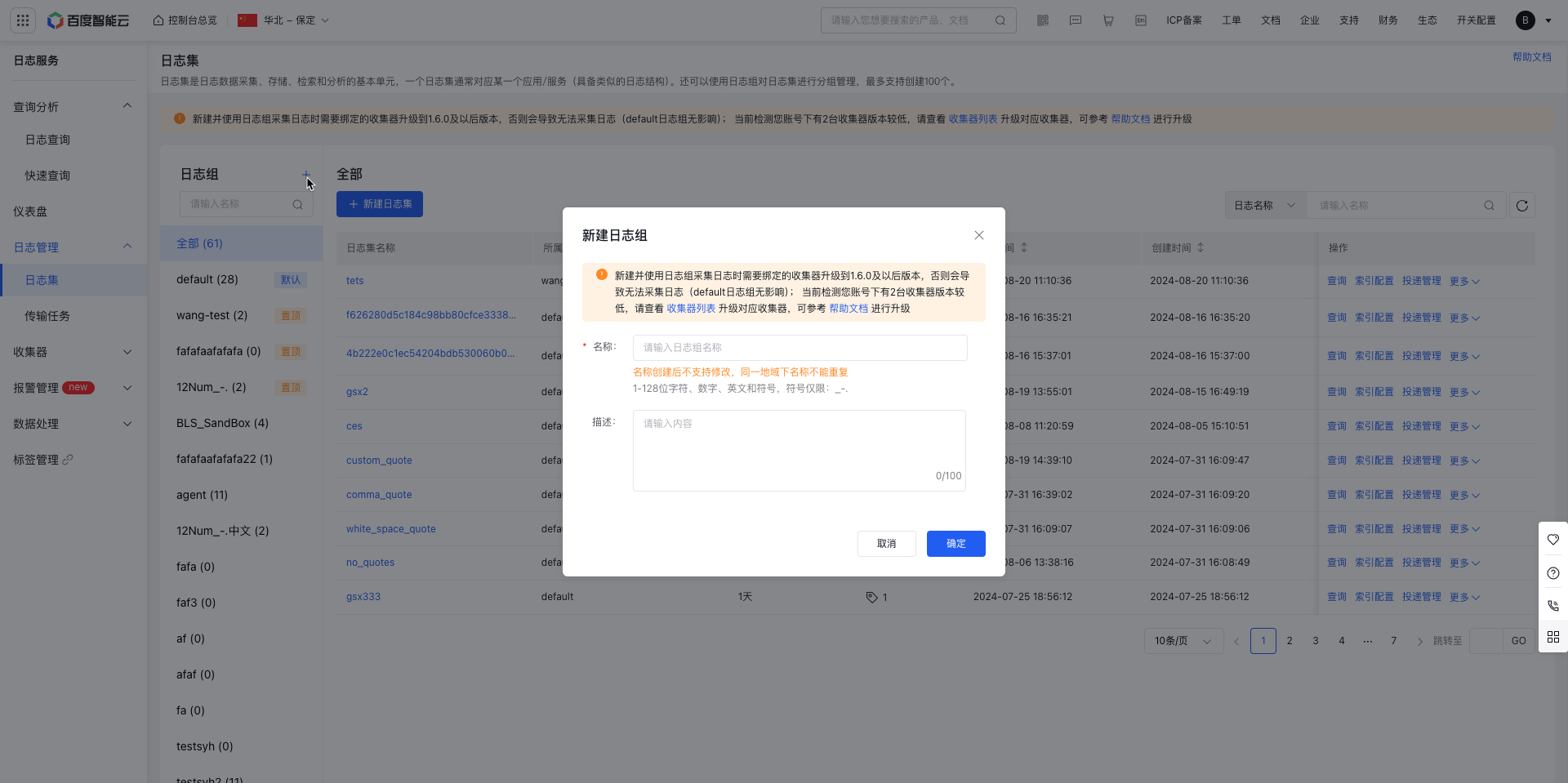
image.png

Create LogStore

LogStore functions as the storage unit for log data. Users can input log data into a specific LogStore using an Agent or API.

  1. Sign in to the Baidu AI Cloud official website, click Management Console in the top-right corner to quickly access the console interface.
  2. Go to Product Service > Baidu Log Service (BLS) to navigate to the Logging -> LogStore page.
  3. Click Create LogStore to open the Create LogStore page, and then fill in configuration information including:

    • Name: Specify the LogStore name (1-128 characters), using numbers, English letters, and permitted symbols (_ - .). Ensure the name is unique within the same region, as names cannot be changed after creation.
    • Select the project to be bound: By default, you may create a new project for association binding
    • Shard Configuration: Each shard supports data writes at a rate of 5 MB/s. Adjust the number of read-write shards based on your requirements. You can enable automatic splitting, which allows the system to split shards dynamically based on traffic. Read-write shards are billed per occupied unit. Please plan accordingly, considering log traffic. Cost: RMB 0.04 per shard per day, with a free credit of 31 shard-days per month per region. For example:

      If the daily read-write Shard count per region is 1, it can last for 31 days.
      If the daily read-write Shard count per region is 3, then 3 * 10 days = 30 (Shards*days) < 31 (Shards*days). The first 10 days of the month are free, and charges for read-write Shards will be generated starting from the 11th day.

    • Tag: Tags can be bound to classify and manage LogStore
    • Storage period: Support customizable configuration for 1-3,650 days or permanent retention
    • Log tiering: For storage periods greater than 7 days, logs in standard storage can be configured to tier to infrequent access storage, which has lower costs (infrequent access storage: RMB 0.005/GB/day, standard storage: RMB 0.0115/GB/day). Modifying the log tiering period supports converting standard storage to infrequent access storage. Currently, restoring data from infrequent access storage to standard storage is not supported, for example:
Plain Text
1    1. Scenario I: Modifying standard storage to infrequent access storage. On the day of modification, standard storage will be converted to infrequent access storage
2     * For example: 10-day standard - 7-day standard + 3-day infrequent access
3       *On the day of modification: Logs with a retention period of 7-10 days are immediately converted to infrequent access storage
4    2. Scenario II: Modifying infrequent access storage to standard storage. After modification, infrequent access storage data will gradually decrease over time and will not be converted to standard storage data
5    * For example: 7-day standard + 3-day infrequent access - 10-day standard
6      * On the day of modification: 7-day standard + 3-day infrequent access
7      * Modified on Day 2: 8-day standard + 2-day infrequent access
8      * Modified on Day 3: 9-day standard + 1-day infrequent access
9      * Modified on Day 4: 10-day standard
10    3. Scenario III: Modifying infrequent access storage to standard storage while reducing the total storage period. On the day of modification, infrequent access storage data for the reduced period is directly discarded, and the remaining infrequent access storage data will gradually decrease over time
11     *For example: 7-day standard + 5-day infrequent access - 10-day standard
12      * On the day of modification: 7-day standard + 3-day infrequent access (discard 2-day infrequent access storage immediately upon modification)
13      * Modified on Day 2: 8-day standard + 2-day infrequent access
14      * Modified on Day 3: 9-day standard + 1-day infrequent access
15      * Modified on Day 4: 10-day standard
  1. Click "OK" after configuration to complete the creation of the LogStore.
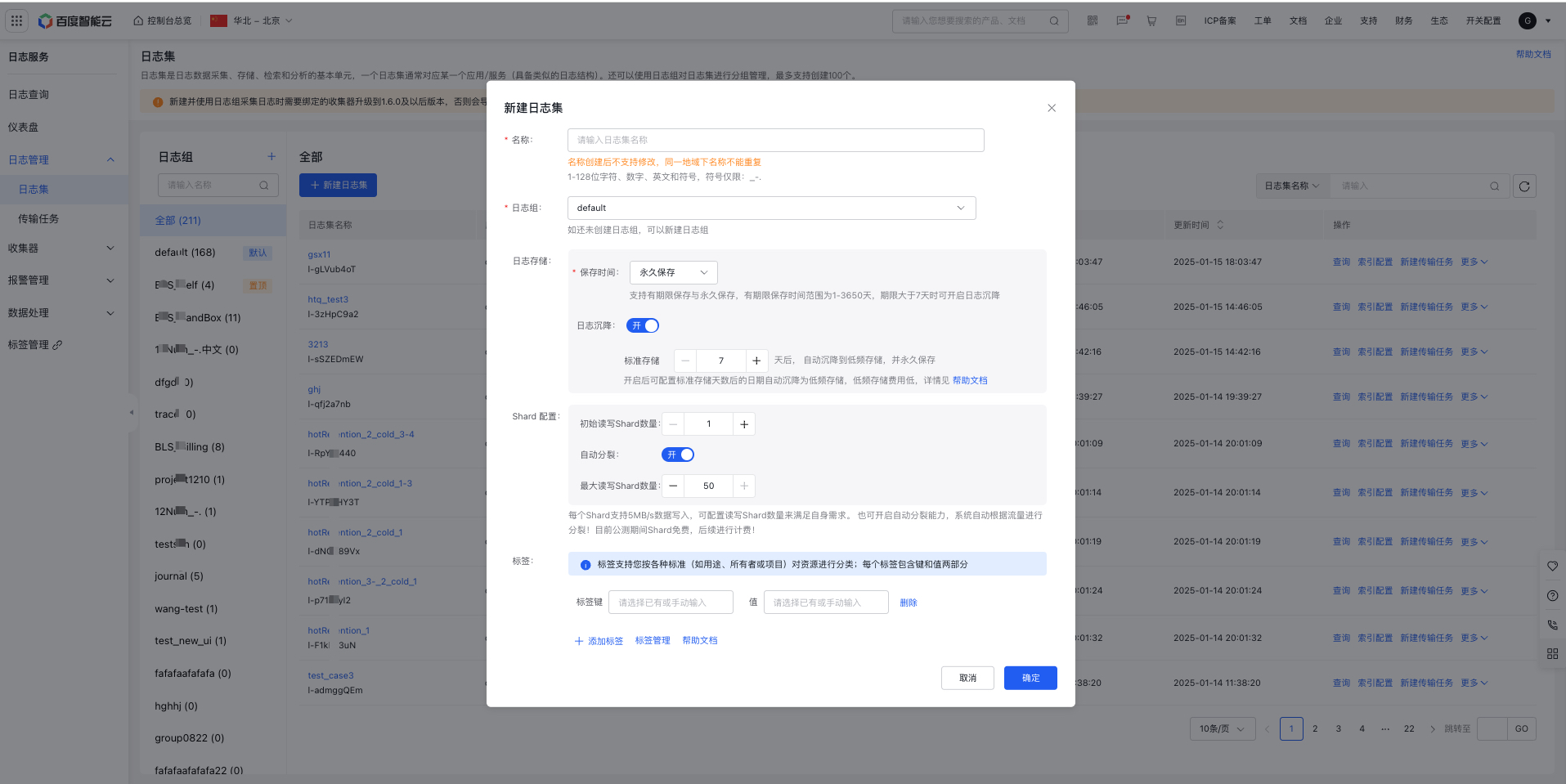
image.png

LogStore details

The LogStore details display LogStore configuration information and shard list contents. The shard list shows each shard's status, creation time, write-stop time, etc. The read-write shard count can be manually modified

Description

  • Increasing read-write shard count will add corresponding shards to the list below
  • Reducing read-write shard count changes the status of removed shards to read-only
  • Modifying read-write shard count may cause delays. Click the Refresh button on the right to synchronize with the latest data
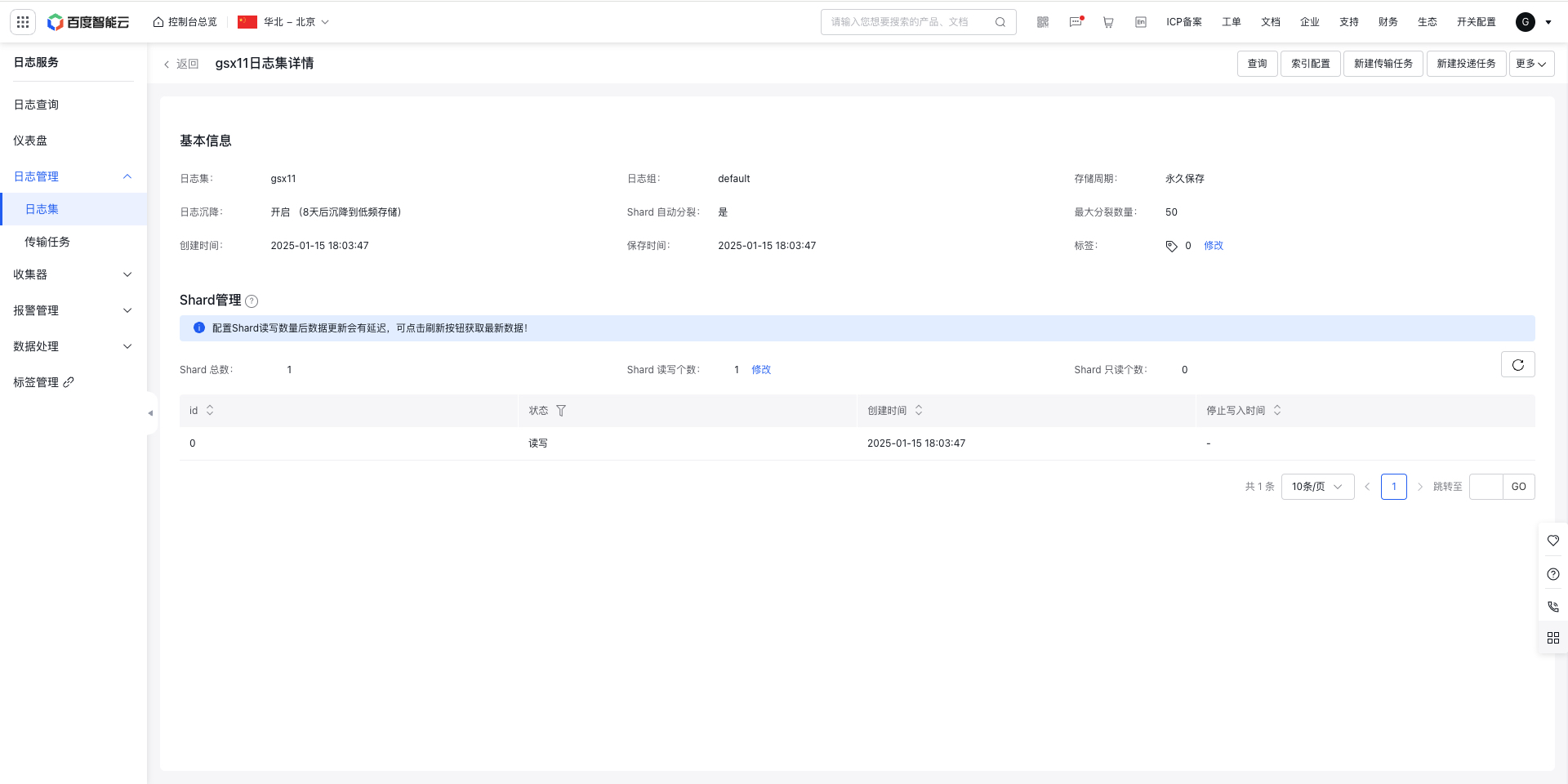
image.png

Edit LogStore

Click the "Edit" button in the operation column of the LogStore list to modify the storage duration and enable or disable automatic shard splitting for the existing LogStore.

Description

  • Changes to the storage period will take effect immediately upon saving.
  • If the storage period of LogStore is shortened, the system will delete the log data beyond the storage period according to the new storage period
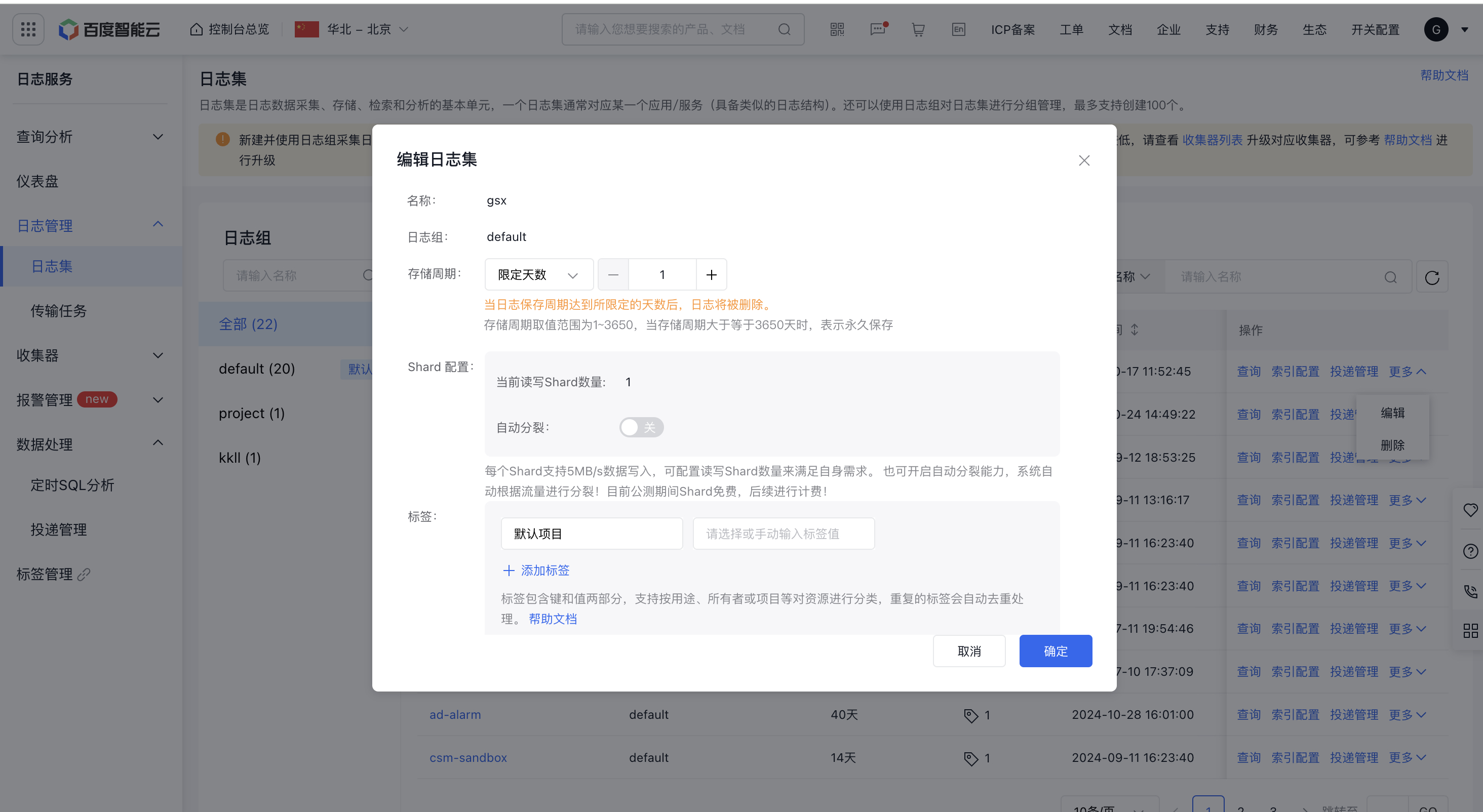
image.png

Delete LogStore

Click "Delete" in the operations column to trigger a confirmation dialog. Please note that deleted LogStores and their data cannot be recovered.

Usage restrictions

The following usage restrictions apply to projects and LogStores:

  • Project: Each account ID can create up to 100 project groups. To request a higher limit, submit a support ticket.
  • LogStore: A maximum of 200 LogStores can be created under each project group. To request a higher limit, submit a support ticket.
  • Log write: Maximum 100 MB/s or 1000 times/s
  • Log reading: Maximum 50 MB/s or 10 times/s
  • Read-Write Shard: Each read-write shard supports data writing at 5 MB/s. Up to 50 shards can be configured.
  • Batch Processing: Each batch can handle up to 1 MB of data.

Previous
Identity and access management
Next
Agent