Log Analysis and Alerting

BLS

  • Function Release Records
  • Product Description
    • Usage restrictions
    • Product Introduction
  • Product pricing
  • Quick Start
    • Introduction
    • Install agent
    • Create LogStore
    • Create Transmission Task
    • Log Analysis and Alerting
    • Create Delivery Task
  • Operation guide
    • Baidu Intelligent Cloud Environment Preparation
    • Overview
    • Identity and access management
    • Logset Management
    • Agent
      • Install Agent on Host
      • Install Agent in K8s Environment
      • Agent Management
      • Agent Release Version
      • Set Agent Startup Parameters
    • Log Collection
      • Transmission Task Collection
        • Create Transmission Task
        • Manage Transmission Task
      • Uploading Logs Using Kafka Protocol
    • Query analysis
      • Log query
      • SQL Syntax
      • Search Syntax
    • Dashboard
      • Overview
      • Management Dashboard
      • Management Dashboard Charts
    • Alarm management
      • Alert Overview
      • Alarm strategy
        • Management alarm strategy
        • Trigger conditions
      • Alarm history
      • Alert execution statistics
      • Alarm notification
        • Alarm Notification Template
        • Alarm callback
    • Data processing
      • Log Delivery
        • Log Delivery Overview
        • Create Delivery Task
        • Manage Delivery Task
      • Scheduled SQL Analysis
        • Manage Scheduled SQL Analysis Task
        • Create Scheduled SQL Analysis Task
      • Real-Time Consumption
      • Data processing
        • Data processing
          • Overview of data processing functions
          • Process control function
          • Mapping enrichment functions
          • Event operation functions
          • Field operation functions
          • Field value extraction functions
    • Log Applications
      • Intelligent Diagnostics
  • Best Practices
    • Use Year-Over-Year and Month-Over-Month as Alert Trigger Conditions
    • BLS Integration with Kibana
    • Use BLS via Grafana
  • Development Guide
    • API Reference
      • API function release records
      • API Overview
      • Interface Overview
      • General Description
      • Service domain
      • Common error codes
      • Terminology
      • Project Related APIs
        • Create Project
        • Update Project
        • Describe Project
        • Delete Project
        • List Project
      • LogStore Related APIs
        • Create LogStore
        • Update LogStore
        • Delete LogStore
        • Describe LogStore
        • Batch Get LogStore
        • List LogStore
      • LogStream Related APIs
        • List LogStream
      • LogRecord Related APIs
        • Push log PushLogRecord
        • Obtain logrecord PullLogRecord
        • Search analysis log QueryLogRecord
        • Histogram API QueryLogHistogram
      • Fast Query FastQuery Related Interfaces
        • Create Fast Query CreateFastQuery
        • Update Fast Query UpdateFastQuery
        • Delete Fast Query DeleteFastQuery
        • Get Fast Query Details DescribeFastQuery
        • Get Fast Query List ListFastQuery
      • Index Related APIs
        • Create Index
        • Update Index
        • Delete Index
        • Describe Index
      • Log Shipper LogShipper Related Interfaces
        • Create Log Shipper
        • Update Log Shipper
        • Set Single Log Shipper Status
        • Delete Single Log Shipper
        • Bulk Delete Log Shipper
        • List Log Shipper Records
        • List Log Shipper
        • Bulk Set Log Shipper Status
        • Get Log Shipper
      • Alarm-Related Interfaces
        • CreateAlarmPolicy
        • UpdateAlarmPolicy
        • DeleteAlarmPolicy
        • ValidateAlarmCondition
        • ValidateAlarmPolicySQL
        • EnableAlarmPolicy
        • DescribeAlarmRecord
        • DisableAlarmPolicy
        • DescribeAlarmPolicy
        • ListAlarmPolicy
        • ListAlarmRecord
        • ListAlarmExecutionStats
        • ListAlarmExecutions
      • LogStore Template-Related Interfaces
        • CreateLogStoreTemplate
        • UpdateLogStoreTemplate
        • DeleteLogStoreTemplates
        • DescribeLogStoreTemplates
        • DescribeLogStoreTemplate
      • Download Log Download Related Interfaces
        • Create Download Task CreateDownloadTask
        • Get Download Task List ListDownloadTask
        • Delete Download Task DeleteDownloadTask
        • Get Download Task Address GetDownloadTaskLink
        • Get Download Task Details DescribeDownloadTask
      • LogAlarm Related Interfaces
        • SetLogAlarmStatus
        • deleteLogAlarm
        • createLogAlarm
        • listLogAlarm
        • updateLogAlarm
        • BulkDeleteLogAlarm
        • PreviewAlarmLogRecord
        • getLogAlarm
        • BulkSetLogAlarmStatus
      • Transmission Task Related Interfaces
        • Create Task CreateTask
        • UpdateTask
      • Interfaces Compatible with Elasticsearch
        • ResolveIndex
        • FieldCaps
        • TermsEnum
        • AsyncSearch
    • SDK Reference
      • Go SDK
        • Overview
        • Initialization
        • Version Release Records
        • Project Operations
        • LogStore Operations
        • Install the SDK Package
        • LogStream Operations
        • LogRecord Operations
        • FastQuery Operations
        • LogShipper Operations
        • Index Operations
        • Download Task Operations
      • Java SDK
        • Overview
        • Install the SDK Package
        • LogRecord Operations
      • iOS SDK
        • Overview
        • Quick start
        • Version Release Records
      • Android SDK
        • Overview
        • Quick start
        • Version Release Records
      • Android & iOS SDK Download
      • SDK Privacy Policy
      • SDK Developer Personal Information Protection Compliance Guide
    • Importing SLS Collection Configuration
  • FAQs
    • Common Questions Overview
    • Fault-related questions
    • Configuration-related questions
  • Log Service Level Agreement SLA
All documents
menu
No results found, please re-enter

BLS

  • Function Release Records
  • Product Description
    • Usage restrictions
    • Product Introduction
  • Product pricing
  • Quick Start
    • Introduction
    • Install agent
    • Create LogStore
    • Create Transmission Task
    • Log Analysis and Alerting
    • Create Delivery Task
  • Operation guide
    • Baidu Intelligent Cloud Environment Preparation
    • Overview
    • Identity and access management
    • Logset Management
    • Agent
      • Install Agent on Host
      • Install Agent in K8s Environment
      • Agent Management
      • Agent Release Version
      • Set Agent Startup Parameters
    • Log Collection
      • Transmission Task Collection
        • Create Transmission Task
        • Manage Transmission Task
      • Uploading Logs Using Kafka Protocol
    • Query analysis
      • Log query
      • SQL Syntax
      • Search Syntax
    • Dashboard
      • Overview
      • Management Dashboard
      • Management Dashboard Charts
    • Alarm management
      • Alert Overview
      • Alarm strategy
        • Management alarm strategy
        • Trigger conditions
      • Alarm history
      • Alert execution statistics
      • Alarm notification
        • Alarm Notification Template
        • Alarm callback
    • Data processing
      • Log Delivery
        • Log Delivery Overview
        • Create Delivery Task
        • Manage Delivery Task
      • Scheduled SQL Analysis
        • Manage Scheduled SQL Analysis Task
        • Create Scheduled SQL Analysis Task
      • Real-Time Consumption
      • Data processing
        • Data processing
          • Overview of data processing functions
          • Process control function
          • Mapping enrichment functions
          • Event operation functions
          • Field operation functions
          • Field value extraction functions
    • Log Applications
      • Intelligent Diagnostics
  • Best Practices
    • Use Year-Over-Year and Month-Over-Month as Alert Trigger Conditions
    • BLS Integration with Kibana
    • Use BLS via Grafana
  • Development Guide
    • API Reference
      • API function release records
      • API Overview
      • Interface Overview
      • General Description
      • Service domain
      • Common error codes
      • Terminology
      • Project Related APIs
        • Create Project
        • Update Project
        • Describe Project
        • Delete Project
        • List Project
      • LogStore Related APIs
        • Create LogStore
        • Update LogStore
        • Delete LogStore
        • Describe LogStore
        • Batch Get LogStore
        • List LogStore
      • LogStream Related APIs
        • List LogStream
      • LogRecord Related APIs
        • Push log PushLogRecord
        • Obtain logrecord PullLogRecord
        • Search analysis log QueryLogRecord
        • Histogram API QueryLogHistogram
      • Fast Query FastQuery Related Interfaces
        • Create Fast Query CreateFastQuery
        • Update Fast Query UpdateFastQuery
        • Delete Fast Query DeleteFastQuery
        • Get Fast Query Details DescribeFastQuery
        • Get Fast Query List ListFastQuery
      • Index Related APIs
        • Create Index
        • Update Index
        • Delete Index
        • Describe Index
      • Log Shipper LogShipper Related Interfaces
        • Create Log Shipper
        • Update Log Shipper
        • Set Single Log Shipper Status
        • Delete Single Log Shipper
        • Bulk Delete Log Shipper
        • List Log Shipper Records
        • List Log Shipper
        • Bulk Set Log Shipper Status
        • Get Log Shipper
      • Alarm-Related Interfaces
        • CreateAlarmPolicy
        • UpdateAlarmPolicy
        • DeleteAlarmPolicy
        • ValidateAlarmCondition
        • ValidateAlarmPolicySQL
        • EnableAlarmPolicy
        • DescribeAlarmRecord
        • DisableAlarmPolicy
        • DescribeAlarmPolicy
        • ListAlarmPolicy
        • ListAlarmRecord
        • ListAlarmExecutionStats
        • ListAlarmExecutions
      • LogStore Template-Related Interfaces
        • CreateLogStoreTemplate
        • UpdateLogStoreTemplate
        • DeleteLogStoreTemplates
        • DescribeLogStoreTemplates
        • DescribeLogStoreTemplate
      • Download Log Download Related Interfaces
        • Create Download Task CreateDownloadTask
        • Get Download Task List ListDownloadTask
        • Delete Download Task DeleteDownloadTask
        • Get Download Task Address GetDownloadTaskLink
        • Get Download Task Details DescribeDownloadTask
      • LogAlarm Related Interfaces
        • SetLogAlarmStatus
        • deleteLogAlarm
        • createLogAlarm
        • listLogAlarm
        • updateLogAlarm
        • BulkDeleteLogAlarm
        • PreviewAlarmLogRecord
        • getLogAlarm
        • BulkSetLogAlarmStatus
      • Transmission Task Related Interfaces
        • Create Task CreateTask
        • UpdateTask
      • Interfaces Compatible with Elasticsearch
        • ResolveIndex
        • FieldCaps
        • TermsEnum
        • AsyncSearch
    • SDK Reference
      • Go SDK
        • Overview
        • Initialization
        • Version Release Records
        • Project Operations
        • LogStore Operations
        • Install the SDK Package
        • LogStream Operations
        • LogRecord Operations
        • FastQuery Operations
        • LogShipper Operations
        • Index Operations
        • Download Task Operations
      • Java SDK
        • Overview
        • Install the SDK Package
        • LogRecord Operations
      • iOS SDK
        • Overview
        • Quick start
        • Version Release Records
      • Android SDK
        • Overview
        • Quick start
        • Version Release Records
      • Android & iOS SDK Download
      • SDK Privacy Policy
      • SDK Developer Personal Information Protection Compliance Guide
    • Importing SLS Collection Configuration
  • FAQs
    • Common Questions Overview
    • Fault-related questions
    • Configuration-related questions
  • Log Service Level Agreement SLA
  • Document center
  • arrow
  • BLS
  • arrow
  • Quick Start
  • arrow
  • Log Analysis and Alerting
Table of contents on this page
  • Log query analysis
  • Create Alarm Strategy
  • Configure basic information
  • Configure alarm rules
  • Configure dashboards
  • Add dashboard
  • View and configure dashboard

Log Analysis and Alerting

Updated at:2025-11-03

Once LogStore and its corresponding transmission task are set up, you can utilize the log query function for analysis, configure log alarms for notifications, and create visual dashboards for enhanced monitoring.

Log query analysis

  1. Sign in to the Baidu AI Cloud official website, click Management Console in the top-right corner to quickly access the console interface.
  2. Go to Product Service > Baidu Log Service (BLS) and navigate to Query Analysis -> Log Query page.
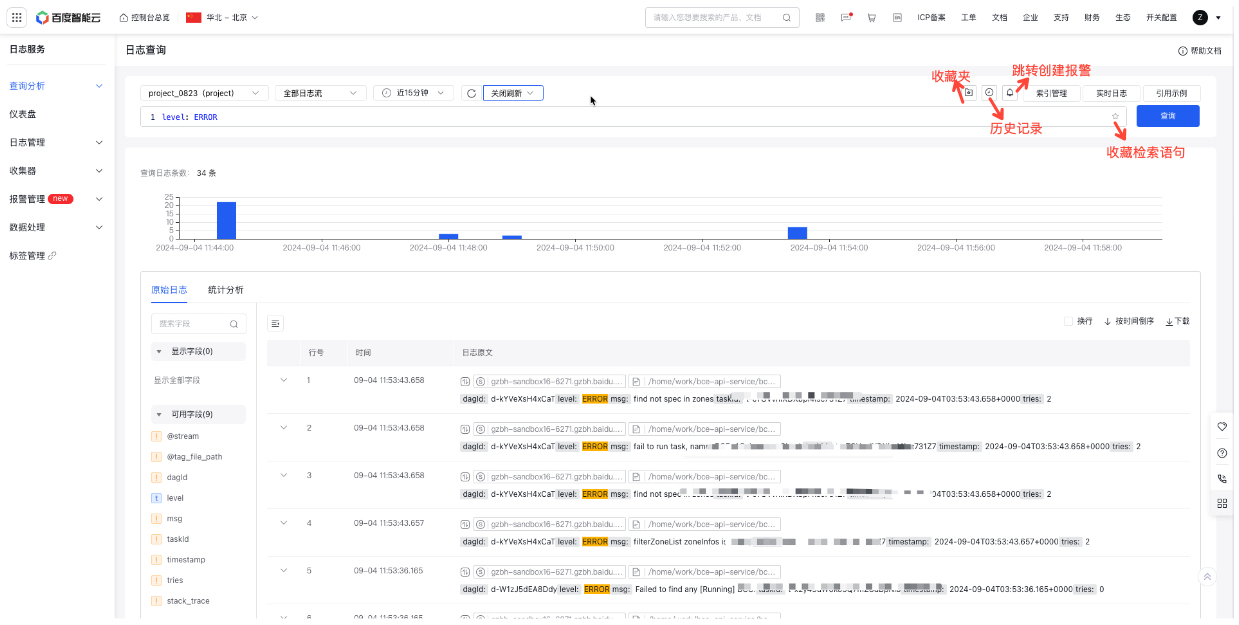
image.png

  1. Choose LogStore, logstream, and the desired time range. Enter SQL statements in the SQL editor or refer to example SQL statements, then click Query to execute the statement and view results below.

    • LogStore Selection: Choose from user-created LogStores in the current region or manually input a LogStore name to filter.
    • Logstream Selection: Specify the logstream within the chosen LogStore. Leave blank to query all logstreams.
  2. Auto-refresh: By default, data query results are not automatically refreshed. When the auto-refresh period is selected, the query statement will run automatically and refresh the results at regular intervals.
  3. Preferred query option: If you often need to revisit the results of this query, click the Favorite button to save the current query to your favorites. Access your favorites to automatically run the query and view the results.
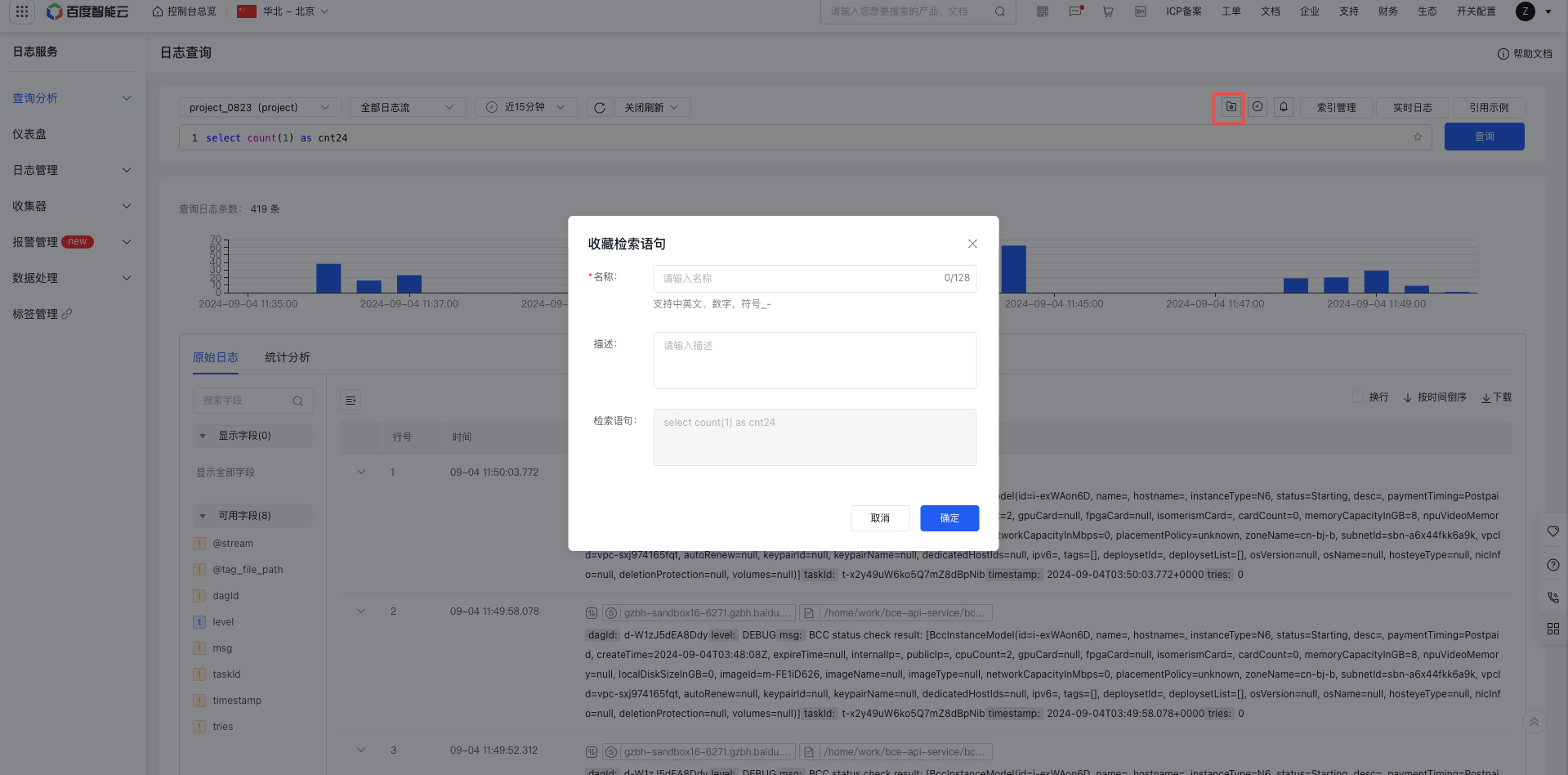
image.png

  1. History Records: Open the History Records pop-up to quickly select and run recently used query statements, with results automatically displayed.
  2. Quick jump alarm: Click the Jump Alarm icon to bring LogStore, and the query statement can quickly redirect to the Alarm Creation page to configure the alarm

Create Alarm Strategy

Log in to Baidu AI Cloud, navigate to Log Service, and click -> in the left-hand menu to open the Alarm Strategy List page. Then, click "Create Alarm Strategy" to configure and set it up.

Configure basic information

In "Basic Information," please enter the alarm strategy name. In "Monitor Object", select the LogStore to be monitored. Supports two methods: sharing LogStores across execution statements or selecting LogStores individually for each execution statement. The former supports selecting multiple LogStores (up to 10), while the latter is single-choice
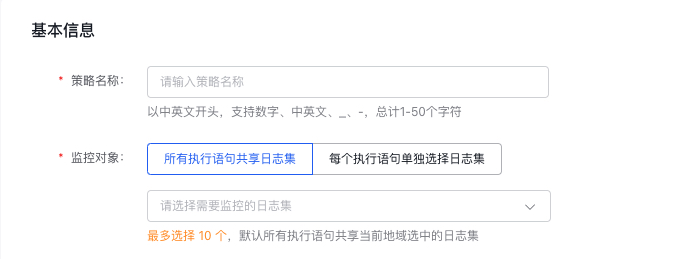
image.png

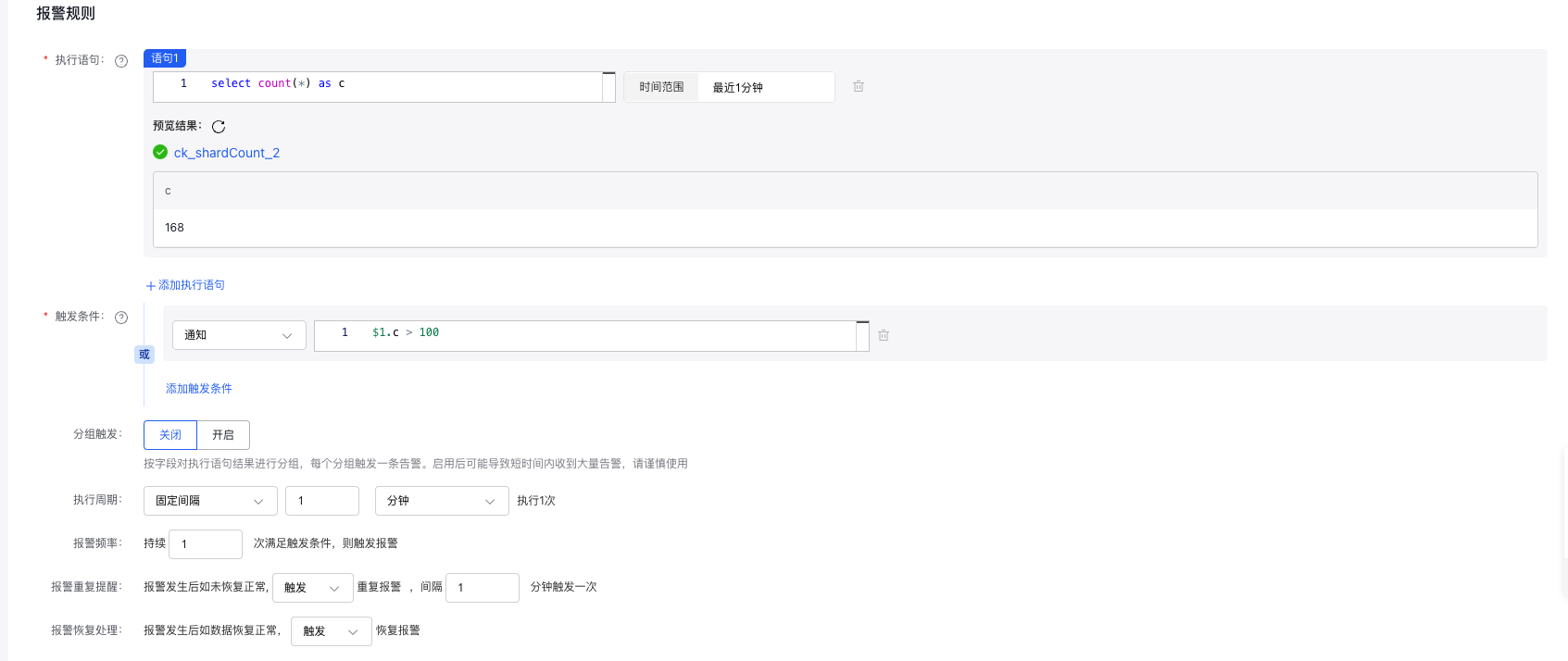
Configure alarm rules

image.png

  • Execution statement: Enter log search and analysis statements, and support the addition of multiple entries, 3 at most; support pure search statements match ..., query statements select ..., and query statements with search conditions match ...| select ...
  • Query time range: The time range specified for filtering logs in the query, with a maximum limit of logs from one day.
  • Trigger conditions: Alarms will be triggered when set conditions are met. There are three levels of alerts: notification, warning, and severe. Alarms corresponding to the respective levels will be triggered when their conditions are satisfied. Multiple alarms will trigger if multiple conditions are met at the same time.

    • Trigger expression: For syntax rules, refer to Trigger condition expressions.
  • Group trigger: Enables group trigger functionality. When activated, if an execution statement results in multiple outcomes, these outcomes are grouped based on specified fields. Each group is assessed individually to determine whether it meets the alarm conditions; any group meeting the criteria will trigger an alarm independently.

    • Grouping field: Choose fields from the results of the execution statement to use as grouping criteria. At least one field must be selected.
    • When utilizing the group trigger function, a single alarm execution might generate a significant number of results that meet the trigger conditions, leading to numerous alarms (an alarm storm). Be sure to appropriately configure the group fields and trigger conditions.
  • Execution period: The frequency of monitoring task execution. The following two configuration methods are provided:

    • Fixed frequency: Execute a monitor task once at a fixed interval (1 min - 24 h)
    • Fixed time: Execute a monitor task once at a fixed time point. Time point range: 00:00 - 23:59
  • Alarm frequency: Trigger an alarm when the condition is met consecutively for a specified number of times
  • Repeated alarm: When an alarm is generated, support defining specific frequency and count for repeated notifications.
  • Recovery alarm notification: Support triggering recovery alarm notification when the alarm is recovered

Configure dashboards

Add dashboard

  1. Select "Dashboard" from the left navigation bar to enter the Dashboard List page.
  2. Click on "Add Dashboard" at the top-left corner of the list, and provide a name for the dashboard in the pop-up window.
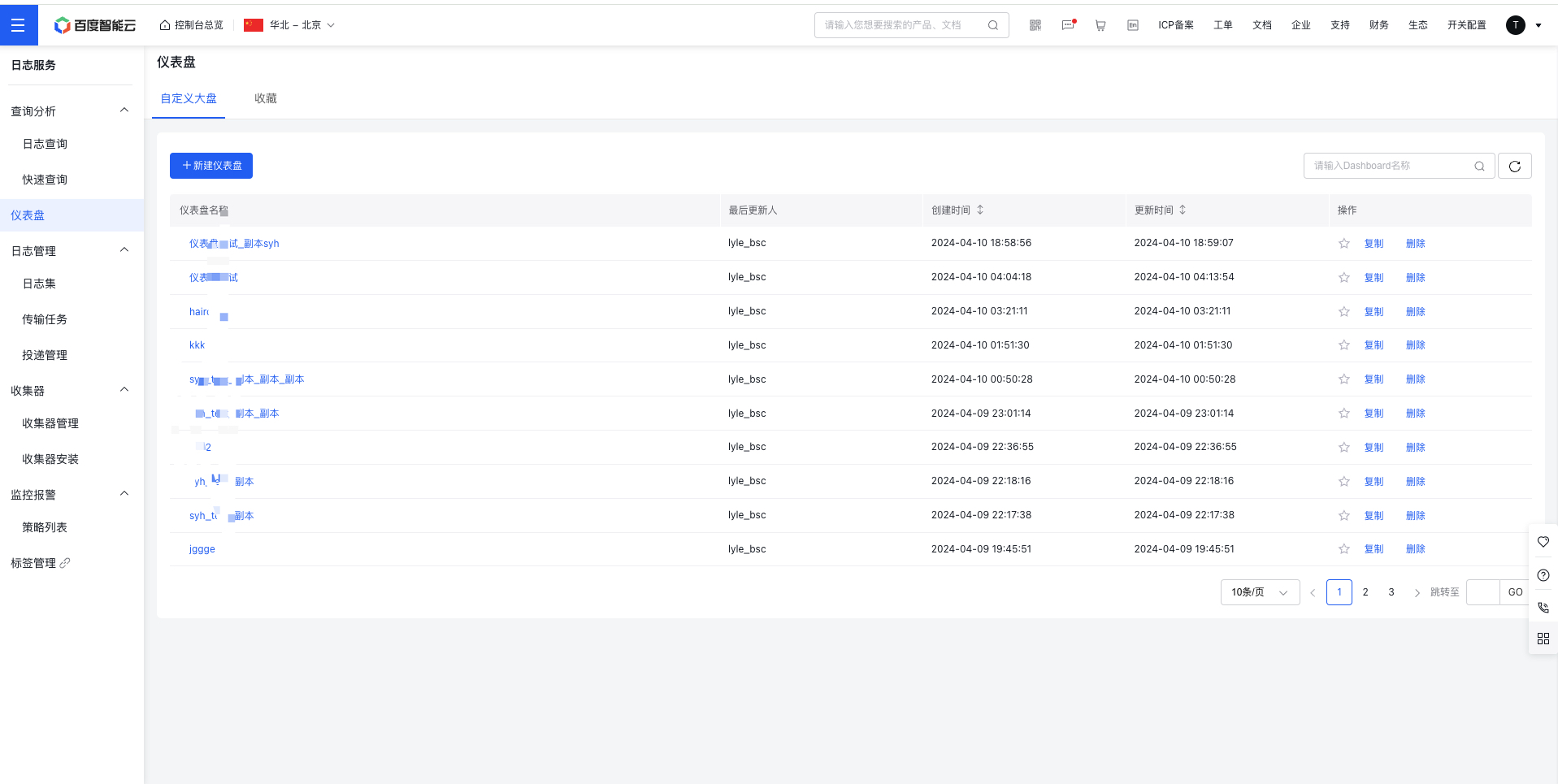
image.png

  1. Click "Confirm," and the dashboard will be successfully created.

View and configure dashboard

  1. Click Dashboard in the left navigation bar to access the Dashboard List page where you can view and configure the dashboard
  2. Click the dashboard name to enter the dashboard details page, and click Chart to enter the chart configuration page.
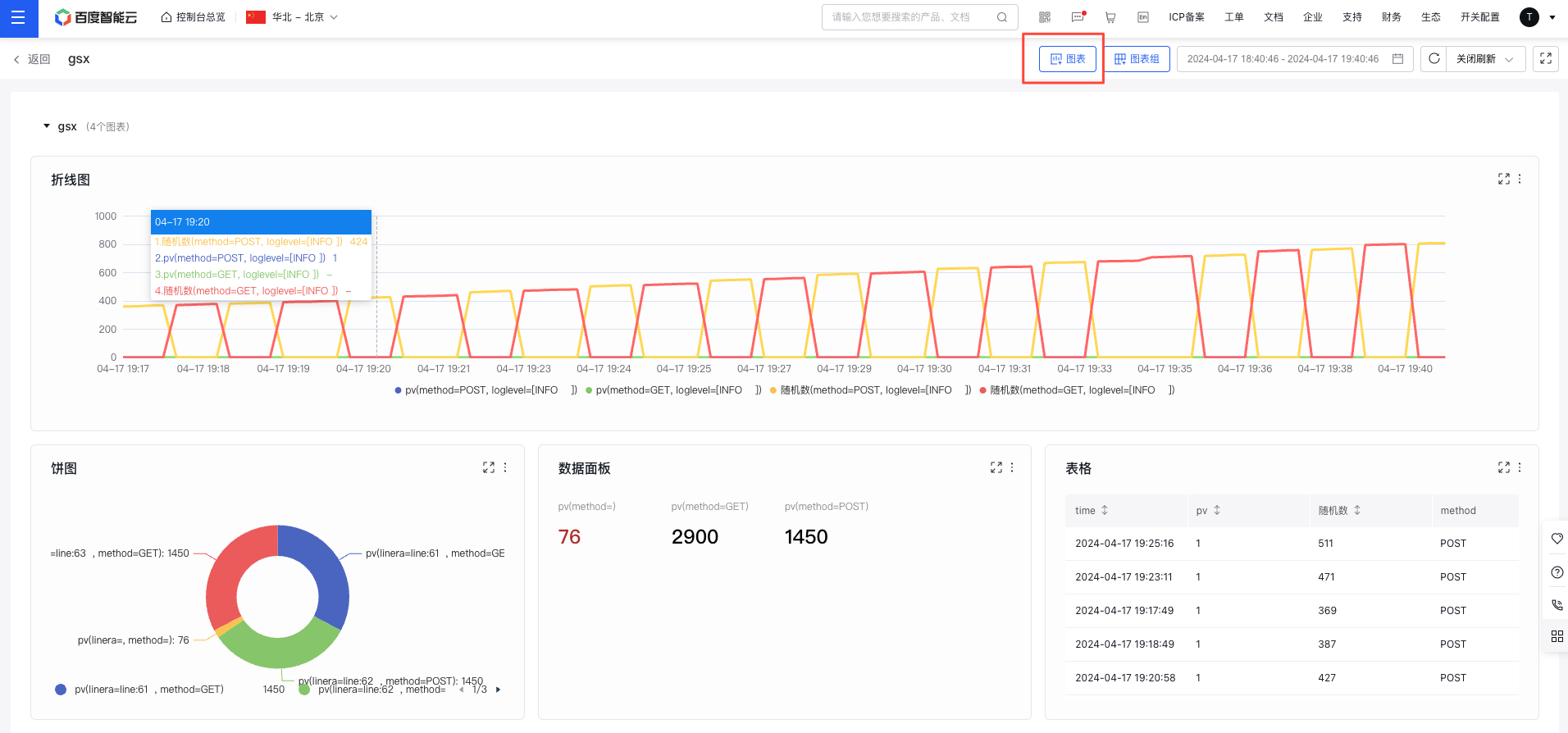
image.png

  1. Select a logstore, configure the query statement (refer to sql syntax), and select the chart type on the right to complete the chart configuration, and then return to the Dashboard details page.
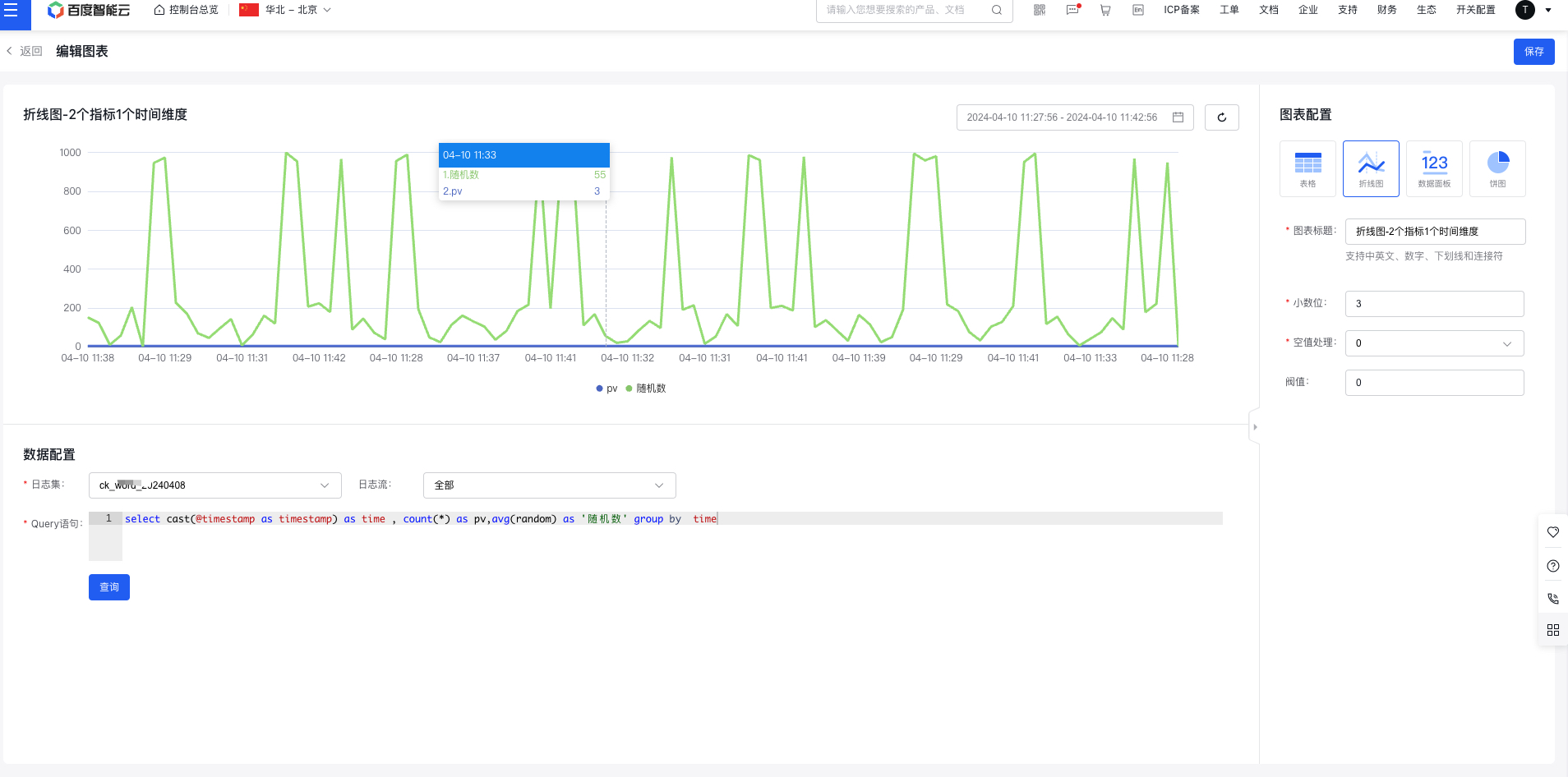
image.png

Previous
Create Transmission Task
Next
Create Delivery Task