Agent Management

BLS

  • Function Release Records
  • Product Description
    • Usage restrictions
    • Product Introduction
  • Product pricing
  • Quick Start
    • Introduction
    • Install agent
    • Create LogStore
    • Create Transmission Task
    • Log Analysis and Alerting
    • Create Delivery Task
  • Operation guide
    • Baidu Intelligent Cloud Environment Preparation
    • Overview
    • Identity and access management
    • Logset Management
    • Agent
      • Install Agent on Host
      • Install Agent in K8s Environment
      • Agent Management
      • Agent Release Version
      • Set Agent Startup Parameters
    • Log Collection
      • Transmission Task Collection
        • Create Transmission Task
        • Manage Transmission Task
      • Uploading Logs Using Kafka Protocol
    • Query analysis
      • Log query
      • SQL Syntax
      • Search Syntax
    • Dashboard
      • Overview
      • Management Dashboard
      • Management Dashboard Charts
    • Alarm management
      • Alert Overview
      • Alarm strategy
        • Management alarm strategy
        • Trigger conditions
      • Alarm history
      • Alert execution statistics
      • Alarm notification
        • Alarm Notification Template
        • Alarm callback
    • Data processing
      • Log Delivery
        • Log Delivery Overview
        • Create Delivery Task
        • Manage Delivery Task
      • Scheduled SQL Analysis
        • Manage Scheduled SQL Analysis Task
        • Create Scheduled SQL Analysis Task
      • Real-Time Consumption
      • Data processing
        • Data processing
          • Overview of data processing functions
          • Process control function
          • Mapping enrichment functions
          • Event operation functions
          • Field operation functions
          • Field value extraction functions
    • Log Applications
      • Intelligent Diagnostics
  • Best Practices
    • Use Year-Over-Year and Month-Over-Month as Alert Trigger Conditions
    • BLS Integration with Kibana
    • Use BLS via Grafana
  • Development Guide
    • API Reference
      • API function release records
      • API Overview
      • Interface Overview
      • General Description
      • Service domain
      • Common error codes
      • Terminology
      • Project Related APIs
        • Create Project
        • Update Project
        • Describe Project
        • Delete Project
        • List Project
      • LogStore Related APIs
        • Create LogStore
        • Update LogStore
        • Delete LogStore
        • Describe LogStore
        • Batch Get LogStore
        • List LogStore
      • LogStream Related APIs
        • List LogStream
      • LogRecord Related APIs
        • Push log PushLogRecord
        • Obtain logrecord PullLogRecord
        • Search analysis log QueryLogRecord
        • Histogram API QueryLogHistogram
      • Fast Query FastQuery Related Interfaces
        • Create Fast Query CreateFastQuery
        • Update Fast Query UpdateFastQuery
        • Delete Fast Query DeleteFastQuery
        • Get Fast Query Details DescribeFastQuery
        • Get Fast Query List ListFastQuery
      • Index Related APIs
        • Create Index
        • Update Index
        • Delete Index
        • Describe Index
      • Log Shipper LogShipper Related Interfaces
        • Create Log Shipper
        • Update Log Shipper
        • Set Single Log Shipper Status
        • Delete Single Log Shipper
        • Bulk Delete Log Shipper
        • List Log Shipper Records
        • List Log Shipper
        • Bulk Set Log Shipper Status
        • Get Log Shipper
      • Alarm-Related Interfaces
        • CreateAlarmPolicy
        • UpdateAlarmPolicy
        • DeleteAlarmPolicy
        • ValidateAlarmCondition
        • ValidateAlarmPolicySQL
        • EnableAlarmPolicy
        • DescribeAlarmRecord
        • DisableAlarmPolicy
        • DescribeAlarmPolicy
        • ListAlarmPolicy
        • ListAlarmRecord
        • ListAlarmExecutionStats
        • ListAlarmExecutions
      • LogStore Template-Related Interfaces
        • CreateLogStoreTemplate
        • UpdateLogStoreTemplate
        • DeleteLogStoreTemplates
        • DescribeLogStoreTemplates
        • DescribeLogStoreTemplate
      • Download Log Download Related Interfaces
        • Create Download Task CreateDownloadTask
        • Get Download Task List ListDownloadTask
        • Delete Download Task DeleteDownloadTask
        • Get Download Task Address GetDownloadTaskLink
        • Get Download Task Details DescribeDownloadTask
      • LogAlarm Related Interfaces
        • SetLogAlarmStatus
        • deleteLogAlarm
        • createLogAlarm
        • listLogAlarm
        • updateLogAlarm
        • BulkDeleteLogAlarm
        • PreviewAlarmLogRecord
        • getLogAlarm
        • BulkSetLogAlarmStatus
      • Transmission Task Related Interfaces
        • Create Task CreateTask
        • UpdateTask
      • Interfaces Compatible with Elasticsearch
        • ResolveIndex
        • FieldCaps
        • TermsEnum
        • AsyncSearch
    • SDK Reference
      • Go SDK
        • Overview
        • Initialization
        • Version Release Records
        • Project Operations
        • LogStore Operations
        • Install the SDK Package
        • LogStream Operations
        • LogRecord Operations
        • FastQuery Operations
        • LogShipper Operations
        • Index Operations
        • Download Task Operations
      • Java SDK
        • Overview
        • Install the SDK Package
        • LogRecord Operations
      • iOS SDK
        • Overview
        • Quick start
        • Version Release Records
      • Android SDK
        • Overview
        • Quick start
        • Version Release Records
      • Android & iOS SDK Download
      • SDK Privacy Policy
      • SDK Developer Personal Information Protection Compliance Guide
    • Importing SLS Collection Configuration
  • FAQs
    • Common Questions Overview
    • Fault-related questions
    • Configuration-related questions
  • Log Service Level Agreement SLA
All documents
menu
No results found, please re-enter

BLS

  • Function Release Records
  • Product Description
    • Usage restrictions
    • Product Introduction
  • Product pricing
  • Quick Start
    • Introduction
    • Install agent
    • Create LogStore
    • Create Transmission Task
    • Log Analysis and Alerting
    • Create Delivery Task
  • Operation guide
    • Baidu Intelligent Cloud Environment Preparation
    • Overview
    • Identity and access management
    • Logset Management
    • Agent
      • Install Agent on Host
      • Install Agent in K8s Environment
      • Agent Management
      • Agent Release Version
      • Set Agent Startup Parameters
    • Log Collection
      • Transmission Task Collection
        • Create Transmission Task
        • Manage Transmission Task
      • Uploading Logs Using Kafka Protocol
    • Query analysis
      • Log query
      • SQL Syntax
      • Search Syntax
    • Dashboard
      • Overview
      • Management Dashboard
      • Management Dashboard Charts
    • Alarm management
      • Alert Overview
      • Alarm strategy
        • Management alarm strategy
        • Trigger conditions
      • Alarm history
      • Alert execution statistics
      • Alarm notification
        • Alarm Notification Template
        • Alarm callback
    • Data processing
      • Log Delivery
        • Log Delivery Overview
        • Create Delivery Task
        • Manage Delivery Task
      • Scheduled SQL Analysis
        • Manage Scheduled SQL Analysis Task
        • Create Scheduled SQL Analysis Task
      • Real-Time Consumption
      • Data processing
        • Data processing
          • Overview of data processing functions
          • Process control function
          • Mapping enrichment functions
          • Event operation functions
          • Field operation functions
          • Field value extraction functions
    • Log Applications
      • Intelligent Diagnostics
  • Best Practices
    • Use Year-Over-Year and Month-Over-Month as Alert Trigger Conditions
    • BLS Integration with Kibana
    • Use BLS via Grafana
  • Development Guide
    • API Reference
      • API function release records
      • API Overview
      • Interface Overview
      • General Description
      • Service domain
      • Common error codes
      • Terminology
      • Project Related APIs
        • Create Project
        • Update Project
        • Describe Project
        • Delete Project
        • List Project
      • LogStore Related APIs
        • Create LogStore
        • Update LogStore
        • Delete LogStore
        • Describe LogStore
        • Batch Get LogStore
        • List LogStore
      • LogStream Related APIs
        • List LogStream
      • LogRecord Related APIs
        • Push log PushLogRecord
        • Obtain logrecord PullLogRecord
        • Search analysis log QueryLogRecord
        • Histogram API QueryLogHistogram
      • Fast Query FastQuery Related Interfaces
        • Create Fast Query CreateFastQuery
        • Update Fast Query UpdateFastQuery
        • Delete Fast Query DeleteFastQuery
        • Get Fast Query Details DescribeFastQuery
        • Get Fast Query List ListFastQuery
      • Index Related APIs
        • Create Index
        • Update Index
        • Delete Index
        • Describe Index
      • Log Shipper LogShipper Related Interfaces
        • Create Log Shipper
        • Update Log Shipper
        • Set Single Log Shipper Status
        • Delete Single Log Shipper
        • Bulk Delete Log Shipper
        • List Log Shipper Records
        • List Log Shipper
        • Bulk Set Log Shipper Status
        • Get Log Shipper
      • Alarm-Related Interfaces
        • CreateAlarmPolicy
        • UpdateAlarmPolicy
        • DeleteAlarmPolicy
        • ValidateAlarmCondition
        • ValidateAlarmPolicySQL
        • EnableAlarmPolicy
        • DescribeAlarmRecord
        • DisableAlarmPolicy
        • DescribeAlarmPolicy
        • ListAlarmPolicy
        • ListAlarmRecord
        • ListAlarmExecutionStats
        • ListAlarmExecutions
      • LogStore Template-Related Interfaces
        • CreateLogStoreTemplate
        • UpdateLogStoreTemplate
        • DeleteLogStoreTemplates
        • DescribeLogStoreTemplates
        • DescribeLogStoreTemplate
      • Download Log Download Related Interfaces
        • Create Download Task CreateDownloadTask
        • Get Download Task List ListDownloadTask
        • Delete Download Task DeleteDownloadTask
        • Get Download Task Address GetDownloadTaskLink
        • Get Download Task Details DescribeDownloadTask
      • LogAlarm Related Interfaces
        • SetLogAlarmStatus
        • deleteLogAlarm
        • createLogAlarm
        • listLogAlarm
        • updateLogAlarm
        • BulkDeleteLogAlarm
        • PreviewAlarmLogRecord
        • getLogAlarm
        • BulkSetLogAlarmStatus
      • Transmission Task Related Interfaces
        • Create Task CreateTask
        • UpdateTask
      • Interfaces Compatible with Elasticsearch
        • ResolveIndex
        • FieldCaps
        • TermsEnum
        • AsyncSearch
    • SDK Reference
      • Go SDK
        • Overview
        • Initialization
        • Version Release Records
        • Project Operations
        • LogStore Operations
        • Install the SDK Package
        • LogStream Operations
        • LogRecord Operations
        • FastQuery Operations
        • LogShipper Operations
        • Index Operations
        • Download Task Operations
      • Java SDK
        • Overview
        • Install the SDK Package
        • LogRecord Operations
      • iOS SDK
        • Overview
        • Quick start
        • Version Release Records
      • Android SDK
        • Overview
        • Quick start
        • Version Release Records
      • Android & iOS SDK Download
      • SDK Privacy Policy
      • SDK Developer Personal Information Protection Compliance Guide
    • Importing SLS Collection Configuration
  • FAQs
    • Common Questions Overview
    • Fault-related questions
    • Configuration-related questions
  • Log Service Level Agreement SLA
  • Document center
  • arrow
  • BLS
  • arrow
  • Operation guide
  • arrow
  • Agent
  • arrow
  • Agent Management
Table of contents on this page
  • View agent
  • Group management
  • Create group
  • Add the agent
  • Delete agent

Agent Management

Updated at:2025-11-03

View agent

You can view agents through the following methods:

  • View in the console:

    Open the Log Service - Agent - Agent Management page to view the Hostname, IP address, and update time of all current agents: Search by hostname, ID, or IP to locate the host to be viewed; or filter by the following statuses:

    • Registered: The agent has been successfully installed on the host, but no transmission tasks have been assigned yet.
    • Running: Transmission tasks have been assigned to the agent.
    • Lost: The connection between the agent and the log service is disconnected, and the status information of the agent cannot be fetched. You can delete agents in a lost status. If the agent becomes disconnected from the log service due to issues such as host being offline, it will enter a lost status. In such cases, you can delete the hosts from the lost list, only removing the corresponding agent records. Once the agent reconnects to the log service, it will re-register itself and return to a registered status, allowing transmission tasks to be redeployed.
    • Uncertified: The token associated with this agent is either lost or invalid, making it uncertifiable and inaccessible.

Group management

To simplify the management of agents, the agent grouping feature is provided. Users can manage agents by application scenario or project. For instance, agents assigned to the same collection task can be grouped together to make filtering by group easier and to streamline their addition to transmission tasks during setup.

Note: The purpose of agent groups is solely to simplify agent management and allow filtering by group names when adding agents to transmission tasks. There is no direct link between agent groups and transmission tasks.

Create group

Go to the Log Service - Agent Management - Group Management page to view the list of existing groups. Click the “Create” button to initiate the creation of a new group.
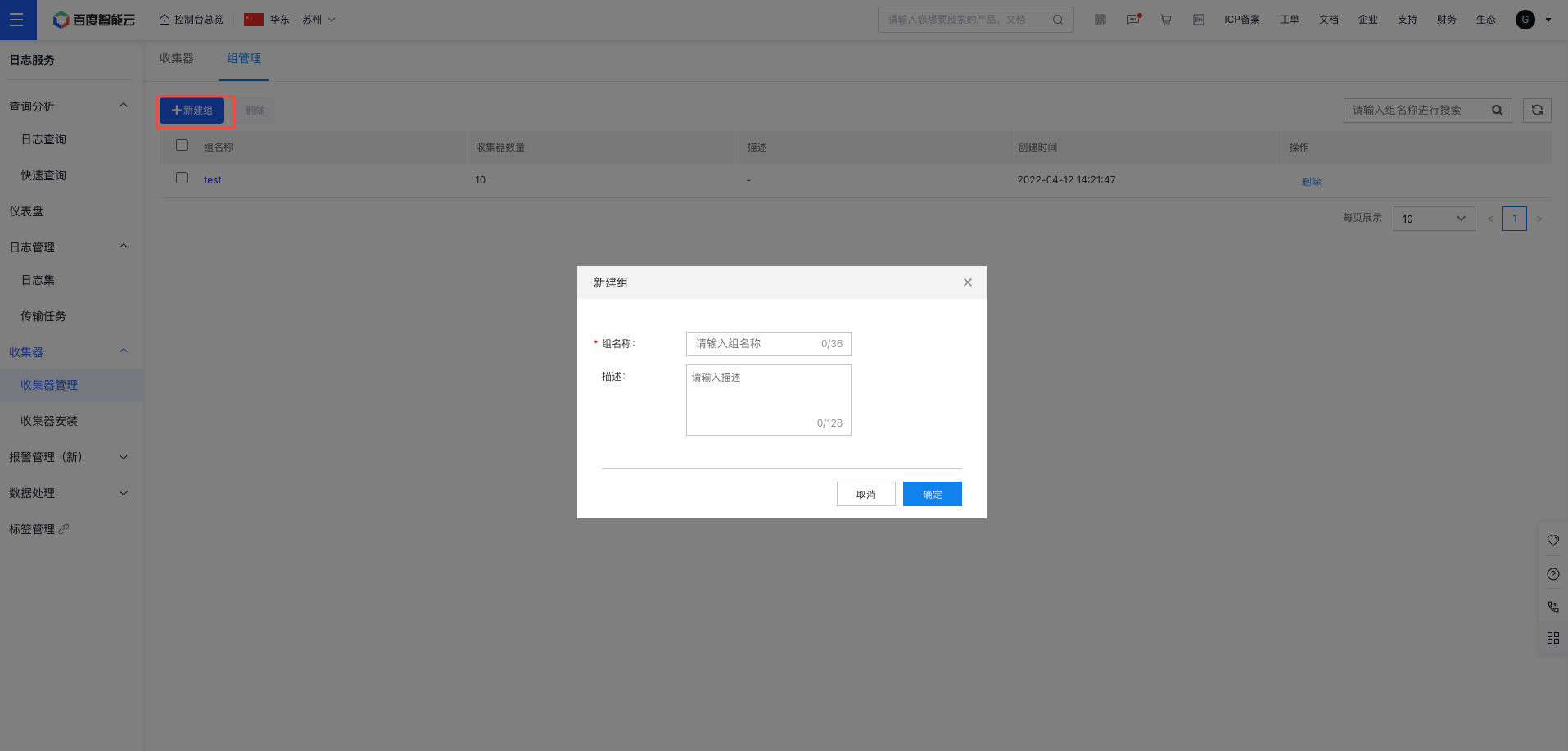
image.png

Enter the group name, description, and other details, then click OK to complete the group creation process.

Add the agent

Go to the Log Service - Agent Management - Group Management page, click a group name to access its details page, and then click Add Agent. A dialog box will appear as shown. Select the desired agents and click OK to add them to the group.
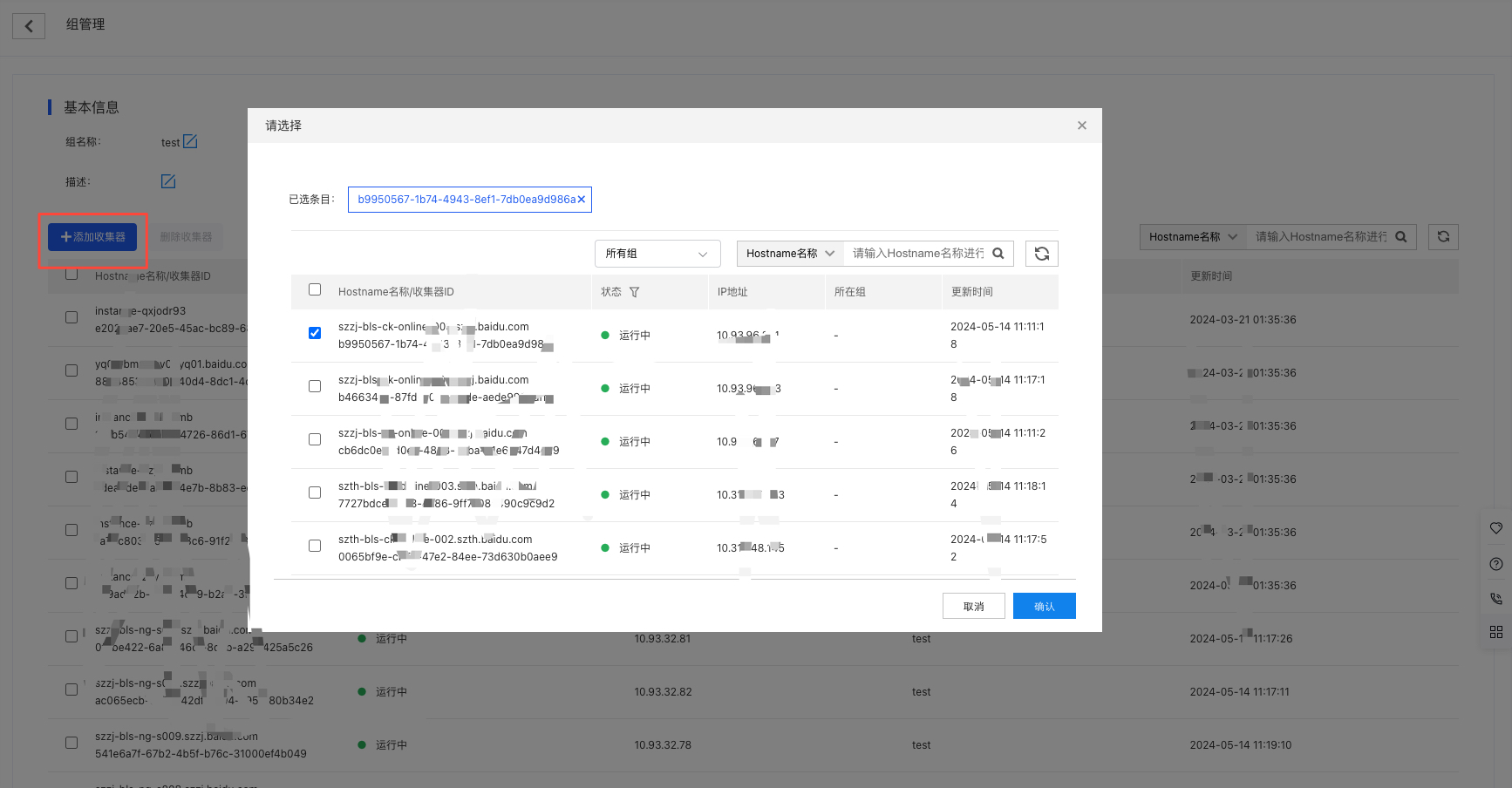
image.png

Delete agent

Go to the Log Service - Agent Management - Group Management page, click a group name to access its details page, select the agents you want to remove from the group, click Delete Agent, and then confirm the action in the pop-up prompt by clicking OK.
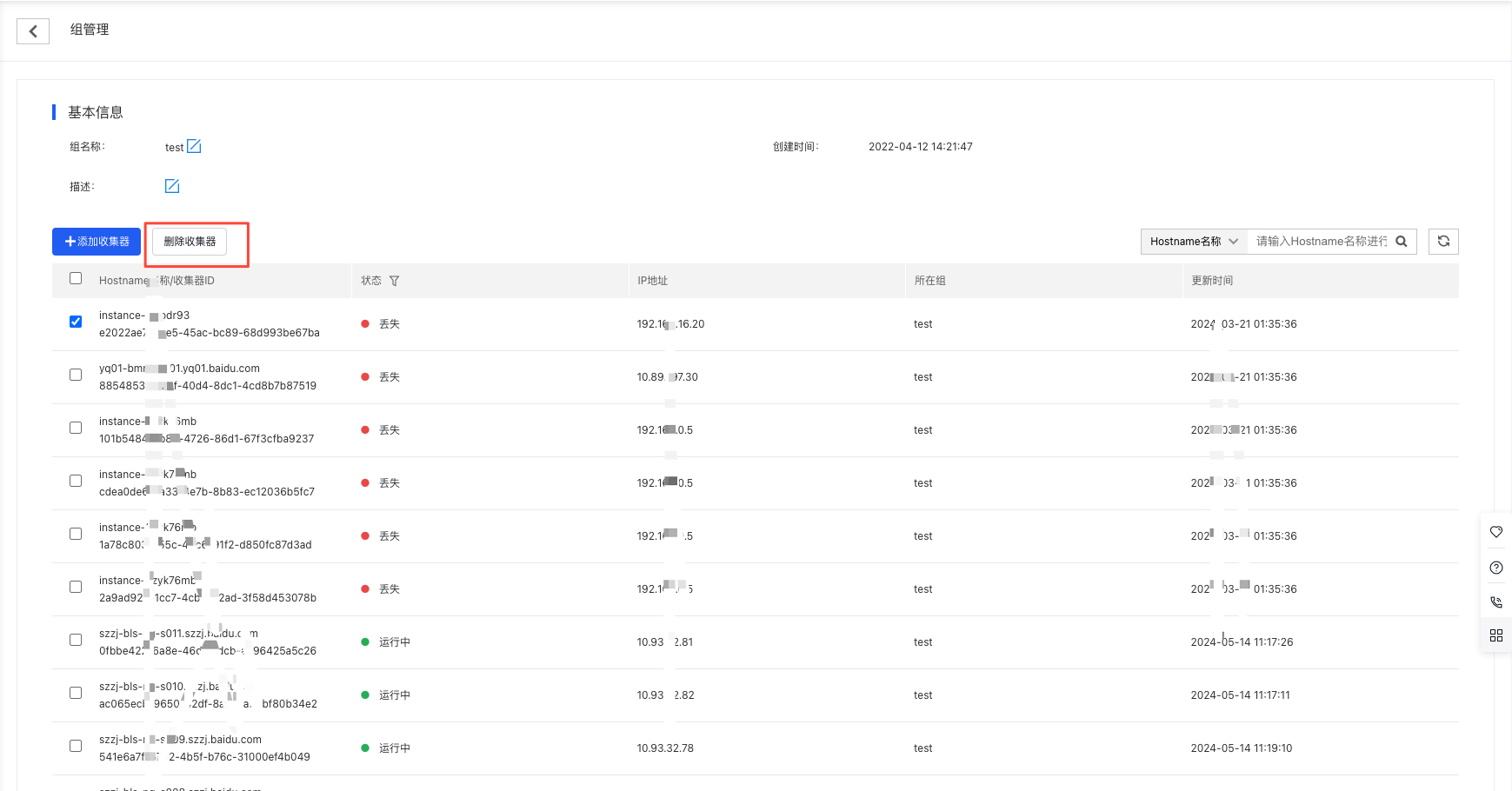
image.png

Description:

  • Removal operation: This action only removes the agent from the group without deleting the agent itself.

Previous
Install Agent in K8s Environment
Next
Agent Release Version