Resolver

DNS

  • API Reference
    • API function release records
    • API Service Domain Name
    • Appendix
    • Common Headers and Error Responses
    • General Description
    • Interface Overview
    • Overview
    • Private DNS Related Interfaces
      • Add resolution record
      • Associate VPC
      • Create a PrivateZone
      • Delete PrivateZone
      • Delete resolution record
      • Disassociate VPC
      • Modify resolution record
      • Query details of a PrivateZone
      • Query PrivateZone list
      • Query resolution record list
      • Set Resolution Record Status
    • Public DNS Related Interfaces
      • Domain Name Related Interfaces
      • Line Group Related Interfaces
      • Resolution Records Related Interfaces
  • FAQs
    • General FAQs
  • Function Release Records
  • Operation guide
    • Identity and access management
    • Local DNS service
      • Add Private Zone
      • Add resolution record
      • Associate VPC
      • Delete Private Zone
      • Resolver
    • Public DNS service
      • Add domain name
      • Add resolution
      • Enable Resolution Service
      • Line Grouping Function
      • Manage Resolution
      • Resolution Line Selection
      • Upgrade Domain Name to Enterprise Edition Operation Guide
    • Resolution Logging Management
  • Product Description
    • Application scenarios
    • Product advantages
    • Product functions
    • Product overview
    • Usage restrictions
  • Product pricing
  • Quick Start
    • Activate Service
    • Use Resolution Service
  • SDK
    • Golang-SDK
      • Exception handling
      • Initialization
      • Install the SDK Package
      • Overview
      • Private DNS
      • Version history
    • Java-SDK
      • Install the SDK Package
      • Overview
      • Private DNS
      • Public DNS
      • Version history
    • Python-SDK
      • Initialization
      • Install the SDK Package
      • Overview
      • Private DNS
      • Public DNS
      • Version history
  • Service Level Agreement (SLA)
    • Internal DNS Service Level Agreement SLA
    • Public DNS Service Level Agreement SLA
  • Typical Practices
    • Implement URL Forwarding via Nginx
    • Local IDC Interconnection with Cloud DNS Service via Resolver
    • Quickly Set Up Private Domain Name Resolution Service Using Terraform
All documents
menu
No results found, please re-enter

DNS

  • API Reference
    • API function release records
    • API Service Domain Name
    • Appendix
    • Common Headers and Error Responses
    • General Description
    • Interface Overview
    • Overview
    • Private DNS Related Interfaces
      • Add resolution record
      • Associate VPC
      • Create a PrivateZone
      • Delete PrivateZone
      • Delete resolution record
      • Disassociate VPC
      • Modify resolution record
      • Query details of a PrivateZone
      • Query PrivateZone list
      • Query resolution record list
      • Set Resolution Record Status
    • Public DNS Related Interfaces
      • Domain Name Related Interfaces
      • Line Group Related Interfaces
      • Resolution Records Related Interfaces
  • FAQs
    • General FAQs
  • Function Release Records
  • Operation guide
    • Identity and access management
    • Local DNS service
      • Add Private Zone
      • Add resolution record
      • Associate VPC
      • Delete Private Zone
      • Resolver
    • Public DNS service
      • Add domain name
      • Add resolution
      • Enable Resolution Service
      • Line Grouping Function
      • Manage Resolution
      • Resolution Line Selection
      • Upgrade Domain Name to Enterprise Edition Operation Guide
    • Resolution Logging Management
  • Product Description
    • Application scenarios
    • Product advantages
    • Product functions
    • Product overview
    • Usage restrictions
  • Product pricing
  • Quick Start
    • Activate Service
    • Use Resolution Service
  • SDK
    • Golang-SDK
      • Exception handling
      • Initialization
      • Install the SDK Package
      • Overview
      • Private DNS
      • Version history
    • Java-SDK
      • Install the SDK Package
      • Overview
      • Private DNS
      • Public DNS
      • Version history
    • Python-SDK
      • Initialization
      • Install the SDK Package
      • Overview
      • Private DNS
      • Public DNS
      • Version history
  • Service Level Agreement (SLA)
    • Internal DNS Service Level Agreement SLA
    • Public DNS Service Level Agreement SLA
  • Typical Practices
    • Implement URL Forwarding via Nginx
    • Local IDC Interconnection with Cloud DNS Service via Resolver
    • Quickly Set Up Private Domain Name Resolution Service Using Terraform
  • Document center
  • arrow
  • DNS
  • arrow
  • Operation guide
  • arrow
  • Local DNS service
  • arrow
  • Resolver
Table of contents on this page
  • Create egress endpoint
  • Create forwarding rule
  • Associate VPC
  • Create ingress endpoint

Resolver

Updated at:2025-11-11

The resolver can either forward DNS request traffic from private zones within Baidu AI Cloud VPC to external DNS systems, or forward external DNS request traffic to private zones within Baidu AI Cloud VPC. This enables seamless service scenarios between cloud and on-premises environments.

The resolver is currently in public beta. To use this product, submit a ticket for application.

Before Configuration, you should know:

  • Each user can create up to 10 egress/ingress endpoints;
  • Each user can add up to 300 forwarding rules;
  • Each endpoint can be linked to a maximum of 100 forwarding rules.

Create egress endpoint

  1. Sign in to Baidu AI Cloud console, select Products & Services - Network - Intelligent Cloud DNS;
  2. In the left navigation menu, select "Resolver," then choose "Egress Endpoint" to access the Egress Endpoint List page.
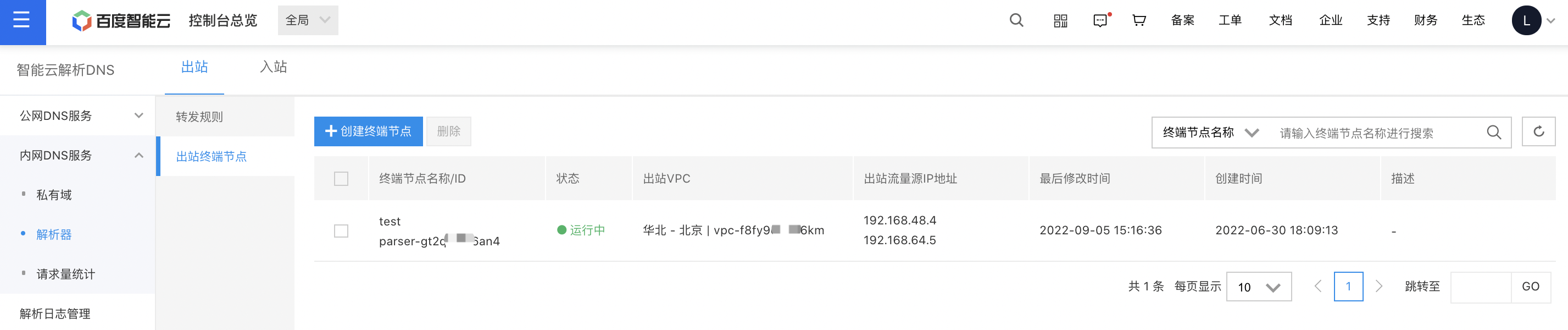
image.png

  1. Click on "Create Endpoint," and a dialog box will appear.
  2. Fill in the following configuration information:
ConfigMap Description
Endpoint name Enter a custom name for the endpoint.
Region Choose the region where the egress VPC is located.
Egress VPC All outgoing DNS query traffic from the resolver will be routed through this VPC.
Description Add a description for the egress endpoint.
Egress traffic source IP address Specify the available IP addresses within the subnet of the egress VPC.
  1. Click "OK" to finalize the creation of the egress endpoint.

Description:

  • To ensure high availability, at least two egress source IP addresses should be added to the resolver, and it's recommended that these addresses be distributed across different availability zones. The resolver supports adding up to six egress source IP addresses.
  • Before deleting an endpoint, ensure that the forwarding rules associated with it are deleted first.

Create forwarding rule

  1. Sign in to Baidu AI Cloud console, select Products & Services - Network - Intelligent Cloud DNS;
  2. In the left navigation menu, select "Resolver," then choose "Forwarding Rule" to access the Forwarding Rule List page.

image.png

  1. Click the "Create Forwarding Rule" button, and a dialog box will appear.
  2. Fill in the following configuration information:
ConfigMap Description
Rule name Enter a custom name for the forwarding rule.
Rule type Currently, only the option "Forward to External DNS System" is available.
Egress endpoint Utilize this egress endpoint to direct DNS query traffic to the specified IP addresses in the target list.
Forward Private Zone Specify the Private Zone name for which resolution requests need to be forwarded.
IP address and port of the external DNS system Send DNS query traffic to the designated IP address and port of the external DNS system.
  1. Click "OK" to finalize the creation of the forwarding rule.

Description:

  • Once the forwarding rule is created, it's possible to modify the rule name, as well as the IP address and port of the external DNS system.
  • A forwarding rule linked to a VPC cannot be deleted unless the VPC association is removed beforehand.

Associate VPC

When creating a forwarding rule, it is essential to associate a VPC for the rule to take effect within it.

  1. Sign in to Baidu AI Cloud console, select Products & Services - Network - Intelligent Cloud DNS;
  2. In the left navigation menu, select "Resolver," then choose "Forwarding Rule" to access the Forwarding Rule List page.
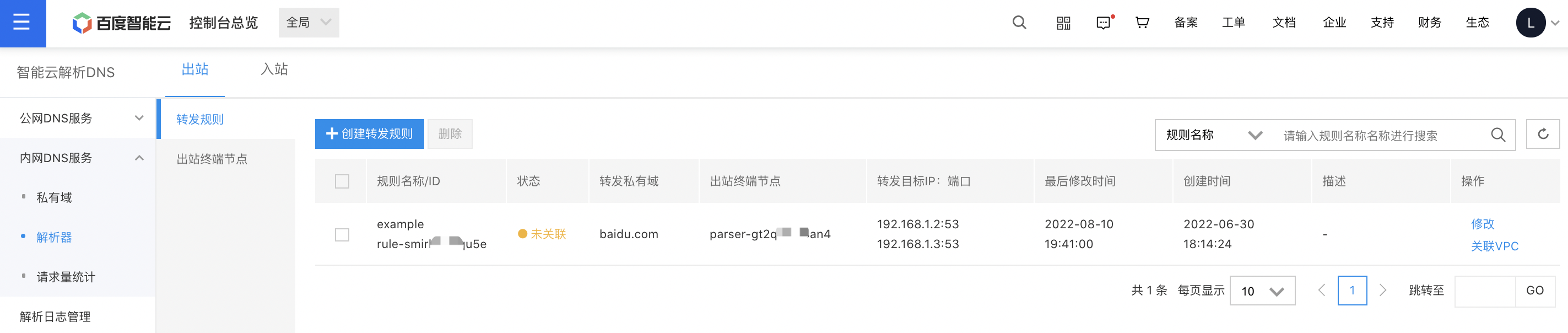
image.png

  1. In the forwarding rule management, click on Associate VPC, and a pop-up window will appear allowing you to select the VPC to associate.
  2. Click OK to finalize the VPC association.

Description:

  • The forwarded domain name or subdomain cannot be associated with the same VPC.

Create ingress endpoint

  1. Sign in to Baidu AI Cloud console, select Products & Services - Network - Intelligent Cloud DNS;
  2. From the left navigation bar, select Resolver, then choose Ingress Endpoint to navigate to the Ingress Endpoint List page.
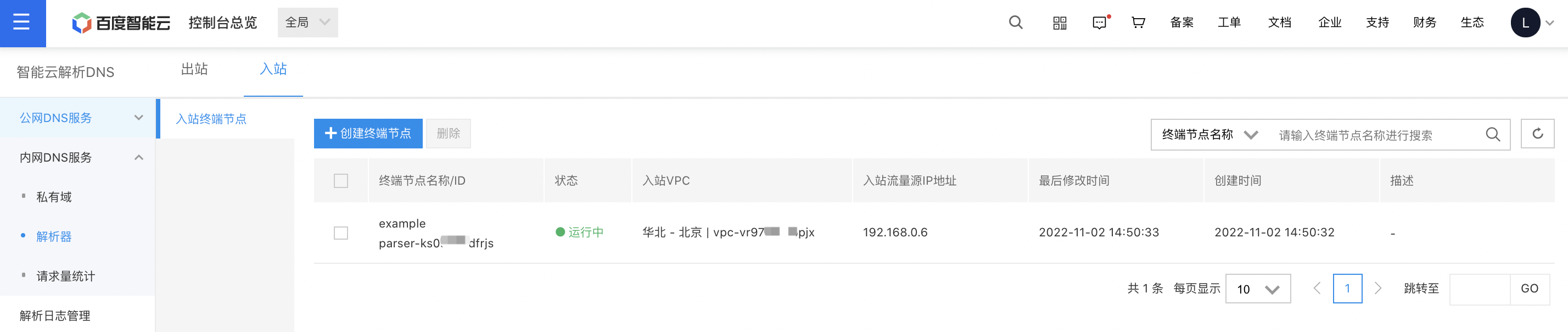
image.png

  1. Click on "Create Endpoint," and a dialog box will appear.
  2. Fill in the following configuration information:
ConfigMap Description
Endpoint name Enter a custom name for the endpoint.
Region Choose the region where the ingress VPC is located.
Ingress VPC All DNS query traffic routed through the resolver will be forwarded via this VPC.
Description Update the description details related to the ingress endpoint.
Ingress traffic source IP address The available IP addresses in the subnet associated with the ingress VPC.
  1. Click "OK" to finalize the creation of the egress endpoint.

Description:

  • The resolver's multi-availability zone disaster recovery feature ensures egress multi-availability; only one source IP address needs to be added for ingress traffic.

Previous
Delete Private Zone
Next
Public DNS service