

Identity and access management
Introduction
Identity and Access Management helps users manage resource access permissions within cloud accounts. It caters to various enterprise roles by granting different staff levels access to specific product permissions. For enterprises requiring multi-user collaboration for resource operations, using Identity and Access Management is recommended.
It is applicable to the following usage scenarios:
- Medium and large enterprise customers: Authorization management for multiple employees in the enterprise;
- Technology-oriented vendor or SAAS platform provider: Resource and permission management for proxy clients;
- Small and medium-sized developers or small enterprises: Add project members or collaborators for resource management.
Create User
-
After logging in with root account, select Identity and Access Management on the console to enter the User Management page;
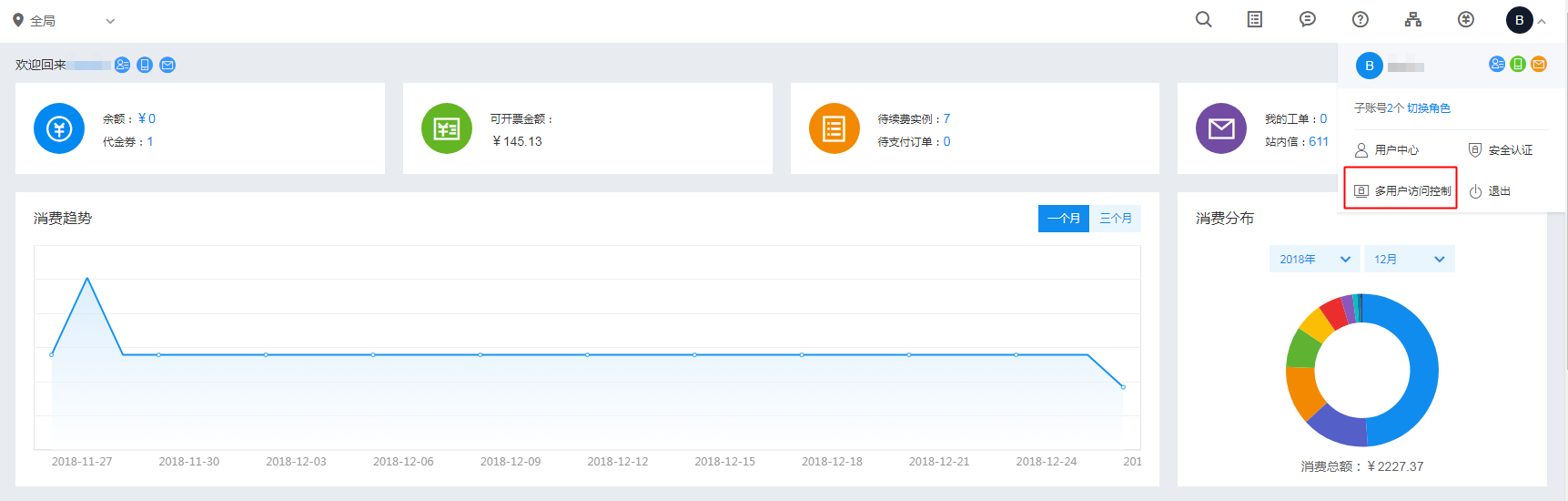
- Click User Management in the left navigation bar, and click Create User on the IAM User Management List page;
- In the New User dialog box that appears, enter the username, confirm the details, and return to the IAM User Management List to view the newly created IAM user.
Configuration Policy
Public DNS supports both system policies and custom policies, allowing for product-level and instance-level permission control of DNS.
- System policy: A pre-defined set of permissions provided by the Baidu AI Cloud system for resource management. These can be directly assigned to IAM users, but users cannot modify them.
- Custom policy: A user-created, more granular set of permissions for resource management, allowing specific permissions to be configured for single instances. This provides flexibility to address the unique permission management needs of different users.
System Policy
The system policy includes 3 types of policies: management permission, operation and maintenance permission and read-only permission. The scope of permission is as follows:
| Policy name | Permission | Permission scope |
|---|---|---|
| DNSReadPolicy | Read-only permission to access the public DNS service | Query domain name list, view resolution records |
| DNSOperatePolicy | Permission for operational actions of public DNS | Query domain name list, view resolution records and resolution configuration |
| DNSFullControlPolicy | Full control permission for public DNS service management | Query domain list, view resolution records, configure resolution, add/delete domain names, renew, upgrade |
| LDReadPolicy | Read-only permission to access the local DNS service | Query domain name list, view instance details |
| LDOperatePolicy | Permission for operational actions of local DNS | Query domain name list, view instance details, configure resolution settings, and associate VPCs |
| LDFullControlPolicy | Full control permission for local DNS service management | Query domain name list, view instance details, configure resolution settings, associate VPCs, add/delete domain names |
| ResolverReadAccessPolicy | Permissions of read-only access resolver | View forwarding rule list, View egress endpoint, view ingress endpoint |
| ResolverOperateAccessPolicy | Permissions of operational action resolver | View forwarding rule list, view egress endpoints, view ingress endpoints, create/modify/delete forwarding rules, associate VPCs, modify egress endpoints, modify ingress endpoints |
| ResolverFullControlAccessPolicy | Full control permission for resolver management | View forwarding rule list, view egress endpoints, view ingress endpoints, create/modify/delete forwarding rules, associate VPCs, create/modify/delete egress endpoints, create/modify/delete ingress endpoints |
Custom Policy
Custom policies authorize users at the instance level, differing from system policies as they apply exclusively to selected instances.
IAM users navigate to Policy Management via the left navigation bar, click Create Policy, enter the policy name, and select the service type (choose Intelligent Cloud DNS for public DNS or local DNS for private DNS). The default Visual Editor method for policy creation requires no modifications.
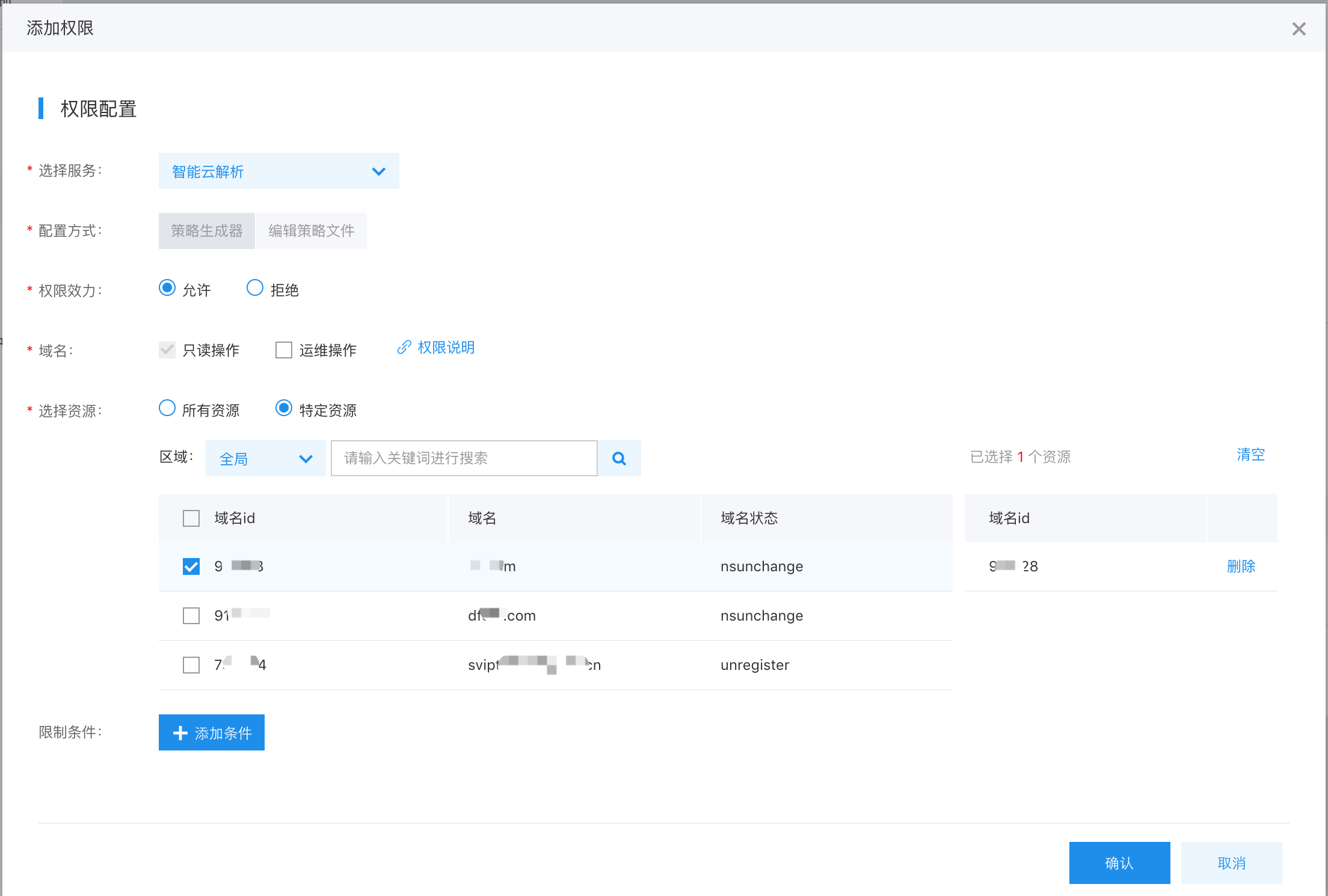
The scope of custom permission is detailed as follows:
| Product Name | Read-only permission | Operation and maintenance permission | Management permission |
|---|---|---|---|
| Public DNS service | Query domain name list, view resolution records | Query domain name list, view resolution records and resolution configuration | Query domain list, view resolution records, configure resolution, delete domain names, renew, upgrade |
| Local DNS service - Private zone | Query domain name list, view instance details, view forwarding rule list | Query domain name list, view instance details, configure resolution settings, and associate VPCs | Query domain name list, view instance details, configure resolution settings, associate VPCs, and delete domain names |
| Private DNS service - Resolver | View forwarding rule list, View egress endpoint, view ingress endpoint | View forwarding rule list, view egress endpoints, view ingress endpoints, create/modify/delete forwarding rules and associate VPCs | View forwarding rule list, view egress endpoints, view ingress endpoints, create/modify/delete forwarding rules, associate VPCs, create/modify/delete egress endpoints, create/modify/delete ingress endpoints |
User Authorization
Under User Management -> IAM User List, locate the relevant IAM user and click Add Permission in the Operations column. You can then authorize the user through either a System Policy or a Custom Policy.
Note: To change an IAM user's permissions without modifying existing policy rules, you must delete the current policy and assign a new one since existing policy permissions cannot be unchecked or edited directly.