

Quickly Set Up Private Domain Name Resolution Service Using Terraform
Overview
This document explains how to use Baidu AI Cloud's local DNS features to map private domain names to resource IPs and outlines the swift creation, deployment, and management of local DNS using Terraform.
Requirement scenarios
When intranet resources become complex, managing them through IP addresses can be tedious. At this point, private domain names can be used for management by mapping private domain name resolution records to resource IPs. Additionally, intranet domain names must remain inaccessible from the public network, ensuring isolation between intranet and public environments. Local DNS services can efficiently address this need.
Solution overview
The local DNS service operates within Baidu AI Cloud’s Virtual Private Cloud (VPC) environment, supporting private domain name resolution and management. It enables users to quickly set up a DNS system within one or more custom virtual private clouds, establishing the mapping of private domain names to resource IPs. Through this service, users can effortlessly manage Baidu AI Cloud resources like BCC and BLB within the VPC using private domain names that remain inaccessible outside of the VPC.
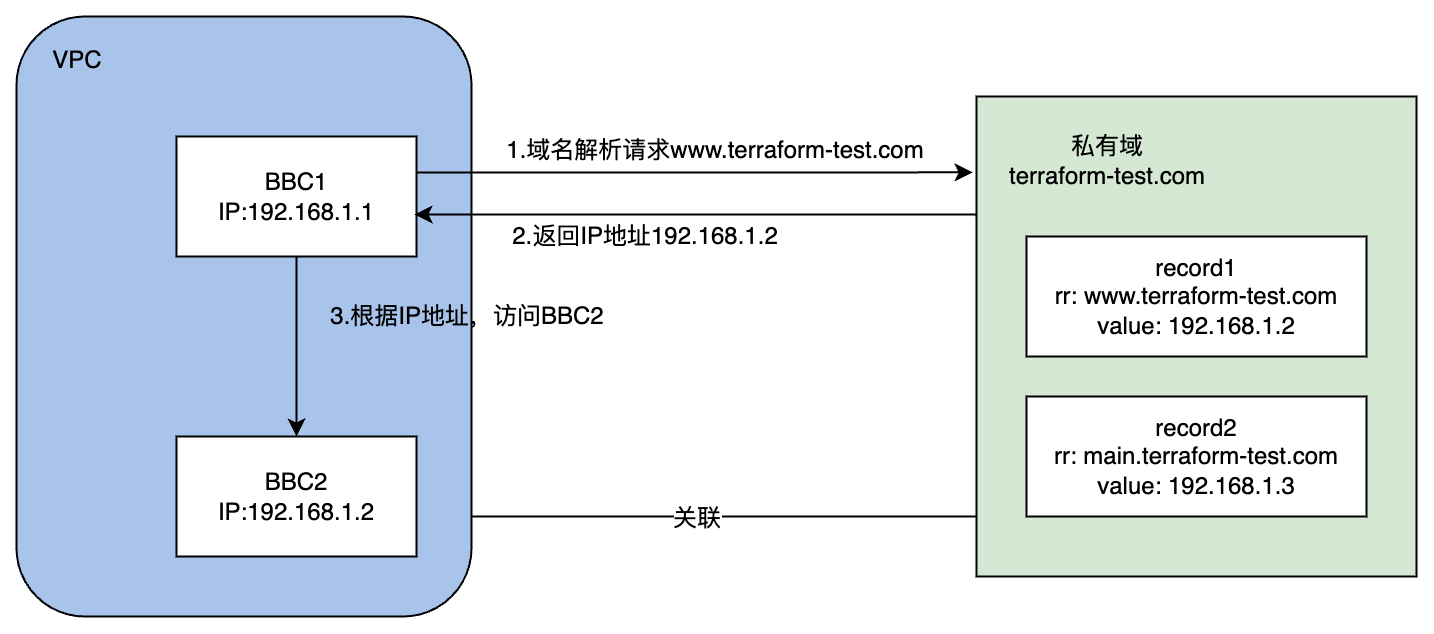
After the service is set up, users can add resolution records in the private zone associated with the VPC to map private domain names to resource IP addresses. The demand scenario for (communication between Baidu Cloud Computes A and B as shown in the figure below) facilitates operation and maintenance management.
Configuration steps
1. Prepare environment
- Terraform: A tool for safely and efficiently building, changing and versioning infrastructure. It is driven by configuration files where you define various components, and Terraform completes the creation, modification and management of all components based on these files. Currently, Baidu AI Cloud has integrated with Terraform. You can use Terraform to create and manage various Baidu AI Cloud resources such as CFC, BOS, VPC and BCC. For details, please refer to Terraform BaiduCloud Provider.
- Virtual Private Cloud (VPC): A customizable virtual network where users can flexibly set network address spaces, achieve virtual private cloud isolation, and enable stable and high-speed peering between multiple virtual networks (intra-city and inter-city). For details, please refer to Virtual Private Cloud (VPC).
2. Deployment process
- Sign in to the Terraform official website and download the installation package suitable for your operating system.
- Set up the Terraform Baidu Provider information. Refer to the sample code below to create a configuration file, and save it as version.tf in the current directory.
1    terraform {
2      required_providers {
3        baiducloud = {
4          source = "baidubce/baiducloud"
5 version = "1.14.5" # Version No.; you can check version update information on the official website
6        }
7      }
8 }- Run the command terraform init. Terraform will initialize the workspace based on the version.tf file in the current directory.
-
Modify the Terraform configuration file. Create a new file named main.tf, and define the metadata for the VPC, private zone, and resolution records within it. Refer to the example configuration and steps provided below:
For more parameter information, please refer to the Official Baidu Provider Documentation
- Create VPC
1    resource "baiducloud_vpc" "test-vpc" {
2 name        = "test_vpc"          # VPC name
3 description = "test_description"  # description
4 cidr        = "192.168.0.0/16"     # cidr information
5 }- Create a private zone
1    resource "baiducloud_localdns_privatezone" "my-private-zone" {
2 zone_name = "terrraform.com"     # Private zone name
3 }- Bind the private zone to the VPC
1    resource "baiducloud_localdns_vpc" "bind-zone-vpc" {
2# Private zone ID; here, the private zone created in the previous step is used; you can also directly enter the private zone ID
3      zone_id = "${baiducloud_localdns_privatezone.my-private-zone.id}"
4# Resource Region
5      region  = "bj"
6# VPCs to be bound; a private zone can be bound to multiple VPCs
7      vpc_ids = [
8        "${baiducloud_vpc.default-vpc.id}"
9      ]
10 }- Create resolution records in the private zone
1    resource "baiducloud_localdns_record" "local-dns-test" {
2# Private zone ID; here, the private zone created in the previous step is used; you can also directly enter the private zone ID
3      zone_id     = "${baiducloud_localdns_privatezone.my-private-zone.id}"
4# Host records cannot be duplicated with existing records, and the combined length of the record value and zone name cannot exceed 255 characters
5      rr          = "www"
6# Resolution record value
7      value       = "1.1.1.1"
8# Resolution record type: Currently support A, AAAA, CNAME, TXT, MX, PTR, SRV
9      type        = "A"
10# Time to Live (TTL) of the resolution record
11      ttl         = "3000"
12# Resolution record priority; only MX resolution records have priority, others shall be 0
13      priority    = 0
14# Resolution record description
15      description = "terraform_test"
16# Resolution record status; it shall be "enable" or "pause"
17      status      = "enable"
18    }
For complete configuration file information, refer to the following code:
1    provider "baiducloud" {
2      access_key = "<YOUR_BAIDUCLOUD_ACCESS_KEY>"
3      secret_key = "<YOUR_BAIDUCLOUD_SECRET_KEY>"
4      region = "bj"
5    }
6# 1. Create a VPC
7    resource "baiducloud_vpc" "test-vpc" {
8      name        = "test_vpc"
9      description = "test_description"
10      cidr        = "192.168.0.0/16"
11      tags        = {
12        "testKey"  = "testValue"
13        "testKey2" = "testValue2"
14      }
15    }
16# 2. Create a private zone
17    resource "baiducloud_localdns_privatezone" "my-private-zone" {
18      zone_name = "terrraform.com"
19    }
20# 3. Bind the private zone to the VPC
21    resource "baiducloud_localdns_vpc" "bind-zone-vpc" {
22      zone_id = "${baiducloud_localdns_privatezone.my-private-zone.id}"
23      region  = "bj"
24      vpc_ids = [
25        "${baiducloud_vpc.test-vpc.id}"
26      ]
27    }
28# 4. Create resolution records
29    resource "baiducloud_localdns_record" "local-dns-test" {
30      zone_id     = "${baiducloud_localdns_privatezone.my-private-zone.id}"
31      rr          = "www"
32      value       = "1.1.1.1"
33      type        = "A"
34      ttl         = "3000"
35      priority    = 0
36      description = "terraform_test"
37      status      = "enable"
38    }
39 - Run the command terraform plan, and Terraform will generate a resource change plan based on the details in the current configuration file.
- Execute the command terraform apply and confirm with "yes" when prompted to automatically carry out the resource creation.
3. Query detailed information about cloud resources
You can use Terraform's datasource to query detailed information about cloud resources, and keyword filtering is supported. Steps are as follows:
- Write the configuration file
- VPC list query
1    data "baiducloud_vpcs" "default" {
2 vpc_id = "id" # ID is not required; query all when not filled in
3# You can filter results using regular expressions of the provided field values. The following example is to query VPCs with name=tf-test-acc*
4      filter {
5        name = "name"
6        values = ["tf-test-acc*"]
7      }
8 }- Private zone information query
1    data "baiducloud_localdns_privatezones" "default" {
2# Not required
3          filter {
4            name = "name"
5            values = ["tf-test-zone*"]
6          }
7 }- Query the list of VPCs bound to the private zone
1    data "baiducloud_localdns_vpcs" "default" {
2 zone_id = "id" # Private zone ID, required
3 }- Query detailed information of resolution records in the private zone
1    data "baiducloud_localdns_records" "local-dns-data" {
2 zone_id = "id" # Private zone ID, required
3# Not required
4      filter {
5        name = "description"
6        values = ["terraform_test"]
7      }
8 }- Run terraform apply.
- Use the terraform show command to review the results.
4. Resource deletion
The following command can be used to delete resources:
1    #By default, the command releases all resources in the current main.tf
2    terraform destroy
3 #You can destroy specific resources through the -target option, in the format: -target=<resource type>.<resource name>, for example:
4    terraform destroy -target baiducloud_vpc.test-vpc
5. Test and verification
Once all configurations are complete, you can create two BCC instances within the VPC to test whether the local DNS resolution records can return the correct IP address. The suggested approach is as follows:
- Set up the local DNS service using the deployment procedure outlined in Step 2.
- Create two BCC instances within the VPC.
- Add a resolution record that points to one of the BCC instances.
- Run the ping command in the other BCC instance to verify whether the domain name resolves to the correct IP address.
Congratulations! You have successfully configured a private domain name resolution service using Terraform.
Summary
Using Terraform, you can effortlessly set up private domain name resolution services with a single command, configuring resources like VPCs, private zones, and resolution records in no time, enabling the rapid establishment of local DNS resolution services.
Related products
Baidu Cloud Compute (BCC), Virtual Private Cloud (VPC), Cloud Smart Network (DNS)