Add resolution record

DNS

  • API Reference
    • API function release records
    • API Service Domain Name
    • Appendix
    • Common Headers and Error Responses
    • General Description
    • Interface Overview
    • Overview
    • Private DNS Related Interfaces
      • Add resolution record
      • Associate VPC
      • Create a PrivateZone
      • Delete PrivateZone
      • Delete resolution record
      • Disassociate VPC
      • Modify resolution record
      • Query details of a PrivateZone
      • Query PrivateZone list
      • Query resolution record list
      • Set Resolution Record Status
    • Public DNS Related Interfaces
      • Domain Name Related Interfaces
      • Line Group Related Interfaces
      • Resolution Records Related Interfaces
  • FAQs
    • General FAQs
  • Function Release Records
  • Operation guide
    • Identity and access management
    • Local DNS service
      • Add Private Zone
      • Add resolution record
      • Associate VPC
      • Delete Private Zone
      • Resolver
    • Public DNS service
      • Add domain name
      • Add resolution
      • Enable Resolution Service
      • Line Grouping Function
      • Manage Resolution
      • Resolution Line Selection
      • Upgrade Domain Name to Enterprise Edition Operation Guide
    • Resolution Logging Management
  • Product Description
    • Application scenarios
    • Product advantages
    • Product functions
    • Product overview
    • Usage restrictions
  • Product pricing
  • Quick Start
    • Activate Service
    • Use Resolution Service
  • SDK
    • Golang-SDK
      • Exception handling
      • Initialization
      • Install the SDK Package
      • Overview
      • Private DNS
      • Version history
    • Java-SDK
      • Install the SDK Package
      • Overview
      • Private DNS
      • Public DNS
      • Version history
    • Python-SDK
      • Initialization
      • Install the SDK Package
      • Overview
      • Private DNS
      • Public DNS
      • Version history
  • Service Level Agreement (SLA)
    • Internal DNS Service Level Agreement SLA
    • Public DNS Service Level Agreement SLA
  • Typical Practices
    • Implement URL Forwarding via Nginx
    • Local IDC Interconnection with Cloud DNS Service via Resolver
    • Quickly Set Up Private Domain Name Resolution Service Using Terraform
All documents
menu
No results found, please re-enter

DNS

  • API Reference
    • API function release records
    • API Service Domain Name
    • Appendix
    • Common Headers and Error Responses
    • General Description
    • Interface Overview
    • Overview
    • Private DNS Related Interfaces
      • Add resolution record
      • Associate VPC
      • Create a PrivateZone
      • Delete PrivateZone
      • Delete resolution record
      • Disassociate VPC
      • Modify resolution record
      • Query details of a PrivateZone
      • Query PrivateZone list
      • Query resolution record list
      • Set Resolution Record Status
    • Public DNS Related Interfaces
      • Domain Name Related Interfaces
      • Line Group Related Interfaces
      • Resolution Records Related Interfaces
  • FAQs
    • General FAQs
  • Function Release Records
  • Operation guide
    • Identity and access management
    • Local DNS service
      • Add Private Zone
      • Add resolution record
      • Associate VPC
      • Delete Private Zone
      • Resolver
    • Public DNS service
      • Add domain name
      • Add resolution
      • Enable Resolution Service
      • Line Grouping Function
      • Manage Resolution
      • Resolution Line Selection
      • Upgrade Domain Name to Enterprise Edition Operation Guide
    • Resolution Logging Management
  • Product Description
    • Application scenarios
    • Product advantages
    • Product functions
    • Product overview
    • Usage restrictions
  • Product pricing
  • Quick Start
    • Activate Service
    • Use Resolution Service
  • SDK
    • Golang-SDK
      • Exception handling
      • Initialization
      • Install the SDK Package
      • Overview
      • Private DNS
      • Version history
    • Java-SDK
      • Install the SDK Package
      • Overview
      • Private DNS
      • Public DNS
      • Version history
    • Python-SDK
      • Initialization
      • Install the SDK Package
      • Overview
      • Private DNS
      • Public DNS
      • Version history
  • Service Level Agreement (SLA)
    • Internal DNS Service Level Agreement SLA
    • Public DNS Service Level Agreement SLA
  • Typical Practices
    • Implement URL Forwarding via Nginx
    • Local IDC Interconnection with Cloud DNS Service via Resolver
    • Quickly Set Up Private Domain Name Resolution Service Using Terraform
  • Document center
  • arrow
  • DNS
  • arrow
  • Operation guide
  • arrow
  • Local DNS service
  • arrow
  • Add resolution record
Table of contents on this page
  • Record type description
  • Custom resolution records
  • Synchronize public Service Records

Add resolution record

Updated at:2025-11-11

Record type description

Local DNS service supports the following types of resolution records in the table:

Record type Host record format Record value format
Record A Valid characters for host records include a-z, A-Z, 0-9, '-', '.', '', and '@' Value of A record: IPv4 address, e.g., 192.168.2.56
AAAA record Valid characters for host records include a-z, A-Z, 0-9, '-', '.', '', and '@' Value of AAAA record: IPv6 address, e.g., 1::1
CNAME record Valid characters for host records include a-z, A-Z, 0-9, '-', '.', '', and '@' CNAME record value: Another domain name. The value must be a domain name (e.g., www.test.com).
MX record Valid characters for host records include a-z, A-Z, 0-9, '-', '.', '', and '@' Value range of TXT: Length must be less than 512, the TXT value must be in string format and can only contain English letters, numbers, or ?-~=:;.@+^/!”
TXT record Valid characters for host records include a-z, A-Z, 0-9, '-', '.', '', and '@' Value of MX record: Domain name of the mail server. Priority can be assigned to different mail servers with values ranging from 0 to 50, where smaller values represent higher priority. The MX record value must be a domain name (e.g., www.test.com).
SRV record Valid characters for host records include a-z, A-Z, 0-9, '-', '.', '', and '@' SRV record format: Priority Weight Port Target-address, with each item separated by spaces. Example: 0 6 8080 vipserver.test.com.

PTR records are visible only in private zones with suffixes in-addr.arpa (IPv4) or ip6.arpa (IPv6, currently unsupported).

Record type Host record format Record value format
PTR record Valid characters for host records include a-z, A-Z, 0-9, '-', '.', '', and '@' PTR record value: A domain name. The PTR record must contain a valid domain name (e.g., www.test.com).

Custom resolution records

  1. On the Intelligent Cloud DNS Local DNS Service page, choose the added private zone and click on Resolution Settings to access the Resolution Settings page.
  2. Go to the Resolution Settings tab, then click on Add Resolution to create resolution records for the private zone.
  3. Fill in the following configuration information:
ConfigMap Description
Record type Supports A records, AAAA records, CNAME records, MX records, TXT records, SRV records, and PTR records
Host record String containing uppercase/lowercase letters, numbers, "@", and "-"
Record value Value range for A records: IPv4 address in dotted-decimal format. Value range for AAAA records: IPv6 address.
TTL TTL (Time To Live) represents the lifespan of cached data, indicating the duration for which local DNS caches the domain name records. Upon cache expiration, it retrieves record values from the authoritative DNS again. The default value is 60 seconds.
  1. After completing the configuration, click OK to finalize the addition of resolution records.
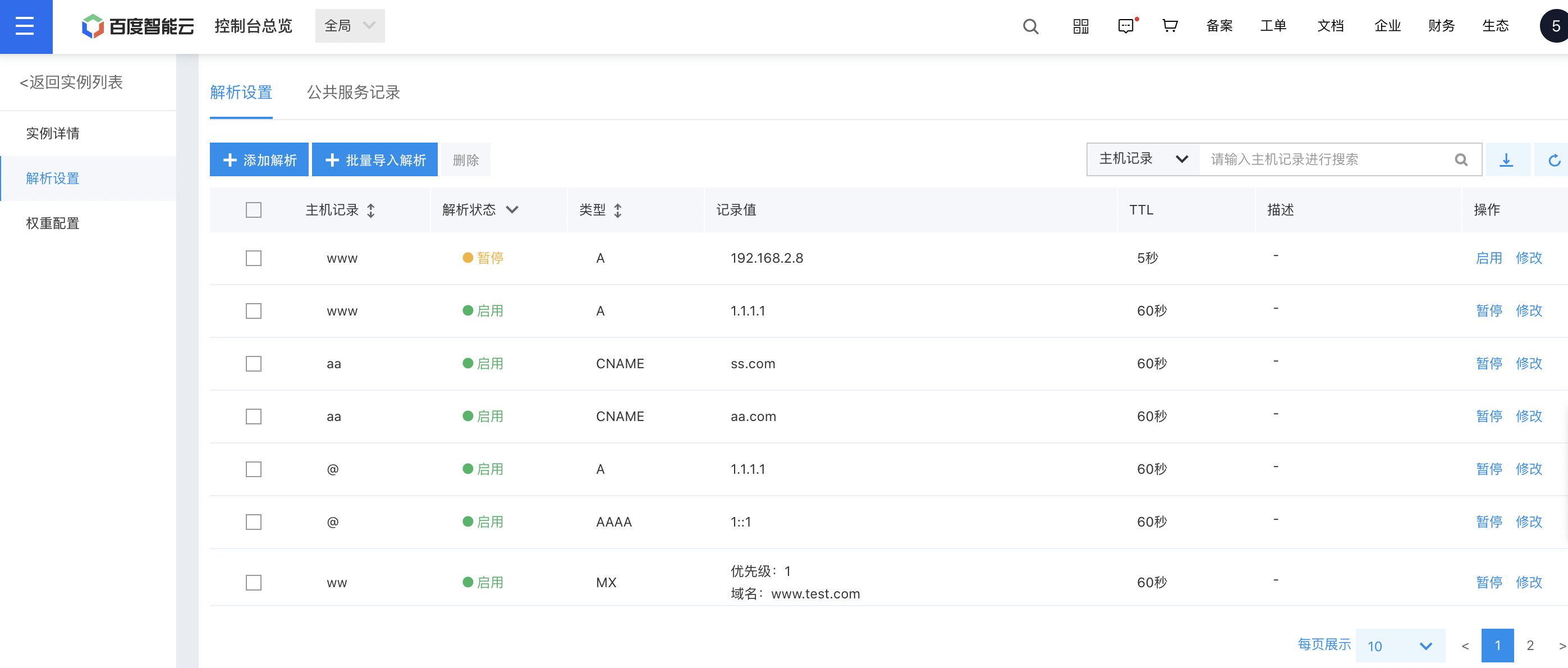
image.png

Description:

  • If a private zone is associated with a VPC, its resolution records will take precedence over corresponding public resolution records.
  • The deletion of resolution records could impact services. Please proceed cautiously. Users may backup records using the download resolution records feature.

Synchronize public Service Records

Synchronizing public service records involves automatically fetching hostname configurations from public service instances like RDS and SCS through the private DNS service, and then generating corresponding private DNS resolution records based on those hostnames.

Description:

  • Supported public services include Baidu AI Cloud Object Storage (BOS), Simple Cache Service (SCS), Relational Database Service (RDS), Gaia Database (GaiaDB), Cloud File System (CFS), and Baidu Storage Gateway (BSG).

Operation step

  1. On the Intelligent Cloud DNS Intranet DNS Service page, choose the added private zone and click on Resolution Settings to access the Resolution Settings page.
  2. Go to the Public Service Records tab, which allows manual and automatic synchronization of public service records.
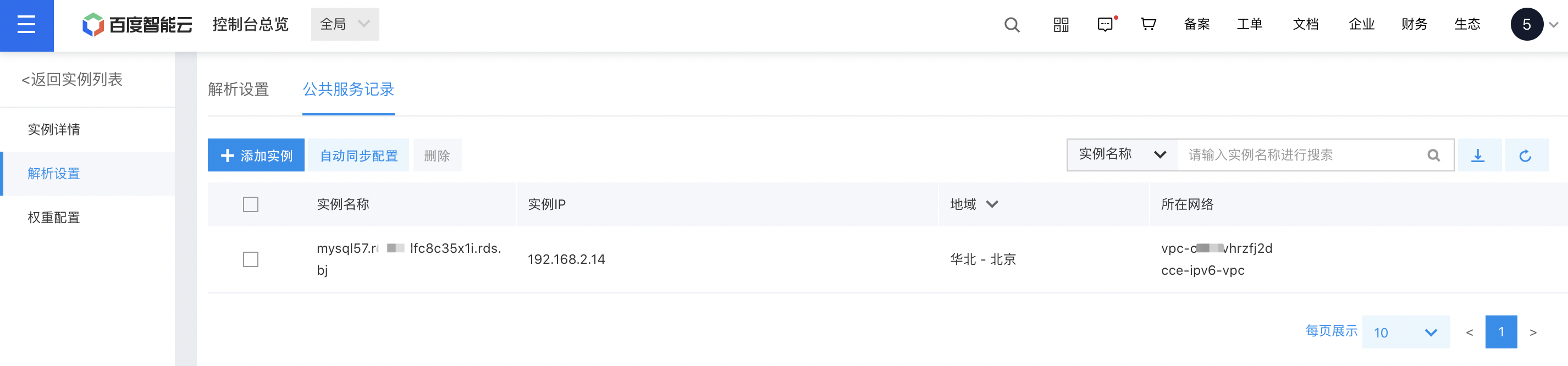
image.png

  1. Click the Add Instance button, and a pop-up will appear. Select the VPC where the public service instance exists, click OK, and the system will automatically retrieve the public service instance name and intranet address within the selected VPC, creating corresponding DNS records.
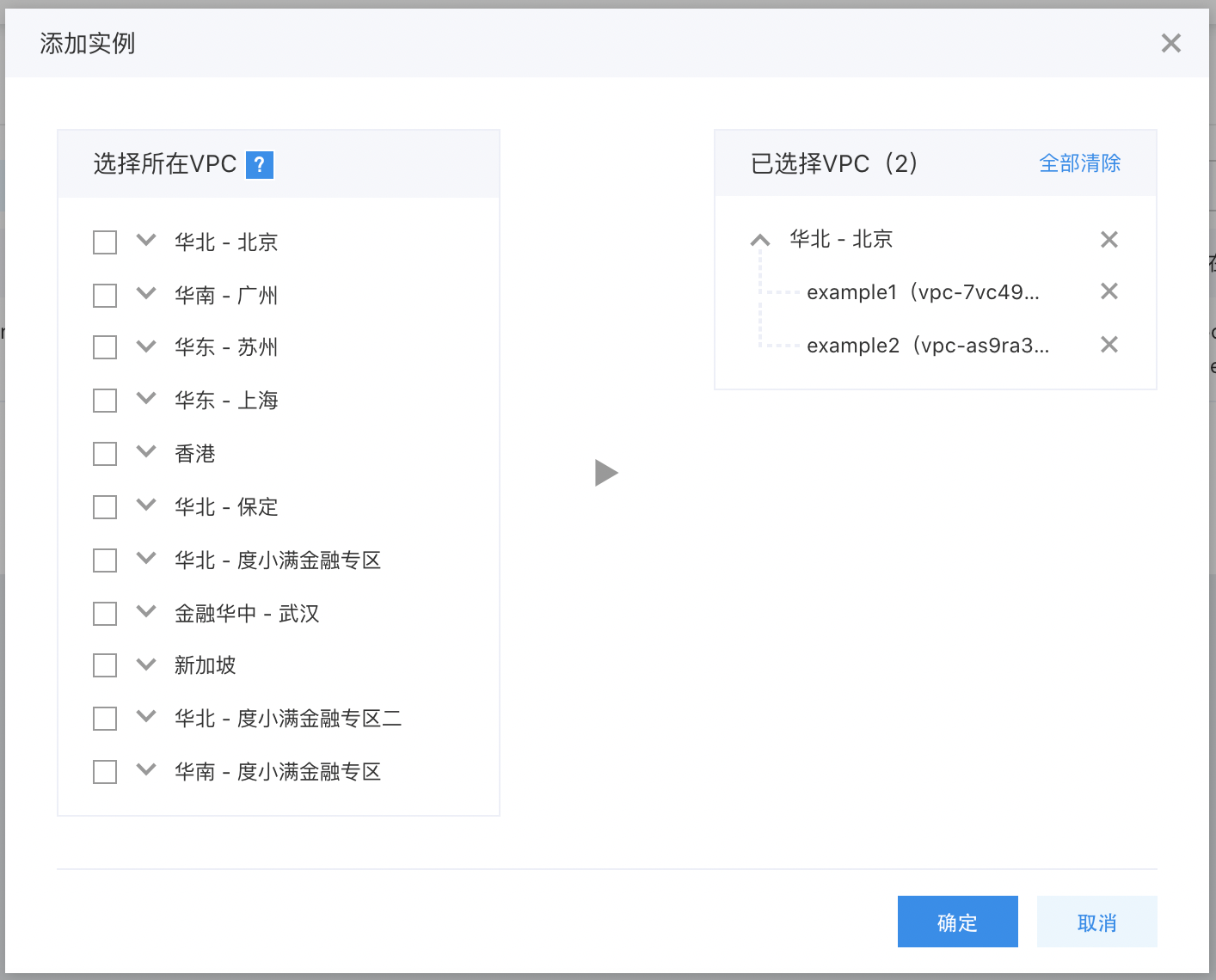
  1. Click the Auto-Sync Configuration button, then select the VPC containing the public service instance. Once enabled, the system will automatically read public service information (e.g., RDS, SCS) within the selected VPC every 5 minutes and update the DNS records.

Previous
Add Private Zone
Next
Associate VPC