Upgrade Domain Name to Enterprise Edition Operation Guide

DNS

  • API Reference
    • API function release records
    • API Service Domain Name
    • Appendix
    • Common Headers and Error Responses
    • General Description
    • Interface Overview
    • Overview
    • Private DNS Related Interfaces
      • Add resolution record
      • Associate VPC
      • Create a PrivateZone
      • Delete PrivateZone
      • Delete resolution record
      • Disassociate VPC
      • Modify resolution record
      • Query details of a PrivateZone
      • Query PrivateZone list
      • Query resolution record list
      • Set Resolution Record Status
    • Public DNS Related Interfaces
      • Domain Name Related Interfaces
      • Line Group Related Interfaces
      • Resolution Records Related Interfaces
  • FAQs
    • General FAQs
  • Function Release Records
  • Operation guide
    • Identity and access management
    • Local DNS service
      • Add Private Zone
      • Add resolution record
      • Associate VPC
      • Delete Private Zone
      • Resolver
    • Public DNS service
      • Add domain name
      • Add resolution
      • Enable Resolution Service
      • Line Grouping Function
      • Manage Resolution
      • Resolution Line Selection
      • Upgrade Domain Name to Enterprise Edition Operation Guide
    • Resolution Logging Management
  • Product Description
    • Application scenarios
    • Product advantages
    • Product functions
    • Product overview
    • Usage restrictions
  • Product pricing
  • Quick Start
    • Activate Service
    • Use Resolution Service
  • SDK
    • Golang-SDK
      • Exception handling
      • Initialization
      • Install the SDK Package
      • Overview
      • Private DNS
      • Version history
    • Java-SDK
      • Install the SDK Package
      • Overview
      • Private DNS
      • Public DNS
      • Version history
    • Python-SDK
      • Initialization
      • Install the SDK Package
      • Overview
      • Private DNS
      • Public DNS
      • Version history
  • Service Level Agreement (SLA)
    • Internal DNS Service Level Agreement SLA
    • Public DNS Service Level Agreement SLA
  • Typical Practices
    • Implement URL Forwarding via Nginx
    • Local IDC Interconnection with Cloud DNS Service via Resolver
    • Quickly Set Up Private Domain Name Resolution Service Using Terraform
All documents
menu
No results found, please re-enter

DNS

  • API Reference
    • API function release records
    • API Service Domain Name
    • Appendix
    • Common Headers and Error Responses
    • General Description
    • Interface Overview
    • Overview
    • Private DNS Related Interfaces
      • Add resolution record
      • Associate VPC
      • Create a PrivateZone
      • Delete PrivateZone
      • Delete resolution record
      • Disassociate VPC
      • Modify resolution record
      • Query details of a PrivateZone
      • Query PrivateZone list
      • Query resolution record list
      • Set Resolution Record Status
    • Public DNS Related Interfaces
      • Domain Name Related Interfaces
      • Line Group Related Interfaces
      • Resolution Records Related Interfaces
  • FAQs
    • General FAQs
  • Function Release Records
  • Operation guide
    • Identity and access management
    • Local DNS service
      • Add Private Zone
      • Add resolution record
      • Associate VPC
      • Delete Private Zone
      • Resolver
    • Public DNS service
      • Add domain name
      • Add resolution
      • Enable Resolution Service
      • Line Grouping Function
      • Manage Resolution
      • Resolution Line Selection
      • Upgrade Domain Name to Enterprise Edition Operation Guide
    • Resolution Logging Management
  • Product Description
    • Application scenarios
    • Product advantages
    • Product functions
    • Product overview
    • Usage restrictions
  • Product pricing
  • Quick Start
    • Activate Service
    • Use Resolution Service
  • SDK
    • Golang-SDK
      • Exception handling
      • Initialization
      • Install the SDK Package
      • Overview
      • Private DNS
      • Version history
    • Java-SDK
      • Install the SDK Package
      • Overview
      • Private DNS
      • Public DNS
      • Version history
    • Python-SDK
      • Initialization
      • Install the SDK Package
      • Overview
      • Private DNS
      • Public DNS
      • Version history
  • Service Level Agreement (SLA)
    • Internal DNS Service Level Agreement SLA
    • Public DNS Service Level Agreement SLA
  • Typical Practices
    • Implement URL Forwarding via Nginx
    • Local IDC Interconnection with Cloud DNS Service via Resolver
    • Quickly Set Up Private Domain Name Resolution Service Using Terraform
  • Document center
  • arrow
  • DNS
  • arrow
  • Operation guide
  • arrow
  • Public DNS service
  • arrow
  • Upgrade Domain Name to Enterprise Edition Operation Guide
Table of contents on this page
  • 1. Back up current resolution records
  • 2. Upgrade the domain name to the enterprise version
  • 3. Modify NS
  • 5. Upload the resolution records of the backup

Upgrade Domain Name to Enterprise Edition Operation Guide

Updated at:2025-11-11

Background

If users have higher requirements for domain name resolution, they can submit a ticket to enable the enterprise version feature and upgrade the current domain name to the enterprise version.

Operation guide

1. Back up current resolution records

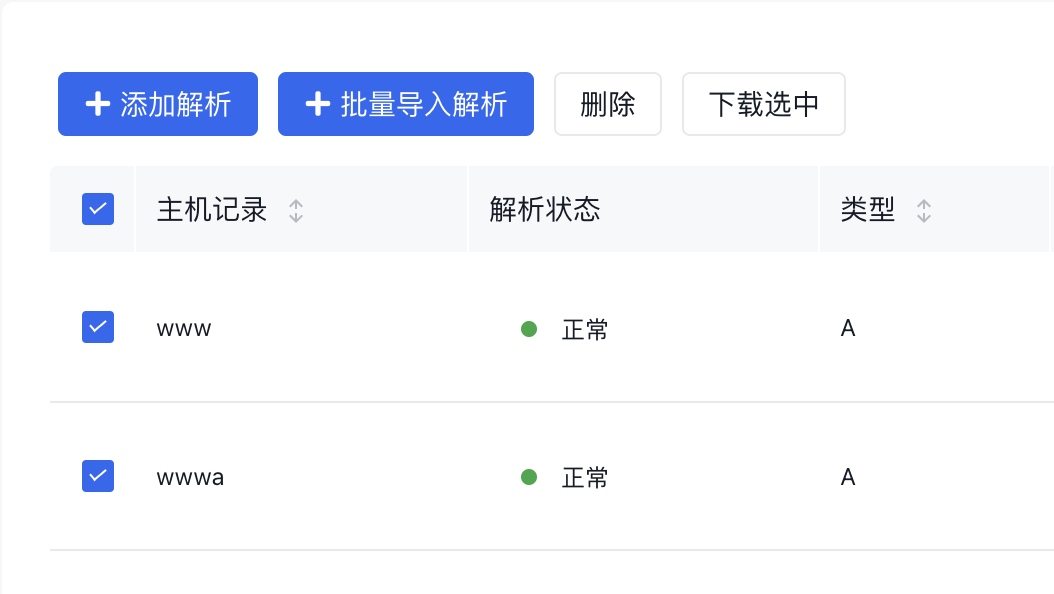
Click [Resolution] on the right side of the domain name to enter the domain name details page. Check all resolution records, click [Download and Select] in the upper left corner, and download the corresponding CSV file of the domain name. ![image.png](https://bce.bdstatic.com/doc/bce-doc/DNS/image_58f3c60.png)
2. Upgrade the domain name to the enterprise version

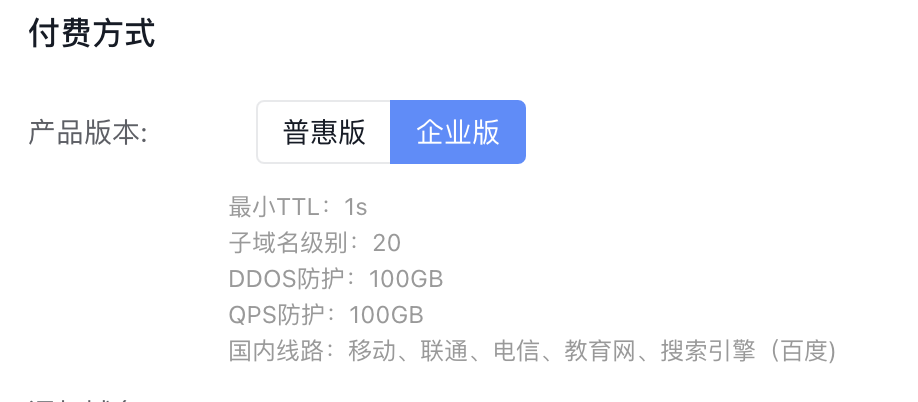
On the domain name list page, click [Upgrade] on the right side of the corresponding domain name to enter the domain name upgrade page. Select [Enterprise Version] for the product version and submit it. image.png
3. Modify NS

After the domain name is upgraded to the enterprise version, please go to the domain name registrar to modify the NS to: sv1.bdydns.cn sv2.bdydns.cn sv3.bdydns.cn sv4.bdydns.cn. It takes 48 hours for the system to update after the NS server is modified. If you have modified the NS and waited for 48 hours, please verify whether the NS modification has taken effect. After confirming that the NS has taken effect correctly, click [Confirm NS Modification] on the right side of the corresponding domain name in the domain name list page. The system will delete the original basic version or discount version domain name and resolution records. Note: Be sure to verify that the changes have taken effect before clicking OK; otherwise, it may cause resolution failure and result in inaccessible access ## 4. Modify the resolution records of the backup After the upgrade, the enterprise version retains the resolution records for the default line from the basic version. However, for non-default lines, users need to define the effective region and re-upload them. Therefore, complete the following operations on the CSV file downloaded in step II: - Delete all records with the internet connection type [Default] - For all records with non-[Default] internet connection types, redefine specific region information in the [Internet Connection Type] field. The supported formats are as follows:
Internet connection type Examples of internet connection type formats to be filled in the table Supported optional regions (need to be filled in the table according to the format listed in the second column)
Telecom Yunnan Branch of China Telecom Yunnan Henan Zhejiang Shanghai Shanxi Hubei Beijing Jiangxi Hebei Hainan Gansu Jilin Liaoning Heilongjiang Fujian Chongqing Inner Mongolia Tibet Tianjin Ningxia Guizhou Guangxi Guangdong Qinghai Shaanxi Shandong Sichuan Hunan Anhui Xinjiang Jiangsu
mobile Yunnan Branch of China Mobile Yunnan Henan Zhejiang Shanghai Shanxi Hubei Beijing Jiangxi Hebei Hainan Gansu Jilin Liaoning Heilongjiang Fujian Chongqing Inner Mongolia Tibet Tianjin Ningxia Guizhou Guangxi Guangdong Qinghai Shaanxi Shandong Sichuan Hunan Anhui Xinjiang Jiangsu
Unicom Yunnan Branch of China Unicom Yunnan Henan Zhejiang Shanghai Shanxi Hubei Beijing Jiangxi Hebei Hainan Gansu Jilin Liaoning Heilongjiang Fujian Chongqing Inner Mongolia Tibet Tianjin Ningxia Guizhou Guangxi Guangdong Qinghai Shaanxi Shandong Sichuan Hunan Anhui Xinjiang Jiangsu
Education network North China. Education Network South China, Central China, North China, East China, Southwest China, Northwest China, Northeast China
Search engine (Baidu) Search engine (Baidu). Line Search engine (Baidu)
China Tietong South China Branch of China Tietong South China, Central China, North China, East China, Southwest China, Northwest China, Northeast China
Dr. Peng South China Branch of Dr. Peng South China, Central China, North China, East China, Southwest China, Northwest China, Northeast China
North China Radio and Television Shanghai. North China Radio and Television Shanghai
Shanghai Wasu Hangzhou. Shanghai Wasu Hangzhou
Hong Kong, Macao and Taiwan Hong Kong. line Hong Kong, Macao and Taiwan
Abroad Japan. line Japan India Germany Russia Canada South Korea, Indonesia Malaysia Philippines Thailand Singapore Vietnam Saudi Arabia Turkey Australia France Spain United Kingdom Ukraine United States Argentina Brazil Mexico

5. Upload the resolution records of the backup

Enter the Domain Name Details page, click [+Batch Import Resolution] in the upper left corner, select the CSV file backed up and downloaded in Step II to upload, and then click OK. The non-default resolutions will be re-added.

Previous
Resolution Line Selection
Next
Resolution Logging Management