

Add resolution
- To access the Resolution page for a domain name, click "Resolution" in the operation column of the domain name list.
- Click "Add Resolution" and input the host record, record values, and settings such as record type, resolution line, and TTL, then click "OK" to complete the resolution.
Description:
- When adding resolution records, first add the default resolution line, then add other resolution line types such as Telecom, Unicom, and Mobile
- The deletion of resolution records may affect the services. Please proceed with caution. Users may perform backup by using the function of download resolution records
Type and meanings of resolution records
Record A
An address record specifies the IPv4 address of a domain name (e.g., 8.8.8.8). To link a domain name to an IP address, add an A record.
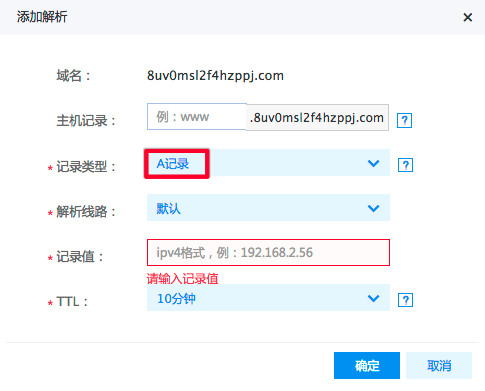
- Record type: A
-
Host record: The host record is the domain name prefix, with common uses including:
Plain Text11. www: The resolved domain name is, for example, www.baidu.com. 2 3 2. @: Direct resolution of the primary domain, e.g., baidu.com. 4 5 3.*: Wildcard resolution, matching all other domain names, e.g., *.baidu.com. - The resolution line can be set to default, China Telecom, China Mobile, China Unicom, or CERNET.
- The record value for an A record typically corresponds to the IP address provided by the user's hosting service provider, such as an IPv4 address like 192.168.2.56.
- TTL (Time To Live) represents the duration for which DNS caches a user’s domain record information. The recommended TTL value is 10 minutes.
AAAA
Specify an IPv6 address record (e.g., aa51::c3) to associate with a hostname or domain name. Use this to resolve to an IPv6 address.
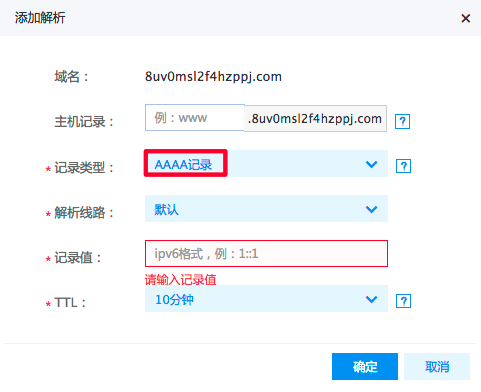
- Record type: AAAA
-
Host record: The host record is the domain name prefix, with common uses including:
Plain Text11. www: The resolved domain name is, for example, www.baidu.com. 2 3 2. @: Direct resolution of the primary domain, e.g., baidu.com. (Cannot create NS records) 4 5 3.*: Wildcard resolution, matching all other domain names, e.g., *.baidu.com. - Resolution line: Selecting Default is recommended.
- Record value: For an AAAA record, input an IPv6 address.
- TTL (Time To Live) represents the duration for which DNS caches a user’s domain record information. The recommended TTL value is 10 minutes.
CNAME
To direct a domain name to another one, which then provides an IP address, a CNAME record must be added. For example: Setting test.baidu.com to direct to a host www.baidu.com enables future access via test.baidu.com instead of www.baidu.com.
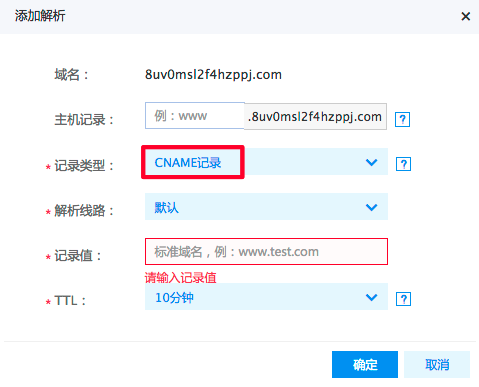
- Record type: CNAME
-
Host record: The host record is the domain name prefix, with common uses including:
Plain Text11. www: The resolved domain name is, for example, www.baidu.com. 2 3 2. @: Direct resolution of the primary domain, e.g., baidu.com. 4 5 3.*: Wildcard resolution, matching all other domain names, e.g., *.baidu.com. - Record value: The CNAME record maps to the free domain name provided by the user's hosting service provider.
- Resolution line: If there's only one IP address or CNAME domain name, choose Default.
- TTL (Time To Live) represents the duration for which DNS caches a user’s domain record information. The recommended TTL value is 10 minutes.
MX
Mail exchange (MX) records are required to set up email function and ensure mail delivery. For example, if the user's email ends with the domain name baidu.com, an MX record for this domain name must be added in the management interface to handle all emails ending with @baidu.com.
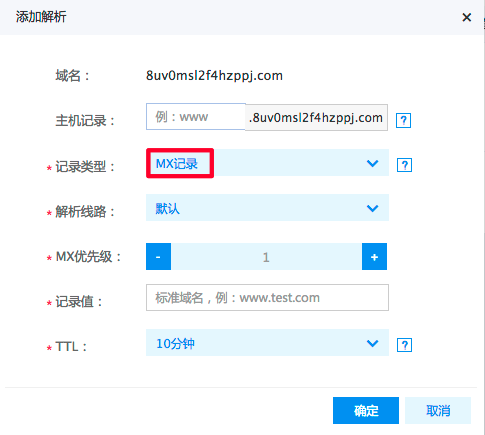
- Record type: MX
-
Host record: The host record is the domain name prefix, with common uses including:
Plain Text11. www: The resolved domain name is, for example, www.baidu.com. 2 3 2. @: Direct resolution of the primary domain, e.g., baidu.com. 4 5 3.*: Wildcard resolution, matching all other domain names, e.g., *.baidu.com. - Resolution line: Selecting Default is recommended.
- MX priority: Specifies the priority level of the MX record, determining the order in which mail servers process emails (1-50). Typically set to 5, 10, or 15 by default.
- Record value: The MX record corresponds to the domain name provided by the user's email service provider.
- TTL (Time To Live) represents the duration for which DNS caches a user’s domain record information. The recommended TTL value is 10 minutes.
NS
Domain name server records. To delegate subdomains to other DNS service providers for resolution, NS records must be added. For example: If the user desires to resolve news.baidu.com with the server at 12.34.56.78, it is necessary to set the NS record for news.baidu.com.
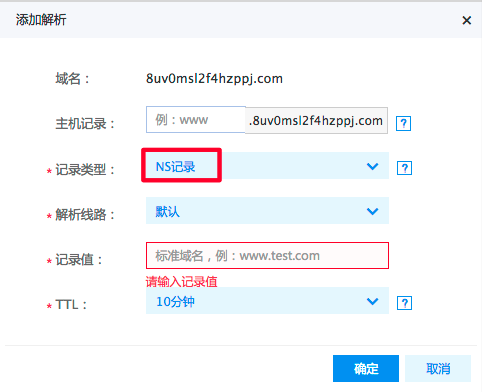
- Record type: NS
-
Host record: The host record is the domain name prefix, with common uses including:
Plain Text11. www: The resolved domain name is, for example, www.baidu.com. 2 3 2. @: Direct resolution of the primary domain, e.g., baidu.com. (Cannot create NS records) 4 5 3.*: Wildcard resolution, matching all other domain names, e.g., *.baidu.com. - Resolution line: Selecting Default is recommended.
- Record value: NS record value delegates authority downward. Input the DNS domain name.
- TTL (Time To Live) represents the duration for which DNS caches a user’s domain record information. The recommended TTL value is 10 minutes.
TXT
You may enter arbitrary text here, up to 255 characters. Most TXT records are utilized for SPF settings (anti-spam).
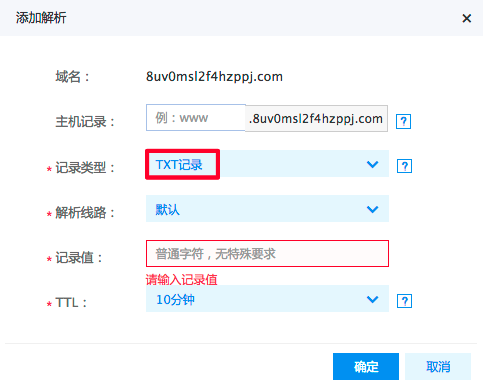
- Record type: TXT
-
Host record: The host record is the domain name prefix, with common uses including:
Plain Text11. www: The resolved domain name is, for example, www.baidu.com. 2 3 2. @: Direct resolution of the primary domain, e.g., baidu.com. 4 5 3.*: Wildcard resolution, matching all other domain names, e.g., *.baidu.com. - Resolution line: Selecting Default is recommended.
- Record value: TXT record values can contain arbitrary text, commonly used for configuring anti-spam measures in enterprise mailboxes.
- TTL (Time To Live) represents the duration for which DNS caches a user’s domain record information. The recommended TTL value is 10 minutes.
SRV
It is used to log the server offering specific services.
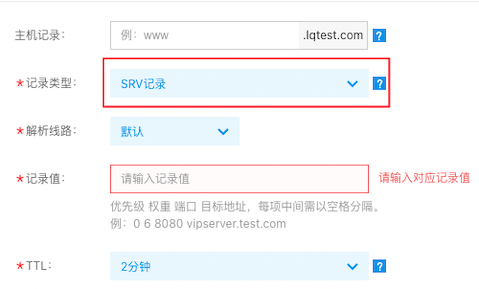
- Record type: SRV
-
Host record: The host record is the domain name prefix, with common uses including:
Plain Text11. Service name.Protocol type, for example, _service._tcp. 2 3 2. www: The resolved domain name is , for example, www.baidu.com. 4 5 3. @: Direct resolution of the primary domain, e.g., baidu.com. 6 7 4.*: Wildcard resolution, matching all other domain names, e.g., *.baidu.com. - Resolution line: Selecting Default is recommended.
- Record value: The SRV record contains details such as priority, weight, port, and hostname of the server, e.g., 0 6 8080 vipserver.test.com.
- TTL (Time To Live) represents the duration for which DNS caches a user’s domain record information. The recommended TTL value is 10 minutes.
CAA
Certificate Authority Authorization (CAA) records are a type of DNS record that allows domain owners to restrict which certificate authorities (CAs) can issue SSL/TLS certificates for their domains. This helps enhance website security by preventing unauthorized certificate issuance.

- Record type: SRV
-
Host record: The host record is the domain name prefix, with common uses including:
Plain Text11. www: The resolved domain name is, for example, www.baidu.com. 2 3 2. @: Direct resolution of the primary domain, e.g., baidu.com. (Cannot create NS records) 4 5 3.*: Wildcard resolution, matching all other domain names, e.g., *.baidu.com. - Resolution line: Select the corresponding resolution line based on requirements
-
Record value: The format of the Certificate Authority Authorization (CAA) record is as follows:
Plain Text1 CAA <flag> <tag> <value> 2 flag: An integer, typically set as 0, indicating that the record can be ignored if it cannot be recognized by the certificate authority (CA). Set to 128, indicating a "critical" flag; the CA must understand this record, otherwise it must not issue the certificate. 3 tag: Specify the type of records, commonly including: 4 - issue: Authorize the specified CA to issue certificates for the domain name. 5 - issuewild: Authorize the specified CA to issue certificates for the domain name. 6 - iodef: Specify the method for receiving violation notifications, such as an email address or URL. 7 value: The value corresponding to the tag, such as the CA's domain name or notification receiving address. - TTL: Time To Live indicates the duration DNS caches the domain record information across different locations. Fill in the relevant TTL value based on user requirements.
- Description: Provide a description for this record.
Description:
- Currently, records tagged as "iodef" type are not supported.