

App Release
Overview
Application publishing serves as a critical step in making an application publicly available. The process is straightforward and can be initiated either through dialogue or by clicking the Publish button. During publishing, the system will lock the operation. After successful publishing, the status changes to "Published" and can be shared. H5 applications can be published directly, while site applications require binding with a field domain name before publishing. Ensure the application is complete before publishing, and wait patiently during the publishing process.
Publishing method
Users can initiate application publishing through the following two methods:
- Dialogue method: You may directly converse with the MeDo platform and explicitly describe your application publishing intent. The platform will invoke the publishing panel according to your command and guide you through the publishing process.
 2.Button operation: Click the Publish button at the top-right of the Application Development interface to access supported publishing channels for the current application type. Select the desired channel and click Publish Now to publish.

Publishing rules
- Publishing status restrictions: During application publishing, the system will prohibit all page operations, including but not limited to modifying application content or conversing with the platform, to ensure stability and data consistency.
- Successful publishing status: After successful publishing, the application status will be automatically updated to "Published". At this point, users can share the application externally for others to access and use. Under Already Live applications, you can view the publishing channels for corresponding applications.
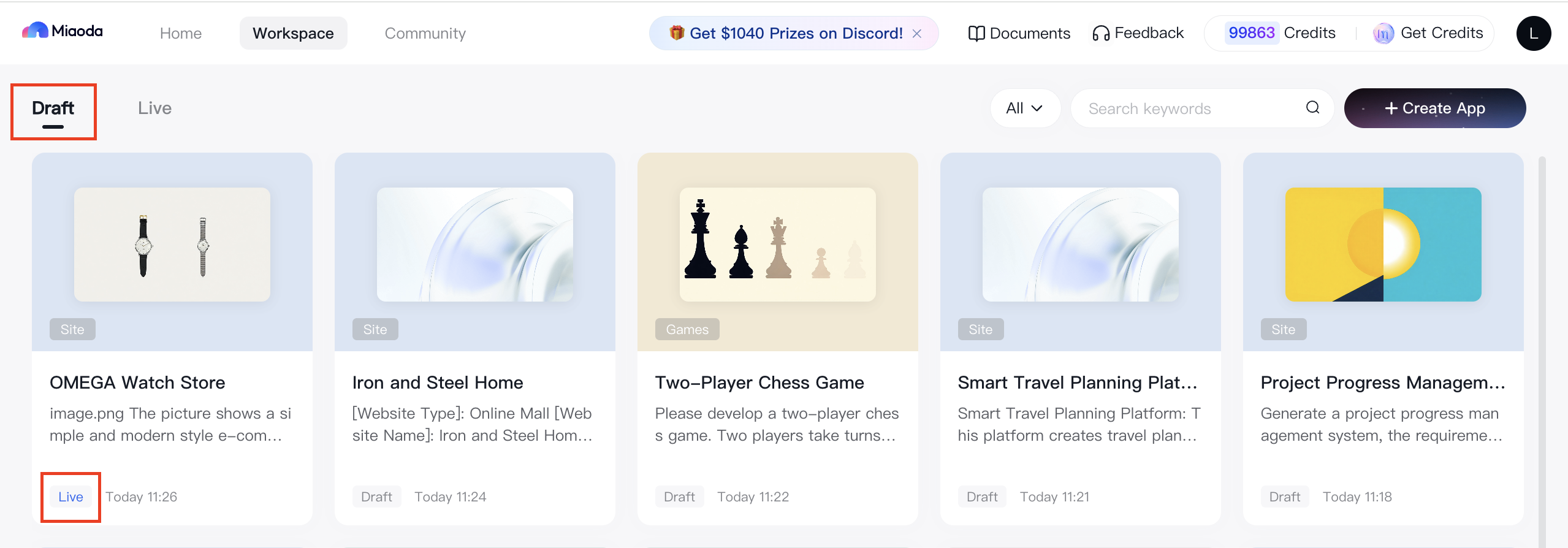

- Multiple publishing: An application can be published multiple times. After each publishing, the My Applications list will display the last updated publishing time of the application, allowing users to track the latest publishing status.
- Publishing channels: An application can be published to multiple channels, with supported channels varying by application type.
Publishing channel description
- MeDo sharing link: All types of applications are published directly through this channel by default. After the application is published, other users can access the application via the link or QR code.

- Dedicated domain name: To enhance brand identity for visitors, an exclusive domain name configuration for site applications is supported. You can pre-configure the domain name via the Application Settings portal in the top navigation bar, and the application will be published directly with the pre-configured domain name. You can also configure your dedicated domain name via the publishing portal. If the application is configured with a dedicated domain name, the dedicated domain name link for access will be prioritized, and the original MeDo sharing link will be hidden.

Note
- Before publishing the application, users must ensure that the application content is complete, functions properly, and has undergone thorough testing to avoid post-publishing issues affecting user experience.
- During publishing, please wait patiently for the system to complete the publishing process. Avoid any operations that may interfere with this process, such as modifying application content or dialogues.
- If any issues are encountered during the publishing process, users can contact MeDo platform's customer support team to obtain timely assistance and solutions.