Configure IAM Tag Permission Policy

CCR

  • Enterprise Edition API Reference
    • Appendix
    • Common Headers and Error Code
    • Enterprise Edition Instance APIs
    • Helm Chart Management Interface
    • Image access control APIs
    • Image Access Credential APIs
    • Image API
    • Image Migration APIs
    • Image On-demand Loading APIs
    • Image Registry APIs
    • Image Synchronization APIs
    • Namespace APIs
    • Overview
    • Service domain
    • Trigger APIs
  • Enterprise Edition Go-SDK
    • Enterprise Edition Instance
    • Initialization
    • Install the SDK Package
    • Overview
  • Enterprise Edition Operation Guide
    • Access configuration
      • Configure Access credentials
      • Configure Custom Endpoint
      • Configure IAM Access Control
      • Configure IAM Tag Permission Policy
      • Configure Robot Account
      • Network Access Control
        • Configure public network access control
        • Configure virtual private cloud access control
        • Network Access Control Overview
    • Container DevOps
      • Manage Trigger
    • Create Enterprise Edition Instance
    • Distribution Management
      • Cross-Instance Synchronization of Image
      • On-Demand Loading of Container Image
      • Using P2P Acceleration in CCE Clusters
    • Event notification
      • Configure Event Notification Alert
      • Image Push Failure Error Code and Handling Methods
    • Image Build
      • Build Based on Existing Image
    • Image Cleanup
      • Clean BOS Storage Space
      • Delete image version
      • Version Retention
    • Image Migration
      • Migrate External Image to Enterprise Edition Instance
    • Image security
      • Immutable image version
      • Security Scanning Container Image
    • Manage Namespace
    • OCI Artifact Management
      • Manage Helm Chart
      • Manage Image Registry
      • OCI Artifact Management Overview
  • Function Release Records
  • Personal Edition API Reference
    • Helm API
    • Image API
    • Image Migration APIs
    • Image Version and Image Version Scanning Interface
    • Namespace APIs
    • Overview
    • User APIs
  • Personal Edition Documentation Set
    • Account Permission Management
    • Cloud Container Engine (CCE) migration to CCR
    • Container Image Service Basic Operations
    • How to Perform Image Scanning
    • How to Upload Helm Chart
    • How to use the DockerHub image accelerator
  • Product Announcement
    • CCR Enterprise Edition Pricing Announcement
    • CCR Enterprise Edition Public Beta Announcement
    • CCR Personal Edition Announcement on Closing New Entry
    • CCR Personal Edition Announcement on Disabling Image Scanning Function
  • Product introduction
    • Core concepts
    • Enterprise Edition Different Specifications Differentiation Description
    • Key functions
    • Product advantages
    • Product Introduction
  • Product pricing
    • Billing overview
  • Quick Start
    • Enterprise Edition Quick Start
    • How to Build Docker Image
  • Service Level Agreement (SLA)
    • CCR Enterprise Edition Service Level Agreement
All documents
menu
No results found, please re-enter

CCR

  • Enterprise Edition API Reference
    • Appendix
    • Common Headers and Error Code
    • Enterprise Edition Instance APIs
    • Helm Chart Management Interface
    • Image access control APIs
    • Image Access Credential APIs
    • Image API
    • Image Migration APIs
    • Image On-demand Loading APIs
    • Image Registry APIs
    • Image Synchronization APIs
    • Namespace APIs
    • Overview
    • Service domain
    • Trigger APIs
  • Enterprise Edition Go-SDK
    • Enterprise Edition Instance
    • Initialization
    • Install the SDK Package
    • Overview
  • Enterprise Edition Operation Guide
    • Access configuration
      • Configure Access credentials
      • Configure Custom Endpoint
      • Configure IAM Access Control
      • Configure IAM Tag Permission Policy
      • Configure Robot Account
      • Network Access Control
        • Configure public network access control
        • Configure virtual private cloud access control
        • Network Access Control Overview
    • Container DevOps
      • Manage Trigger
    • Create Enterprise Edition Instance
    • Distribution Management
      • Cross-Instance Synchronization of Image
      • On-Demand Loading of Container Image
      • Using P2P Acceleration in CCE Clusters
    • Event notification
      • Configure Event Notification Alert
      • Image Push Failure Error Code and Handling Methods
    • Image Build
      • Build Based on Existing Image
    • Image Cleanup
      • Clean BOS Storage Space
      • Delete image version
      • Version Retention
    • Image Migration
      • Migrate External Image to Enterprise Edition Instance
    • Image security
      • Immutable image version
      • Security Scanning Container Image
    • Manage Namespace
    • OCI Artifact Management
      • Manage Helm Chart
      • Manage Image Registry
      • OCI Artifact Management Overview
  • Function Release Records
  • Personal Edition API Reference
    • Helm API
    • Image API
    • Image Migration APIs
    • Image Version and Image Version Scanning Interface
    • Namespace APIs
    • Overview
    • User APIs
  • Personal Edition Documentation Set
    • Account Permission Management
    • Cloud Container Engine (CCE) migration to CCR
    • Container Image Service Basic Operations
    • How to Perform Image Scanning
    • How to Upload Helm Chart
    • How to use the DockerHub image accelerator
  • Product Announcement
    • CCR Enterprise Edition Pricing Announcement
    • CCR Enterprise Edition Public Beta Announcement
    • CCR Personal Edition Announcement on Closing New Entry
    • CCR Personal Edition Announcement on Disabling Image Scanning Function
  • Product introduction
    • Core concepts
    • Enterprise Edition Different Specifications Differentiation Description
    • Key functions
    • Product advantages
    • Product Introduction
  • Product pricing
    • Billing overview
  • Quick Start
    • Enterprise Edition Quick Start
    • How to Build Docker Image
  • Service Level Agreement (SLA)
    • CCR Enterprise Edition Service Level Agreement
  • Document center
  • arrow
  • CCR
  • arrow
  • Enterprise Edition Operation Guide
  • arrow
  • Access configuration
  • arrow
  • Configure IAM Tag Permission Policy
Table of contents on this page
  • Background
  • Operation steps

Configure IAM Tag Permission Policy

Updated at:2025-11-03

After binding cloud resource tags to a CCR enterprise edition, you can use tags to allocate and control access permissions for instances. This document explains how IAM users’ permissions can be controlled using tags to grant different permissions to access various CCR instances.

Background

Tags are a way to categorize cloud resources for better management. IAM can manage user identities and control access permissions for cloud resources based on policies. By combining tags with IAM and using tags as conditions in permission policies, you can achieve more precise permission management for cloud resources.

Operation steps

This step involves using the Baidu AI Cloud root account to create a custom permission policy, UseTagAccessPolicy (which restricts IAM users to accessing only CCR instances with the specified tag test: ccr), and then granting this custom permission policy (UseTagAccessPolicy) to the IAM user.

  1. Navigate to the Identity and Access Management console.
  2. Click Policy Management in the left navigation bar to enter the Permission Policy List page.
  3. Click Create Policy, and then select Create by Tag in the system pop-up box to enter the Create Permission Policy by Tag page.
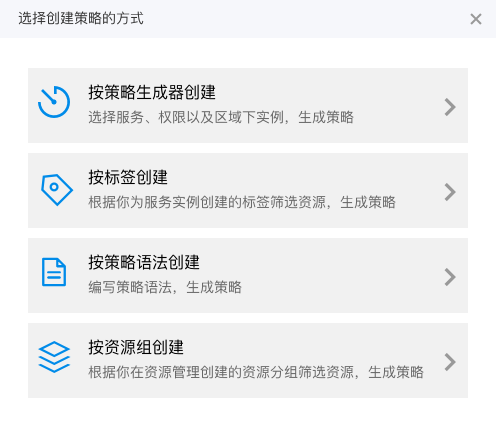
    image.png

  4. Complete relevant configurations on the Create Permission Policy by Tag page:
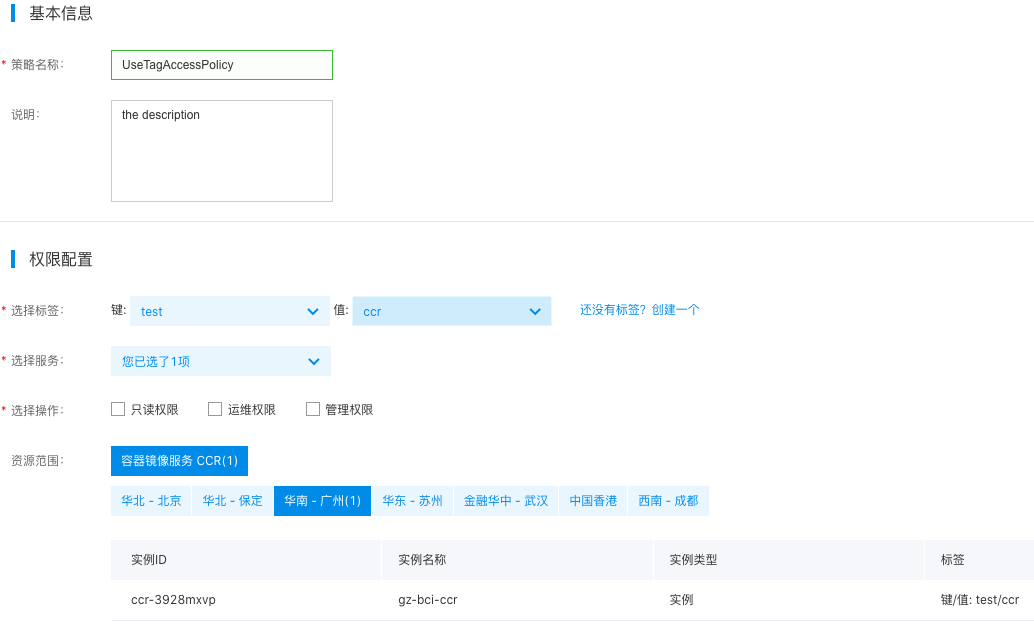
    image.png

ConfigMap Required/Optional Configuration
Policy name Required Custom policy name: Enter "UseTagAccessPolicy" here.
Select tag Required Select the tag bound to the target resource; select test: cce here.
Select service Required Select the cloud service that corresponds to the target resource. Choose "Cloud Container Registry (CCR)" here. The system will automatically filter all CCR instances associated with this tag.
Select operation Required Specify the IAM user permissions to operate on the target resources. Choose "Read-only Permission" here. Multiple permissions, such as "Operation and Maintenance Permission" and "Management Permission," can also be selected.
Resource scope Required Indicate the CCR instance for which this policy will apply. The system will automatically match CCR instances from all regions associated with the selected tags.
Plain Text
1>**Description**
2>
3>* Read-only permission: Have read-only permission for all instances associated with the selected tag.
4>* Operation and maintenance permission: possess the full read-write permissions for all instances associated with the selected tags, excluding instance creation, instance upgrade and renewal
5>* Management permission: possess the full read-write permissions for all instances associated with the selected tags
6>
  1. Click the OK button to complete the creation. You can view the created policy on the Permission Policy List page.
  2. Grant the custom permission policy to the target IAM user. For specific steps, refer to IAM User Authorization.

Previous
Configure IAM Access Control
Next
Configure Robot Account