

Use manually deployed RapidFS
Use manually deployed RapidFS
Prerequisites
RapidFS is currently not publicly available for download. To use RapidFS without CCE or BMR integration, send a request email to [rapidfs@baidu.com](rapidfs@baidu.com?subject=Application for RapidFS Trial).
The following documentation presumes that a RapidFS cluster has already been deployed.
Preparation
Master service address
A complete RapidFS cluster includes three services: Master, MetaServer, and DataServer. During typical usage, users only need to interact with the Master service.
The Master service is generally deployed in a high-availability mode with three nodes.
During subsequent operations, unless otherwise specified, commands can be sent to any master node. Users may also configure DNS or VIP for these three nodes, accessing them through DNS or VIP. Hereinafter, master_node represents the master service address and port that accepts commands, formatted as 10.0.0.1:8000.
rapidfs_cli management tool
RapidFS management commands are executed using rapidfs_cli and are usually run by administrators.
Data source
RapidFS, as a caching acceleration service, can provide acceleration for specified data sources. Currently, the following types of data sources are supported:
- Baidu object storage (BOS)
- Private object storage ABC Storage
- Object storage compatible with the S3 interface (current support is experimental and should not be used in production environments)
- HDFS (under development, stay tuned)
Customers need to provide data source-related details for administrators to set up RapidFS. For configuration guides on various namespace types, refer to the Create Namespace section.
Namespace management
Create namespace
Create a namespace with BOS, ABC storage, and S3 as data sources
Administrators can create an object storage namespace using the following command:
1./rapidfs_cli -op create_bos_namespace \
2              -group <group> \
3              -namespace <namespace> \
4              [-type <type>]
5              -bucket <bucket_name> \
6              -source_endpoint <endpoint> \
7              [-ak <access_key>] [-sk <secret_key>] [-sts_token <sts_token>] \
8              [-source_prefix <source_prefix>] \
9              -master_node <master_node>
The meanings of the parameters are as follows:
- group: Name of the namespace group that the namespace belongs to. In RapidFS, each namespace group uniquely represents a group of MetaServers.
- namespace: The globally unique name of the namespace.
- type: Optional parameter, the type of object storage, with possible values: bos, abc_storage, s3. If unspecified, the default value is bos.
- bucket: The name of the object storage bucket.
- source_endpoint: The service endpoint of object storage. For Baidu AI Cloud BOS, refer to documentation; consult the provider for other object storage services.
- ak, sk, sts_token: Optional parameter, authentication parameters for object storage, representing Access Key, Access Secret Key, and STS Token, respectively.
-
source_prefix: Optional parameter. If not configured, all data in the bucket will be loaded; configuration will load only objects matching the specified prefix. For example, Bucket A contains the following data:
Plain Text1dir1/dir2/file1 2dir1/dir2/file2 3dir1/dir3/ 4dir2/file2To load data from directory
dir1/dir2, specifydir1/dir2/as the prefix. RapidFS will only loaddir1/dir2/file1anddir1/dir2/file2.Note: The trailing/is indispensable, and the reason will be explained below.If you only want to load data with the prefix
dir1/dir, you can specifydir1/diras the prefix, thendir1/dir2/file1,dir1/dir2/file2, anddir1/dir3/will be loaded.When soft links, files, or directories are loaded into RapidFS, the
source_prefixprefix will be automatically removed upon display. - master_node: The service address of the Master component.
After the create_bos_namespace command is successfully executed, RapidFS begins importing Symlinks, files, and directories from object storage. Before the import is completed, the namespace is in an unserviceable status.
All file modifications handled by RapidFS are synchronized to object storage. However, Symlinks and directories created in RapidFS are not synced back to the object storage.
RapidFS has the following limitations when importing data:
- Objects whose names begin with
/or contain consecutive/will be ignored. This is because although/a/b,a/b, anda//bare treated as the same file in RapidFS, they correspond to three distinct objects in object storage, making them indistinguishable and unmanageable by RapidFS. Similarly,dir1/dir2/file1will also be ignored ifdir1/dir2is set assource_prefixfor import, as the remaining part starts with/. - If directories and files with identical paths coexist, the files will be ignored. For example, If both
a/banda/b/objects exist, users will only seea/b/.
Create a namespace with HDFS as the data source
Currently under development; stay tuned.
Update namespace
After the creation of the namespace administrators can update partial configuration of the namespace:
1./rapidfs_cli -op update_namespace \
2              -namespace <namespace> \
3              [-source_endpoint <endpoint>] \
4              [-ak <access_key>] [-sk <secret_key>] [-sts_token <sts_token>] \
5              -master_node <master_node>
The meanings of the parameters are as follows:
- namespace: The namespace to be updated.
- source_endpoint: optional parameter. The service endpoint of object storage. For Baidu AI Cloud BOS, refer to documentation; consult the provider for other object storage services.
- ak, sk, sts_token: Optional parameter, authentication parameters for object storage, representing Access Key, Access Secret Key, and STS Token, respectively.
- master_node: The service address of the Master component.
Delete namespace
When a namespace is no longer in use, administrators may delete it:
1./rapidfs_cli -op drop_namespace \
2              -namespace <namespace> \
3              [-force <true|false>] \
4              -master_node <master_node>
The meanings of the parameters are as follows:
- namespace: The namespace to be deleted.
- force: Optional parameter, whether to force delete the namespace. Valid values are
trueorfalse, defaulting tofalse. When set totrue, RapidFS will purge all data in the namespace; when set tofalse, RapidFS only removes the namespace information from the master, leaving namespace data intact. - master_node: The service address of the Master component.
Whether or not the force mode is used to delete namespace, duplicate namespace names can be reused after successful deletion.
Query namespace
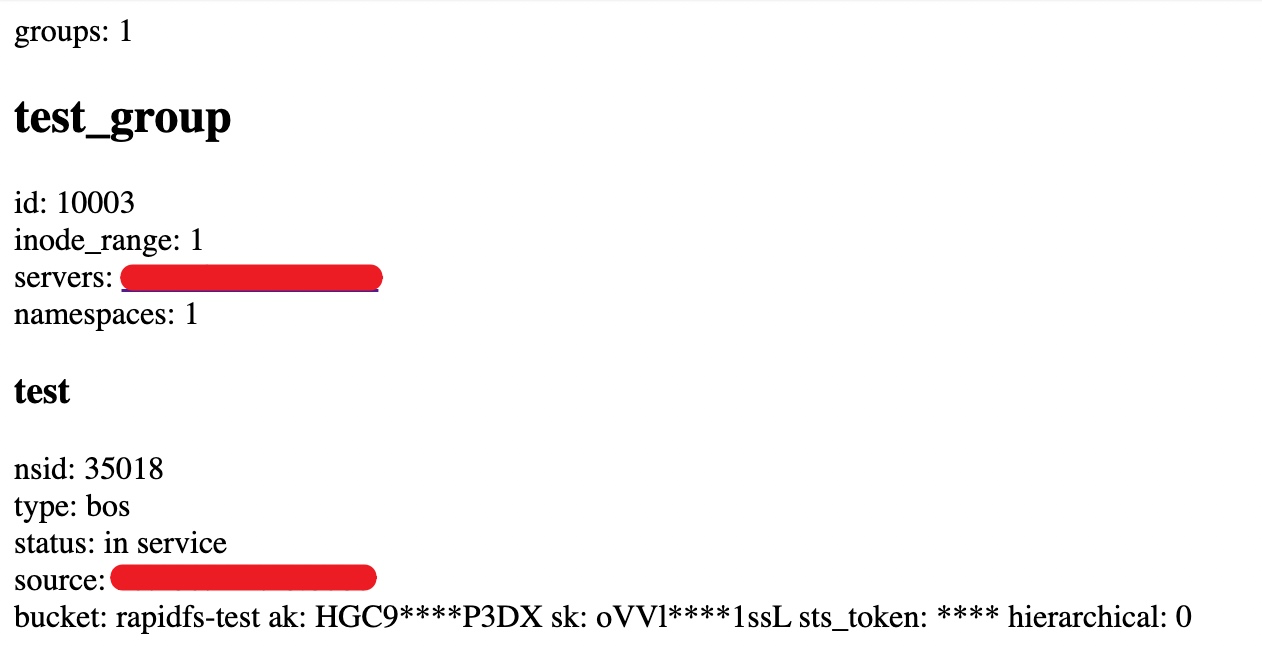
RapidFS Master provides a simple web interface to query namespace status at:
1http://<master_node>/ns_statusThe following figure illustrates the webpage display information:
Task management
Data preheating
After the namespace is operating normally, users can initiate data warm-up tasks at any time to let RapidFS proactively warm up data:
1./rapidfs_cli -op warmup_dataset \
2              -job_uuid <job_uuid> \
3              -namespace <namespace> \
4              [-path <path>] \
5              -master_node <master_node>
The meanings of the parameters are as follows:
- job_uuid: A string that uniquely identifies a task.
- namespace: The namespace to be managed.
- path: Optional parameter, specifies a preheating path. Only files under this subtree will be preheated. If not specified, the entire namespace will be preheated.
- master_node: The service address of the Master component.
Preheating is performed on a best-effort basis in the background. If cache space is insufficient, preheated data may undergo cache release upon completion. Task execution results are retained for a period after completion for querying. For the same job_uuid's warmup_dataset, repeated calls before task information cleanup are equivalent to queries.
Query task
After initiating a task, users may query its status:
1./rapidfs_cli -op stat_dataset_job \
2              -job_uuid <job_uuid> \
3              -master_node <master_node>
The meanings of the parameters are as follows:
- job_uuid: A string that uniquely identifies a task.
- master_node: The service address of the Master component.
Status information will remain available for several hours after task completion, allowing for repeated queries during this time.
Revoke tasks
Before task completion, users may cancel the task:
1./rapidfs_cli -op cancel_dataset_job \
2              -job_uuid <job_uuid> \
3              -master_node <master_node>
The meanings of the parameters are as follows:
- job_uuid: A string that uniquely identifies a task.
- master_node: The service address of the Master component.
Note: Revoking a task only halts its execution; any changes already made will not be undone.
Use RapidFS
RapidFS offers two methods of usage: Integration into the Hadoop big data ecosystem via the HCFS SDK, or local usage through FUSE client mounting.
Usage via HCFS SDK
Modify Hadoop's configuration file core-site.xml by adding the following configuration:
1<property>
2    <name>fs.rapidfs.impl</name>
3    <value>com.baidu.bce.bmr.rapidfs.RapidFileSystemImpl</value>
4    <description>The Rapid FileSystem</description>
5  </property>
6  <property>
7    <name>rapidfs.master.address</name>
8    <value>10.0.0.1:8000</value>
9 <description>RapidFS master service address, which can be a list.</description>
10  </property>
11  <property>
12    <name>rapidfs.debug.mode</name>
13    <value>false</value>
14 <description>Whether to enable debug mode.</description>
15  </property>
16  <property>
17    <name>rapidfs.data.cache.size</name>
18    <value>50000000000</value>
19 <description>Local temporary data cache size must be larger than (2G)2000000000</description>
20  </property>
21  <property>
22    <name>rapidfs.data.cache.dir</name>
23    <value>/ssd1/rapidfs_client/cache_dir</value>
24 <description>Local temporary data cache path, which must be provided with write permissions for the directory</description>
25  </property>
26  <property>
27    <name>rapidfs.internal.config.path</name>
28    <value>/tmp/rapidfs.conf</value>
29 <description>RapidFS's internal configuration file; generally, users do not need to configure it</description>
30  </property>
Once configured, the RapidFileSystem class can be directly utilized in Hadoop using the rapidfs.jar package provided by RapidFS.
RapidFS's schema format is:
1rapidfs://namespace_name/pathSpecifically, namespace_name refers to the namespace's name, and path indicates the actual file or directory location.
Accessed via the FUSE client
Mount client
Mount RapidFS via rfsmount:
1./rfsmount <local_mount_point> <master_nodes> \
2           --namespace_name=<namespace_name> \
3           [--conf=<client.conf>] \
4           [-o uid=<uid>,gid=<gid>,umask=<umask>...]
The meanings of the parameters are as follows:
- local_mount_point: The local directory to mount, which must already exist.
- master_nodes: Service address of the master component. If VIP or DNS is not configured, it is recommended to list all Master nodes here, separated by
,, e.g.,10.0.0.1:8000,10.0.0.2:8000,10.0.0.3:8000. - namespace_name: The namespace intended to be mounted.
- conf: Optional parameter. Users can specify an additional configuration file to pass other parameters.
-o uid=,gid=,umask=...: FUSE-supported parameters can still be passed via the -o option. For details, refer toFUSE Help documentation. Performance-related parameters in rfsmount have been fully optimized. Direct user adjustment is not recommended. If adjustment is necessary, prioritize referencing the ConfigMap provided by rfsmount. For configuration of permission-related parameters, refer to Recommended Security rfsmount Settings-2. Restrict Mount Target Permissions.
Typically, customers may focus on additional ConfigMap items including:
1# --- Log-Related ---
2# Log levels are INFO/NOTICE/WARNING/FATAL, with values being 0, 1, 2, and 3 respectively
3# Detailed debug logs: set to 88 to enable, 0 to disable
4--verbose=0
5# --- FUSE-related ---
6# Attribute cache timeout period, in seconds
7--rapidfs_fuse_attr_timeout_s=3
8# Directory entry lookup cache timeout period, in seconds
9--rapidfs_fuse_entry_timeout_s=3
10# Concurrency level for processing requests
11--rapidfs_fuse_concurrency=64
12# Whether to enable close-to-open consistency. If enabled, every file open operation will verify whether the file has changed. If not enabled, only attribute and directory entry cache timeouts will be validated. Enabling this option significantly impacts small file performance. It is not recommended for scenarios with infrequent data changes.
13--rapidfs_fuse_cto=0
14# Prefetch parameter. 0 adapts based on RapidFS's internal data slice size (Default: 4MB), with negative values (e.g., -1) to disable prefetching
15--rapidfs_fuse_readahead_kb=0
For More configurations, refer to the flags subpage in the client's built-in web interface (refer to ViewClient Built-in Web Interface).
Recommended security configuration for rfsmount
It is recommended to restrict mount permissions to root alone, while configuring appropriate uid, gid, and umask settings to control access to the mounted data, limiting it to specific users or groups.
1. Restrict rfsmount execution to root only
Without fuse3 installed, rfsmount can only be executed by the root user, requiring no additional setup. If fuse3 is installed, any client can execute rfsmount by default. It is advisable to enforce measures to restrict permissions.
Users can execute the following command as root to confirm whether fuse3 is installed:
1which fusermount3If the prompt shows /usr/bin/which: no fusermount3 in, it indicates that fuse3 is not installed on the system.
If fuse3 is installed, the authority of mount can be restricted to root-only execution through the following steps:
1# Remove executable Permission for "other" users
2chmod o-x `/usr/bin/which fusermount3`
2. Restrict the authority of mount for mount targets
By default, rfsmount assigns 0777 permissions to all symlinks, files, and directories, meaning that all clients have read, write, and execution capabilities. For stricter permission controls, users can use the uid, gid, and umask settings provided by FUSE. For example:
1./rfsmount /mnt 10.0.0.1:8000 --namespace_name=test -o uid=1001,gid=1002,umask=0007This mount command removes read, write, and access permissions for "other" users using umask=0007, setting all symlinks, files, and directories to 0770 permissions. Additionally, it specifies the owner (uid=1001) and group (gid=1002) of the mounted target.
For more details, please refer to the FUSE Help documentation.
View the client's built-in webpage
rfsmount is implemented based on bprc. Creating a dummy_server.port file in the working directory enables brpc's built-in webpage:
1echo 8111 > dummy_server.portThe above command starts the built-in brpc page on port 8111. Generally, users are concerned with two subpages: vars and flags
- vars: The vars page contains various system monitoring information. Searching for
rapidfs_enables quick filtering. The names of monitoring items are self-explanatory and will not be elaborated further. - flags: It contain all adjustable system configuration information. ConfigMap related to rfsmount primarily starts with
rapidfs_fuse_andrapidfs_client_, each with a brief description.
Use the client
After a successful mount, users can interact with RapidFS much like a local file system. RapidFS supports random read, sequential read, and sequential write for all data sources; however, random write capability depends on the underlying data source:
- For object storage as the data source, random write support is limited. Writing randomly to existing objects results in copying all data.
- When HDFS is the data source, random writes are not supported.
In summary, RapidFS is not suitable for scenarios that require extensive random write operations.
Uninstall client
When the client is no longer needed, users can unmount the mount target using the umount command:
1umount <local_mount_point>The meanings of the parameters are as follows:
- local_mount_point: The local directory used for mounting.