VPC网络SASL_PLAINTEXT方式生产和消费消息
更新时间:2025-08-21
在同 VPC 网络下访问,使用 SASL_PLAINTEXT 协议接入,接入点可以在 集群详情 页面查看。
环境准备
- 安装GCC
- 安装C++ 依赖库。
Shell
1yum install librdkafka-devel
2yum install cyrus-sasl
3yum install cyrus-sasl-scram
集群准备
1. 购买专享版消息服务for Kafka集群
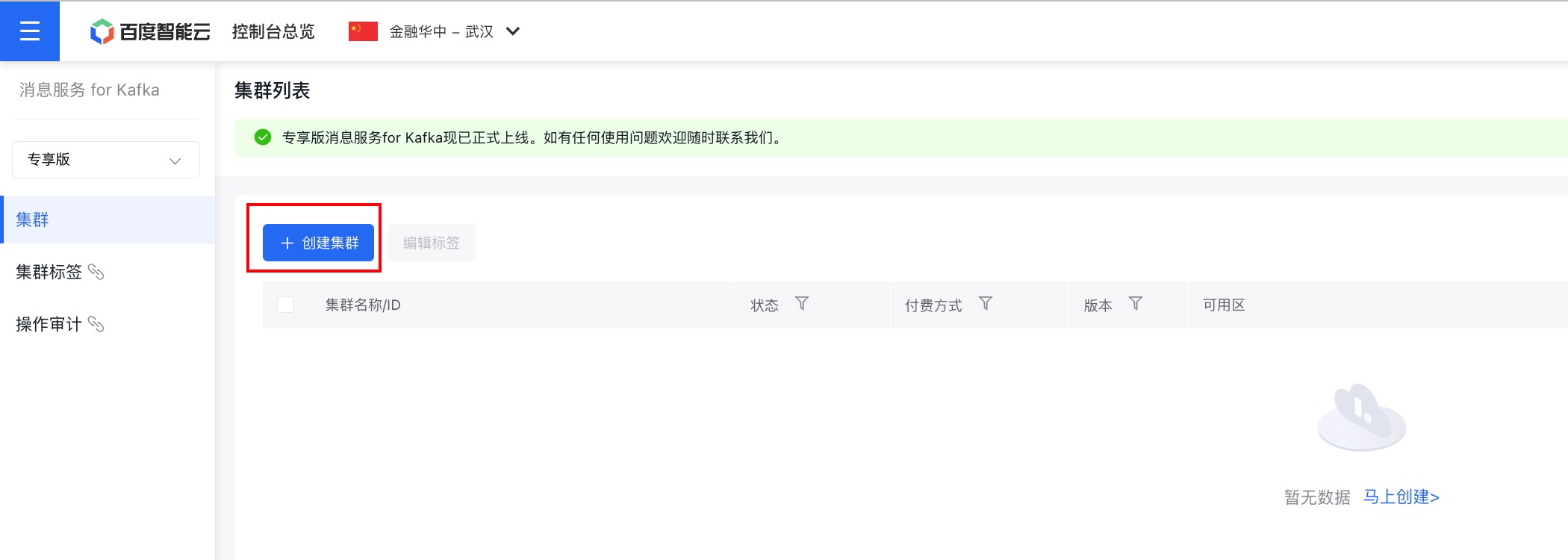
开通消息服务 for Kafka服务后,在控制台页面点击『创建集群』,即可进行购买。
2. 为购买的集群创建主题
在控制台页面点击集群名称,进入集群详情页面。
在左侧的边栏中点击『主题管理』,进入主题管理页面。
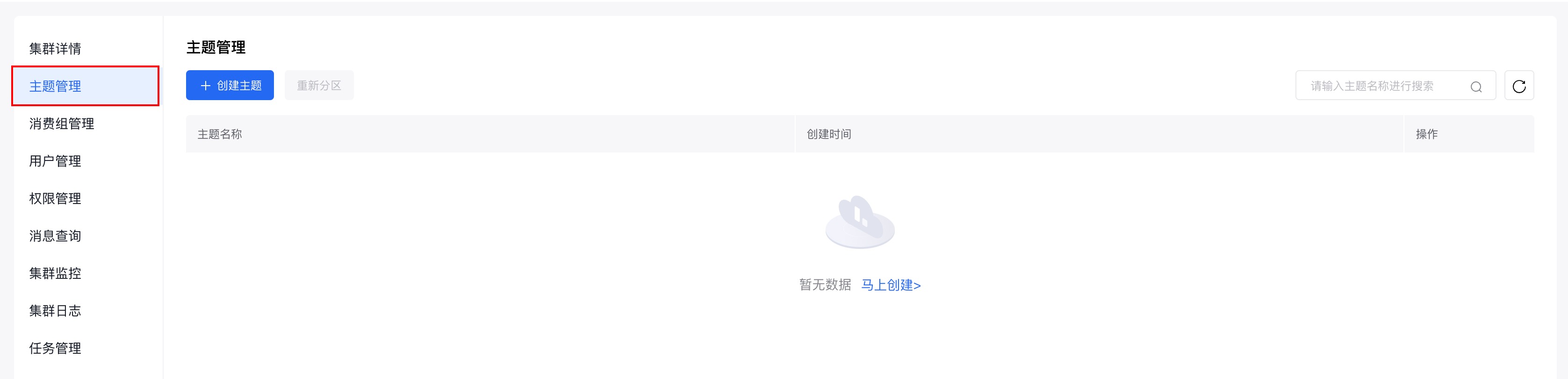
在主题管理页面点击『创建主题』,进行主题的创建。
使用步骤:
步骤一:获取集群接入点
具体请参考:接入点查看。
步骤二:编写测试代码
生产者代码示例
创建KafkaProducerDemo.c文件,具体代码示例如下:
Shell
1/*
2* librdkafka - Apache Kafka C library
3*
4* Copyright (c) 2017, Magnus Edenhill
5* All rights reserved.
6*
7* Redistribution and use in source and binary forms, with or without
8* modification, are permitted provided that the following conditions are met:
9*
10* 1. Redistributions of source code must retain the above copyright notice,
11*    this list of conditions and the following disclaimer.
12* 2. Redistributions in binary form must reproduce the above copyright notice,
13*    this list of conditions and the following disclaimer in the documentation
14*    and/or other materials provided with the distribution.
15*
16* THIS SOFTWARE IS PROVIDED BY THE COPYRIGHT HOLDERS AND CONTRIBUTORS "AS IS"
17* AND ANY EXPRESS OR IMPLIED WARRANTIES, INCLUDING, BUT NOT LIMITED TO, THE
18* IMPLIED WARRANTIES OF MERCHANTABILITY AND FITNESS FOR A PARTICULAR PURPOSE
19* ARE DISCLAIMED. IN NO EVENT SHALL THE COPYRIGHT OWNER OR CONTRIBUTORS BE
20* LIABLE FOR ANY DIRECT, INDIRECT, INCIDENTAL, SPECIAL, EXEMPLARY, OR
21* CONSEQUENTIAL DAMAGES (INCLUDING, BUT NOT LIMITED TO, PROCUREMENT OF
22* SUBSTITUTE GOODS OR SERVICES; LOSS OF USE, DATA, OR PROFITS; OR BUSINESS
23* INTERRUPTION) HOWEVER CAUSED AND ON ANY THEORY OF LIABILITY, WHETHER IN
24* CONTRACT, STRICT LIABILITY, OR TORT (INCLUDING NEGLIGENCE OR OTHERWISE)
25* ARISING IN ANY WAY OUT OF THE USE OF THIS SOFTWARE, EVEN IF ADVISED OF THE
26* POSSIBILITY OF SUCH DAMAGE.
27  */
28
29/**
30* Simple Apache Kafka producer
31* using the Kafka driver from librdkafka
32* (https://github.com/edenhill/librdkafka)
33  */
34
35#include <stdio.h>
36#include <signal.h>
37#include <string.h>
38
39
40/* Typical include path would be <librdkafka/rdkafka.h>, but this program
41* is builtin from within the librdkafka source tree and thus differs. */
42  #include "librdkafka/rdkafka.h"
43
44
45static volatile sig_atomic_t run = 1;
46
47/**
48* @brief Signal termination of program
49  */
50  static void stop(int sig) {
51  run = 0;
52  fclose(stdin); /* abort fgets() */
53  }
54
55
56/**
57* @brief Message delivery report callback.
58*
59* This callback is called exactly once per message, indicating if
60* the message was succesfully delivered
61* (rkmessage->err == RD_KAFKA_RESP_ERR_NO_ERROR) or permanently
62* failed delivery (rkmessage->err != RD_KAFKA_RESP_ERR_NO_ERROR).
63*
64* The callback is triggered from rd_kafka_poll() and executes on
65* the application's thread.
66  */
67  static void dr_msg_cb(rd_kafka_t *rk, const rd_kafka_message_t *rkmessage, void *opaque) {
68  if (rkmessage->err) {
69  fprintf(stderr, "%% Message delivery failed: %s\n", rd_kafka_err2str(rkmessage->err));
70  } else {
71  fprintf(stderr, "%% Message delivered (%zd bytes, partition %" PRId32 ")\n", rkmessage->len, rkmessage->partition);
72  }
73
74  /* The rkmessage is destroyed automatically by librdkafka */
75  }
76
77
78
79int main(int argc, char **argv) {
80rd_kafka_t *rk;        /* Producer instance handle */
81rd_kafka_conf_t *conf; /* Temporary configuration object */
82
83    char errstr[512];      /* librdkafka API error reporting buffer */
84    char buf[512];         /* Message value temporary buffer */
85
86    const char *brokers;   /* Argument: broker list */
87    const char *topic;     /* Argument: topic to produce to */
88    const char *username;      /* Argument: sasl username */
89    const char *password;      /* Argument: sasl password */
90
91    /*
92     * Argument validation
93     */
94
95    // 检查参数配置
96    if (argc != 5) {
97        fprintf(stderr, "%% Usage: %s <broker> <topic> <username> <password>\n", argv[0]);
98        return 1;
99    }
100
101    // 接入点信息
102    brokers = argv[1];
103    // 主题名称
104    topic   = argv[2];
105    // 用户管理中创建的用户名称
106    username = argv[3];
107    // 用户管理中创建的用户密码
108    password = argv[4];
109
110
111    /*
112     * Create Kafka client configuration place-holder
113     */
114    conf = rd_kafka_conf_new();
115
116    /* Set bootstrap broker(s) as a comma-separated list of
117     * host or host:port (default port 9092).
118     * librdkafka will use the bootstrap brokers to acquire the full
119     * set of brokers from the cluster. */
120    if (rd_kafka_conf_set(conf, "bootstrap.servers", brokers, errstr, sizeof(errstr)) != RD_KAFKA_CONF_OK) {
121        fprintf(stderr, "%s\n", errstr);
122        return 1;
123    }
124    // 认证机制支持PLAIN、SCRAM-SHA-512两种机制,根据集群所使用的认证方式进行选择
125    if (
126            rd_kafka_conf_set(conf, "security.protocol", "sasl_plaintext", errstr, sizeof(errstr)) != RD_KAFKA_CONF_OK
127            || rd_kafka_conf_set(conf, "sasl.mechanism", "SCRAM-SHA-512", errstr, sizeof(errstr)) != RD_KAFKA_CONF_OK
128            || rd_kafka_conf_set(conf, "sasl.username", username, errstr, sizeof(errstr)) != RD_KAFKA_CONF_OK
129            || rd_kafka_conf_set(conf, "sasl.password", password, errstr, sizeof(errstr)) != RD_KAFKA_CONF_OK
130    ) {
131        fprintf(stderr, "%s\n", errstr);
132        return -1;
133    }
134
135    /* Set the delivery report callback.
136     * This callback will be called once per message to inform
137     * the application if delivery succeeded or failed.
138     * See dr_msg_cb() above.
139     * The callback is only triggered from rd_kafka_poll() and
140     * rd_kafka_flush(). */
141    rd_kafka_conf_set_dr_msg_cb(conf, dr_msg_cb);
142
143    /*
144     * Create producer instance.
145     *
146     * NOTE: rd_kafka_new() takes ownership of the conf object
147     *       and the application must not reference it again after
148     *       this call.
149     */
150    rk = rd_kafka_new(RD_KAFKA_PRODUCER, conf, errstr, sizeof(errstr));
151    if (!rk) {
152        fprintf(stderr, "%% Failed to create new producer: %s\n", errstr);
153        return 1;
154    }
155
156    /* Signal handler for clean shutdown */
157    signal(SIGINT, stop);
158
159    fprintf(stderr,
160            "%% Type some text and hit enter to produce message\n"
161            "%% Or just hit enter to only serve delivery reports\n"
162            "%% Press Ctrl-C or Ctrl-D to exit\n");
163
164    while (run && fgets(buf, sizeof(buf), stdin)) {
165        size_t len = strlen(buf);
166        rd_kafka_resp_err_t err;
167
168        /* Remove newline */
169        if (buf[len - 1] == '\n') {
170            buf[--len] = '\0';
171        }
172
173        /* Empty line: only serve delivery reports */
174        if (len == 0) {
175            rd_kafka_poll(rk, 0/*non-blocking */);
176            continue;
177        }
178
179        /*
180         * Send/Produce message.
181         * This is an asynchronous call, on success it will only
182         * enqueue the message on the internal producer queue.
183         * The actual delivery attempts to the broker are handled
184         * by background threads.
185         * The previously registered delivery report callback
186         * (dr_msg_cb) is used to signal back to the application
187         * when the message has been delivered (or failed).
188         */
189    retry:
190        err = rd_kafka_producev(
191            /* Producer handle */
192            rk,
193            /* Topic name */
194            RD_KAFKA_V_TOPIC(topic),
195            /* Make a copy of the payload. */
196            RD_KAFKA_V_MSGFLAGS(RD_KAFKA_MSG_F_COPY),
197            /* Message value and length */
198            RD_KAFKA_V_VALUE(buf, len),
199            /* Per-Message opaque, provided in
200             * delivery report callback as
201             * msg_opaque. */
202            RD_KAFKA_V_OPAQUE(NULL),
203            /* End sentinel */
204            RD_KAFKA_V_END
205        );
206
207        if (err) {
208            /*
209             * Failed to *enqueue* message for producing.
210             */
211            fprintf(stderr,
212                    "%% Failed to produce to topic %s: %s\n", topic,
213                    rd_kafka_err2str(err));
214
215            if (err == RD_KAFKA_RESP_ERR__QUEUE_FULL) {
216                /* If the internal queue is full, wait for
217                 * messages to be delivered and then retry.
218                 * The internal queue represents both
219                 * messages to be sent and messages that have
220                 * been sent or failed, awaiting their
221                 * delivery report callback to be called.
222                 *
223                 * The internal queue is limited by the
224                 * configuration property
225                 * queue.buffering.max.messages */
226                rd_kafka_poll(rk, 1000 /*block for max 1000ms*/);
227                goto retry;
228            }
229        } else {
230            fprintf(stderr, "%% Enqueued message (%zd bytes) "
231                    "for topic %s\n",
232                    len, topic);
233        }
234
235
236        /* A producer application should continually serve
237         * the delivery report queue by calling rd_kafka_poll()
238         * at frequent intervals.
239         * Either put the poll call in your main loop, or in a
240         * dedicated thread, or call it after every
241         * rd_kafka_produce() call.
242         * Just make sure that rd_kafka_poll() is still called
243         * during periods where you are not producing any messages
244         * to make sure previously produced messages have their
245         * delivery report callback served (and any other callbacks
246         * you register). */
247        rd_kafka_poll(rk, 0 /*non-blocking*/);
248    }
249
250
251    /* Wait for final messages to be delivered or fail.
252     * rd_kafka_flush() is an abstraction over rd_kafka_poll() which
253     * waits for all messages to be delivered. */
254    fprintf(stderr, "%% Flushing final messages..\n");
255    rd_kafka_flush(rk, 10 * 1000 /* wait for max 10 seconds */);
256
257    /* If the output queue is still not empty there is an issue
258     * with producing messages to the clusters. */
259    if (rd_kafka_outq_len(rk) > 0) {
260        fprintf(stderr, "%% %d message(s) were not delivered\n", rd_kafka_outq_len(rk));
261    }
262
263    /* Destroy the producer instance */
264    rd_kafka_destroy(rk);
265
266    return 0;
267}
消费者代码示例
创建KafkaConsumerDemo.c文件,具体代码示例如下:
Shell
1/*
2* librdkafka - Apache Kafka C library
3*
4* Copyright (c) 2019, Magnus Edenhill
5* All rights reserved.
6*
7* Redistribution and use in source and binary forms, with or without
8* modification, are permitted provided that the following conditions are met:
9*
10* 1. Redistributions of source code must retain the above copyright notice,
11*    this list of conditions and the following disclaimer.
12* 2. Redistributions in binary form must reproduce the above copyright notice,
13*    this list of conditions and the following disclaimer in the documentation
14*    and/or other materials provided with the distribution.
15*
16* THIS SOFTWARE IS PROVIDED BY THE COPYRIGHT HOLDERS AND CONTRIBUTORS "AS IS"
17* AND ANY EXPRESS OR IMPLIED WARRANTIES, INCLUDING, BUT NOT LIMITED TO, THE
18* IMPLIED WARRANTIES OF MERCHANTABILITY AND FITNESS FOR A PARTICULAR PURPOSE
19* ARE DISCLAIMED. IN NO EVENT SHALL THE COPYRIGHT OWNER OR CONTRIBUTORS BE
20* LIABLE FOR ANY DIRECT, INDIRECT, INCIDENTAL, SPECIAL, EXEMPLARY, OR
21* CONSEQUENTIAL DAMAGES (INCLUDING, BUT NOT LIMITED TO, PROCUREMENT OF
22* SUBSTITUTE GOODS OR SERVICES; LOSS OF USE, DATA, OR PROFITS; OR BUSINESS
23* INTERRUPTION) HOWEVER CAUSED AND ON ANY THEORY OF LIABILITY, WHETHER IN
24* CONTRACT, STRICT LIABILITY, OR TORT (INCLUDING NEGLIGENCE OR OTHERWISE)
25* ARISING IN ANY WAY OUT OF THE USE OF THIS SOFTWARE, EVEN IF ADVISED OF THE
26* POSSIBILITY OF SUCH DAMAGE.
27  */
28
29/**
30* Simple high-level balanced Apache Kafka consumer
31* using the Kafka driver from librdkafka
32* (https://github.com/edenhill/librdkafka)
33  */
34
35#include <stdio.h>
36#include <signal.h>
37#include <string.h>
38#include <ctype.h>
39
40
41/* Typical include path would be <librdkafka/rdkafka.h>, but this program
42* is builtin from within the librdkafka source tree and thus differs. */
43  //#include <librdkafka/rdkafka.h>
44  #include "librdkafka/rdkafka.h"
45
46
47static volatile sig_atomic_t run = 1;
48
49/**
50* @brief Signal termination of program
51  */
52  static void stop(int sig) {
53  run = 0;
54  }
55
56
57
58/**
59* @returns 1 if all bytes are printable, else 0.
60  */
61  static int is_printable(const char *buf, size_t size) {
62  size_t i;
63
64  for (i = 0; i < size; i++) {
65  if (!isprint((int)buf[i])) {
66  return 0;
67  }
68  }
69
70  return 1;
71  }
72
73
74int main(int argc, char **argv) {
75rd_kafka_t *rk;          /* Consumer instance handle */
76rd_kafka_conf_t *conf;   /* Temporary configuration object */
77rd_kafka_resp_err_t err; /* librdkafka API error code */
78
79    char errstr[512];        /* librdkafka API error reporting buffer */
80
81    const char *brokers;     /* Argument: broker list */
82    const char *groupid;     /* Argument: Consumer group id */
83    const char *username;      /* Argument: sasl username */
84    const char *password;      /* Argument: sasl password */
85    char **topics;           /* Argument: list of topics to subscribe to */
86
87    int topic_cnt;           /* Number of topics to subscribe to */
88    rd_kafka_topic_partition_list_t *subscription; /* Subscribed topics */
89    int i;
90
91    /*
92     * Argument validation
93     */
94
95    // 检查参数配置
96    if (argc < 6) {
97        fprintf(stderr, "%% Usage: %s <broker> <group.id> <username> <password> <topic1> <topic2>..\n", argv[0]);
98        return 1;
99    }
100
101    // 接入点信息
102    brokers   = argv[1];
103    // 消费组 id
104    groupid   = argv[2];
105    // 用户管理中创建的用户名称
106    username  = argv[3];
107    // 用户管理中创建的用户密码
108    password  = argv[4];
109    // 主题名称
110    topics    = &argv[5];
111
112    topic_cnt = argc - 5;
113
114
115    /*
116     * Create Kafka client configuration place-holder
117     */
118    conf = rd_kafka_conf_new();
119
120    /* Set bootstrap broker(s) as a comma-separated list of
121     * host or host:port (default port 9092).
122     * librdkafka will use the bootstrap brokers to acquire the full
123     * set of brokers from the cluster. */
124    if (rd_kafka_conf_set(conf, "bootstrap.servers", brokers, errstr, sizeof(errstr)) != RD_KAFKA_CONF_OK) {
125        fprintf(stderr, "%s\n", errstr);
126        rd_kafka_conf_destroy(conf);
127        return 1;
128    }
129    // 认证机制支持PLAIN、SCRAM-SHA-512两种机制,根据集群所使用的认证方式进行选择
130    if (
131            rd_kafka_conf_set(conf, "security.protocol", "sasl_plaintext", errstr, sizeof(errstr)) != RD_KAFKA_CONF_OK
132            || rd_kafka_conf_set(conf, "sasl.mechanism", "SCRAM-SHA-512", errstr, sizeof(errstr)) != RD_KAFKA_CONF_OK
133            || rd_kafka_conf_set(conf, "sasl.username", username, errstr, sizeof(errstr)) != RD_KAFKA_CONF_OK
134            || rd_kafka_conf_set(conf, "sasl.password", password, errstr, sizeof(errstr)) != RD_KAFKA_CONF_OK
135    ) {
136        fprintf(stderr, "%s\n", errstr);
137        return -1;
138    }
139
140    /* Set the consumer group id.
141     * All consumers sharing the same group id will join the same
142     * group, and the subscribed topic' partitions will be assigned
143     * according to the partition.assignment.strategy
144     * (consumer config property) to the consumers in the group. */
145    if (rd_kafka_conf_set(conf, "group.id", groupid, errstr, sizeof(errstr)) != RD_KAFKA_CONF_OK) {
146        fprintf(stderr, "%s\n", errstr);
147        rd_kafka_conf_destroy(conf);
148        return 1;
149    }
150
151    /* If there is no previously committed offset for a partition
152     * the auto.offset.reset strategy will be used to decide where
153     * in the partition to start fetching messages.
154     * By setting this to earliest the consumer will read all messages
155     * in the partition if there was no previously committed offset. */
156    if (rd_kafka_conf_set(conf, "auto.offset.reset", "earliest", errstr, sizeof(errstr)) != RD_KAFKA_CONF_OK) {
157        fprintf(stderr, "%s\n", errstr);
158        rd_kafka_conf_destroy(conf);
159        return 1;
160    }
161
162    /*
163     * Create consumer instance.
164     *
165     * NOTE: rd_kafka_new() takes ownership of the conf object
166     *       and the application must not reference it again after
167     *       this call.
168     */
169    rk = rd_kafka_new(RD_KAFKA_CONSUMER, conf, errstr, sizeof(errstr));
170    if (!rk) {
171        fprintf(stderr, "%% Failed to create new consumer: %s\n", errstr);
172        return 1;
173    }
174
175    conf = NULL; /* Configuration object is now owned, and freed,
176                  * by the rd_kafka_t instance. */
177
178
179    /* Redirect all messages from per-partition queues to
180     * the main queue so that messages can be consumed with one
181     * call from all assigned partitions.
182     *
183     * The alternative is to poll the main queue (for events)
184     * and each partition queue separately, which requires setting
185     * up a rebalance callback and keeping track of the assignment:
186     * but that is more complex and typically not recommended. */
187    rd_kafka_poll_set_consumer(rk);
188
189
190    /* Convert the list of topics to a format suitable for librdkafka */
191    subscription = rd_kafka_topic_partition_list_new(topic_cnt);
192    for (i = 0; i < topic_cnt; i++) {
193        rd_kafka_topic_partition_list_add(
194            subscription,
195            topics[i],
196            /* the partition is ignored
197             * by subscribe() */
198            RD_KAFKA_PARTITION_UA
199        );
200    }
201
202    /* Subscribe to the list of topics */
203    err = rd_kafka_subscribe(rk, subscription);
204    if (err) {
205        fprintf(stderr, "%% Failed to subscribe to %d topics: %s\n", subscription->cnt, rd_kafka_err2str(err));
206        rd_kafka_topic_partition_list_destroy(subscription);
207        rd_kafka_destroy(rk);
208        return 1;
209    }
210
211    fprintf(stderr,
212            "%% Subscribed to %d topic(s), "
213            "waiting for rebalance and messages...\n",
214            subscription->cnt);
215
216    rd_kafka_topic_partition_list_destroy(subscription);
217
218
219    /* Signal handler for clean shutdown */
220    signal(SIGINT, stop);
221
222    /* Subscribing to topics will trigger a group rebalance
223     * which may take some time to finish, but there is no need
224     * for the application to handle this idle period in a special way
225     * since a rebalance may happen at any time.
226     * Start polling for messages. */
227
228    while (run) {
229        rd_kafka_message_t *rkm;
230
231        rkm = rd_kafka_consumer_poll(rk, 100);
232        if (!rkm) {
233            continue; /* Timeout: no message within 100ms,
234                       *  try again. This short timeout allows
235                       *  checking for `run` at frequent intervals.
236                       */
237        }
238
239        /* consumer_poll() will return either a proper message
240         * or a consumer error (rkm->err is set). */
241        if (rkm->err) {
242            /* Consumer errors are generally to be considered
243             * informational as the consumer will automatically
244             * try to recover from all types of errors. */
245            fprintf(stderr, "%% Consumer error: %s\n", rd_kafka_message_errstr(rkm));
246            rd_kafka_message_destroy(rkm);
247            continue;
248        }
249
250        /* Proper message. */
251        printf("Message on %s [%" PRId32 "] at offset %" PRId64 ":\n",
252               rd_kafka_topic_name(rkm->rkt), rkm->partition,
253               rkm->offset);
254
255        /* Print the message key. */
256        if (rkm->key && is_printable(rkm->key, rkm->key_len)) {
257            printf(" Key: %.*s\n", (int)rkm->key_len, (const char *)rkm->key);
258        } else if (rkm->key) {
259            printf(" Key: (%d bytes)\n", (int)rkm->key_len);
260        }
261
262        /* Print the message value/payload. */
263        if (rkm->payload && is_printable(rkm->payload, rkm->len)) {
264            printf(" Value: %.*s\n", (int)rkm->len, (const char *)rkm->payload);
265        } else if (rkm->payload) {
266            printf(" Value: (%d bytes)\n", (int)rkm->len);
267        }
268
269        rd_kafka_message_destroy(rkm);
270    }
271
272
273    /* Close the consumer: commit final offsets and leave the group. */
274    fprintf(stderr, "%% Closing consumer\n");
275    rd_kafka_consumer_close(rk);
276
277
278    /* Destroy the consumer */
279    rd_kafka_destroy(rk);
280
281    return 0;
282}
步骤三:编译并运行
编译并运行上述两个代码文件。
Bash
1# 启动消费者
2gcc -lrdkafka ./consumer.c -o consumer
3./consumer <broker> <group.id> <username> <password> <topic1> <topic2>..
4# 启动生产者
5gcc -lrdkafka ./producer.c -o producer
6./producer <broker> <topic> <username> <password>
步骤四:查看集群监控
查看消息是否发送成功或消费成功有两种方式:
- 在服务器端/控制台查看日志。
- 在专享版消息服务 for Kafka控制台查看集群监控,获取集群生产、消息情况。
推荐使用第二种方式,下面介绍如何查看集群监控。
(1)在专享版消息服务 for Kafka的控制台页面找到需要连接的集群,点击集群名称进入『集群详情』页面。

(2)页面跳转后,进入左侧边中的『集群详情』页面。
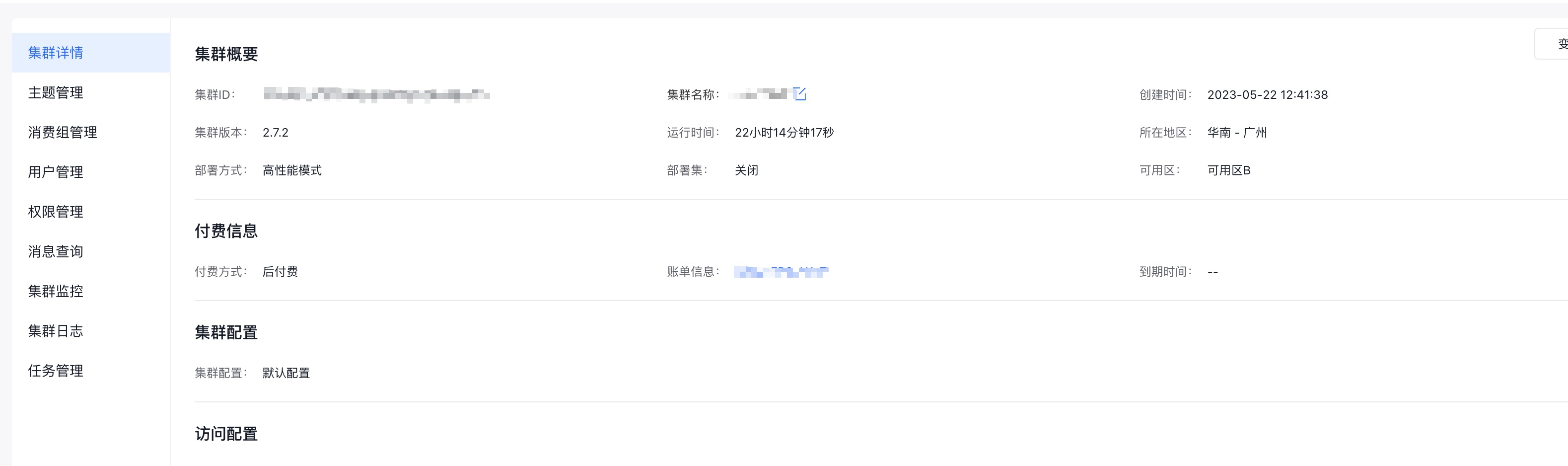
(3)点击左侧边栏中的『集群监控』,进入『集群监控』页面。
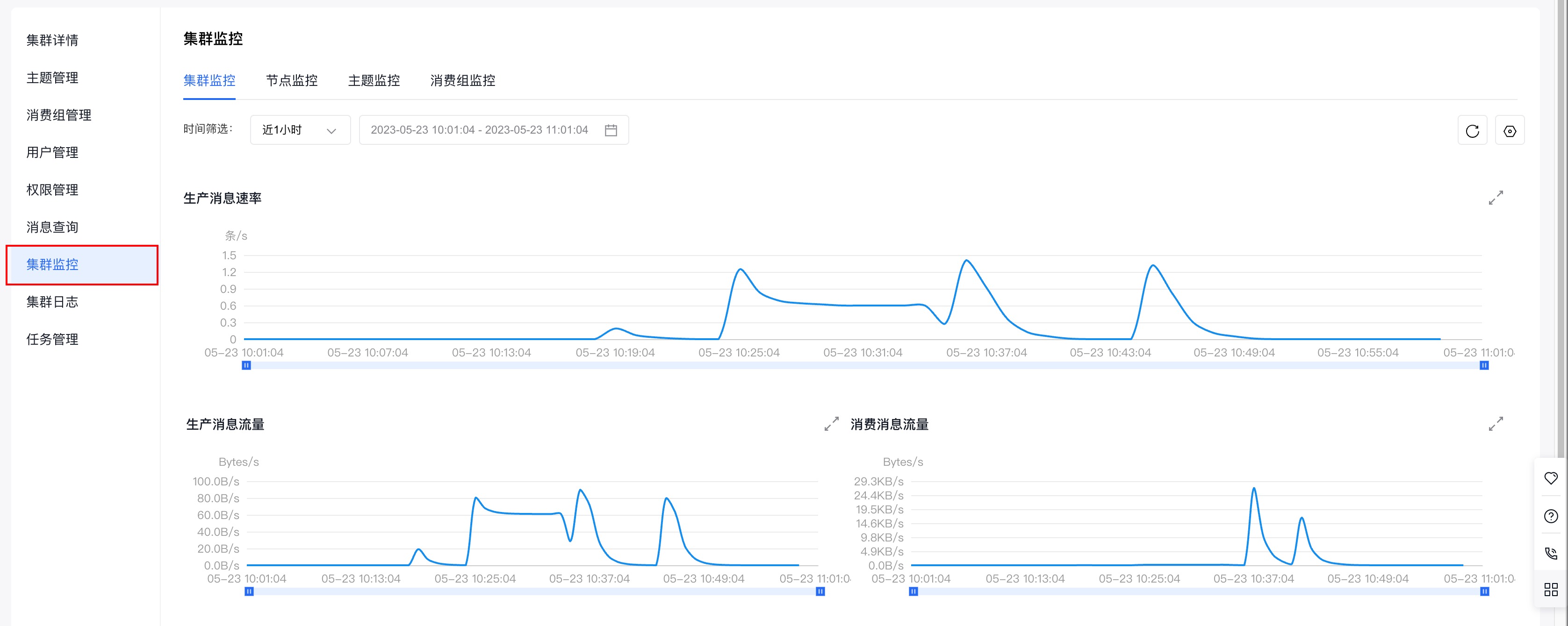
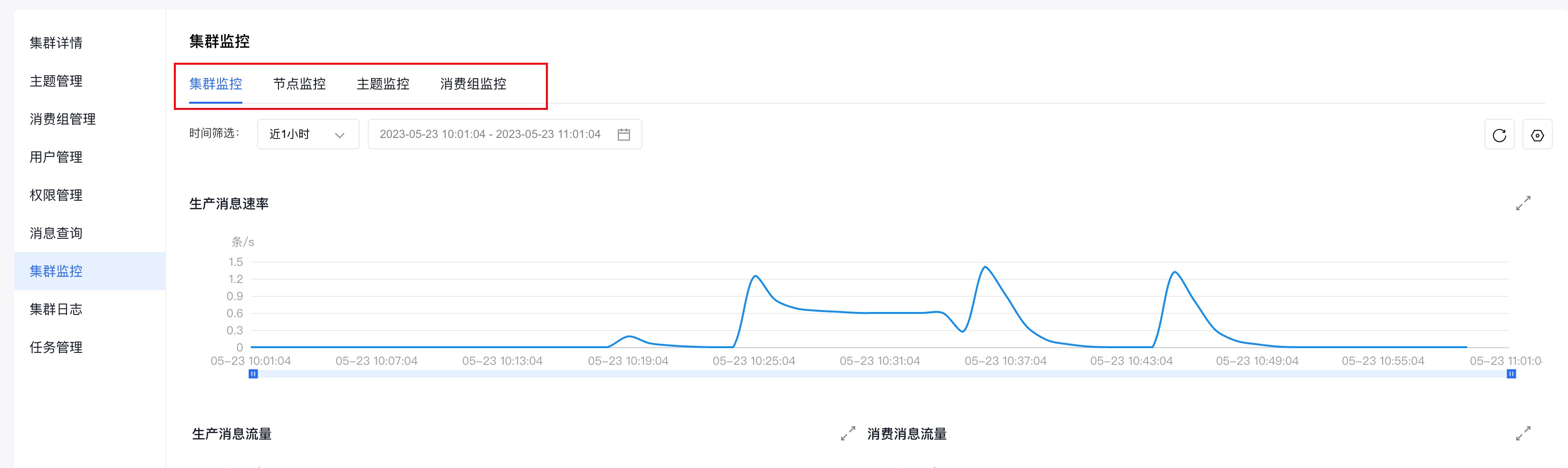
(4)通过查看『集群监控』页面,提供的不同纬度的监控信息(集群监控、节点监控、主题监控、消费组监控),即可获知集群的生产和消费情况。
集群监控的具体使用请参考:集群监控