

Quick Start
Welcome to the Baidu AI Cloud Qianfan AI Application Developer Center! Whether you are an experienced developer or just starting to explore the world of artificial intelligence, this guide will help you get up and running quickly and start building intelligent applications with capabilities such as text generation, conversational interaction, content analysis, and more.
Create an API Key
First, log in to Console - Security Authentication - API Key. Click Create API Key. The created API Key can be used for Qianfan AppBuilder, ModelBuilder, and AI Open Capabilities.
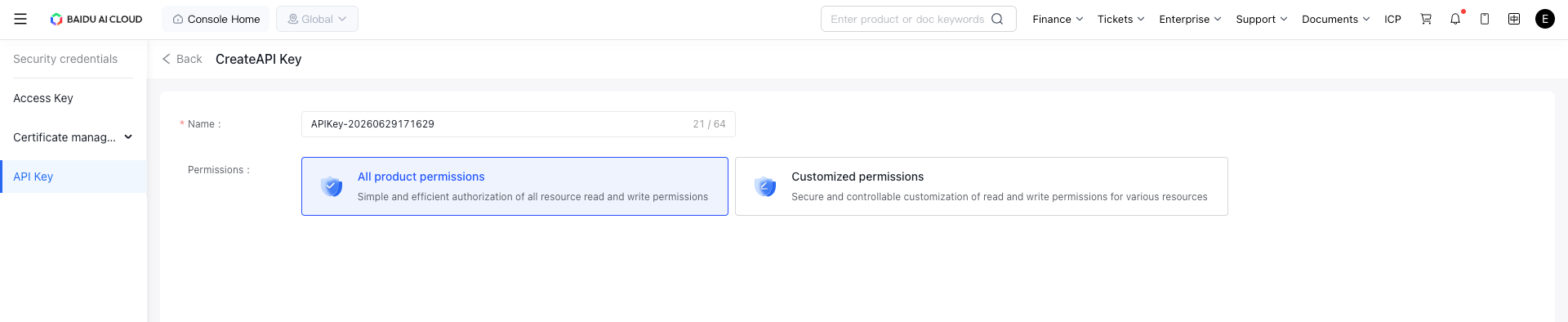
A single API Key supports simultaneous calls to all three capabilities: Qianfan AppBuilder, ModelBuilder, and AI Open Capabilities. You can click "Add Permissions" on the page and select the capability scope you plan to call with this API Key under "Services" to enable multi-directional calls.
When sending requests with an API Key, the Authorization field in the request Header must contain the API Key authentication information.
Note: When filling in the authentication information, you need to prefix the API Key with Bearer. A sample request is as follows:
| Request Header | Parameter Example |
|---|---|
| Authorization | Bearer bce-v3/ALTAK-DaI**2UEDIWx1EF/1c518f0576wee39s49109qq8ciq37 |
Send a Large Model Chat Request
Once you have an API Key, you can send your first API request. You can use the HTTP client REST API of your choice, the official Qianfan SDK, or the OpenAI-compatible SDK.
HTTP Request
Refer to the Model List to select the model parameter.
1curl --location 'https://api.baiduqianfan.ai/v1/chat/completions' \
2--header 'Content-Type: application/json' \
3--header 'Authorization: Bearer bce-v3/ALTAK-*********/614fb**********' \
4--data '{
5    "model": "ernie-3.5-8k",
6    "messages": [
7        {
8            "role": "system",
9            "content": "Platform Assistant"
10        },
11        {
12            "role": "user",
13            "content": "Hello"
14        }
15    ]
16}'
SDK Request
1from openai import OpenAI
2
3client = OpenAI(
4    api_key="bce-v3/ALTAK-KZke********/f1d6ee*************",  # Qianfan bearer token
5    base_url="https://api.baiduqianfan.ai/v1",  # Qianfan domain
6    default_headers={"appid": "app-xxxxxx"}   # User's appid on Qianfan, optional
7)
8
9completion = client.chat.completions.create(
10    model="ernie-4.0-turbo-8k", # For preset services, refer to the model list; for custom services, enter the API address
11    messages=[{'role': 'system', 'content': 'You are a helpful assistant.'},
12              {'role': 'user', 'content': 'Hello!'}]
13)
14
15print(completion.choices[0].message)
Next Steps
Now that you've made your first API request, you can continue exploring the following content:
Model Capabilities
- Text Generation: Generate coherent and natural text content through large models, suitable for scenarios such as writing, dialogue, and summarization.
- Visual Understanding: Analyze image and video content using large models to implement functions such as object recognition, scene understanding, and image description.
- Deep Thinking: Conduct reasoning and analysis based on logic and data, suitable for tasks such as question answering, decision support, and problem solving.